SAM3模型环境搭建以及图片+视频分割测试
- 09 Feb, 2026
本文详细记录了Meta在2025年11月份开源的图像分割模型SAM3的环境搭建,以及基于其中的Sample进行图片和视频分割的流程。
SAM3(Segment Anything Model 3)是Meta发布的最新版本图像分割模型。它延续了前一代SAM模型的设计理念,进一步提升了在图像分割任务中的性能和适应性。
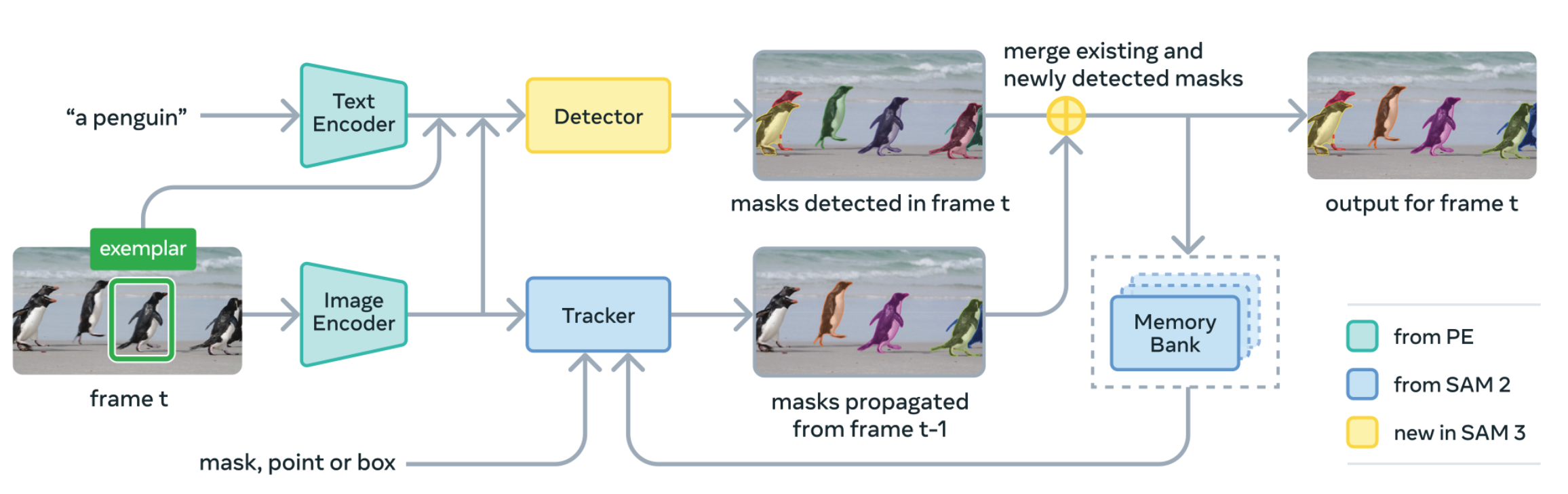
源代码及其权重文件下载
除了在Github上下载源代码以外,还需要提前下载好模型的权重文件sam3.pt(3.2GB)。按照Github仓库Readme的介绍,正规的流程应该是在Huggingface上提出申请(facebook/sam3 · Hugging Face),申请通过后就可以从Huggingface上进行下载,但是这个申请经常会莫名其妙的reject掉申请,而且不给出任何原因,不清楚是怎么回事:
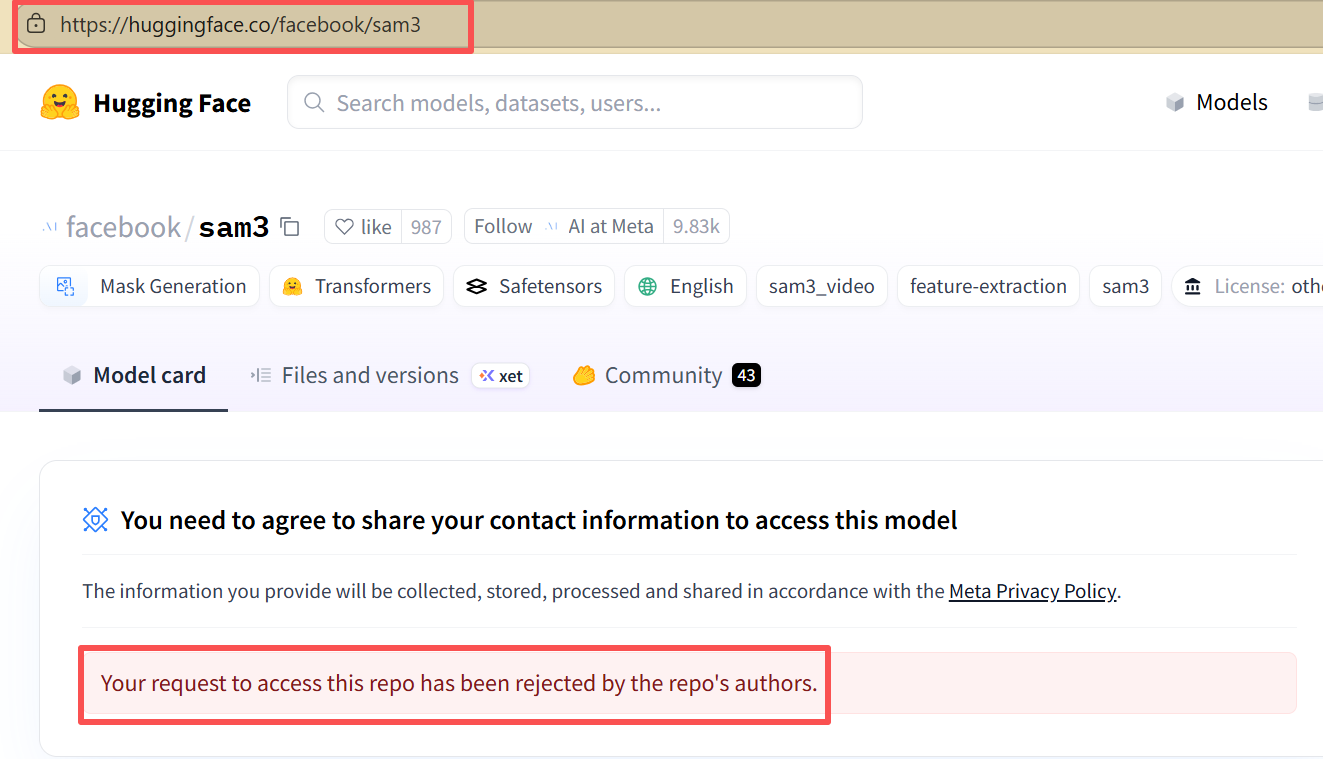
所以可以通过其他办法提前把这个权重文件下载到。知乎一位UP主提供了权重文件的下载路径:互链高科,下载速度非常快。因此可以从以上站点先下载权重文件,放到sam3工程的根目录下。
环境搭建
开发环境的需求如下:
- Python 3.12版本及其以上
- Pytorch 2.7版本及其以上
- Nvidia显卡,CUDA12.6版本及其以上
按照项目的readme文件创建sam3的conda环境并且激活该环境:
conda create -n sam3 python=3.12
conda deactivate
conda activate sam3
然后安装pytorch,以及进入sam3的源代码安装sam3 package:(我的显卡是5070Ti,Cuda版本是12.9,所以直接按照pytorch官方的命令进行以下安装即可)
pip3 install torch torchvision --index-url https://download.pytorch.org/whl/cu128
cd sam3
pip install -e .
需要注意:在sam3环境中要运行以下的静态图片以及视频测试的例程时,会提示No module named ‘triton’错误,此时还需要额外装一个triton-windows的包:
pip install triton triton-windows图片/视频分割测试
静态图片测试
以下代码对一张静态图片中所包含的熊目标进行检测,并画出结果。
import torch
from PIL import Image

from sam3.model_builder import build_sam3_image_model
from sam3.model.sam3_image_processor import Sam3Processor
from sam3.visualization_utils import plot_results

# Load the model
model = build_sam3_image_model(checkpoint_path="sam3.pt")
processor = Sam3Processor(model)

# Load an image
# image = Image.open("assets/images/test_image.jpg")
image = Image.open("D:/test/Bear/2025-11-20_11-50-44.png").convert("RGB")
inference_state = processor.set_image(image)

# Prompt the model with text
#output = processor.set_text_prompt(state=inference_state, prompt="child")
output = processor.set_text_prompt(state=inference_state, prompt="bear")

# Get the masks, bounding boxes, and scores
masks, boxes, scores = output["masks"], output["boxes"], output["scores"]
print(masks.shape, boxes.shape, scores.shape)
print(boxes[0])

plot_results(image, inference_state)
以上代码需要在官方源代码plot_results代码的最后增加一句plt.show()才能把图像真正显示出来。
以上代码执行的图像分割效果如下所示:

以上代码中,processor执行检测和分割操作返回三个变量masks、boxes和scores:
- masks:与原图分辨率相同的单通道mask图像,在这个mask图像中以不同的色彩标记各个检测目标的像素位置,有几个分割目标就有几张独立的mask图像。
- boxes:对指定目标类型的检测框,在图像中检测到几个目标,就有几个box,每个box中都包含有检测到目标的检测框的左上角和右下角的坐标。
- scores:检测到的各个目标的置信度。
下图是以上熊图像中使用bear来进行检测的输出信息,可结合以下信息理解三个输出变量的含义:
torch.Size([1, 1, 785, 648]) torch.Size([1, 4]) torch.Size([1])
tensor([153.1315, 336.1199, 468.9052, 710.1578], device='cuda:0')
found 1 object(s)
视频测试
基于对Bilibili Up主Coding茶水间的教学视频(参考资料3)继续测试SAM3的视频分割功能。这个测试需要比较高的显卡配置,我的笔记本32GB内存,RTX5070Ti显卡,跑一段22s的视频足足花了6分40秒,所以做这个测试还是尽量选一些比较短的视频来进行,否则每次调试等待的实际太磨人了。
以下是使用SAM3对视频文件中的每一帧图像基于提示词的提示进行指定目标的检测和分割,整体流程沿用了Coding茶水间的代码逻辑,但是再完成视频文件中每一帧图像分割以后,对分割得到的mask图像帧与原始图像帧之间进行叠加生成分割后保存的图像流程做了一些简化,使用render_masklet_frame来进行mask与原始图像帧的合并操作,代码理解上更简单一些。
本质上,以下代码经过propogate_video_frames处理以后,就得到了目标分割图像mask的列表sam3_output_frames,这个结构中包含有所有检测到指定目标的图像帧列表,video_file_frames结构中保存了从视频文件中所读取到的所有图像帧列表,然后在循环中把分割图像帧mask与原始图像帧进行合并操作,就得到了两帧合并的图像。而没有检测到目标的图像,依然使用原始图像帧,最终把所有的合并图像帧保存在一个mp4文件中。
关键代码如下所示:
sam3_output_frames = propogate_video_frames(video_predictor, session_id)

    blend_result_imgs = []
    for frame_idx in range(0, len(video_file_frames)):
        if frame_idx in sam3_output_frames:
            orginal_frame = video_file_frames[frame_idx]
            sam_output_frame = sam3_output_frames[frame_idx]

            try:
                # 使用render_masklet_frame生成带掩码的图像
                blend_frame = render_masklet_frame(orginal_frame, sam_output_frame, frame_idx=frame_idx)
                blend_result_imgs.append(blend_frame)
            except Exception as e:
                print(f"处理帧{frame_idx}时出错:{e}")
                # 出错时使用原始帧
                blend_result_imgs.append(orginal_frame)
        else:
            # 如果没有该帧的输出,使用原始帧
            blend_result_imgs.append(video_file_frames[frame_idx])

    print(f"共生成{len(blend_result_imgs)}帧")

    # 使用封装的函数保存视频
    save_to_mp4(blend_result_imgs, 'output.mp4', fps=30)
参考资料
- facebookresearch/sam3: The repository provides code for running inference and finetuning with the Meta Segment Anything Model 3 (SAM 3), links for downloading the trained model checkpoints, and example notebooks that show how to use the model.
- SAM3模型来了,手把手带你运行SAM3模型代码,SAM3模型初探!_哔哩哔哩_bilibili
- SAM3源码实战之二,手把手带你执行视频分割处理。_哔哩哔哩_bilibili
- 连载1:Meta SAM3开发实战——最简图像分割 - 知乎