Case Analysis: GitOps-Driven Development and Deployment Workflow for AWS Cloud-Native Applications
- 01 Jun, 2026
This article demonstrates the complete workflow of code development, testing, and automated deployment in production environments on AWS using GitOps principles, through a simple Python project.
The general requirements of this case are:
- The local client sends an HTTP request (containing a file name string in the request message) to AWS API Gateway;
- AWS Gateway receives it and forwards it to Lambda;
- Lambda creates a file in S3 based on the file name and returns a message to the client.
1. Introduction to GitOps-Driven Cloud-Native Application Development Workflow
In traditional operations modes, we are accustomed to performing cloud environment operations and management using imperative operations (such as manually typing commands in the AWS web console to create an S3 bucket, or manually packaging and uploading code to S3). Under the increasingly popular GitOps philosophy, deeply integrating Infrastructure as Code (IaC) with CI/CD pipelines makes operations much more efficient and reliable.
The core idea of GitOps is very simple: the Git repository of project code is the single source of truth for the system state, and cloud environment deployments automatically unfold based on the code committed in the Git repository.
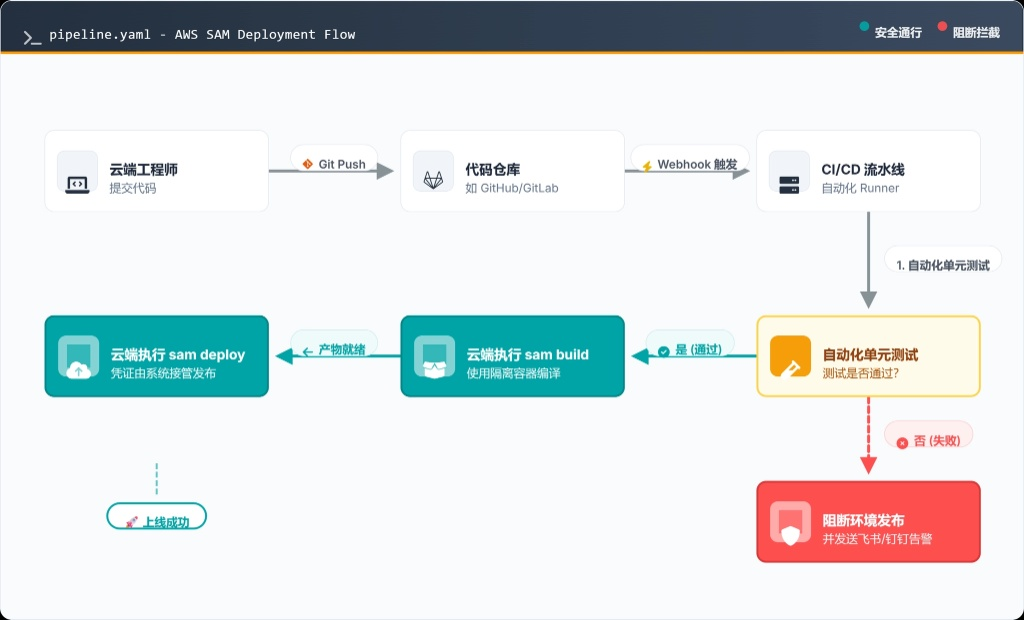
This standardized development and testing workflow goes as follows:
- Coding & Testing Environment: Developers write business code (Python, Java, Node.js, etc.) and infrastructure architecture definition files (YAML) in their local IDE, and run basic unit tests locally using unit testing tools (such as Python’s
pytest). - Code Commit (Git Push): Developers push the code to the
mainbranch of GitHub. - GitHub Pipeline & Automated Testing: The code push in the previous step automatically triggers the GitHub Actions pipeline. Upon receiving the code submission, Actions spins up an isolated container environment based on the latest code, and installs dependencies and runs unit tests according to the pipeline configuration file. If the tests executed in this automated process fail, the pipeline immediately blocks with a red error light, preventing erroneous code from polluting the cloud.
- AWS Cloud Automated Orchestration (SAM & CloudFormation): Once the above testing process passes, Actions automatically invokes AWS’s cloud infrastructure deployment APIs (CloudFormation) based on strict permission controls (OIDC). During this process, code compilation and packaging are executed, and the infrastructure is smoothly deployed to the AWS environment.
Through this highly automated approach, environment discrepancies are completely eliminated. Developers can focus solely on writing code while leaving the rest of the work to the pipeline.
2. Local Environment and Code Structure Preparation
Implementing the GitOps workflow described above requires upgrading the project from a local debugging mode to a production deployment mode. A standardized Python project directory tree corresponding to the above workflow should look like this:
my-aws-serverless-project/
├── .github/
│   └── workflows/
│       └── pipeline.yaml    # CI/CD pipeline core definition file
├── src/
│   ├── __init__.py          # Declares as a Python package
│   ├── app.py               # Lambda core business code
│   └── requirements.txt     # Business dependencies (e.g., boto3)
├── test/
│   ├── __init__.py          # Declares as a Python package
│   └── test_app.py          # Automated unit testing code
└── template.yaml            # AWS SAM Infrastructure as Code template
The template.yaml file is the AWS CloudFormation infrastructure template definition file, which can be thought of as the architectural blueprint submitted by the project to AWS. Its specific contents are detailed in the subsequent AWS CloudFormation execution workflow section.
The .github/workflows/pipeline.yaml file defines the automated execution rules for the GitHub Actions CI/CD workflow, which will be detailed in the subsequent section covering GitHub Actions execution.
src/app.py is the core business logic code executed in AWS Lambda for this demo; eventually, this code will be deployed to AWS Lambda. Note that in a production environment, Lambda must include robust error handling, CORS cross-origin support, and structured logging.
The code for this part is as follows: the main workflow parses the request message sent from API Gateway, extracts the filename field, and creates a file in S3.
import json
import boto3
import os
import logging

# Production logging configuration: facilitates searching and setting alarms in CloudWatch
logger = logging.getLogger()
logger.setLevel(logging.INFO)

# Best practice: Initialize the boto3 client outside the handler.
# This reuses TCP connections during Lambda container warm starts, significantly reducing latency.
s3_client = boto3.client('s3')

# Build unified CORS response headers suitable for a real API Gateway environment
CORS_HEADERS = {
    "Content-Type": "application/json",
    "Access-Control-Allow-Origin": "*",  # In production, it is recommended to replace with a specific domain
    "Access-Control-Allow-Methods": "OPTIONS,POST",
    "Access-Control-Allow-Headers": "Content-Type"
}

def lambda_handler(event, context):
    """
    AWS Lambda core entry point
    """
    # Record request context, useful for tracing after CI/CD deployment
    request_id = context.aws_request_id if context else "local-test"
    logger.info(f"[RequestId: {request_id}] Received event: {json.dumps(event)}")

    bucket_name = os.environ.get('TARGET_BUCKET')

    if not bucket_name:
        logger.error("Configuration Error: TARGET_BUCKET environment variable is missing.")
        return build_response(500, {"error": "Server configuration error"})

    try:
        # 1. Safely parse the HTTP body passed from API Gateway
        body_str = event.get('body', '{}')
        # Prevent loads from crashing if the frontend passes null
        body = json.loads(body_str) if body_str else {}

        filename = body.get('filename')
        if not filename:
            logger.warning(f"[RequestId: {request_id}] Bad Request: Missing filename")
            return build_response(400, {"error": "Missing 'filename' in request payload"})

        # 2. Generate business content
        file_content = b"This data was processed by the CI/CD managed Lambda function."

        # 3. Write to the AWS S3 Bucket automatically provisioned by CI/CD
        logger.info(f"Writing file '{filename}' to bucket '{bucket_name}'")
        s3_client.put_object(
            Bucket=bucket_name,
            Key=filename,
            Body=file_content
        )

        # 4. Successful response
        logger.info(f"[RequestId: {request_id}] Successfully created {filename}")
        return build_response(200, {
            "message": "File created successfully",
            "filename": filename,
            "bucket": bucket_name
        })

    except json.JSONDecodeError:
        logger.error("Failed to parse request body as JSON")
        return build_response(400, {"error": "Invalid JSON payload"})
    except Exception as e:
        logger.error(f"Unexpected error: {str(e)}", exc_info=True)
        return build_response(500, {"error": "Internal Server Error"})

def build_response(status_code: int, body: dict) -> dict:
    """
    Helper function to uniformly build API Gateway standard response formats
    """
    return {
        "statusCode": status_code,
        "headers": CORS_HEADERS,
        "body": json.dumps(body)
    }
To execute automated tests in the CI/CD workflow defined by GitHub Actions later, unit test code needs to be written in advance. The unit test code for this case is located at test/test_app.py:
import json
import pytest
from unittest.mock import patch, MagicMock
import os

# Inject required environment variables before loading app
os.environ['TARGET_BUCKET'] = 'mock-bucket-for-ci'
from src import app

@patch('src.app.s3_client') # Intercept s3_client in app.py
def test_lambda_handler_success(mock_s3):
    # Prepare simulated API Gateway request data
    mock_event = {
        "body": json.dumps({"filename": "ci_test.txt"})
    }

    # Execute function
    response = app.lambda_handler(mock_event, MagicMock())

    # 1. Verify if the HTTP response status meets expectations
    assert response['statusCode'] == 200
    response_body = json.loads(response['body'])
    assert response_body['filename'] == "ci_test.txt"

    # 2. Verify if Lambda actually called boto3 (critical business logic test)
    mock_s3.put_object.assert_called_once_with(
        Bucket='mock-bucket-for-ci',
        Key='ci_test.txt',
        Body=b"This data was processed by the CI/CD managed Lambda function."
    )

def test_lambda_handler_missing_filename():
    mock_event = {"body": "{}"}
    response = app.lambda_handler(mock_event, MagicMock())
    assert response['statusCode'] == 400
After code submission, and before the GitHub Actions pipeline executes the actual deployment in AWS CloudFormation, Actions will first run the test code above. If the tests fail (e.g., an assertion fails), the program will throw a non-zero exit code, and the pipeline will automatically trigger to block the release of code to the production environment.
3. AWS OIDC Role Setup
OIDC (OpenID Connect) is an identity authentication protocol based on OAuth 2.0. When the GitHub pipeline runs, GitHub issues a temporary digital identity credential (JWT Token) with a digital signature to the current runner. The runner accesses AWS based on this credential. Upon verifying that the signature was indeed issued by GitHub and confirming that the visitor belongs to the main branch of the specified repository, AWS issues the runner a set of temporary access permissions with a very short lifespan (typically 1 hour), which are discarded after use. This completely eliminates the need for manually managed long-term credentials, achieving true zero-trust and automated security.
To implement the mechanism described above, three steps must be completed: telling AWS to trust GitHub, creating a dedicated role in AWS, and configuring the GitHub pipeline to use OIDC login.
First, register GitHub as a “Trusted Identity Provider” in AWS.
Log in to the AWS console, go to the IAM service, select Identity providers in the left navigation bar, click Add provider, select OpenID Connect, fill in the following information, and click Add provider:
- Provider URL:
https://token.actions.githubusercontent.com - Audience:
sts.amazonaws.com
Second, create an IAM Role in AWS for GitHub to assume.
Click Roles in the left navigation bar of IAM, then click Create role. Fill in and select according to the figure below:
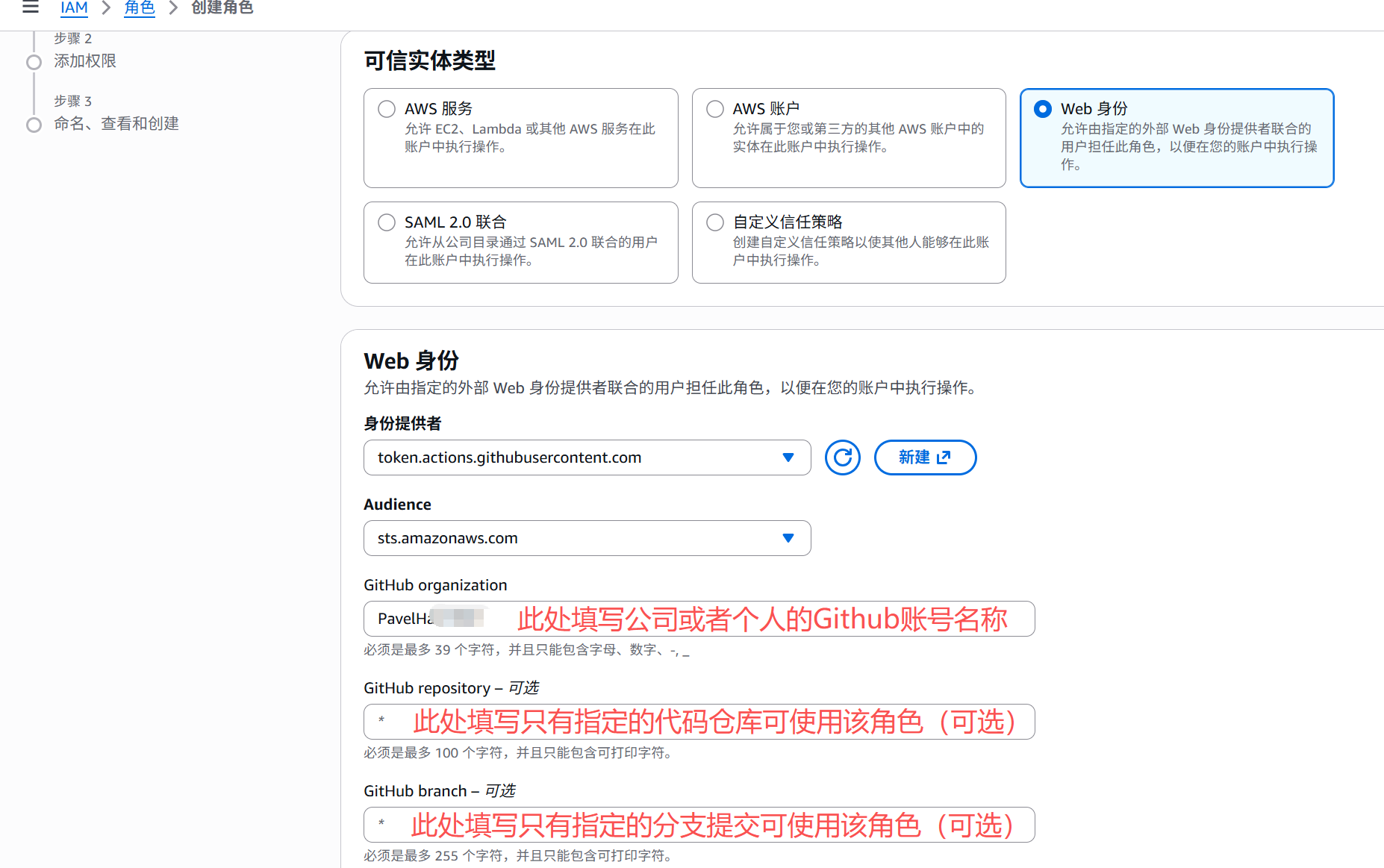
Next, add permissions to this role: To allow SAM to smoothly deploy resources in the subsequent CI/CD workflow, grant the AdministratorAccess permission to this role. Finally, name the role GitHubActionsDeployRole and create it.
Once the role is created, go to its detailed information page and record its ARN, which will need to be configured in the pipeline.yaml file required by GitHub Actions later:
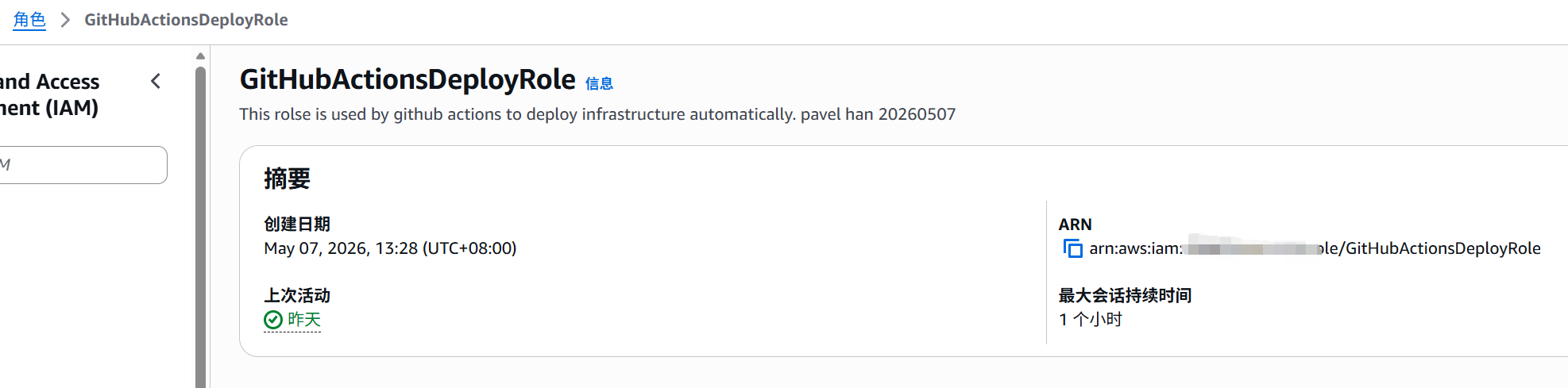
The configurations and modifications to be made in AWS are now complete. The next step is to configure the GitHub Actions pipeline configuration file.
4. GitHub Actions Execution Workflow
How exactly does GitHub Actions start and execute the automated CI/CD workflow? The answer lies in the .github/workflows/pipeline.yaml file committed with the code. When a developer executes git push locally, the GitHub Webhook automatically triggers this file to run the complete CI/CD pipeline.
The underlying logic behind GitHub Actions is: GitHub’s backend engine only monitors YAML files located in the .github/workflows/ folder at the root directory of the project (as long as the suffix is .yml or .yaml), and multiple pipelines can work in parallel. The filenames of the YAML configuration files in this directory can be customized. Therefore, in real commercial projects, multiple files are usually placed in the .github/workflows/ directory, each with its own responsibilities. For example:
unit-test.yaml: Defines that Python unit tests will run whenever code is committed (regardless of the branch).deploy-prod.yaml: Defines that the full suite of actions to deploy to the AWS cloud is executed only when code is pushed to themainbranch.
When parsing this YAML configuration file, GitHub automatically decides which pipeline to wake up based on the conditions defined by the on: keyword in the file.
For this current demo project, its corresponding pipeline YAML configuration file is:
name: AWS SAM Deployment Flow

on:
  push:
    branches:
      - main

jobs:
  build-test-deploy:
    runs-on: ubuntu-latest # CI/CD pipeline automated Runner

    # Grant GitHub Actions permissions to issue OIDC Tokens
    permissions:
      id-token: write   # This is a required permission for OIDC
      contents: read    # This is a required permission for checking out code (actions/checkout)

    steps:
      - name: Checkout Repository
        uses: actions/checkout@v3

      - name: Setup Python
        uses: actions/setup-python@v4
        with:
          python-version: '3.11'

      # ---------------------------------------------------
      # Automated Unit Testing
      # ---------------------------------------------------
      - name: Install Test Dependencies
        run: |
          pip install pytest
          pip install boto3

      - name: Run Unit Tests
        run: |
          python -m pytest test/test_app.py -v
      # Note: If the previous pytest fails, the pipeline will abort right here, and subsequent steps will not execute!

      # ---------------------------------------------------
      # Execute sam build and sam deploy in the cloud
      # ---------------------------------------------------
      - name: Setup AWS SAM CLI
        uses: aws-actions/setup-sam@v2

      # Use OIDC role assumption to replace long-term credentials
      - name: Configure AWS Credentials
        uses: aws-actions/configure-aws-credentials@v2
        with:
          # Replace with the Role ARN copied earlier in the AWS OIDC section
          role-to-assume: arn:aws:iam::XXXXXXXXXXXXXXXX:role/GitHubActionsDeployRole
          aws-region: ap-northeast-1 # Replace with your own region

      - name: SAM Build
        run: sam build --use-container # Blueprint: "Compile using isolated container"

      - name: SAM Deploy
        run: >
          sam deploy
          --stack-name my-iot-edge-stack
          --resolve-s3
          --capabilities CAPABILITY_IAM
          --no-confirm-changeset
          --no-fail-on-empty-changeset
4.1 Actions Evaluating Unit Tests
Question: Every time we push code to GitHub, how does Actions determine which unit test files to execute, and how does it determine whether the unit tests executed successfully?
Addressing the first question above, the unit tests that Actions determines to execute are defined by its pipeline YAML file. For this demo, it is the following snippet:
- name: Run Unit Tests
        run: |
          python -m pytest test/test_app.py -v
That is, the only unit test file to be run for the current demo is test_app.py under the test directory. If a directory is specified for pytest instead of a unit test file, pytest will recursively search down for all Python files in that directory, but it only recognizes files whose filenames start with test_ (such as test_app.py above) or end with _test.py, and will only run unit test functions within them whose names start with test_.
Addressing the second question above, the criteria used by Actions to judge whether unit tests succeed are related to the assert statements in the unit test file. When the conditions specified in the assert statements hold true, it indicates that the unit tests ran normally, and execution continues downward until the complete unit test workflow finishes, returning an exit code 0 to the system to indicate successful completion. If any assert statement condition is not met, the program throws an AssertionError exception and returns an exit code 1.
The operating system in GitHub Actions inspects the exit code of each execution step. An exit code of 0 indicates that the step completed smoothly; otherwise, it immediately determines that the current step execution failed, blocks the execution of all subsequent commands, and returns an error.
5. AWS CloudFormation Execution Workflow
In the CI/CD pipeline, the core philosophy of Infrastructure as Code (IaC) is: all cloud resources should be defined and automatically created by code rather than manually clicked through the AWS console. This part of the work is defined by the template.yaml file.
In the GitHub Actions pipeline configuration file .github/workflows/pipeline.yaml mentioned earlier, the final command executed—sam deploy --stack-name my-iot-edge-stack—is responsible for realizing the AWS cloud infrastructure defined in template.yaml within the cloud environment.
sam deployreads thetemplate.yamlconfiguration file, and sends this configuration file along with the complete deployment package via temporary permissions obtained through OIDC to a core underlying service of AWS—AWS CloudFormation.- Upon receiving the configuration file, CloudFormation automatically calculates which underlying APIs need to be executed to create the S3 Bucket, Lambda, and API Gateway in order.
- If any step fails during this automated deployment process, CloudFormation automatically rolls back (deleting all half-built resources), ensuring that the cloud environment never enters a “half-broken” dirty state.
The template.yaml corresponding to this demo is as follows:
AWSTemplateFormatVersion: '2010-09-09'
Transform: AWS::Serverless-2016-10-31
Description: >
  IoT Edge to Cloud Pipeline - Managed by CI/CD
  API Gateway -> Lambda -> S3

# Introduce parameterization: allows specifying dev or prod environment during CI/CD deployment
Parameters:
  EnvironmentType:
    Type: String
    Default: dev
    AllowedValues:
      - dev
      - prod
      - test

Resources:
  # Create S3 Bucket
  IoTDataBucket:
    Type: AWS::S3::Bucket
    Properties:
      # Use AWS pseudo parameters to dynamically generate a globally unique Bucket name to prevent naming conflicts
      BucketName: !Sub "iot-edge-logs-${AWS::AccountId}-${AWS::Region}-${EnvironmentType}"
      # In production, it is recommended to enable versioning and encryption (uncomment as needed)
      # VersioningConfiguration:
      #   Status: Enabled

  # Lambda computation layer definition
  FileCreatorFunction:
    Type: AWS::Serverless::Function
    Properties:
      CodeUri: src/
      Handler: app.lambda_handler
      Runtime: python3.11
      Timeout: 10
      MemorySize: 128
      # Environment variables directly reference the Bucket automatically created above
      Environment:
        Variables:
          TARGET_BUCKET: !Ref IoTDataBucket
      # Follow the principle of least privilege: grant write permissions only to the specific Bucket above
      Policies:
        - S3WritePolicy:
            BucketName: !Ref IoTDataBucket
      Events:
        CreateFileApi:
          Type: Api
          Properties:
            Path: /create-file
            Method: post

# Output deployment results; after CI/CD runs, you can directly see the API invocation URL in the Action logs
Outputs:
  ApiEndpoint:
    Description: "API Gateway endpoint URL for Prod environment"
    Value: !Sub "https://${ServerlessRestApi}.execute-api.${AWS::Region}.amazonaws.com/Prod/create-file"
  StorageBucketName:
    Description: "The dynamically created S3 Bucket Name"
    Value: !Ref IoTDataBucket
Question: If developers subsequently modify the current code and push it to GitHub after each modification, it will execute the automated deployment pipeline to create the S3 Bucket, Lambda Function, and API Gateway. What happens if a previous commit has already created these resources?
The answer is: no matter how many times the above pipeline is executed, the final state in the cloud will always match the state declared in the cloud environment deployment code.
When the Actions pipeline runs sam deploy --stack-name my-iot-edge-stack for the first time, AWS CloudFormation creates a “logical file folder” named my-iot-edge-stack in the cloud.
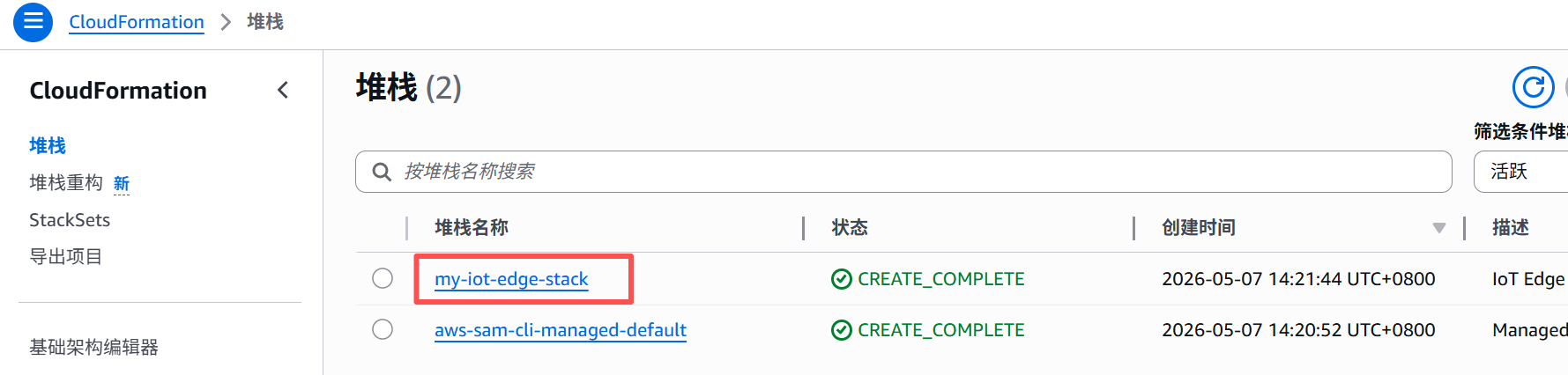
This file folder records all current states and unique IDs of the S3 Bucket, Lambda, and API Gateway created by the pipeline, and AWS firmly remembers the association between these resources and the pipeline.
When code is modified and pushed again subsequently, the pipeline packages the new blueprints and code and sends them to AWS. Upon receiving them, AWS does not immediately overwrite them, but handles them differently based on specific conditions:
- If only business code is modified (e.g.,
app.py): That is, the content oftemplate.yamlhas not changed (meaning infrastructure does not need to be touched), and only the hash value of the underlying Lambda compression package has changed. At this point, AWS only deploys the new code package to the existing Lambda function, replacing the old code. The previous S3 Bucket and API Gateway are completely untouched, and historical files in S3 remain intact. - If infrastructure parameters are modified (
template.yaml): For example, changingMemorySize: 128in the Lambda Container configuration toMemorySize: 256. At this point, AWS determines that the configuration properties of Lambda have changed. It directly modifies the configuration of the existing Lambda function via underlying APIs, scaling its memory up to 256MB. Similarly, S3 and API remain as they are. - If nothing is changed and the pipeline is accidentally triggered again: That is, the new code is 100% identical to the state in the file folder. Then the GitHub Actions pipeline outputs
No changes to deploy. Stack my-iot-edge-stack is up to dateat thesam deploystep, and finishes in seconds with a green success status without performing any redundant operations.
It should be noted in the above workflow that S3 Bucket is used to store core business data, and CloudFormation has special protection logic for storage resources. If a subsequent commit directly deletes the entire IoTDataBucket code block in template.yaml (or renames it) and pushes it to GitHub, AWS by default does not allow the direct deletion of a Bucket containing data when the pipeline attempts an update. This causes the deployment to throw an error directly (Update Rollback), protecting production data from being wiped out by an accidental commit.
6. Testing and Verification
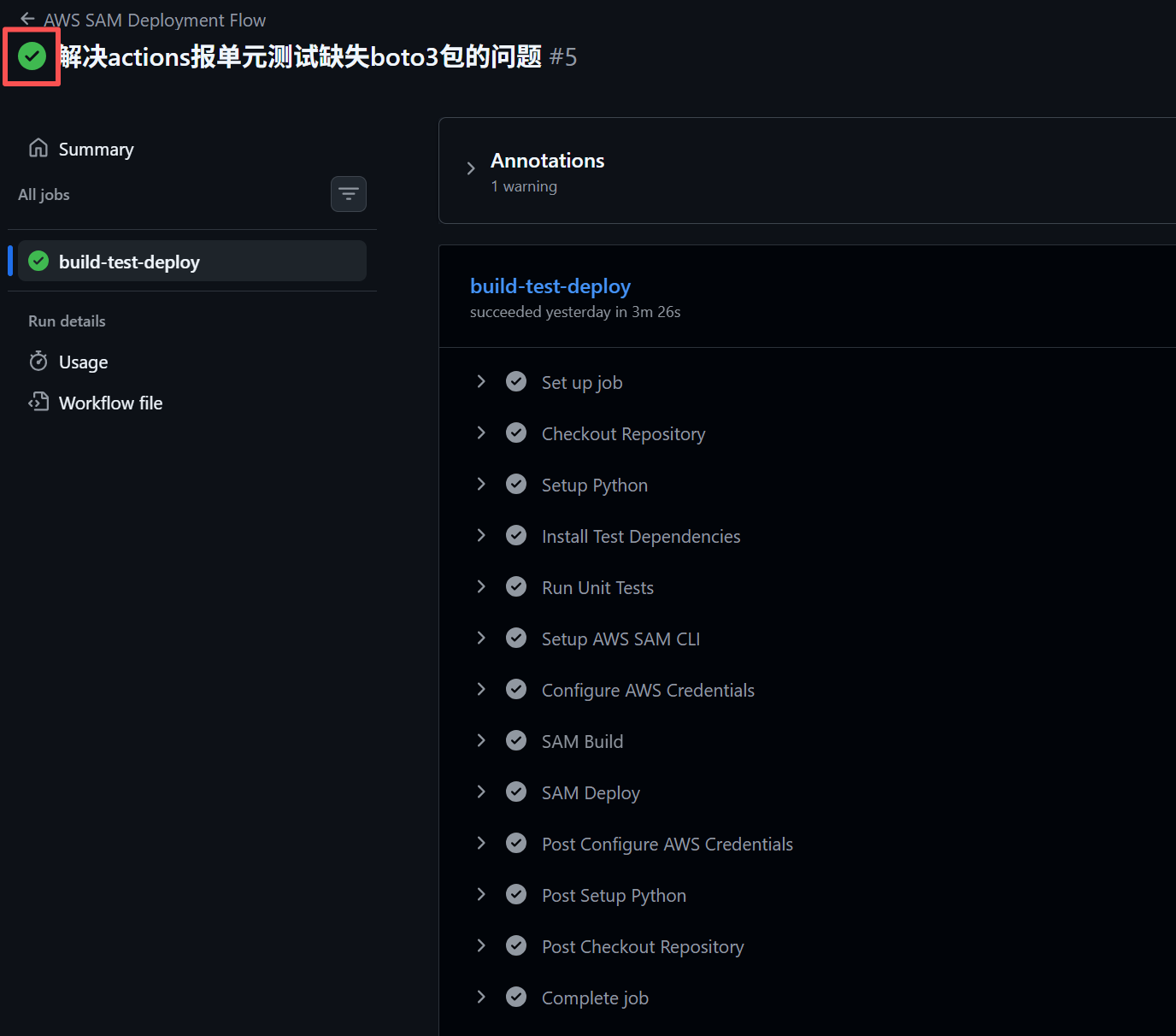
After completing all the preparations above, commit the code to the main branch on GitHub. The corresponding Actions will automatically start, execute the unit tests, and automatically deploy the cloud environment on AWS once the unit tests pass:
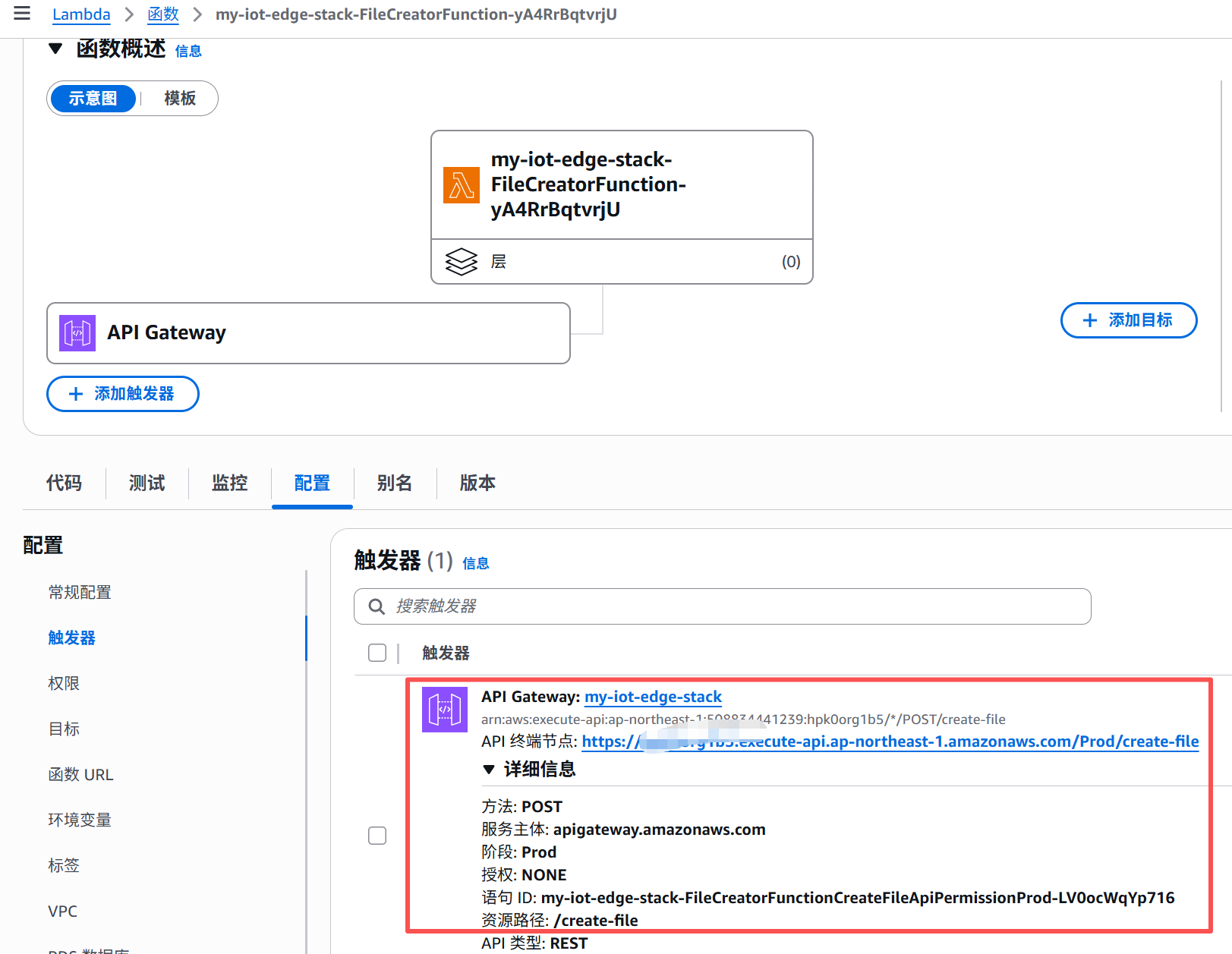
Once the entire process is complete, you can check the specific deployment status and its corresponding API in AWS Lambda:
Next, you can test using the curl command in a terminal or similar interface (replace with your own API):
C:\Users\windl>curl -X POST https://xxxxxxxx.execute-api.ap-northeast-1.amazonaws.com/Prod/create-file -H "Content-Type: application/json" -d "{\"filename\": \"my_first_cloud_test.txt\"}"
{"message": "File created successfully", "filename": "my_first_cloud_test.txt", "bucket": "iot-edge-logs-xxxxxxxxxx-ap-northeast-1-dev"}