An Analysis of the Workflow and Security Mechanisms of Stripe Online Payments
- 23 May, 2026
In the web world, handling user credit card numbers during online payment processes is an extremely high-risk operation. For full-stack developers implementing overseas business scenarios within their applications, they must deal with cross-border credit card network communications, 3D Secure dynamic authentication, and strict PCI-DSS security compliance audits. To address this challenge, Stripe emerged. Its brilliance lies in encapsulating chaotic real-world capital flows into highly predictable, developer-friendly interfaces through exceptionally elegant RESTful APIs and a webhook-based asynchronous event-driven model. Under this architecture, developers’ own servers never need to touch, transmit, or store the user’s real credit card numbers in plaintext; they simply send instructions to Stripe, and Stripe returns a token indicating the execution result after processing, greatly simplifying the complexity of payment operations.
Explanation of the Stripe Online Payment Execution Workflow
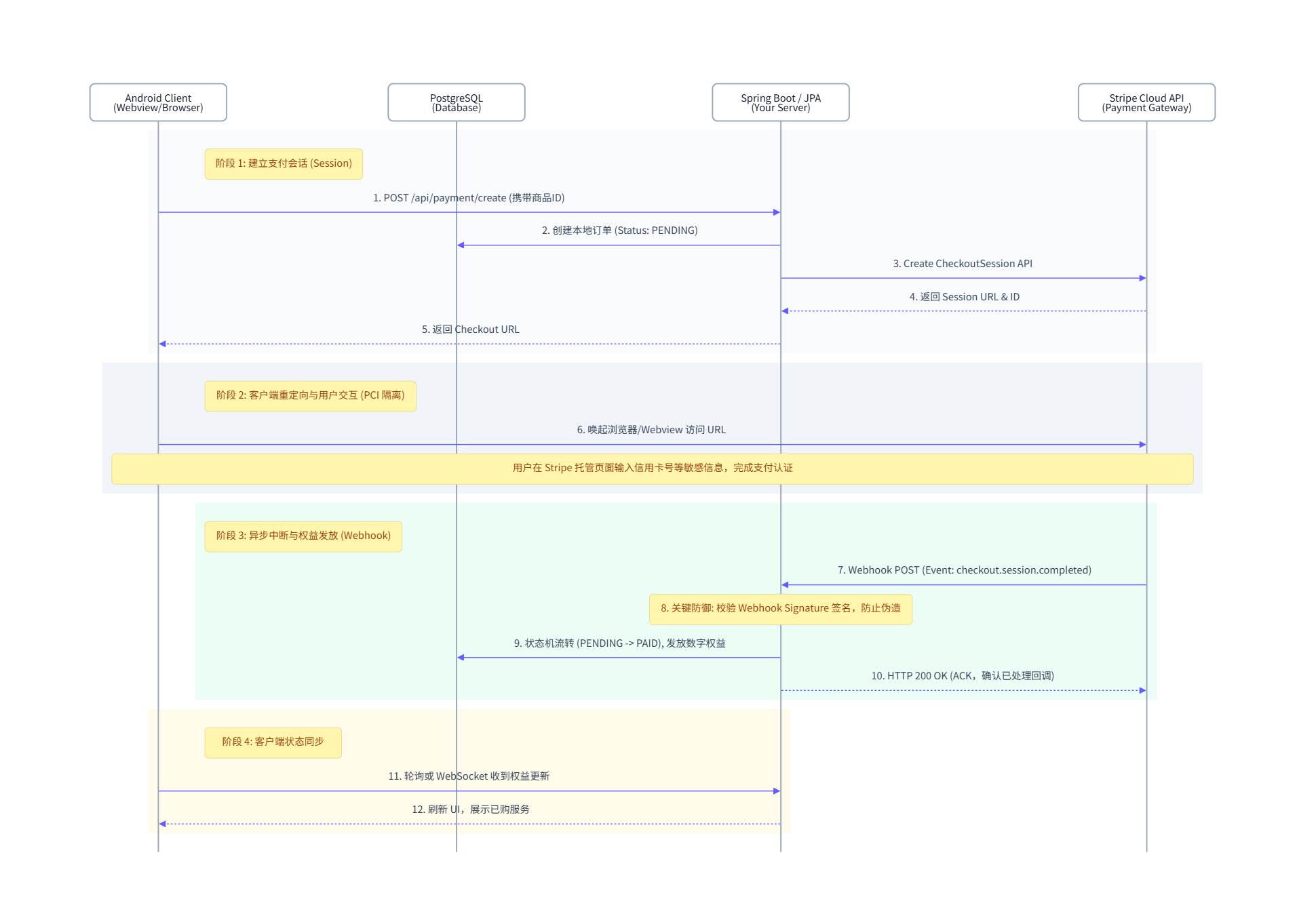
The flowchart below illustrates the complete workflow of Stripe online payments, using an Android app completing an online payment via Stripe as an example. The entire payment process can be divided into four stages:
- Stage 1: Establishing the Payment Session
- First, within the Android app, the user initiates the payment process by clicking the button to purchase a product or service. At this point, the app sends a payment purchase request to the developer’s backend Spring Boot server.
- Upon receiving the request, the backend server creates a new purchase order in its PostgreSQL database. Since the payment has not yet started, the order status is set to
Pending. - Next, the backend server sends a request to the Stripe Cloud to create a payment session request.
- After receiving this request, the Stripe server returns the session URL and token ID to the backend server.
- The backend server then forwards the URL and token ID as-is to the app via a persistent connection between them.
- Stage 2: The Payment Interaction Between the Client and the Stripe Server
- Following the first stage, the app receives the payment session URL and token from the Stripe server. The app then visits the URL to interact directly with the Stripe server and complete the actual payment process. This step is entirely transparent to both the developer’s app and the backend server.
- Stage 3: Notifying the Backend Server Upon Payment Completion
- When the user finishes the payment process with Stripe in the app, the app UI remains on a page waiting for payment confirmation. Meanwhile, the Stripe server sends a payment confirmation message to the developer’s backend server.
- Upon receiving the payment confirmation, the backend server updates the purchase order status to
PAIDin the PostgreSQL database and modifies the user’s entitlement information accordingly. - Finally, the backend server sends a purchase completion confirmation back to the app via WebSocket or polling requests. The app then refreshes its UI to display the purchased product or service information to the user.
The Webhook Mechanism for Stripe Server Payment Event Notifications
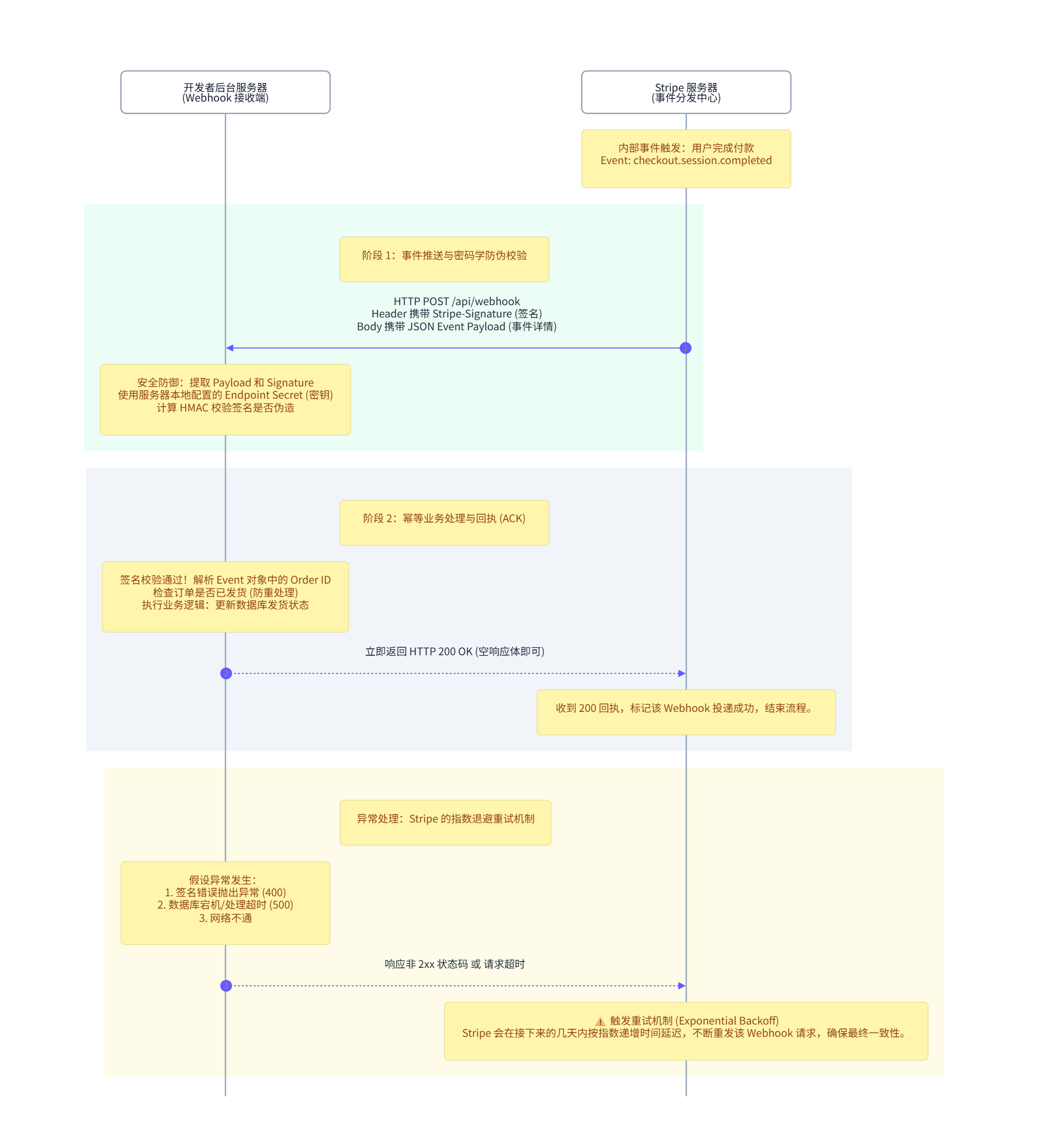
In the workflow described above, after the developer’s backend server requests Stripe to create a payment session (Step 3 in the flowchart above), the Stripe server does not open and maintain a persistent connection session with the backend server during subsequent payment sessions (as this would waste too much Stripe server memory). Instead, it uses a webhook mechanism: once the user completes the payment, the Stripe server proactively initiates a request to the Webhook URL registered by the developer’s backend server to notify it of the payment completion status.
Therefore, to support this webhook mechanism, when developers register their Stripe accounts, they must pre-register their server’s public IP address in the Stripe developer dashboard. This allows the Stripe server to know the Webhook URL and send payment completion notifications to it after users finish paying.
Consequently, communication between the developer’s backend server and the Stripe server always follows a standard RESTful stateless communication model. Each time the developer’s backend server sends a request to the Stripe server to create a payment session, the Stripe server returns a payment session URL and token ID, after which the connection is closed. Once the payment is later completed, the Stripe server uses the webhook mechanism to send the event completion notification back to the developer’s backend server.
Below is a flowchart showing the Stripe server proactively initiating a payment event completion notification to the Webhook URL after a user finishes making a payment. This includes cryptographic authentication information to ensure communication security, while also handling potential webhook communication failures by having the Stripe server retry event notification requests over a certain period to ensure a complete closed-loop process for payments and notifications:
Frontend-to-Stripe Communication Modes: Checkout vs. Payment Element
For the frontend (app, web), after initiating a payment session request and obtaining the session URL and token ID returned by the Stripe server from the backend server, the actual payment process is completed through communication between the frontend and the Stripe server. Communication modes between the frontend and Stripe primarily fall into two categories: Checkout and Payment Element.
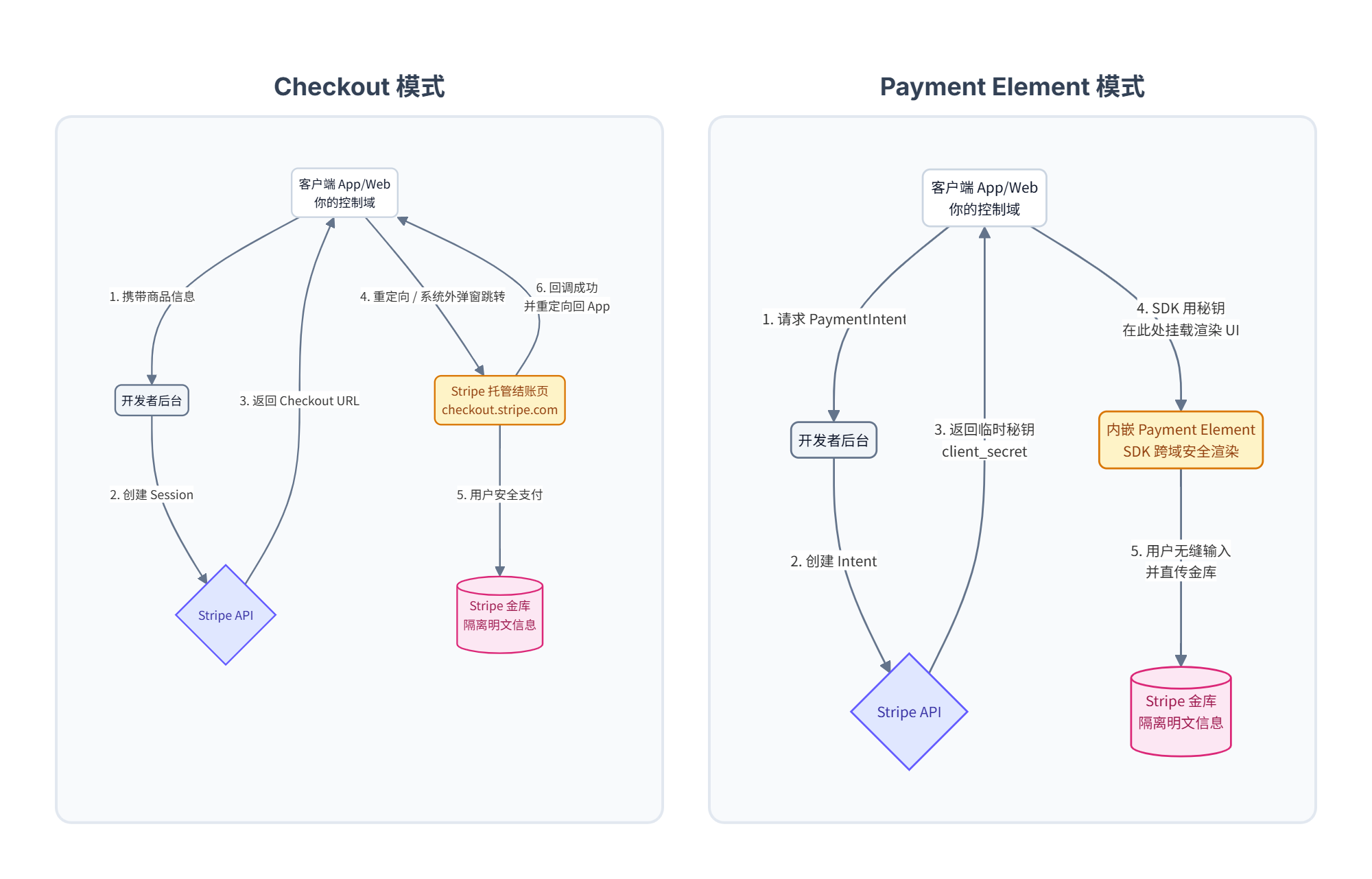
Checkout Mode
The operational mechanism of Checkout mode is as follows: when the backend server calls the Stripe API to create a payment session, the Stripe server generates a logical order and dynamically renders a single-page application (SPA) webpage dedicated to that order, hosted under Stripe’s domain (typically checkout.stripe.com). This Checkout URL is then returned to the developer’s backend server and forwarded to the frontend.
In this scenario, developers only need to access this Checkout URL within their app or frontend webpage via redirection or by opening a built-in browser.
Stripe injects powerful features into this page. If it detects that a user is using Safari, it automatically displays Apple Pay; if Chrome, Google Pay; it even automatically switches languages and local currencies based on the user’s IP address (such as automatically showing iDEAL payments in Europe). Developers do not need to write a single line of code for these complex detection logics, as they are entirely handled automatically by the Stripe server.
Payment Element Native Mode
The operational mechanism of this mode is that the user does not leave the developer’s domain or app during the checkout process. Developers are required to design and render a visually appealing checkout page (containing shopping carts, shipping addresses, etc.) on their own web page or app frontend using HTML/CSS or native Android components. In other words, the checkout page is designed and presented to the user by the developer.
Of course, to ensure the payment process remains securely isolated, the specific area on the frontend checkout page where users input their credit card numbers must integrate Stripe’s frontend SDK to request the rendering of a Payment Element component. On the web, this component is essentially a cross-origin <iframe> (or a secure view inside an app).
With this design, even though the outer input fields of the payment page are designed by the developer, when the user types their bank card number, it is entered directly into Stripe’s iframe/secure view and sent straight to Stripe’s vault. The developer’s own outer JavaScript or Android code cannot read these plaintext credentials, perfectly bypassing PCI compliance audits and ensuring that the entire payment lifecycle and its security are managed entirely by Stripe.
The process flowcharts for these two modes are illustrated in the figure below:
How does Stripe distinguish between these two modes?
The answer is: Stripe does not care which mode the frontend uses at all. It only cares whether the API request initiated by the developer’s backend server to the Stripe server uses the Checkout API or the Payment Element API.
- When using Checkout mode, the API request sent by the backend server to Stripe is
POST /v1/checkout/sessions(refer to https://docs.stripe.com/api/checkout/sessions). At this point, the Stripe server generates a webpage with a payment interface and returns the URL of this webpage to the backend server. - When using Payment Element mode, the API request sent by the backend server to Stripe is
POST /v1/payment_intents(refer to https://docs.stripe.com/api/payment_intents). At this point, the Stripe server creates an order record in memory and returns a one-time secret key to the backend server, after which the frontend communicates with the Stripe server based on this key to complete the payment.
Stripe’s Secure Communication Mechanisms and Keys
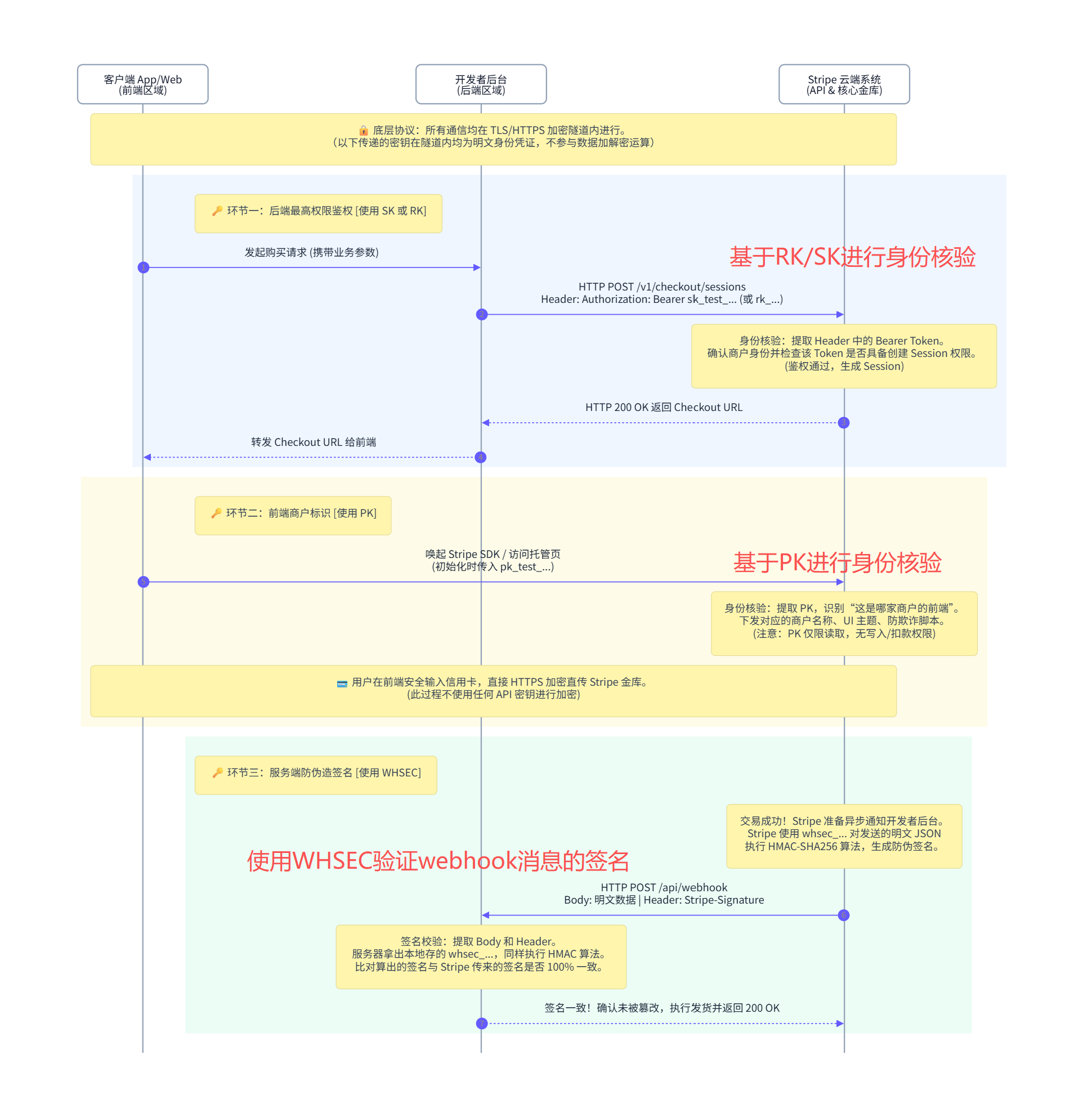
As shown in the flowcharts above, the entire payment communication process involves three parties: the frontend, the backend, and the Stripe server. To ensure communication security throughout the payment process, Stripe provides three sets of keys for identity authentication and signature verification. These three sets of keys are generated in the Stripe developer dashboard:
- Publishable Key (Public key, starting with
pk_): Hardcoded into the frontend (app/web) code. Its role is to allow the frontend to prove “whose frontend I am” when communicating with the Stripe server. - Secret Key (Private key, starting with
sk_): Must and can only be securely stored in the backend server’s environment variables, and must never be leaked to the frontend or committed to a Git repository. Its role is to be placed in the HTTPAuthorization: Bearer <sk_...>header when calling Stripe APIs from the backend (such as creating orders, issuing refunds, or querying bills), allowing the Stripe server to identify which merchant the payment request originates from.- In addition to the Secret Key, there is actually a Restricted Key. Its function is similar to the Secret Key, but it is a subset of the Secret Key’s permissions, possessing only partial privileges. If only payment session creation capabilities are needed, a Restricted Key can be used to prevent the leakage of higher-privilege Secret Keys.
- Webhook Secret (Signing key, starting with
whsec_): Also kept exclusively in the backend server’s environment variables. Its role is specifically to verify whether Webhook requests sent from Stripe to the backend server have been tampered with by hackers along the way.
It should be noted that all communications across the entire Stripe payment workflow take place over HTTPS/TLS connections. The three sets of keys mentioned above are transmitted in plaintext within the encrypted HTTPS channel solely for identity authentication and do not participate in data encryption or decryption operations.
As illustrated in the diagram below, three sets of keys are used across the payment workflow for communication role identification and authorization:
- Step 1: In the communication where the backend server sends a payment session request to the Stripe server, the backend server must include its SK/RK in the HTTP message. Upon receipt, the Stripe server checks the identity ownership of this SK/RK and verifies whether it has the permission to create sessions.
- Step 2: During the actual payment interaction between the frontend and the Stripe server, the frontend must pass its PK to the Stripe server in its HTTP message, allowing the Stripe server to identify the origin of the frontend communicating with it.
- Step 3: After the payment process between the frontend and the Stripe server concludes, the Stripe server sends an event notification to the backend server via the webhook mechanism. Upon receiving this message, the backend server must use the Webhook Secret key to verify the message’s signature, ensuring that the message genuinely originated from the Stripe server.