Summary of Learning: Amazon AWS Lambda Service
- 07 May, 2026
AWS Lambda is a fully managed serverless compute service. Compared to traditional Java/Python/Node.js services based on EC2 and resident processes, when handling identical application requirements with Lambda, developers only need to upload their code to the server, and AWS automatically provisions the required compute resources, releasing them immediately after execution. This article summarizes the various concepts of the AWS Lambda Service.
1. Introduction to AWS Lambda Service
In traditional backend architectures built on AWS EC2 and resident Java/Python/Node.js processes, our development and operations (Ops) model is server-oriented. This means operations teams must constantly monitor operating system security patches, JVM runtime tuning, Application Load Balancer (ALB) configurations, and provision massive amounts of redundant computing power to guard against sudden traffic spikes. These computing resources are often severely underutilized during nighttime hours (which automated load balancing can mitigate but not completely solve), resulting in a massive waste of cloud spend.
AWS Lambda is a fully managed serverless compute service introduced by Amazon Web Services. Its emergence has fundamentally transformed the backend computing paradigm: Operations teams simply upload code (supporting Python, Node.js, Java, Go, or even custom runtimes based on container images), and AWS automatically prepares the execution environment with millisecond-level latency, releasing resources immediately after the code finishes executing. This model eliminates tedious operational tasks while automatically handling the spin-up and teardown of computing resources, truly achieving pay-as-you-go pricing.

Core Lambda Concept 1: Event-Driven
In the world of Lambda, there are no longer resident daemon processes like Tomcat or Netty that continuously block and listen on HTTP ports. The lifecycle of a Lambda function is entirely driven by events, which are known as triggers in the Lambda context. For example, here are some typical events/triggers in the camera and IoT domains:
- An edge security camera sends a boundary-crossing intrusion alert message to AWS IoT Core via the MQTT protocol.
- An app client initiates a REST API request to retrieve a list of historical device recordings via Amazon API Gateway.
- An edge device successfully uploads a short video clip of anomalous motion trajectories to an Amazon S3 bucket.
Lambda is invoked to execute its corresponding code only when these exact events occur, and billing is calculated down to the millisecond. This means that when all devices are in a silent period, the cloud computing node bill drops instantly to zero.
Core Lambda Concept 2: Stateless
This is the aspect that differs most significantly from traditional backend development models like EC2-based resident Java/Python processes.
Since Lambda instances are created on-demand and can be destroyed at any time, you must never store any session or business state data that needs to be reused across requests in the local memory or disk directory (such as /tmp****) of a Lambda execution function.
All persistent business states must be externalized, for example, by writing them to Amazon DynamoDB (NoSQL key-value store), Amazon RDS (relational databases), or Amazon S3.
When designing a serverless network architecture based on AWS Lambda, you must first keep in mind and build your services around certain hard limits established by AWS:
- Maximum Execution Time (Timeout): Currently 15 minutes (900 seconds). Therefore, Lambda is entirely unsuited for running long-running backend batch processing tasks; long-running tasks should instead use AWS Fargate or AWS Batch.
- Memory and Compute Ratio: The memory configuration for Lambda function execution ranges from 128 MB to 10,240 MB. You cannot directly select the number of vCPU cores; AWS scales vCPU cores and network throughput in direct linear proportion to the allocated memory size, meaning the memory configuration directly dictates storage and computing resources.
- Payload: The upper limit for the payload contained within a synchronous invocation request body is 6 MB, and 256 KB for asynchronous invocations.
2. Detailed Workflow of AWS Lambda
The implementation of Lambda within the AWS system uses a mechanism similar to Docker containers to create isolated execution spaces for different applications belonging to different users. However, to balance extreme security isolation in a public cloud multi-tenant environment with the ultra-fast startup required by serverless computing, AWS developed and open-sourced a technology called Firecracker written from scratch in Rust. This is a KVM-based microVM (micro-virtual machine). Compared to traditional containers that share the operating system kernel, Firecracker can spin up a micro-sandbox with complete hardware isolation in a fraction of a second. Simply put, it is an advanced, high-performance kind of container.
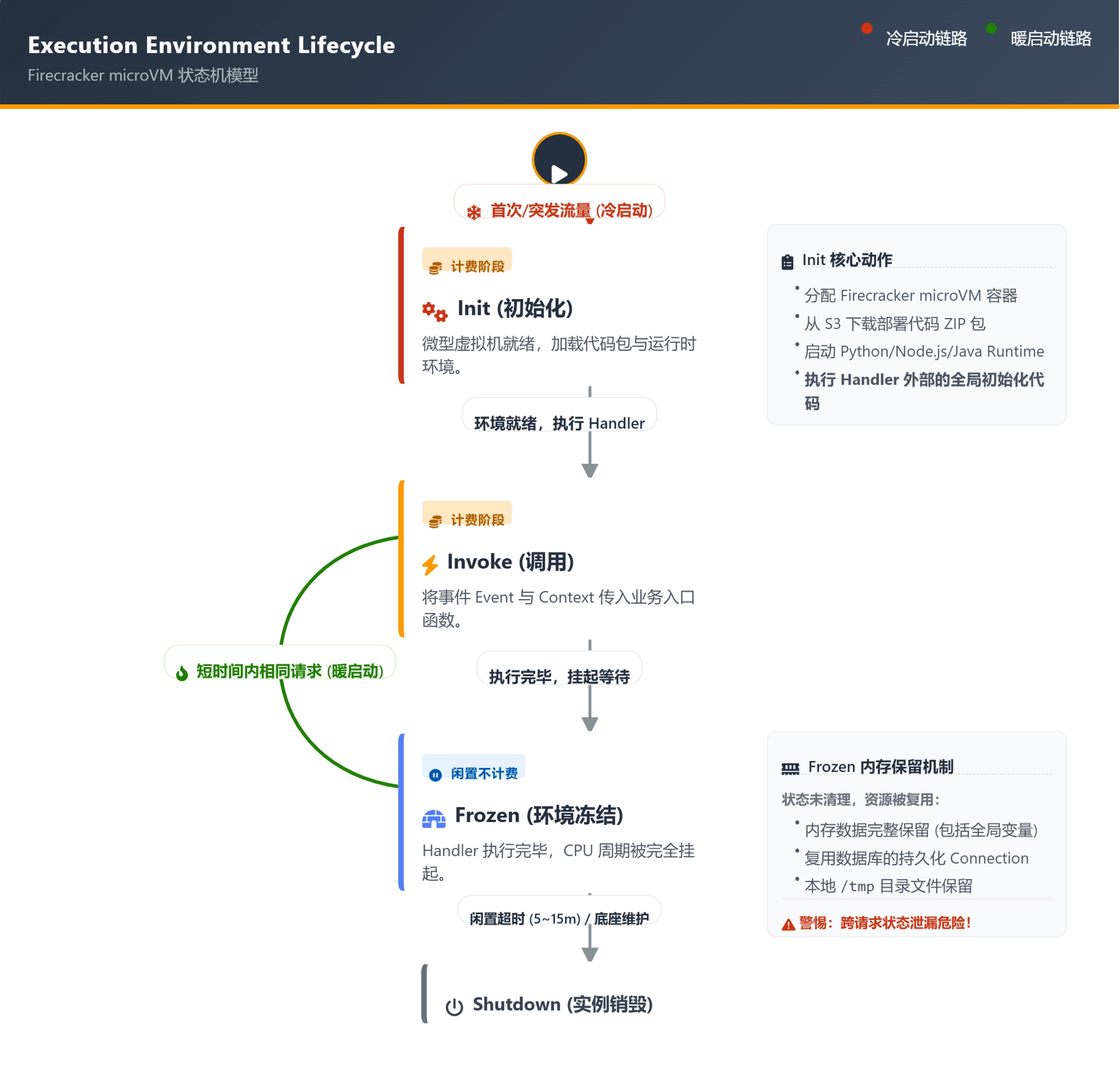
When we deploy code (such as a Python 3.12 device authentication script) to the cloud Lambda environment, its underlying actual lifecycle is illustrated in the diagram below:
As shown, the execution process of a Lambda container can be divided into three main phases:
- Init (Initialization Phase - Cold Start): When the first request arrives, or if all existing instances are busy, AWS allocates a new Firecracker instance. Upon startup, this instance downloads the deployment package from S3 via the internal network, initializes the Python interpreter, and executes all global code in the Lambda function file outside of
def handler(event, context):(such asimport boto3or establishing database connections). This phase is very time-consuming and is known as a Cold Start. For heavy Java JVMs, this phase can even take several seconds. - Invoke (Invocation Phase): AWS passes the JSON payload of the HTTP or MQTT message to the Lambda
handlerfunction and executes its business logic. - Freeze & Thaw (Freeze and Reuse): After the
handlerfunction returns (return), AWS does not destroy the Firecracker instance. Instead, it suspends the CPU of this micro-virtual machine (while it remains alive in memory). At this point, the instance incurs no charges, but the state in memory (including database connection objects) is fully preserved. If new requests flood in shortly after (typically within 5 to 15 minutes), AWS instantly thaws the instance, skipping the Init phase and jumping straight to Invoke (i.e., directly executing the handler function). This is a responsive Warm Start.
Optimizing Cold Starts via the Provisioned Concurrency Mechanism
Note that during the warm start process mentioned above, Lambda responds extremely quickly. However, during a cold start, the entire process of container startup, loading, and execution takes longer, which can result in a poor user experience in certain application scenarios. To solve this problem, AWS introduced the Provisioned Concurrency mechanism. Its core logic is to trade space for time.
Before traffic actually arrives, you can use API commands to instruct AWS to silently pre-allocate a specified number of micro-virtual machines in the background and pre-run the time-consuming Init phase. This way, when real device concurrent requests arrive, all requests are routed directly to these pre-warmed instances, achieving ultra-fast response times within tens of milliseconds.
However, it is worth noting that once provisioned concurrency is enabled, you will be continuously billed over time for these pre-warmed instances, even if there are no requests at all.
A typical use case for this mode is identifying the peak traffic windows of your application every day, and then proactively enabling the Provisioned Concurrency mechanism right before those windows arrive to improve user response speeds.
3. Lambda Trigger Message Queue Patterns
As noted above, Lambda is merely a computing unit. In real business scenarios, how are request data sent from devices routed smoothly, securely, and reliably to Lambda? Depending on the business scenario, AWS provides three distinct invocation models:
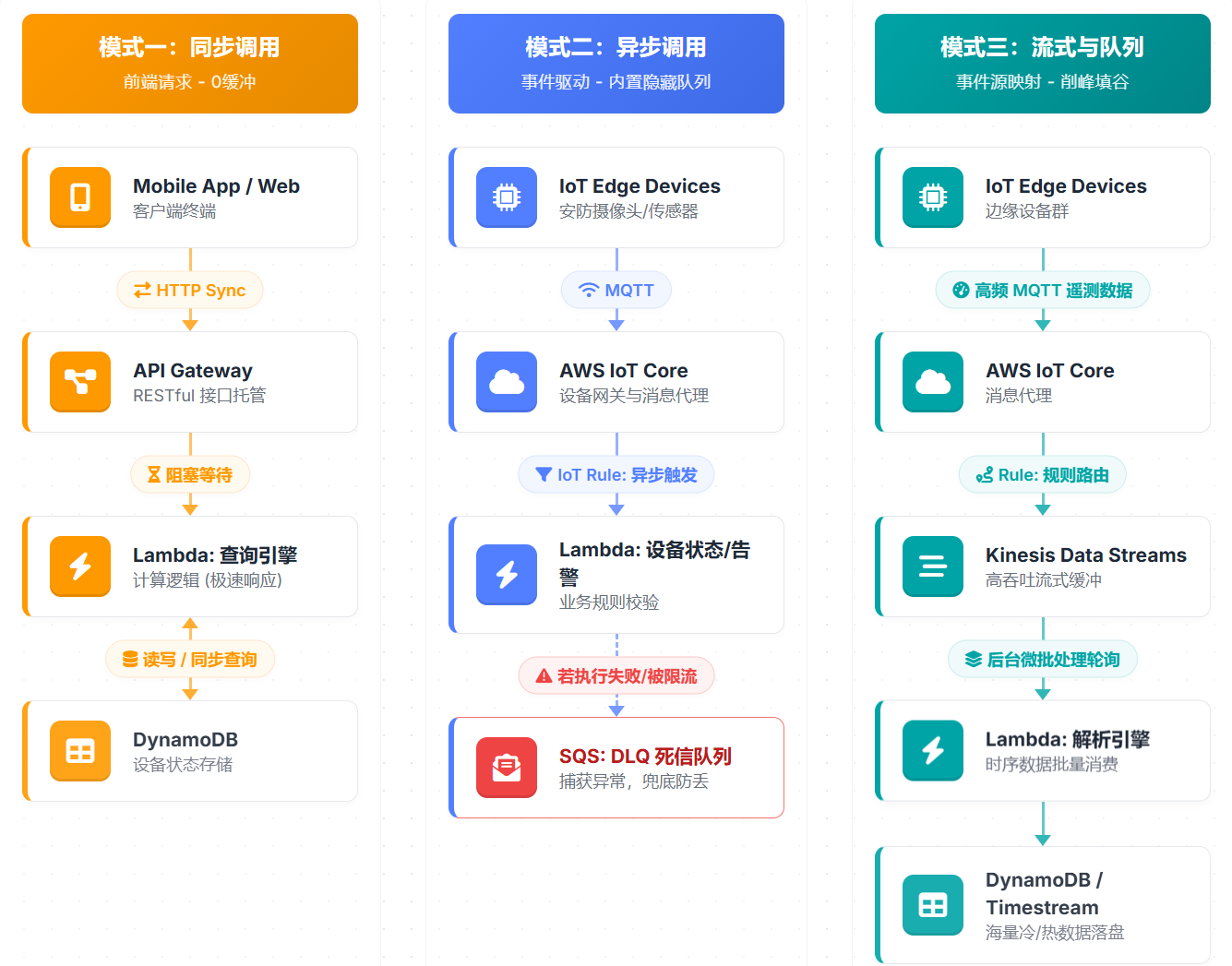
Synchronous Invocation Mode:
- Working Mechanism: The client initiates a request and blocks the connection until Lambda finishes execution and returns an HTTP response.
- Queue Characteristics: There is no internal queue buffering in this mode. Therefore, if 5,000 requests flood in simultaneously while the current Lambda concurrency quota is only 1,000, the excess 4,000 requests are immediately rejected by the system, returning a
429 Too Many Requests (ThrottlingException)to the frontend device. - Mitigation Strategy: Frontend device requests must implement rigorous exponential backoff and jitter retry algorithms.
Asynchronous Invocation Mode:
- Working Mechanism: Follows a fire-and-forget principle. After the AWS IoT Rules Engine pushes an event to Lambda’s internal gateway, it receives immediate confirmation and places the event into a managed queue inside AWS, from which Lambda asynchronously pulls and executes it.
- Queue Retries and DLQ: If an exception is thrown during Lambda code execution or if concurrency throttling is encountered, the internal Lambda queue will retry up to 2 times by default (usually spaced 1 minute and 2 minutes apart). Note: If both retries fail, the message is permanently dropped; thus, this queue mechanism is inherently unreliable. Therefore, to ensure that alerts or critical signaling messages are not lost, you must bind a Dead-Letter Queue (DLQ) to the Lambda, typically designating an Amazon S3/SQS queue to capture ultimately failed messages for subsequent alert analysis or manual intervention and compensation.
Stream-Based Queue Triggers:
If edge devices emit data at a very high frequency, handling such high-frequency messages directly via Lambda is not an optimal design.
- A sound architectural design routes high-frequency messages sent from IoT Core into Amazon Kinesis Data Streams or Amazon SQS first. Lambda does not act as an independent HTTP endpoint; instead, it runs a background poller. Based on configured parameters like
BatchSizeandMaximumBatchingWindowInSeconds(e.g., wait up to 1 second or gather up to 500 records), this poller bundles scattered stream data into a JSON array and passes it to a Lambda instance for processing.
4. Best Practices for Lambda Development and Deployment
In real IoT cloud-native backend development, modifying code manually via the AWS web console or allowing developers to have direct production deployment permissions on their local machines is extremely dangerous. A more rational approach is to promote Infrastructure as Code (IaC) within the team and establish a strict CI/CD automated deployment pipeline.
In fact, AWS specifically developed the SAM (Serverless Application Model) tool to handle the development and standardized deployment workflows of serverless cloud services.
For Lambda services, the best practice workflow for development and deployment can generally be divided into 5 stages:
- Local IDE and Code Definition: Developers write Python business logic (
app.py) in their local IDE and maintain atemplate.yamlconfiguration file. In this YAML file, all cloud resources must be defined declaratively. This configuration file serves as the system blueprint for cloud deployment, ensuring absolute traceability and immutability of the cloud environment. - Packaging and Building (
sam build): Used to generate delivery artifacts. Ultimately, all code and dependencies are archived into a local hidden folder named.aws-sam, ready for the cloud. - Cloud Synchronization (
sam deploy): In this step, SAM automatically compresses the packaged code and dependencies into a.zipfile and uploads this ZIP package through a secure channel to a hidden bucket in Amazon S3. - Orchestration and Deployment: What gets uploaded in the previous step includes not only the code ZIP package but also the translated
template.yamlfile. AWS hands this configuration file over to AWS CloudFormation (AWS’s infrastructure automation orchestration engine), which performs the actual cloud environment deployment based ontemplate.yaml. - Trigger and Execution: Completing the previous step effectively finalizes the deployment. Next, you can send messages from the client to the server to test and verify functionality.
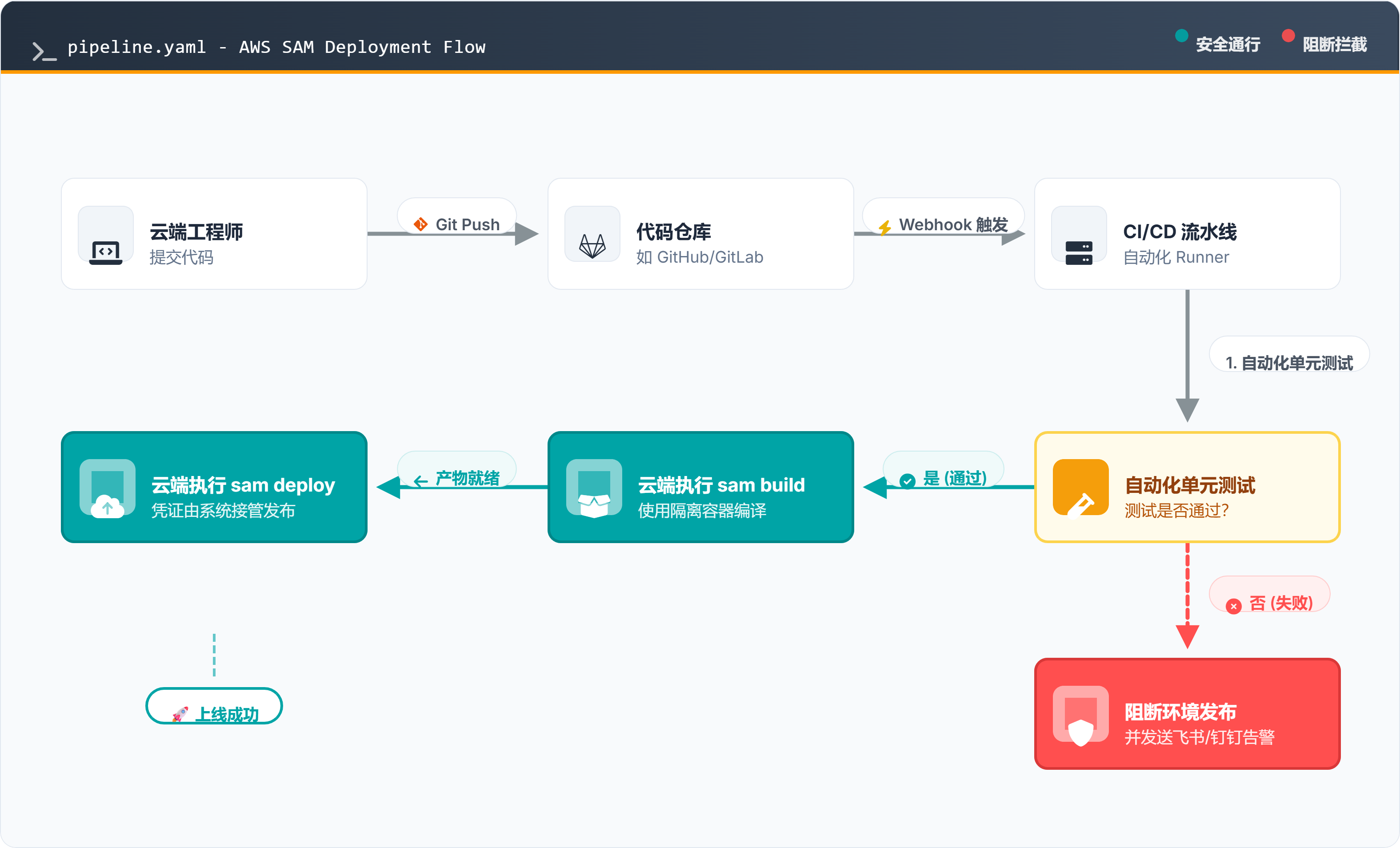
In practical engineering applications, the above workflow should be integrated with CI/CD automated testing and deployment pipelines to make the overall software release process more scientific and efficient: engineers write Python code and template.yaml, push to a code repository (such as GitLab, GitHub, or AWS CodeCommit), triggering an automated CI/CD pipeline where cloud servers automatically execute sam build and sam deploy, followed by rigorous automated testing before production release.