How Does TFLite Handle Operator Versions and Compatibility Issues?
- 28 Apr, 2026
When performing model deployment and on-device adaptation on Rockchip NPU platforms, consistency between the Opset version specified during ONNX export and the Opset version supported by the on-device model conversion tool (RKNN-Toolkit2) is crucial. If the conversion tool does not support certain operator types in the ONNX file, the conversion process will fail. So, does TFLite also suffer from Opset version issues—meaning that when exporting a model to the TFLite format, is there an Opset version that must match the version supported by the interpreter, otherwise leading to similar conversion failures as seen on the Rockchip platform? And how does the TFLite workflow handle operator version consistency? This article attempts to summarize the answers to these questions.
For related background information, please refer to:
- ONNX Opset Version: How to Understand the Opset Version in the ONNX Export Process?
- TFLite Framework Core Concepts and Workflow: How to Understand the Core Concepts and Framework Workflow of TFLite/LiteRT?
TFLite Operator Version Information
Regarding whether the TFLite framework has the same concept of Opset versions and handles this problem similarly to ONNX, the short answer is: TFLite does have the concept of operator versions, but its processing workflow differs significantly from ONNX.
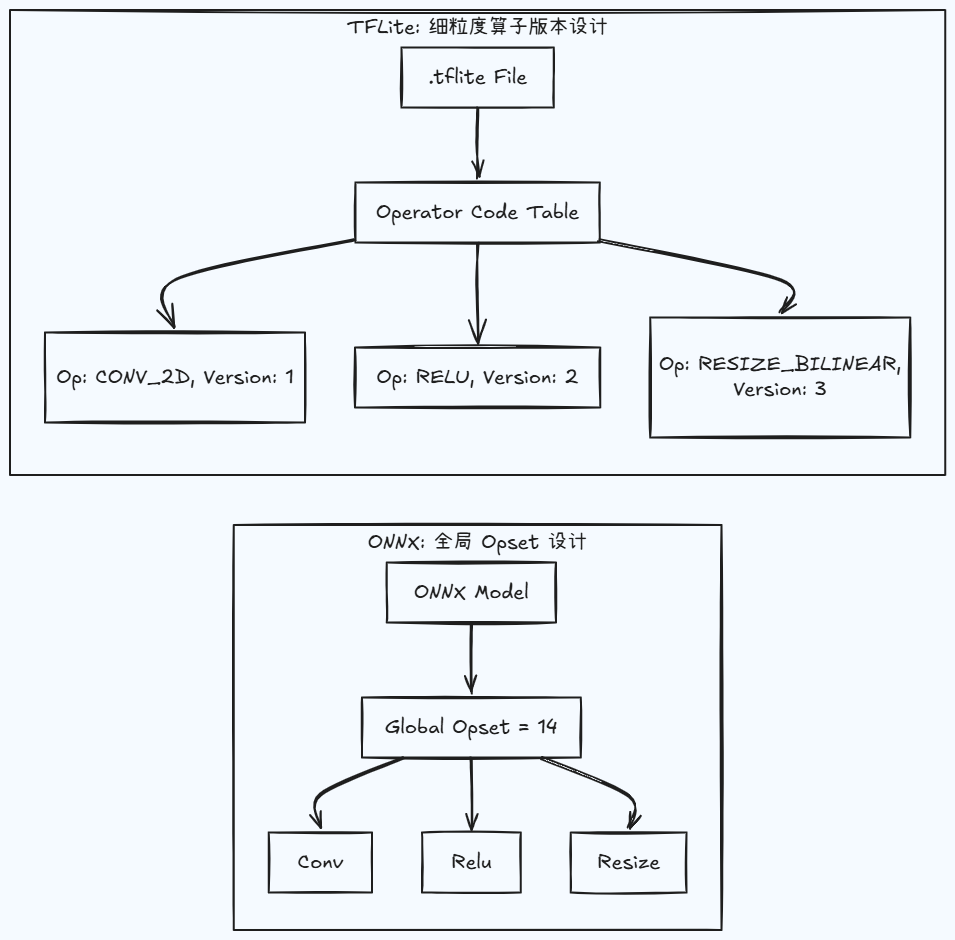
A .tflite file is essentially a serialized FlatBuffer binary file. At the header of this file, there is a dedicated OperatorCode array (known as the operator registry). When a model is exported, the TFLite converter registers all operators used in the model into this table, with each operator independently recording its own version number, rather than having a unified operator set version like ONNX.
As shown in the striking difference between the two in the figure below: TFLite adopts fine-grained, independent version numbers for individual operators, and the model file itself has no concept of an operator set version; whereas ONNX uses a global operator set version, regulating and managing the entire operator set through the model file.
Why does TFLite adopt this per-operator version management model instead of the global Opset version approach used by ONNX?
The primary reason is that operator-level version management provides better forward compatibility, which is crucial for the heavily fragmented software and hardware Android ecosystem. Suppose our model contains only the most basic Conv2D and Relu operators, and we export it using the latest version of the model converter:
- In ONNX’s Global Opset Mode: The model converter flags this ONNX file as a relatively newer
Opset 18. Consequently, even if theConv2Doperator has not changed at all from Opset 1 to 18, an older version of ONNX Runtime encounteringOpset 18might directly throw an error and refuse to load it. - In TFLite’s Per-Operator Version Management Mode: During conversion, the converter detects that the model does not use any new features of
Conv2D, and thus tags theCONV_2Doperator asVersion 1in the TFLite model file. In this case, even if the user’s Android phone contains a much older version of the TFLite Interpreter, it can still seamlessly load and run this newly exported model.
Operator Version Matching
Similar to model exporting, adaptation, and on-device loading and execution on other embedded platforms, running a TFLite model on Android requires attention to three aspects of operator version matching: the operator versions of the model conversion tool (Converter), the operator versions supported by the Interpreter, and the operator versions supported by the Delegate. Only when the operator version information of these three components matches can we ensure that the TFLite model runs successfully on Android.
- For concepts related to the TFLite model converter, Interpreter, and Delegate, and their structures within the Android system, please refer to the note How to Understand the Core Concepts and Framework Workflow of TFLite/LiteRT?.
Converter
The TFLite model Converter tool has an internal operator version probing algorithm to automatically detect the version information of each operator in the model file. For example, for the FullyConnected operator, if the Keep_num_dims feature is not enabled, the Converter will tag this operator as Version 1 during model conversion; if the model’s inference calculation requires this new feature, the Converter will tag it as Version 2. This acts as an operator version determination strategy of “use a lower version whenever possible,” which is core to ensuring that models and apps achieve the widest possible device compatibility.
In summary, for the Converter, no matter how new the tool is, its working logic is: during the TFLite format conversion process, it scans and probes the minimum required version for each operator in the computational graph, and then sets this minimum version as the operator’s version. This maximizes the device compatibility range for the operator and the model moving forward.
Interpreter
The Interpreter also has its own version support matrix. During the loading of the TFLite model file and the construction of the model’s computational graph, it similarly scans the version information of each operator and checks its compatibility with its own supported versions.
During the process of parsing the FlatBuffer structure of the TFLite model file, the Interpreter extracts the version information of each operator and compares it against its internal OpResolver (operator registry). If an operator requires Version 5 according to the TFLite file, but the Interpreter’s codebase only implements Version 4 for that operator, it will immediately throw an Unresolved builtin op exception and refuse to execute.
Therefore, whether a model can successfully run on Android heavily depends on the Interpreter’s support for operator versions. This is why when developing Android apps using the Flutter framework, you should use the latest version of the tflite_flutter plugin whenever possible.
💡 The Interpreter itself is just an ordinary C++ dynamic link library (such as
libtensorflowlite_c.so) that is hard-packed into the APK rather than provided by the underlying Android system. The advantage of this is that the Interpreter is tightly bound to the app’s model. As long as the app passes comprehensive testing, it is guaranteed to run across different hardware platforms and Android system versions. Consequently, if a system contains multiple apps running different models, there will be multiple independent copies of the Interpreter. Of course, TFLite’s core interpreter is designed to be extremely lightweight, stripping away all training-related code. A basic C++ Interpreter library is typically only 1MB to 2MB in size, having a negligible impact on modern app sizes.
The Interpreter actually contains CPU implementations for all the operators it supports. Thus, if a Delegate does not support a specific operator, the Interpreter automatically falls back to its internally implemented CPU operator.
Delegate
As for the Delegate, it also maintains its own version information for the operators it supports. During the handshake between the Delegate and the Interpreter, the Interpreter acquires the operator version information supported by the Delegate. In this scenario, during operator scheduling in forward inference, the Interpreter clearly knows which operators are supported by the Delegate and which are not and must therefore be executed on the CPU.
Of course, unlike the Interpreter—which is built into the Android app layer—the Delegate’s support for operators is fixed within the Android system. This is easy to understand, as the NPU driver implementation beneath the Delegate relies on SoC vendor implementations and cannot be resolved at the app layer. Therefore, unless the entire system is upgraded, the Delegate layer’s support for operator versions remains fixed. Operators that the Delegate cannot support must be scheduled by the Interpreter to run on the CPU.
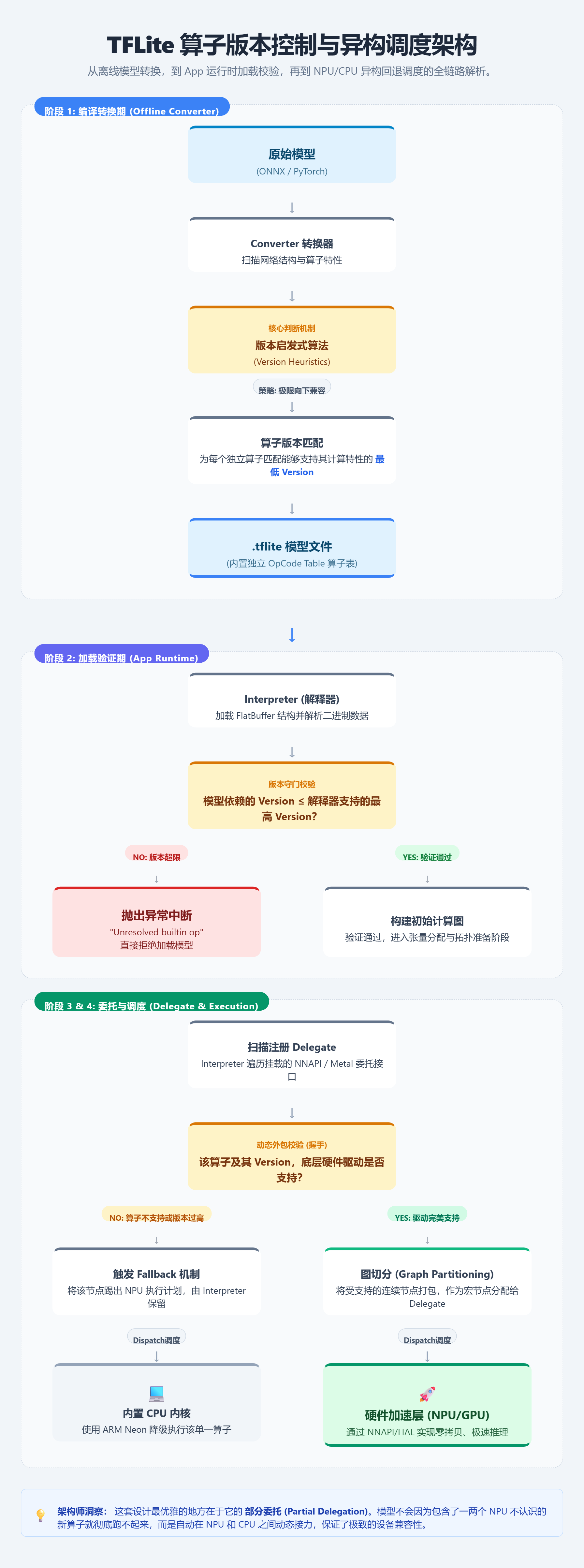
Complete Workflow of TFLite Forward Inference and Operator Versions
At this point, the complete workflow—covering TFLite operator version management, operator version estimation during TFLite model export, and operator version matching and scheduling between the Interpreter and Delegate on Android—becomes crystal clear: