How to Understand the Core Concepts and Workflow of TFLite/LiteRT?
- 26 Apr, 2026
This article organizes the core concepts of TFLite, compares it with the ONNX framework, and examines the key workflows of its internal components, aiming to build a comprehensive understanding of the overall concept and workflow of this standard AI inference framework on Android.
What is TFLite? And a Comparison with ONNX
TensorFlow Lite, launched by Google, is an open-source deep learning framework designed specifically for mobile, embedded, and edge devices. It enables developers to run high-performance inference tasks with extremely low latency and a small binary footprint on mobile phones (Android/iOS), microcontrollers (MCUs), and various IoT devices.
As is well known, running various AI models on edge board devices already has a very popular framework in ONNX. So why not use ONNX directly on Android? The reason mainly lies in the ecosystem competition between Facebook’s PyTorch/ONNX and Google’s TensorFlow.
Although ONNX Runtime now supports running on Android, TFLite should still be the preferred choice for running AI models within Android apps for the following reasons:
- Compatibility issues: In the implementation of the Android system, Google provides a layer of NNAPI (Neural Networks API) encapsulation. TFLite is Google’s primary edge machine learning framework, and its support for NNAPI takes the highest priority. If ONNX is used, various driver incompatibilities or performance degradation may occur when calling NPUs from different SoC manufacturers, making compatibility management a major headache.
- Memory and package size issues: To run models using ONNX on Linux or Android systems, ONNX Runtime must be bundled in, and the associated library files are usually large (tens of MBs), which directly increases the app’s installation package size and memory footprint. TFLite does not have this problem. The core TFLite interpreter is extremely small (only a few hundred KBs), and the relevant runtime environment is already built into the Android system.
Overall Workflow of TFLite Model Deployment
Deploying a complex deep learning model to a mobile phone typically involves a complete process ranging from training, pruning/format conversion/quantization, to on-device execution. This workflow is largely identical across all edge AI frameworks.
For instance, regarding model adaptation on the Rockchip platform, the overall adaptation process is as follows:
- First, complete model training on a PC/AI server and export it as an ONNX model.
- Next, convert the exported ONNX model into an RKNN-format on-device model using Rockchip’s RKNN-Toolkit.
- Within Rockchip’s processor, the on-device model cooperates with its runtime library
librknnrt.soand the application to complete the on-device inference task.
The above workflow is entirely identical to running AI inference using the TFLite framework in Android systems on mobile phones, except that the process is slightly simplified:
- Model Conversion Section: First, convert the raw trained PyTorch model (usually
.ptor.pth) into a flat buffer format.tflitefile using a tool such as TFLite Converter. Similar to the workflow of other on-device model conversion tools, this conversion process includes operations such as operator fusion (combining multiple sequential operations into one to reduce memory access times) and quantization (converting 32-bit floating-point weights in the original model file into 16-bit floating-point FP16 or 8-bit integer INT8, trading a marginal loss in accuracy for multiple times speedup while reducing model size and VRAM requirements). - On-Device Inference Execution Section: While the Android app is running, the TFLite Interpreter built into the Android system is responsible for loading the model, managing memory buffers, and scheduling computing operators.
💡 Note: In the model conversion phase, models trained under the PyTorch framework generally need to be converted to ONNX models first, and then converted to the tflite format using tools like
onnx2tensorflow. However, Google also released an AI Edge Torch tool in 2024 to enable direct conversion.
How Does a TFLite Model Run Under the Android Framework?
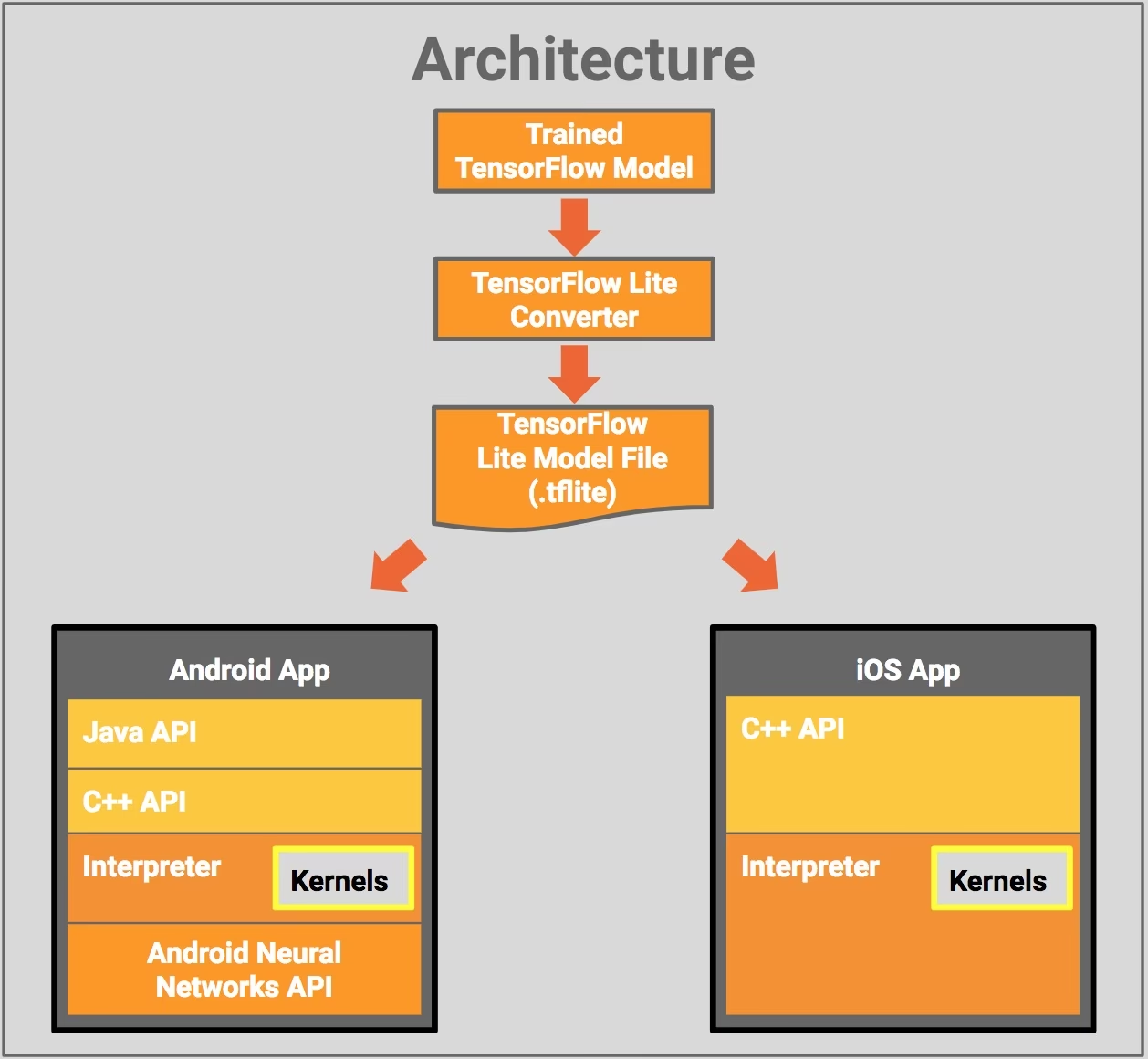
As seen in the framework diagram above, running a model converted into the TFLite format within an Android app relies on two key components: Interpreter and Android Neural Networks API (NNAPI).
The Interpreter is the core control center for running TFLite models in the system. It is responsible for loading models, parsing computational graphs, and managing memory buffers. Throughout the model workflow, the Interpreter does not directly perform complex floating-point and operator calculations; instead, it is responsible for dispatching the computational tasks defined in the model.
- In fact, the Interpreter is somewhat similar to Rockchip’s
librknnrt.so, which assists applications in loading models, parsing computational graphs, and managing memory. Upon receiving input data, it schedules and manages the computational tasks for each layer of the model, assigns them to appropriate processors (CPU/GPU/NPU), and manages memory copies between processors based on specific scheduling conditions. Therefore, its tasks are: load and parse models, dispatch computational tasks, and manage memory across different computational tasks and processors.
NNAPI, on the other hand, is a C API provided by the Android system. Its existence is to abstract away the fragmentation of underlying NPU, GPU, and DSP hardware. The NNAPI provided by Google in the Android system is merely an API call interface framework that cooperates with the Interpreter. For SoC manufacturers such as Rockchip, Qualcomm, and MediaTek, their core work to enable Android phones to execute TFLite model inference smoothly lies in implementing the NNAPI interface specifically within their SoC designs.
Specifically, these SoC manufacturers need to write corresponding NPU driver instructions based on the NeuralNetworks.h standard provided by the Android NNAPI module. The key tasks of these driver instructions are implementing model operator mapping (translating standard operators defined by Android, such as ANEURALNETWORKS_CONV_2D, into specific instructions that their own NPUs can understand and execute) and memory management (implementing shared control of memory across different types and regions to avoid redundant data copying between the CPU and NPU during inference).
In summary, this forms the following calling relationship and workflow:
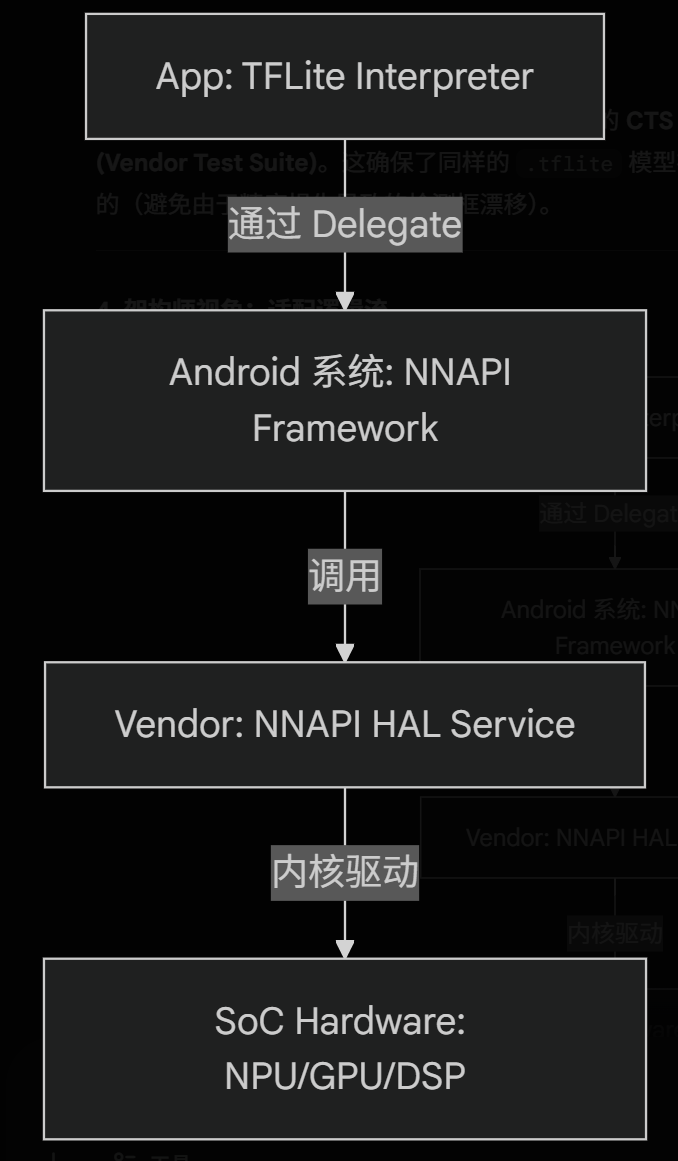
- First, the application logic code of the app calls the Interpreter to load and parse the model file.
- During the process where the Interpreter executes inference on input data, it invokes APIs defined within the Android system’s NNAPI framework via the Delegate mechanism. NNAPI defines various standard operators, and during inference, the Interpreter calls the corresponding API interfaces in NNAPI for specific operators.
- Beneath NNAPI are the specific operator implementations by various SoCs, which are implemented by individual SoC manufacturers based on the capabilities of the CPU/GPU/NPU within their SoCs. Effectively, NNAPI defines a standard layer of operator interfaces, shielding the differences in how various SoC manufacturers implement these operators on their hardware. Thus, from the perspective of the application and the Interpreter, they only see the standard interfaces defined by NNAPI.
The Delegate Mechanism for the Interpreter Calling the NNAPI Framework
The calling workflow between the Interpreter and the NNAPI framework described above is merely a simplified explanation; in reality, the Interpreter does not directly call the API interfaces defined by NNAPI. If the Interpreter were to call NNAPI directly using hardcoded logic, two problems would arise:
- Some operators may not be supported (Fallback): NNAPI does not necessarily support all operators in a TFLite model file. Direct calls would cause the program to crash when encountering unsupported operators.
- Cross-platform compatibility issues: TFLite has grand ambitions—it aims to run not only on Android but also on Windows, Linux, and iOS, none of which have NNAPI (for instance, the iOS app part in the architecture diagram above has no NNAPI at all).
Therefore, the Interpreter employs a delegate mechanism when calling the NNAPI framework on Android.
In essence, a Delegate is an abstract plugin interface designed by the Interpreter to achieve cross-platform compatibility.
- Looking upward (towards the Interpreter), it defines a standard C API via
TfLiteDelegate, shielding the differences among various hardware platforms, SoCs, and NPUs through this C API. The Interpreter always needs only to call this C API interface to invoke underlying computing power and complete the inference process. - Looking downward (towards various NPU implementations on different platforms), it acts as a client responsible for invoking deep learning operator acceleration libraries specific to different system and hardware platforms (such as Android’s
libneuralnetworks.soor iOS’sMetal.framework).
At this point, the complete structure and calling workflow of the TFLite framework become quite clear: