Hand Landmark Detection Model: MediaPipe Hand Landmarker
- 24 Apr, 2026
Introduction to MediaPipe Hand Landmarker
Google’s MediaPipe Hand Landmarker (a hand landmark detection model based on the MediaPipe inference framework) is currently one of the most popular and efficient solutions for real-time hand landmark detection and tracking in the field of computer vision. It can run on mobile devices (Android/iOS), web browsers, and even compute-constrained edge devices, outputting the 3D coordinate positions of 21 hand landmarks within an image at real-time frame rates.
The image below shows the indexing of the 21 finger joint coordinates within the hand region that can be detected by this hand landmark model package. The model was trained on approximately 30,000 real-world images alongside multiple rendered, synthetic hand models superimposed onto various backgrounds.

Google provides official implementations of the Hand Landmarker model for four platforms: iOS, Android, Web, and Python. Therefore, if you are using this model on any of these four platforms, you can directly refer to the official sample code to easily invoke the model and fulfill your application requirements.
So, what if you want to run this model on other platforms and languages, such as using C/C++ on alternative embedded platforms?
The answer is a resounding yes, though it is slightly more complex. Running the Hand Landmarker model depends on Google’s open-source MediaPipe inference framework. At its core, the underlying architecture of this framework is a streaming ML framework built around C++, utilizing TensorFlow Lite as the inference backend and managing data streams via graph computation (Graph).
MediaPipe itself is open-source and extremely friendly to commercial applications. Its code repository is hosted on GitHub: https://github.com/google-ai-edge/mediapipe. It is licensed under the Apache 2.0 License, allowing you to freely use, modify, distribute, and even integrate it into your own commercial software as closed-source without needing to open-source your business code.
Therefore, to run this model using C/C++, you must first cross-compile the MediaPipe framework for your target system, and then invoke the model’s inference capabilities on top of this framework.
Model Workflow and Output Data Parsing
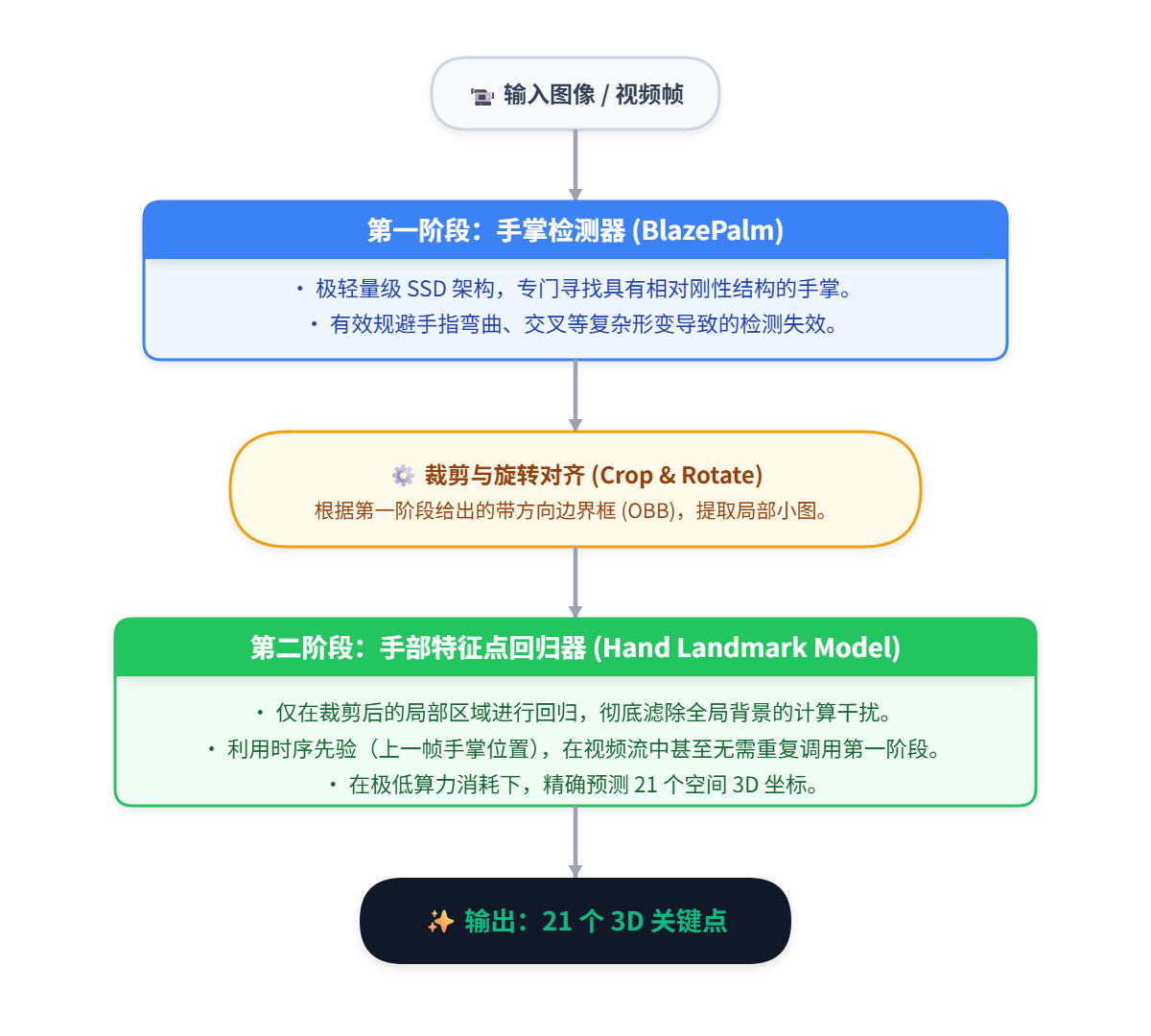
The exceptional performance and detection frame rates achieved by the MediaPipe Hands Landmarker model during runtime stem from its core cascaded two-stage network architecture:
- Hand Detector:
- This model is an extremely lightweight SSD (Single Shot Detector) architecture. Its task is to quickly locate the bounding box of the entire hand in the full image, returning an oriented bounding box.
- In video imagery, hand deformation can be extreme (fingers can bend and cross), making direct detection of the entire hand quite challenging. In contrast, the palm is a relatively rigid structure with distinct square-like features that are very easily captured by a network.
- Hand Landmark Detector:
- Once the first-stage Hand Detector model locates the palm region, the system crops, rotates, and aligns that region (using the bounding box returned by the first stage) before feeding it into the second-stage Landmarker model. This model is specialized in precisely detecting 21 3D coordinates within the cropped sub-image.
- Because the second-stage model only needs to perform inference on the cropped local region, computational load is drastically reduced while irrelevant background interference is filtered out. This is the fundamental reason why the model runs both fast and accurately.
In the interface design and execution flow of the model, the MediaPipe Tasks API includes three main running modes (IMAGE, VIDEO, and LIVE_STREAM), corresponding to single images, image frames in a video file, and real-time streams with callbacks, respectively. These correspond to the following three API call interfaces:
detect(image): Image Mode (IMAGE). Executes without any memory/state. Every input image requires the system to first locate the hand across the entire image before detecting the 21 hand landmarks. This is suitable for processing static photo collections on disk.detect_for_video(image, timestamp_ms): Video Mode (VIDEO). Maintains memory and executes synchronously with blocking. During inference, it maintains an ROI cache internally. After locating the hand region in the previous frame, it can directly locate that region in the next frame to run the lightweight landmark detection. This is suitable for processing pre-recorded local video files.detect_async(image, timestamp_ms): Live Stream Mode (LIVE_STREAM). Maintains memory and executes asynchronously without blocking. Tailored specifically for real-time camera feeds. The main thread sends the image to the model inference framework and returns immediately without waiting for the result. Once the underlying C++ thread pool in the inference framework finishes computing, it returns the result to the main thread via a callback function. Therefore, using this mode requires passing aresult_callbackparameter when initializingHandLandmarkerOptionsto specify which function is responsible for receiving the asynchronous results returned by C++.
The diagram below illustrates the data structure of the results returned after detecting hands and their landmarks in an image using the above interfaces:

Below is a code example for parsing and utilizing the interface return results:
def parse_result(result):
    if not result.hand_landmarks:
        return "No hands detected in the frame"

    # Iterate through each detected hand (assuming N=2)
    for idx in range(len(result.hand_landmarks)):
        # Extract the 21 landmarks of the hand
        landmarks = result.hand_landmarks[idx]
        # Extract whether the hand is left or right
        hand_type = result.handedness[idx][0].category_name
        confidence = result.handedness[idx][0].score

        # Extract coordinates of the index fingertip (the 8th landmark)
        index_finger_tip = landmarks[8]

        print(f"Detected {hand_type} (Confidence: {confidence:.2f})")
        print(f"Index Fingertip: x={index_finger_tip.x:.3f}, y={index_finger_tip.y:.3f}, z={index_finger_tip.z:.3f}")
Model Running Example
To run this model locally on a PC using Python, you need to install Google’s mediapipe support package and download the hand_landmarker.task model file.
pip install mediapipeThe download link for the hand_landmarker.task model package is: https://storage.googleapis.com/mediapipe-models/hand_landmarker/hand_landmarker/float16/1/hand_landmarker.task
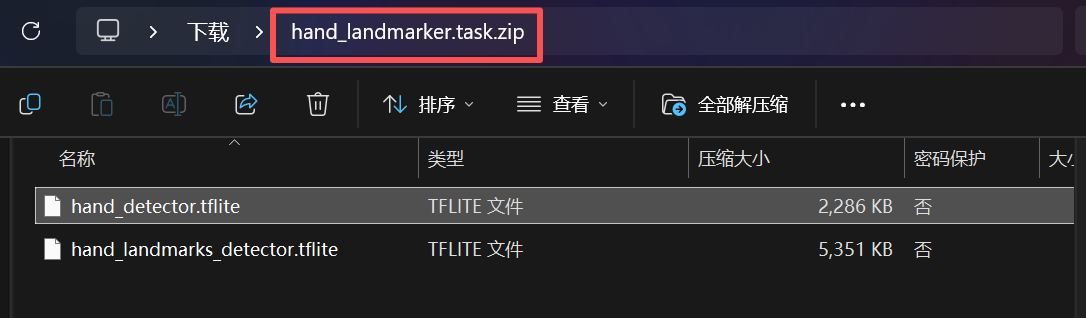
Although the hand_landmarker.task model file uses .task as its extension, it is essentially a compressed archive containing two model files: hand_detector.tflite (palm detection model) and hand_landmarks_detector.tflite (hand landmark detection model). You can simply add a .zip extension to this model file and open it to view its contents:
The following sample code demonstrates how to use OpenCV to perform hand and landmark detection and annotation on a local PC webcam feed:
import cv2
import time
import math
import mediapipe as mp
from mediapipe.tasks import python
from mediapipe.tasks.python import vision

# ==========================================
# 1. Configure MediaPipe Tasks API
# ==========================================
model_path = 'hand_landmarker.task' # Ensure this file is in the same directory
base_options = python.BaseOptions(model_asset_path=model_path)
options = vision.HandLandmarkerOptions(
    base_options=base_options,
    num_hands=2,
    min_hand_detection_confidence=0.5,
    min_tracking_confidence=0.5,
    running_mode=vision.RunningMode.VIDEO
)
detector = vision.HandLandmarker.create_from_options(options)

# 2. Custom Hand Skeleton Topology
HAND_CONNECTIONS = [
    (0, 1), (1, 2), (2, 3), (3, 4),         # Thumb
    (0, 5), (5, 6), (6, 7), (7, 8),         # Index finger
    (9, 10), (10, 11), (11, 12),            # Middle finger
    (13, 14), (14, 15), (15, 16),           # Ring finger
    (0, 17), (17, 18), (18, 19), (19, 20),  # Pinky
    (5, 9), (9, 13), (13, 17)               # Palm metacarpals
]

def process_and_draw(frame, detection_result):
    """Extract coordinates, render skeleton, and calculate physical actions"""
    if not detection_result.hand_landmarks:
        return frame

    h, w, _ = frame.shape
    for hand_landmarks in detection_result.hand_landmarks:
        # 1. Coordinate conversion: Denormalize 21 normalized coordinates to true pixel matrices [21, 2]
        pixel_pts = []
        for lm in hand_landmarks:
            px, py = int(lm.x * w), int(lm.y * h)
            pixel_pts.append((px, py))

        # 2. Rapidly render skeleton connections
        for p1, p2 in HAND_CONNECTIONS:
            cv2.line(frame, pixel_pts[p1], pixel_pts[p2], (255, 200, 0), 2)

        # 3. Render the 21 joint nodes
        for px, py in pixel_pts:
            cv2.circle(frame, (px, py), 4, (0, 0, 255), -1)

        # 4. Core industrial logic: Scale-invariant pinch detection
        # Extract key landmarks: 0 (wrist), 4 (thumb tip), 5 (index MCP), 8 (index tip)
        wrist = pixel_pts[0]
        index_mcp = pixel_pts[5]
        thumb_tip = pixel_pts[4]
        index_tip = pixel_pts[8]

        # Euclidean distance calculation
        D_pinch = math.hypot(index_tip[0] - thumb_tip[0], index_tip[1] - thumb_tip[1])
        L_ref = math.hypot(index_mcp[0] - wrist[0], index_mcp[1] - wrist[1])

        # Prevent division by zero with an extremely small probability buffer
        ratio = D_pinch / (L_ref + 1e-6)

        # UI interaction feedback: Trigger event if within the pinch threshold!
        if ratio < 0.25:  # 0.25 is a highly robust industrial empirical value
            cv2.line(frame, thumb_tip, index_tip, (0, 255, 0), 4) # Green connection line
            cv2.putText(frame, "STATUS: PINCHING!", (wrist[0]-50, wrist[1]+50),
                        cv2.FONT_HERSHEY_DUPLEX, 0.8, (0, 255, 0), 2)
        else:
            cv2.line(frame, thumb_tip, index_tip, (0, 0, 255), 2) # Red connection line
            cv2.putText(frame, "STATUS: OPEN", (wrist[0]-50, wrist[1]+50),
                        cv2.FONT_HERSHEY_DUPLEX, 0.8, (0, 0, 255), 2)

    return frame

# 3. Video Stream Main Loop
cap = cv2.VideoCapture(0)
p_time = 0

while cap.isOpened():
    success, frame = cap.read()
    if not success:
        break

    frame = cv2.flip(frame, 1)
    rgb_frame = cv2.cvtColor(frame, cv2.COLOR_BGR2RGB)

    mp_image = mp.Image(image_format=mp.ImageFormat.SRGB, data=rgb_frame)
    frame_timestamp_ms = int(time.time() * 1000)

    # Core inference
    result = detector.detect_for_video(mp_image, frame_timestamp_ms)

    # Pass the original BGR frame into the custom processing engine
    final_frame = process_and_draw(frame, result)

    # Calculate FPS
    c_time = time.time()
    fps = 1 / (c_time - p_time) if (c_time - p_time) > 0 else 0
    p_time = c_time
    cv2.putText(final_frame, f'FPS: {int(fps)}', (20, 40), cv2.FONT_HERSHEY_SIMPLEX, 1, (255, 0, 0), 2)

    cv2.imshow('Industrial Hand Tracking', final_frame)

    if cv2.waitKey(1) & 0xFF == ord('q'):
        break

cap.release()
cv2.destroyAllWindows()