Study Notes on Amazon AWS Bedrock Service
- 23 Apr, 2026
Core Features of AWS Bedrock
Amazon Bedrock is a fully managed Serverless service provided by AWS that enables unified API access to high-performance foundation models (FMs) from leading AI companies (such as Anthropic, Meta, Mistral, Amazon, etc.), while offering a suite of peripheral features to facilitate the building of generative AI applications.
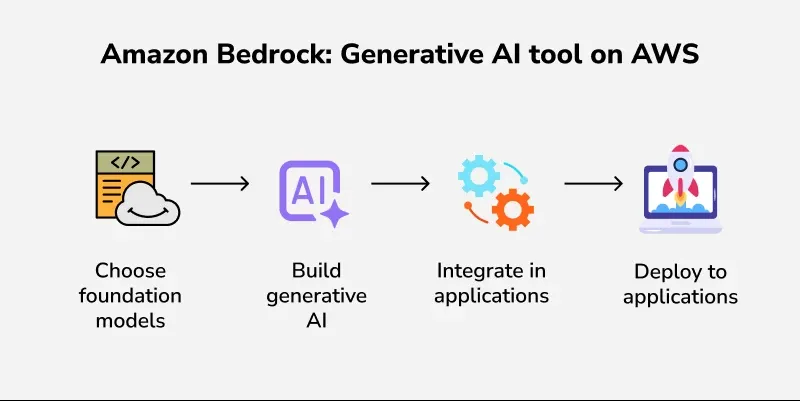
Below is a list of the core functional modules provided by Amazon Bedrock:
- Provides a unified Serverless API interface for Foundation Models (FMs), enabling access to industry-leading multimodal large models (including Anthropic, Meta, Mistral, Cohere, AI21 Labs, Amazon’s proprietary Titan and Nova models, as well as domestic models such as DeepSeek, GLM, Qwen, and Kimi). It also allows user applications to dynamically route model inference requests across multiple AWS regions, thereby improving availability and breaking through single-region throughput limits.
- Supports native knowledge base applications and fully managed RAG (Retrieval-Augmented Generation) pipelines. It can automatically connect to backend data sources (such as S3, Confluence, SharePoint, etc.), process document chunking, convert them into vectors stored in vector databases like OpenSearch, and automatically perform similarity retrieval and context enhancement when a user asks a question.
- Supports model fine-tuning, allowing the use of enterprise proprietary labeled data for supervised fine-tuning of selectively supported models (such as Amazon Titan, Llama, Cohere, etc.) to improve model accuracy in specific domains.
- Implements a model-independent safety filtering layer based on Guardrails, supporting custom topic-denial policies to filter harmful information (hate speech, violence, explicit content) from model-generated content, intercept prompt injections, and mask PII (Personally Identifiable Information) to ensure AI outputs comply with enterprise requirements.
Relationships and Differences Between Amazon Bedrock, SageMaker, and Q
Within the AWS AI ecosystem, the positioning of Amazon Bedrock, Amazon SageMaker, and Amazon Q can easily cause confusion since they all appear to provide support for AI model access on the surface. Below is a detailed explanation of the specific positioning and differences of these three services in actual use.
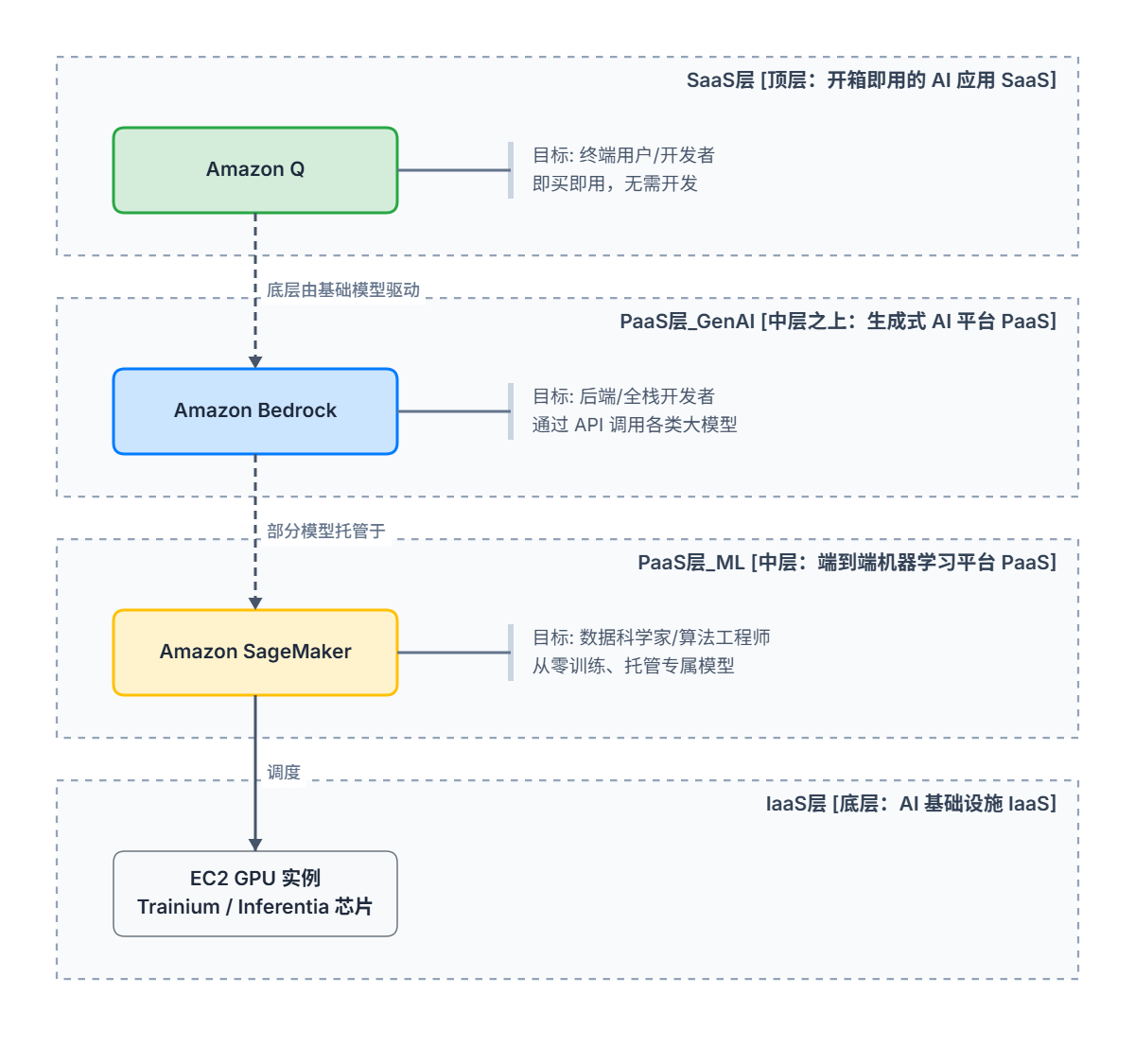
- Amazon Q: Positioned as an out-of-the-box, enterprise-customized AI assistant
- Essentially a fully built, generative AI assistant tailored for enterprises, directly facing end-users and developers.
- Its core feature is that it can be used immediately upon activation without writing any code. It is available in several different editions:
- Amazon Q Developer (formerly CodeWhisperer): Primarily embedded in IDEs (such as VS Code) or the AWS Console to assist with writing code, troubleshooting Lambda errors, or explaining complex IoT Rule SQL.
- Amazon Q Business: Can be thought of as an enterprise knowledge base for internal employees, allowing companies to integrate internal HR documents, IT guidelines, and other materials. Employees can then ask questions directly via the web interface provided by Q Business, complete with strict access control (i.e., only answering content that the employee has permission to view).
- Amazon Q is billed on a per-user basis upon activation; for example, the Amazon Q Business Pro subscription is approximately $20 per user per month. This means its positioning is targeted at internal enterprise use (To-B/To-E) or individual developer efficiency tools, making it unsuitable for direct integration with consumer-facing (To-C) applications.
- Amazon Bedrock: Positioned as a super gateway for large model APIs (PaaS for GenAI)
- This service is a fully managed, serverless generative AI service targeted at application developers (backend/full-stack engineers).
- Its core philosophy is that developers do not need to deploy models themselves or manage servers; with just a single line of code (calling an API), they can switch between multiple industry-leading models. Therefore, within the AWS ecosystem, Bedrock serves as the cornerstone for developers to build their own AI applications, providing model services (MaaS) for AI applications.
- Amazon SageMaker: Positioned as a cloud-based platform for machine learning model development and training (End-to-End MLOps PaaS)
- This service is a full-lifecycle machine learning workbench targeted at model developers (data scientists and algorithm engineers).
- Using SageMaker for machine learning AI model development and training requires developers to select specific EC2 instance types (such as
ml.p4d.24xlarge), configure Jupyter Notebooks, and write model training scripts (PyTorch/TensorFlow).- SageMaker can be used not only for developing and training large generative AI models, but also extensively for traditional predictive AI (such as XGBoost, time series forecasting, etc.).
- Therefore, if industry open-source AI models cannot meet specific application requirements, developers can design their own model network architectures, collect massive amounts of training data to train from scratch, or perform deep fine-tuning on existing models. In such cases, SageMaker should be used.
The figure below summarizes the positioning differences among the three:
Basic Usage and Testing of Bedrock Models
Before writing code to actually invoke models on Bedrock, you first need to install the dependencies in your local environment and configure them properly. Enter the following command in the terminal window of the current system (Windows) to install AWS CLI v2 (after the initial installation, you need to re-enter the terminal to use aws CLI commands):
msiexec.exe /i https://awscli.amazonaws.com/AWSCLIV2.msiWhen using the AWS CLI tool for the first time, you need to create a new access key in the AWS Web Console (IAM - Users / [Username] / Security Credentials / Access Keys) and configure this key in the terminal using the aws configure command:
AWS Access Key ID [None]: Your Access Key ID
AWS Secret Access Key [None]: Your Secret Access Key
Default region name [None]: us-east-1 (The region where Bedrock service is located)
Default output format [None]: json
To query the list of models supported by a specified AWS Bedrock region and their corresponding model ARNs, use the following command:
aws bedrock list-foundation-models --region us-east-1 --query "modelSummaries[*].[modelId, modelArn]" --output tableBelow is an example using Python and the AWS boto3 package to access a specified model on Bedrock:
import boto3
import base64

bedrock_runtime = boto3.client('bedrock-runtime', region_name='us-east-1')

model_id = 'us.amazon.nova-2-lite-v1:0'
image_path = 'bear.png'  # Please replace with your image path

def encode_image(image_path):
    with open(image_path, 'rb') as image_file:
        return base64.b64encode(image_file.read()).decode('utf-8')

try:
    print("Reading image...\n")
    base64_image = encode_image(image_path)

    user_prompt = "Please describe the contents of this image in detail."

    response = bedrock_runtime.converse(
        modelId=model_id,
        messages=[
            {
                "role": "user",
                "content": [
                    {
                        "text": user_prompt
                    },
                    {
                        "image": {
                            "format": "png",
                            "source": {
                                "bytes": base64.b64decode(base64_image)  # Converse API requires raw bytes
                            }
                        }
                    }
                ]
            }
        ],
        inferenceConfig={
            "maxTokens": 30,
            "temperature": 0.7,
            "topP": 0.9
        }
    )

    response_text = response['output']['message']['content'][0]['text']
    print("🤖 Image Description:\n" + "-"*40)
    print(response_text)

    # Check Token consumption
    print("\n" + "="*40)
    print(f"💰 Token Consumption Stats: Input {response['usage']['inputTokens']} | Output {response['usage']['outputTokens']}")

except FileNotFoundError:
    print(f"❌ Error: Image file not found. Please check if the path is correct: {image_path}")
except Exception as e:
    print(f"❌ Call failed: {e}")
As you can see, the process of accessing Bedrock models is very similar to using HTTP to call API endpoints of various large model services, except that it uses the AWS Boto3 bedrock_runtime.converse interface and specifies the modelId.