A Complete Implementation Workflow of Human Face Recognition Based on InsightFace
- 20 Apr, 2026
This article details the workflow of face recognition in computer vision, and provides a code-level demonstration and explanation using InsightFace, a complete face detection and recognition solution.
Complete Workflow of Face Detection + Recognition
In industrial deployment practices of face recognition for real-world products, the problem is not solved by a single independent model. Instead, it relies on a cascaded pipeline: Face Detection + Geometric Correction of the Detected Face (Alignment) + Face Recognition (Recognition).
In the current industrial landscape—especially on mobile devices (smartphones) and edge computing platforms (such as the Rockchip RK3588)—the standardized face recognition solution is the InsightFace open-source ecosystem. This solution supports real-time, high-precision face recognition on compute-constrained NPUs. Its typical pipeline consists of: SCRFD (lightweight face detection and landmark localization) + affine transformation alignment + MobileFaceNet-ArcFace (lightweight feature extraction). Therefore, the entire face recognition workflow can be divided into three stages:
- Phase 1 (Detector - SCRFD): Takes a full high-resolution image as input. The SCRFD model detects face regions and localizes 5 facial landmarks (both eyes, nose tip, and both mouth corners). This stage outputs the bounding boxes of the face regions along with the 5 facial landmarks.
- Phase 2 (Aligner - Geometric Transformation): This step performs pure image geometric transformation rather than a deep learning module (OpenCV’s
warpAffineinterface can be used directly for this transformation). It calculates the transformation matrix between the detected landmarks and standard template landmarks. The primary goal is to straighten and normalize the face image detected in the previous stage. - Phase 3 (Recognizer - MobileFaceNet): Takes the cropped and straightened face image as input, outputs its corresponding 512-dimensional feature vector, computes the cosine distance against face feature data stored in a database, performs feature matching, and finds the corresponding face ID.
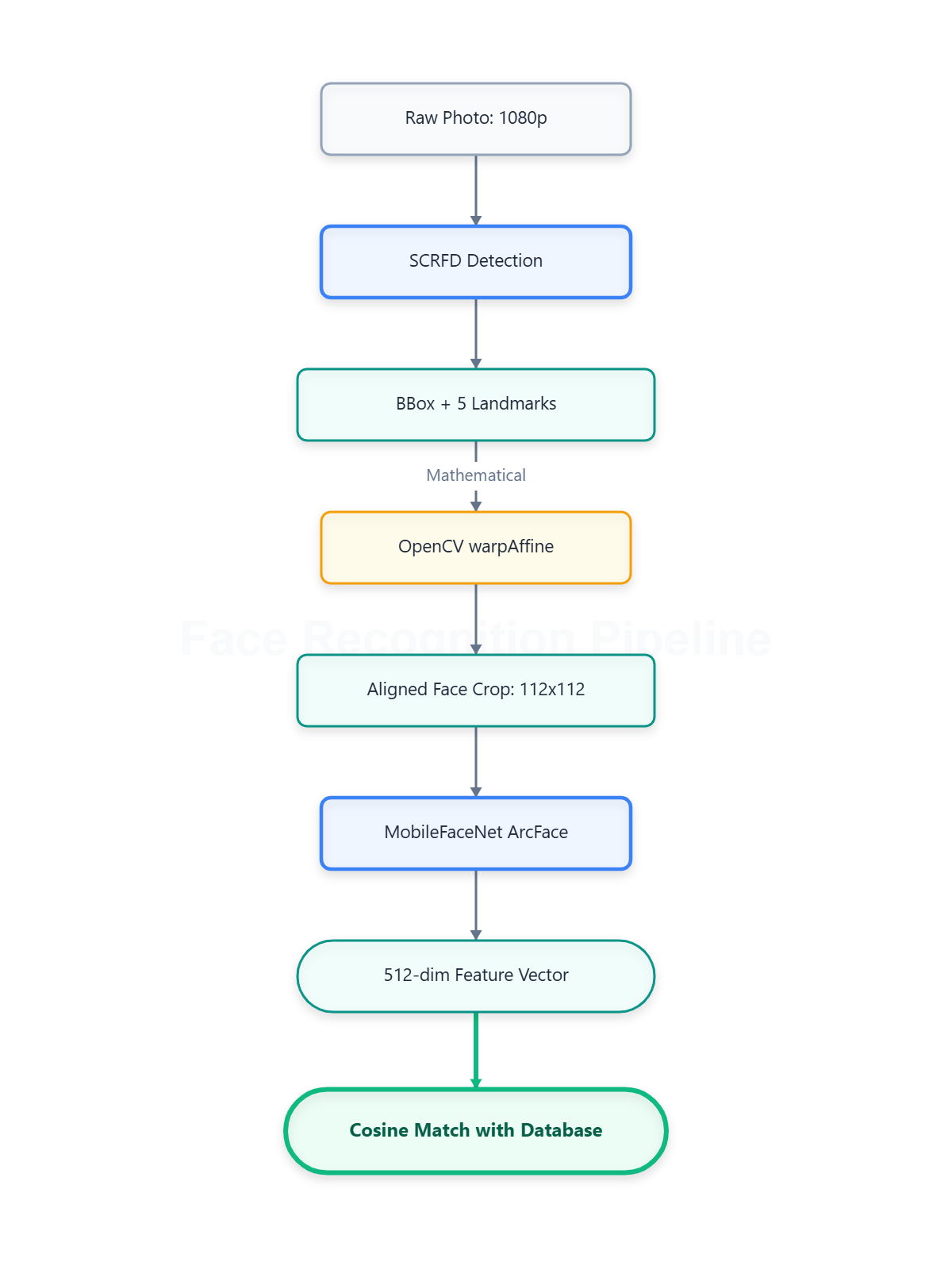
From the perspective of the data flow diagram:
- Detection Stage: Takes a high-resolution image (e.g., 1920 x 1080) as input. Through SCRFD model detection, it finds $N$ faces and outputs their corresponding bounding box coordinates ($N \times 4$) as well as the $(x, y)$ coordinates of the 5 landmarks for each face ($N \times 5 \times 2$).
- Alignment Stage: In this stage, face images of arbitrary sizes and angles are cropped, scaled, and rotated into strictly frontal faces via matrix multiplication. The output dimension for each face image is forcibly fixed to 112x112, resulting in an input tensor dimension of $N \times 3 \times 112 \times 112$ for the next stage.
- Recognition Stage: Based on the face images output by the alignment stage, MobileFaceNet extracts a feature vector for each face. Each face outputs a 512-dimensional feature vector, making the output data dimension $N \times 512$. Next, based on these 512-dimensional feature vectors, cosine distances are computed against the vector database to perform matching and locate the corresponding face ID.
Summary of the Face Recognition and Matching Workflow
The process described above—detecting face regions from an input image, aligning the face region images, and extracting feature vectors from the aligned faces—is relatively straightforward. So, once the feature vectors of the face images are extracted, how is face recognition carried out further?
In fact, this face recognition process is essentially an image search task within a vector database. This step is identical to the natural language-based image search workflow of OpenAI’s CLIP scheme (A Case Study on OpenAI’s Lightweight Multi-Modal Model CLIP).
- First, a registration library of face feature vectors is required, which pre-stores the feature vectors of known individuals. These known individuals’ feature vectors are processed through the same steps of detection-alignment-feature generation to obtain their 512-dimensional feature vectors, which are then stored in this registration library. Note that feature generation must use the same MobileFaceNet model; that is, the enrollment process for known individuals and the subsequent face recognition process must use the exact same MobileFaceNet model for feature vector generation, otherwise the feature vectors will be mismatched.
- The subsequent face recognition process is essentially a query operation against the vector registration library. Real-time 512-dimensional face features are captured from the current camera frame and extracted via MobileFaceNet, and cosine distance comparison is performed against the registration library to find and identify the face ID.
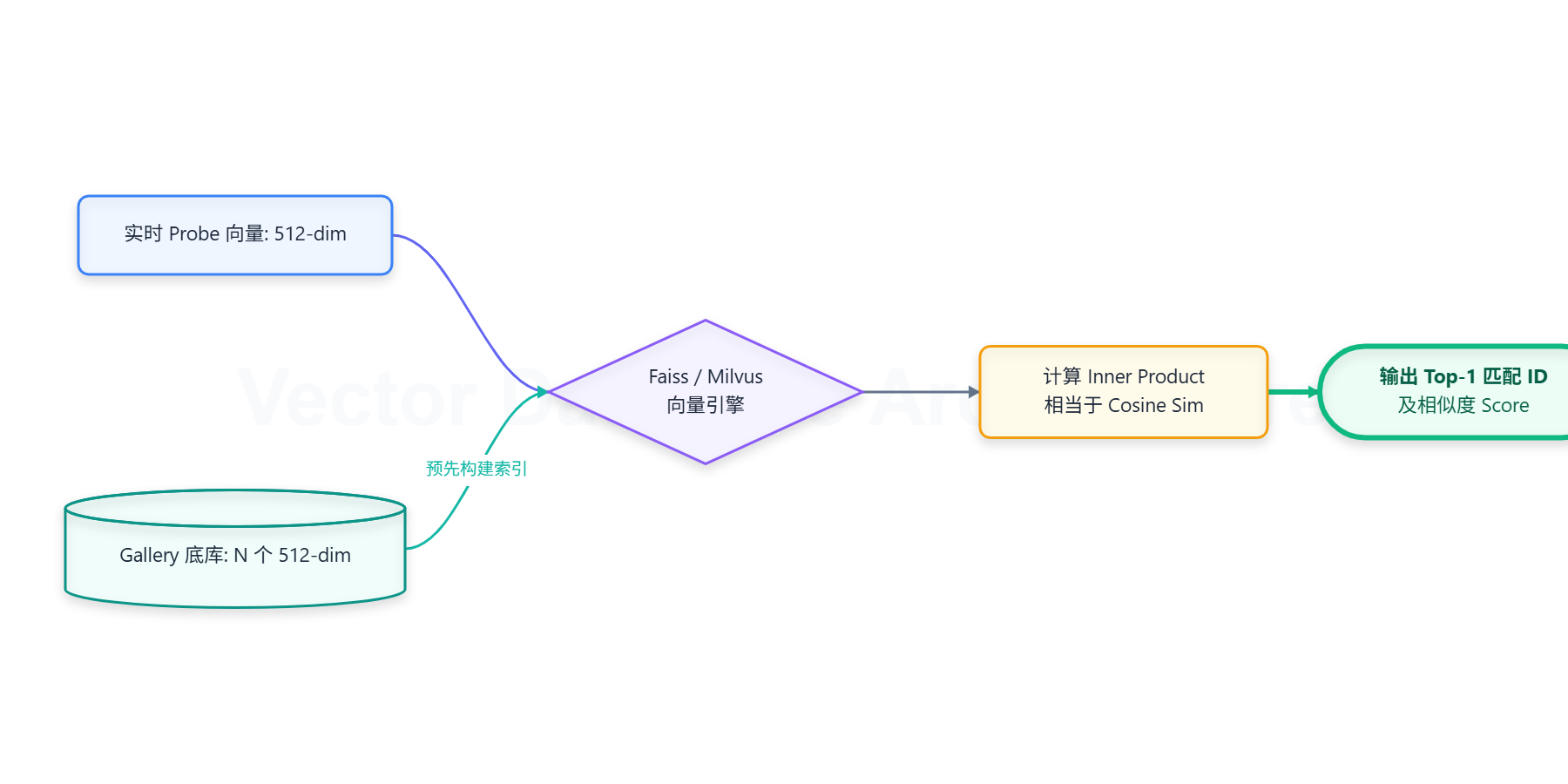
If the number of known individuals in the registration library is small, the feature information of all known individuals can be stored and traversed linearly. The time complexity of this traditional linear traversal algorithm is $O(N)$. If the number of known individuals is large, modern vector databases (such as Faiss, Milvus) can be adopted. These databases reduce the search complexity to $O(\log N)$ by introducing Approximate Nearest Neighbor (ANN) algorithms.
When storing face feature vectors into the database and matching them using cosine distance, the vector norms must first be uniformly scaled to 1 (a step known as L2 normalization) to project them onto a hypersphere. This is a prerequisite for making cosine similarity equivalent to the vector inner product. Thus, the calculation of cosine similarity simplifies to:
$$ \text{Score} = \sum_{i=1}^{512} A_i \times B_i $$
Complete Implementation Record of Face Recognition Based on InsightFace
The execution workflows for face detection, geometric correction and scaling, face information enrollment, and face recognition have been detailed above. Below is the implementation of the face recognition function using the complete solution provided by InsightFace.
First, install the InsightFace package and various dependencies required for the project demo:
pip install insightface onnxruntime opencv-python numpyFace Detection
The code workflow for face detection based on InsightFace is as follows:
import cv2
import insightface
from insightface.app import FaceAnalysis

# Reference official API logic: app = FaceAnalysis(name='buffalo_l', allowed_modules=['detection'])
# The 'buffalo_l' pre-trained package contains high-quality SCRFD detection models
app = FaceAnalysis(name='buffalo_l', allowed_modules=['detection'], providers=['CPUExecutionProvider']) # Automatically downloads the buffalo model package on first execution

# Set NMS threshold and confidence threshold
app.prepare(ctx_id=0, det_size=(640, 640), det_thresh=0.5)
print("SCRFD model loaded successfully!")

img_path = 'test_image.jpg'
img = cv2.imread(img_path)

faces = app.get(img)

for i, face in enumerate(faces):
    bbox = face.bbox.astype(int)
    kps = face.kps.astype(int)
    score = face.det_score

    print(f"Face {i+1}: Confidence {score:.3f}, Coordinates [X1, Y1, X2, Y2]: {bbox}")

    cv2.rectangle(img, (bbox[0], bbox[1]), (bbox[2], bbox[3]), (0, 255, 0), 2)
    for kp in kps:
        cv2.circle(img, (kp[0], kp[1]), 2, (0, 0, 255), -1)

# Display results
cv2.imshow("SCRFD Detection Result", img)
cv2.waitKey(0)
cv2.destroyAllWindows()
The FaceAnalysis API automatically downloads the buffalo_l model package on its first execution, which contains several ONNX model files for the face detection + recognition pipeline, including:
det_10g.onnx: SCRFD face detection model.w600k_r50.onnx: ResNet50 face recognition model.w600k_mbf.onnx: MobileFaceNet recognition model.genderage.onnx: Predicts gender and age based on face images.2d106det.onnx: Dense landmarks module for predicting 106 fine facial contour points (commonly used for beauty filters and stickers).1k3d68.onnx: 3D pose module for 3D face reconstruction and deep pitch/yaw angle calculation.
When performing face detection, simply call app.get to obtain the coordinates and landmark information of all faces contained within the image frame.
Geometric Transformation
Having obtained the coordinate positions and landmark information of the face regions in the image via the SCRFD model in the previous step, the next step is to forcibly flatten faces with arbitrary angles (pitch, yaw, roll) into a unified frontal facial topological coordinate system. This ensures that subsequent facial feature extraction steps deal with standardized, forward-facing frontal face images.
The basic mathematical principle behind this step is: on a 112x112 resolution canvas, based on the 5 standard frontal benchmark point constants provided by InsightFace and the 5 facial landmark coordinate positions detected in the previous step, a matrix transformation is calculated between the two sets of coordinates. Only rotation, translation, and uniform scaling are permitted (stretching and non-uniform deformation are disallowed), with the objective of minimizing the error between the two sets of landmarks.
In practical engineering implementation, OpenCV’s cv2.estimateAffinePartial2D can be called directly to execute this geometric transformation.

The code corresponding to this step is as follows:
import cv2
import numpy as np

# Official InsightFace standard 112x112 reference coordinates for 5 landmarks (left eye, right eye, nose tip, left mouth corner, right mouth corner)
REFERENCE_FACIAL_POINTS = np.array([
    [38.2946, 51.6963],
    [73.5318, 51.5014],
    [56.0252, 71.7366],
    [41.5493, 92.3655],
    [70.7299, 92.2041]
], dtype=np.float32)

def align_face(img, kps):
    """
    Receives the original image and facial landmarks, and returns the aligned 112x112 face image.
    """
    # Ensure kps type is float32
    kps = kps.astype(np.float32)

    M, _ = cv2.estimateAffinePartial2D(kps, REFERENCE_FACIAL_POINTS, method=cv2.LMEDS)

    if M is None:
        return None

    aligned_face = cv2.warpAffine(img, M, dsize=(112, 112), borderValue=(0, 0, 0))

    return aligned_face
Face Recognition
Following the geometric transformation process, each face detected from the original image is transformed into a normalized 112x112 resolution frontal face image. The next step is to extract its feature vector from this standardized face image and query the vector database to retrieve its corresponding ID.
For the feature vector extraction task, InsightFace provides two sets of models targeting hardware with varying computing demands:
w600k_r50(ResNet-50 backbone): Uses the classic ResNet-50 deep residual network with strong feature extraction capabilities, but high computational load, making it suitable for servers and high-performance devices.w600k_mbf(MobileFaceNet backbone): A lightweight network designed specifically for mobile devices, using Depthwise Separable Convolutions with very few parameters and fast inference speeds, making it suitable for embedded and mobile devices.
Regardless of which model is used, a 512-dimensional feature vector is ultimately extracted from the 112x112 face image produced in the previous stage.
import numpy as np
import onnxruntime as ort

class FaceRecognizer:
    def __init__(self, model_path):
        if not os.path.exists(model_path):
            raise FileNotFoundError(f"Model not found: {model_path}")

        # Initialize ONNX inference session
        self.session = ort.InferenceSession(model_path, providers=['CPUExecutionProvider'])
        # Get the input node name of the model
        self.input_name = self.session.get_inputs()[0].name
        print(f"FaceRecognizer initialized with model: {model_path}")

    def extract_feature(self, aligned_img):
        """
        Takes 112x112 BGR aligned face as input, outputs a 512-dimensional L2-normalized vector.
        """
        # 1. Color space conversion: BGR -> RGB
        img = cv2.cvtColor(aligned_img, cv2.COLOR_BGR2RGB)

        # 2. Dimension conversion: HWC -> CHW (112, 112, 3) -> (3, 112, 112)
        img = np.transpose(img, (2, 0, 1))

        # 3. Normalization and type conversion: (x - 127.5) / 127.5
        img = (img - 127.5) / 127.5
        img = img.astype(np.float32)

        # 4. Add Batch dimension: (3, 112, 112) -> (1, 3, 112, 112)
        input_tensor = np.expand_dims(img, axis=0)

        # 5. ONNX forward inference
        outputs = self.session.run(None, {self.input_name: input_tensor})
        embedding = outputs[0][0]  # Extract 1D array of shape (512,)

        # 6. L2 normalization
        embedding_norm = embedding / (norm(embedding) + 1e-10)
        return embedding_norm

model_path = "models/buffalo_l/w600k_r50.onnx"
recognizer = None

recognizer = FaceRecognizer(model_path)

# Extract features
feature = recognizer.extract_feature(aligned_face)
Now that we have the 512-dimensional feature vector corresponding to the face, the next step is to determine whether they match by calculating the cosine distance between the detected face’s feature vector and those stored in the face vector library. Given the feature vectors $\mathbf{A}$ and $\mathbf{B}$ of two faces (which are already L2-normalized, i.e., $|\mathbf{A}|=1, |\mathbf{B}|=1$), the mathematical basis for determining whether they belong to the same person is:
$$ \text{Similarity} = \mathbf{A} \cdot \mathbf{B}^T = \sum_{i=1}^{512} A_i B_i $$
If $\text{Similarity} > \text{Threshold}$ (usually set to 0.45 or 0.5), they can be classified as the same person. Thus, calculating the similarity between two feature vectors is straightforward: you can directly use NumPy’s dot product formula and compare it against the threshold:
def compute_similarity(feat1, feat2):
    """
    Calculate the cosine similarity between two feature vectors.
    Since they are already L2-normalized, compute the inner product directly.
    """
    return np.dot(feat1, feat2)