Training Baidu RT-DETRv2 and Its Deployment on the RK3588 Platform
- 17 Apr, 2026
The official GitHub repository for Baidu’s RT-DETRv2 model is: https://github.com/lyuwenyu/RT-DETR. This project contains two independent implementations of the model based on PyTorch and Baidu’s PaddlePaddle. This article documents the complete process of custom dataset training, inference testing, ONNX export, and RK3588 development board adaptation for the PyTorch implementation.
Source Code Download and Training Dataset Preparation
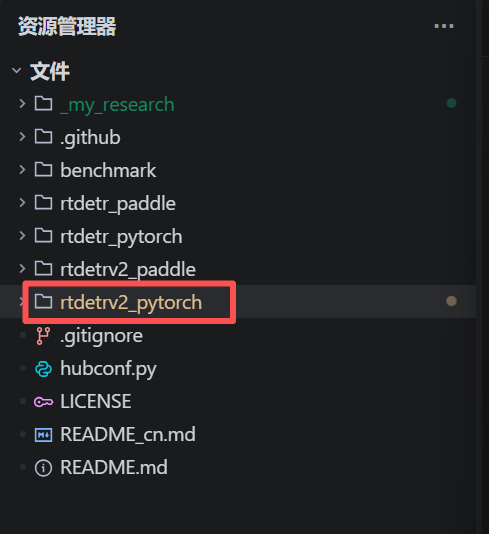
The official GitHub repository for Baidu’s RT-DETRv2 model is: https://github.com/lyuwenyu/RT-DETR. First, download the source code from the link above. As shown, the project actually contains both PaddlePaddle and PyTorch implementations for two models: RT-DETR and RT-DETRv2. Here, we only focus on the rtdetrv2_pytorch directory, highlighted in the red box.
Since the default training data format for the RT-DETR model is COCO, you must convert your own dataset annotation format into the COCO format prior to training.
We found a facial feature detection dataset for babies on Roboflow and downloaded it in COCO annotation format. This dataset will be used subsequently to train the RT-DETRv2 model: https://universe.roboflow.com/pavel-txwf8/baby_monitoring-x30nd-1hjmq/dataset/1.
Next, begin modifying the training and dataset configuration files. In the source code of RT-DETRv2, the rtdetrv2_pytorch\configs\rtdetrv2 directory contains multiple configuration files for different models and datasets:
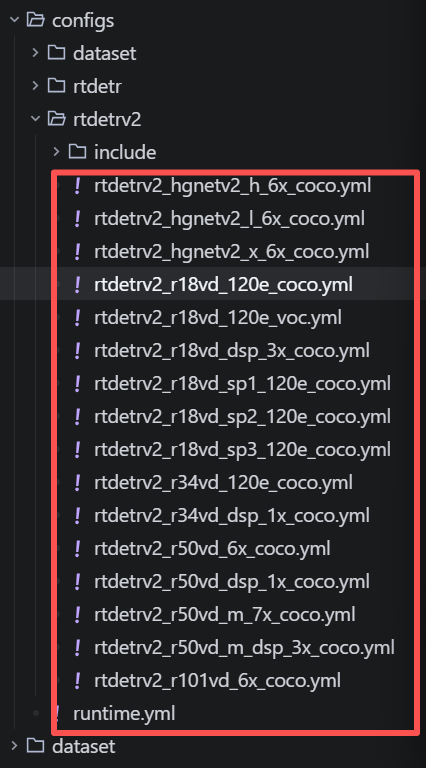
The naming conventions of these configuration files follow a typical engineering logic of “Model Scaling + Backbone Network + Training Strategy”.
- Model Backbone Core Version:
rtdetrv2_r18vd/rtdetrv2_r34vd/rtdetrv2_r50vd:Where r18, r34, and r50 refer to the number of layers in the ResNet backbone network. Thevddenotes the use of the ResNet-vd structure. Compared to the original ResNet, it optimizes the downsampling part, which is more beneficial for preserving feature information and is very NPU-friendly.hgnetv2:A lightweight backbone network developed independently by Baidu.
- Model Scaling:
rtdetrv2_s/rtdetrv2_m/rtdetrv2_l:Where s, m, and l are analogous to the Small/Medium/Large scaling in YOLO, typically involving the configuration of hidden layer dimensions and encoder layer counts.
- Number of Training Epochs:
120e/72e/30e:Whereestands for Epochs.120emeans training for 120 epochs, generally used for training from scratch or long-cycle fine-tuning to achieve the highest accuracy;30emeans training for 30 epochs, typically used for rapid validation or fine-tuning based on pre-trained models.
- Dataset Annotation Format:
coco:Indicates that the configuration adapts to the MS-COCO dataset annotation format by default.
Here, rtdetrv2_r18vd_120e_coco.yml is used as the base to modify the configuration file for custom dataset training. The main modification involves appending the configuration information of your own dataset to the end of the aforementioned configuration file as follows:
### pavel added
num_classes: 6

RTDETRTransformerv2:
  num_classes: 6
  num_queries: 100  # from 300 to 100, can significantly improve inference FPS on RK3588

rtdetrv2_loss:
  num_classes: 6

train_dataloader:
  dataset:
    img_folder: D:/Datasets/FaceMask/Coco/train/
    ann_file: D:/Datasets/FaceMask/Coco/train/_annotations.coco.json
    transforms:
      policy:
        epoch: 117
  total_batch_size: 8
  num_workers: 2
  collate_fn:
    scales: ~

val_dataloader:
  dataset:
    img_folder: D:/Datasets/FaceMask/Coco/valid/
    ann_file: D:/Datasets/FaceMask/Coco/valid/_annotations.coco.json
  total_batch_size: 8
  num_workers: 0
RTDETRv2 Model Training and Local Inference Testing
Before training, download the pre-trained weights of the model so that training can be resumed/continued from them. Since we selected rtdetrv2_r18vd_120e_coco as our training configuration file, the corresponding pre-trained weights to download should be rtdetrv2_r18vd_120e_coco.pth. The download link is: https://github.com/lyuwenyu/storage/releases/download/v0.1/rtdetrv2_r18vd_120e_coco.pth.
At this point, the training data configuration files and pre-trained weights are ready. The next step is to invoke the rtdetrv2_pytorch\tools\train.py script to execute the training process:
Training command:
python .\tools\
train.py
 -c ..\_my_research\rtdetrv2_r18vd_120e_coco.yml -t ..\_my_research\checkpoints\rtdetrv2_r18vd_120e_coco.pth --seed 42
Resuming training after interruption:
python .\tools\
train.py
 -c ..\_my_research\rtdetrv2_r18vd_120e_coco.yml --resume .\output\rtdetrv2_r18vd_120e_coco_baby\checkpoint0013.pth
The files generated during and after the training process are saved in the output_dir specified in rtdetrv2_r18vd_120e_coco.yml, which includes:
checkpoint0xxx.pth:Weight files for each epoch during training.last.pth: Weight file for the final epoch.best.pth: The weight file of the epoch with the highest mAP during training, which represents the final training result. This model weight file should be used for inference testing and subsequent model conversion.log.txt: Records the Loss and AP variations throughout the training process.
After training is complete, you can run the following inference test command to verify the effectiveness of the training results. The project contains a local inference script file: rtdetrv2_pytorch\references\deploy\rtdetrv2_torch.py .
python rtdetrv2_torch.py -c rtdetrv2_r18vd_120e_coco.yml -r output\rtdetrv2_r18vd_120e_coco_baby\best.pth --im-file test.jpgIssues Encountered During Training:
Since some images in the training dataset have excessively high resolutions (e.g., 6000x4000), you need to modify the code in train.py to lift the restriction on input image resolution limits; otherwise, errors will occur during training. Add the following to the beginning of train.py:
# pavel added to remove the image resolution limit
from PIL import Image
Image.MAX_IMAGE_PIXELS = None
Exporting the Model to ONNX
Baidu’s RT-DETRv2 PyTorch implementation provides an ONNX model export script: rtdetrv2_pytorch\tools\export_onnx.py. However, because we intend to deploy it to the RK3588 platform later, we need to modify this script to remove the post-processing logic. This step is crucial for subsequent RK3588 model conversion and board-side inference.
Modify the ONNX conversion script based on rtdetrv2_pytorch\tools\export_onnx.py, mainly concerning the model declaration and ONNX export configurations:
class Model(nn.Module):
        def __init__(self, ) -> None:
            super().__init__()
            self.model = cfg.model.deploy()
            # self.postprocessor = cfg.postprocessor.deploy()

        #def forward(self, images, orig_target_sizes):
        def forward(self, images):
            outputs = self.model(images)
            # Pavel added to remove the postprocessor
            # outputs = self.postprocessor(outputs, orig_target_sizes)
            outputs = torch.sigmoid(outputs['pred_logits']), outputs['pred_boxes']

            return outputs
Additionally, since this model contains the Grid Sample operator—matching the issue encountered in Custom Data Training of the RT-DETR Model and Its Adaptation on RK3588—and the latest version of the RKNN runtime library (v2.3.2) does not support this operator, we follow the same resolution path by using a Monkey Patch to replace the Grid Sample operator prior to exporting the model:
# Replace F.grid_sample
_original_grid_sample = F.grid_sample
F.grid_sample = export_friendly_grid_sample

model = Model()
data = torch.rand(1,3,640,640)
model.eval()

torch.onnx.export(
    model,
    data,
    args.output_file,
    input_names=['images'],
    output_names=['logits', 'boxes'],
    #dynamic_axes=dynamic_axes,
    dynamic_axes=None,
    opset_version=16,
    verbose=False,
    do_constant_folding=True,
    dynamo=False,
)
Then, execute the script above to export the ONNX format (it is recommended to use onnxsim to further simplify the operators in the model file after each ONNX export):
python .\export_onnx.py -c rtdetrv2_r18vd_120e_coco.yml -r output\rtdetrv2_r18vd_120e_coco_baby\best.pth --output_file .\output\onnx\rtdetrv2_r18vd_120e_coco.onnx --check
python -m onnxsim .\output\onnx\rtdetrv2_r18vd_120e_coco.onnx .\output\onnx\rtdetrv2_r18vd_120e_coco_sim.onnx
RK3588 Board-Side Model Conversion and Execution
The subsequent workflow and steps for converting and running the RKNN model on the RK3588 platform are identical to those described in Custom Data Training of the RT-DETR Model and Its Adaptation on RK3588, with one key exception: the model conversion must be set to the FP16 quantization format. If configured to a quantization mode like W8A8, the board-side execution results are poor, likely because quantization compromises the algorithm’s accuracy.