The Training Process of PANNs Audio Tagging Model Using ESC-50 Dataset
- 01 Apr, 2026
This article documents the complete workflow for custom training of the audio detection and classification model PANNs using the ESC-50 dataset.
Introduction to the ESC-50 Dataset
In the article Summary of Pre-research Information on PANNs Audio Classification Model, we introduced PANNs, a very popular model in audio classification applications. This model is thoroughly trained on Google’s AudioSet dataset, achieving exceptional performance in various types of audio detection, recognition, and classification tasks. Based on the pre-trained file of this model (CNN14 architecture) Cnn14_mAP=0.431.pth, this article fine-tunes the pre-trained model using the ESC-50 audio dataset to adapt it to the detection and classification requirements of the ESC-50 dataset.
The ESC-50 dataset consists of 2,000 environmental audio recordings and serves as a benchmark dataset for environmental sound classification methods. Each audio file in the dataset is 5 seconds long and is categorized into 50 semantic classes, with 40 examples per class, loosely grouped into 5 major categories:
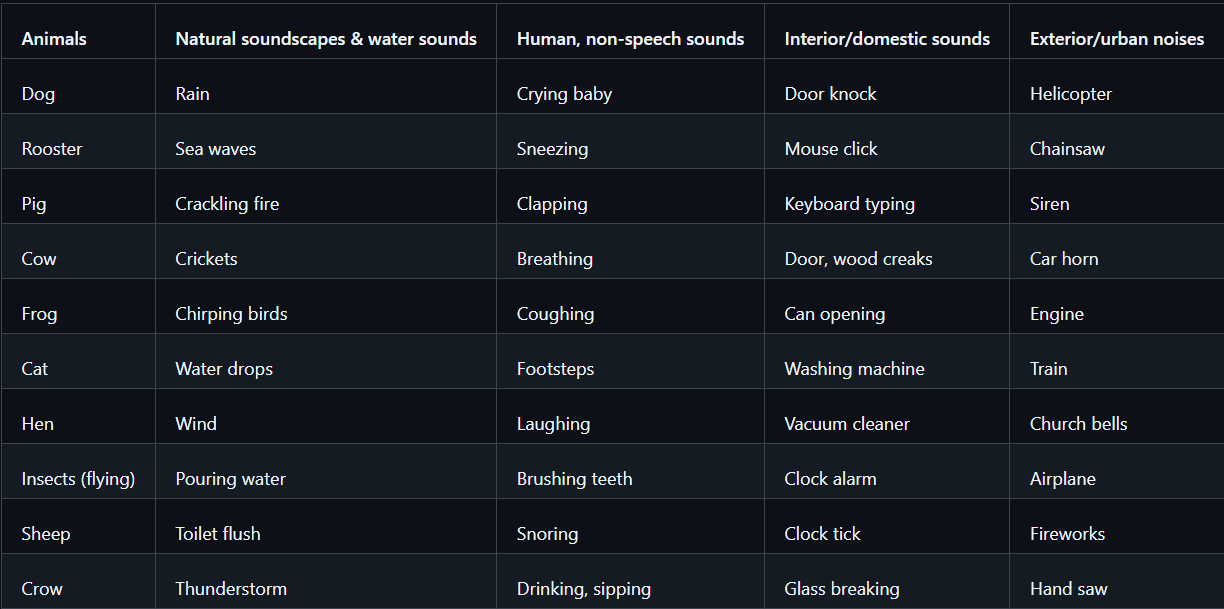
ESC-50 Dataset Download URL: karolpiczak/ESC-50: ESC-50: Dataset for Environmental Sound Classification
Note that the original sampling rate of the audio files in the ESC-50 dataset is 44.1kHz, while the pre-trained weights of PANNs Cnn14 are based on 32kHz. Therefore, when reading these audio files for model training, forced resampling from 44.1kHz to 32kHz is required.
Training Process Documentation for the ESC-50 Dataset
Objectively speaking, the PANNs model does not offer very friendly support for custom dataset training, so you need to design and handle the processing pipelines for each stage of the training process (dataset preparation, model classification head modification, training workflow) on your own.
Preparation of the Training Dataset
First, download the archive of the ESC-50 dataset from the download URL mentioned above. The entire dataset is around 600 MB.
Next, create a custom ESC50 Dataset class inheriting from PyTorch’s Dataset class, and implement the __len__ and __getitem__ interfaces within it. It is worth mentioning here that because the PANNs model is trained on 32kHz audio files, the 44.1kHz audio files from the ESC-50 dataset must be converted to 32kHz before loading the training data.
In addition, to further standardize the length of audio data in the training dataset, the audio length is uniformly fixed to 5 seconds. Audio files that are too long are truncated directly, while files that are too short are padded with zeros at the end.
class ESC50Dataset(Dataset):
    def __init__(self, csv_file, audio_dir, sample_rate=32000):
        self.df = pd.read_csv(csv_file)
        self.audio_dir = audio_dir
        self.sr = sample_rate

    def __len__(self):
        return len(self.df)

    def __getitem__(self, idx):
        path = f"{self.audio_dir}/{self.df.iloc[idx]['filename']}"

        # Force 32kHz resampling to match the PANNs pre-training setup
        audio, _ = librosa.load(path, sr=self.sr, mono=True)

        # Fix audio length to 5 seconds (32000 * 5 = 160000 sampling points)
        if len(audio) < 160000:
            audio = np.pad(audio, (0, 160000 - len(audio)), 'constant')
        else:
            audio = audio[:160000]

        label = self.df.iloc[idx]['target'] # Read the label from the dataset's csv file
        return torch.tensor(audio), torch.tensor(label)
Modifying the CNN14 Classification Head
The PANNs model was designed and trained based on Google’s AudioSet dataset, and the pre-trained file Cnn14_mAP=0.431.pth corresponds to a model classification head that supports 527 audio classes. However, the ESC-50 dataset supports 50 audio classes. Therefore, the classification head must be modified before training to meet the requirements of the ESC-50 dataset.
The entire process consists of the following steps:
- First, instantiate a Cnn14 model based on the PANNs source code and load the pre-trained model file.
- Next, modify the classification head of the Cnn14 model, replacing the default linear layer of 527 neurons in the final layer with a linear layer of 50 neurons.
- Finally, initialize the weight parameters of the newly modified classification head’s linear layer.
def get_model(checkpoint_path, num_classes=50):
    # 1. Instantiate the original Cnn14 model
    model = Cnn14(sample_rate=32000, window_size=1024, hop_size=320,
                  mel_bins=64, fmin=50, fmax=14000, classes_num=527)

    # 2. Load the AudioSet 527-class pre-trained weights
    checkpoint = torch.load(checkpoint_path, map_location='cpu')
    model.load_state_dict(checkpoint['model'])

    # 3. Replace the classification head (fc_audioset) with ESC-50's 50 classes
    in_features = model.fc_audioset.in_features
    model.fc_audioset = nn.Linear(in_features, num_classes)

    # 4. Initialize weights for the new layer
    nn.init.xavier_uniform_(model.fc_audioset.weight)

    return model
At this point, the pre-trained dataset and the model architecture to be trained are ready. The next step is to begin training.
Model Training
The model training workflow is not significantly different from that of a standard convolutional neural network model. It is worth noting that since this is a classification model, the training process uses the standard Cross-Entropy loss function, and the optimizer is Adam.
def train(model, device, train_loader, optimizer, loss_func, epoch):
    model.train()
    total_loss = 0
    for batch_idx, (data, target) in enumerate(tqdm(train_loader, desc=f"Epoch {epoch} [Train]")):
        data, target = data.to(device), target.to(device)

        optimizer.zero_grad()
        # Forward pass: The PANNs model automatically handles Log-Mel spectrogram conversion internally
        output = model(data)
        loss = loss_func(output['clipwise_output'], target)

        # Backward pass and optimization
        loss.backward()
        optimizer.step()
        total_loss += loss.item()

    return total_loss / len(train_loader)

# The implementation of validation code is similar to the training code

# Complete training workflow
full_dataset = ESC50Dataset(CSV_FILE, AUDIO_DIR)

# Simple split: first 1600 for training, remaining 400 for testing
train_idx = list(range(0, 1600))
test_idx = list(range(1600, 2000))
train_loader = DataLoader(Subset(full_dataset, train_idx), batch_size=BATCH_SIZE, shuffle=True)
test_loader = DataLoader(Subset(full_dataset, test_idx), batch_size=BATCH_SIZE, shuffle=False)

# Initialize model and optimizer
print("Initializing PANNs CNN14 for ESC-50...")
model = get_model(CHECKPOINT_PATH, num_classes=50).to(device)
optimizer = optim.Adam(model.parameters(), lr=LR)
loss_func = nn.CrossEntropyLoss()

# Start training loop
best_acc = 0.0
for epoch in range(1, EPOCHS + 1):
    train_loss = train(model, device, train_loader, optimizer, loss_func, epoch)
    val_loss, val_acc = validate(model, device, test_loader, loss_func)

    print(f"Epoch {epoch}: Train Loss: {train_loss:.4f} | Val Loss: {val_loss:.4f} | Val Acc: {val_acc:.2f}%")

    # Save the model weights with the best performance
    if val_acc > best_acc:
        best_acc = val_acc
        torch.save({'model': model.state_dict()}, SAVE_PATH)
        print(f"==> Best model saved with accuracy: {best_acc:.2f}%")

    print(f"Training Complete! Best Accuracy: {best_acc:.2f}%")
The log information during the training process is as follows:
Epoch 28: Train Loss: 2.9666 | Val Loss: 2.9842 | Val Acc: 93.00%
Epoch 29 [Train]: 100%|█████████████████████| 100/100 [00:12<00:00,  8.27it/s]
[Validating]: 100%|███████████████████████████| 25/25 [00:01<00:00, 16.03it/s]
Epoch 29: Train Loss: 2.9666 | Val Loss: 2.9857 | Val Acc: 92.25%
Epoch 30 [Train]: 100%|█████████████████████| 100/100 [00:12<00:00,  8.23it/s]
[Validating]: 100%|███████████████████████████| 25/25 [00:01<00:00, 16.63it/s]
Epoch 30: Train Loss: 2.9663 | Val Loss: 2.9863 | Val Acc: 93.00%
Training Complete! Best Accuracy: 93.50%
As can be seen, after 30 epochs of training, the recognition accuracy on the validation set reached 93.5%. Once training is complete, the trained model parameters are automatically saved as the cnn14_esc50_best.pth file.
Inference
Finally, perform inference testing on the trained model using the following code:
def predict(model, audio_path, labels, device):
    # Force resampling to 32kHz
    audio, _ = librosa.load(audio_path, sr=32000, mono=True)

    # Uniformly adjust the input audio duration to 5 seconds
    if len(audio) < 160000:
        audio = np.pad(audio, (0, 160000 - len(audio)), 'constant')
    else:
        audio = audio[:160000]

    # Convert to Tensor and add Batch dimension
    audio_tensor = torch.tensor(audio[None, :]).to(device)
    with torch.no_grad():
        output = model(audio_tensor)
        # Get the index with the highest probability
        probs = output['clipwise_output'][0]
        pred_idx = torch.argmax(probs).item()

    return labels[pred_idx], probs[pred_idx].item()

# Load the model
device = torch.device("cuda" if torch.cuda.is_available() else "cpu")
model = load_custom_model(MODEL_PATH).to(device)

# Test a single file
test_wav = "D:/Datasets/ESC-50/audio/1-1791-A-26.wav"
label, score = predict(model.to(device), test_wav, label_map, device)

print(f"--- Inference Result ---")
print(f"Audio File: {test_wav}")
print(f"Predicted Category: {label}")
print(f"Confidence: {score:.4f}")