Adaptation and Deployment Process of the Lightweight LLM Qwen2.5-0.5B on RK3588
- 16 Mar, 2026
This article provides a detailed study and summary of Rockchip’s RKLLM tool and its official related guidance documents, documenting the complete process and precautions for adapting the lightweight large language model Qwen2.5-0.5B to the RK3588.
Overall, deploying an LLM on the Rockchip NPU follows the same core logic and workflow as deploying YOLO: PC-side model conversion -> pushing the model and libraries to the board -> calling the API to run. However, for large language model adaptation, the RKNN-Toolkit2 toolchain is no longer used; instead, the RKLLM-Toolkit toolchain, optimized specifically for large language models, is employed.
- RKNN-Toolkit2: Handles Convolutional Neural Networks (CNNs) and simple Transformers (Vision Transformers).
- RKLLM-Toolkit: Specifically handles large language models, supporting weight quantization (W4A16/W8A8) and KV Cache optimization.
The following diagram illustrates the framework of Rockchip’s RKLLM Toolkit and its software-hardware application ecosystem, which is similar to RKNN:

- RKLLM-Toolkit: Used for model conversion and quantization on the PC.
- RKLLM Runtime: Provides C/C++ programming interfaces for Rockchip NPU platforms, helping users deploy RKLLM models on the NPU and accelerate the execution of LLM applications.
- RKNPU Kernel Driver: Responsible for interacting with the NPU hardware, which can be found in Rockchip’s kernel code.
Environment Setup
Download the rkllm codebase from the rkllm GitHub repository (airockchip/rknn-llm).
PC-Side Environment
Create an independent rkllm environment, navigate to the rkllm-toolkit/packages directory within the rknn-llm repository, and install rkllm-toolkit along with its dependencies:
conda create -n rkllm python=3.10
conda activate rkllm
pip install -r requirements.txt
pip install rkllm_toolkit-1.2.3-cp310-cp310-linux_x86_64.whl
Board-Side Environment
For running LLMs on the Rockchip NPU, the board-side mainly requires support for the NPU driver and the librkllmrt.so shared library (located under rkllm-runtime/Linux/librkllm_api/aarch64).
The NPU driver requires version v0.9.8 or higher. You can check whether your board’s driver meets the requirement using the following command; otherwise, you will need to recompile the kernel:
cat@lubancat:~/qwen2.5$ sudo cat /sys/kernel/debug/rknpu/version
RKNPU driver: v0.9.8
Downloading the Model File and Inference Testing on PC
Use transformers to download the Qwen2.5-0.5B model files from Hugging Face and perform a local inference test on your PC to verify the integrity of the downloaded files:
from transformers import AutoModelForCausalLM, AutoTokenizer
import torch

# Model path; will automatically download from HuggingFace when executed (approx. 1GB)
model_name = "Qwen/Qwen2.5-0.5B-Instruct"
tokenizer = AutoTokenizer.from_pretrained(model_name)
model = AutoModelForCausalLM.from_pretrained(
    model_name,
    torch_dtype="auto",  # Automatic precision is recommended for PC-side inference
    device_map="auto"    # Automatically uses GPU if available, otherwise falls back to CPU
)

# Prepare conversation
prompt = "你好,请自我介绍一下。"
messages = [
    {"role": "system", "content": "You are a helpful assistant."},
    {"role": "user", "content": prompt}
]

# Format Prompt
text = tokenizer.apply_chat_template(
    messages,
    tokenize=False,
    add_generation_prompt=True
)

model_inputs = tokenizer([text], return_tensors="pt").to(model.device)

# Generate response
print("--- 模型输出 ---")
generated_ids = model.generate(
    **model_inputs,
    max_new_tokens=512,
    do_sample=True,
    temperature=0.7
)
response = tokenizer.batch_decode(generated_ids, skip_special_tokens=True)[0]
print(response)
Slow download speeds from Hugging Face can be resolved by setting a domestic mirror. Set the environment variables before running the download script above:
$env:HF_ENDPOINT = "https://hf-mirror.com"     # Windows
export HF_ENDPOINT=https://hf-mirror.com       # Linux
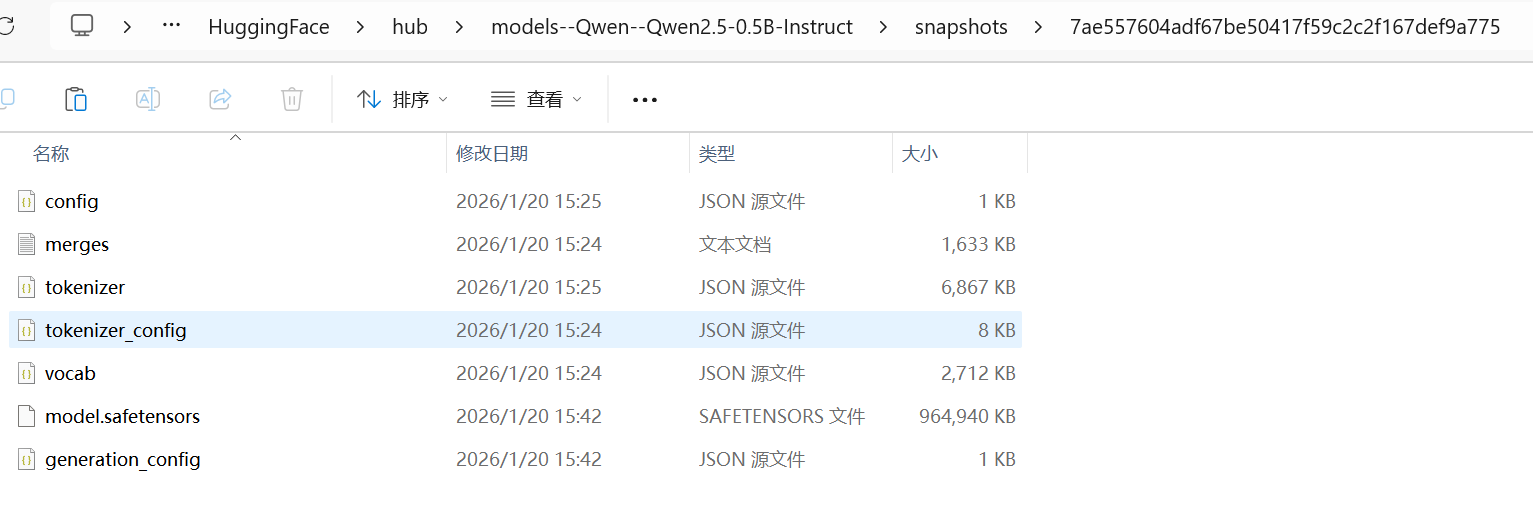
The list of downloaded model files is shown in the figure below:
Model Conversion
Using the rkllm-toolkit package installed in the environment setup section, execute the following code to complete model conversion:
from rkllm.api import RKLLM
import os

model_path = "/home/pavelhan/models/qwen2.5-0.5B" # Points to the local folder of the model files downloaded earlier
output_path = "./qwen2_5_0_5b_w4a16.rkllm"

rkllm = RKLLM()

# 1. Load model
print("Loading model from HuggingFace format...")
ret = rkllm.load_huggingface(model=model_path)
if ret != 0:
    print("Load model failed!"); exit(ret)

# 2. Model building configuration
print("Building RKLLM model...")
ret = rkllm.build(
    do_quantization=True,
    optimization_level=1,
    #quantized_dtype='w4a16', # 4-bit weights, 16-bit activations; not supported by RK3588
    quantized_dtype='w8a8', # 8-bit weights, 8-bit activations; supported by RK3588
    target_platform='rk3588'
)
if ret != 0:
    print("Build model failed!"); exit(ret)

# 3. Export model
print(f"Exporting to {output_path}...")
ret = rkllm.export_rkllm(output_path)
if ret != 0:
    print("Export failed!"); exit(ret)

print("Conversion completed successfully!")
Note: Regarding quantization type support, the RK3588 does not support
w4a16, but supports four types:w8a8,w8a8_g128,w8a8_g256, andw8a8_g512.
After the model conversion finishes, a qwen2_5_0_5b_w8a8.rkllm file of around 800MB will be generated in the current directory.
Board-Side Compilation and Inference
Once the board-side model conversion is complete, the next step is to prepare the board-side inference code:
#include <iostream>
#include <string>
#include <vector>
#include <cstring>
#include "rkllm.h"
// Callback function: handles tokens generated by the model
int callback(RKLLMResult* result, void* userdata, LLMCallState state) {
if (state == RKLLM_RUN_FINISH) {
// Print performance statistics after inference ends
std::cout << "\n[Performance Statistics]" << std::endl;
std::cout << "Peak Memory Usage: " << result->perf.memory_usage_mb << " MB" << std::endl;
std::cout << "Prefill Time: " << result->perf.prefill_time_ms << " ms" << std::endl;
} else if (state == RKLLM_RUN_ERROR) {
std::cerr << "RKLLM run error!" << std::endl;
} else if (state == RKLLM_RUN_NORMAL) {
// In version 1.2.3, generated content is passed back via result->text
if (result && result->text) {
std::cout << result->text << std::flush;
}
}
// Return 0 to inform the SDK to continue the inference process
return 0;
}
int main(int argc, char** argv) {
if (argc < 2) {
std::cout << "Usage: ./rkllm_demo <model_path>" << std::endl;
return -1;
}
std::string model_path = argv[1];
// 1. Configure RKLLM parameters
RKLLMParam param = rkllm_createDefaultParam();
param.model_path = model_path.c_str();
param.max_context_len = 1024;
param.max_new_tokens = 256;
param.top_k = 1;
param.top_p = 0.9;
param.temperature = 0.8;
// 2. Initialize model handle
LLMHandle handle = nullptr;
std::cout << "Initializing RKLLM with model: " << model_path << " ..." << std::endl;
int ret = rkllm_init(&handle, ¶m, callback);
if (ret != 0) {
std::cerr << "rkllm_init failed! ret=" << ret << std::endl;
return -1;
}
std::cout << "RKLLM Initialized Success!" << std::endl;
// 3. Construct input data (crucial correction point)
std::string prompt_str = "<|im_start|>system\nYou are a helpful assistant.<|im_end|>\n"
"<|im_start|>user\n请介绍一下陕西省省会城市的相关资料。<|im_end|>\n"
"<|im_start|>assistant\n";
RKLLMInput rkllm_input;
memset(&rkllm_input, 0, sizeof(RKLLMInput));
rkllm_input.input_type = RKLLM_INPUT_PROMPT;
rkllm_input.role = "user";
rkllm_input.prompt_input = prompt_str.c_str();
rkllm_input.enable_thinking = false; // Qwen2.5-0.5B is not a deep thinking model, set to false
// 4. Configure inference parameters
RKLLMInferParam infer_params;
memset(&infer_params, 0, sizeof(RKLLMInferParam));
infer_params.mode = RKLLM_INFER_GENERATE; // Set to normal generation mode
infer_params.keep_history = 1; // Whether to keep KV Cache history
// 5. Execute inference
std::cout << "Assistant: " << std::flush;
rkllm_run(handle, &rkllm_input, &infer_params, nullptr);
// 6. Destroy handle and release resources
rkllm_destroy(handle);
return 0;
}For cross-compiling the board-side inference code, you can follow standard development methods by compiling on the PC and then uploading to the board for execution. However, for the RKLLM-Toolkit version 1.2.3 that I used, the explicitly recommended cross-compilation tool version in the documentation is GCC 10.2, whereas the compilation toolchain for the Rockchip platform on my PC was gcc-linaro-6.3.1-2017.05-x86_64_aarch64-linux-gnu. Fortunately, the Debian system running on my Rockchip RK3588 board had a compilation tool that met the requirements:
cat@lubancat:~/qwen2.5$ gcc -v
Using built-in specs.
COLLECT_GCC=gcc
COLLECT_LTO_WRAPPER=/usr/lib/gcc/aarch64-linux-gnu/10/lto-wrapper
Target: aarch64-linux-gnu
Configured with: ../src/configure -v --with-pkgversion='Debian 10.2.1-6' --with-bugurl=file:///usr/share/doc/gcc-10/README.Bugs --enable-languages=c,ada,c++,go,d,fortran,objc,obj-c++,m2 --prefix=/usr --with-gcc-major-version-only --program-suffix=-10 --program-prefix=aarch64-linux-gnu- --enable-shared --enable-linker-build-id --libexecdir=/usr/lib --without-included-gettext --enable-threads=posix --libdir=/usr/lib --enable-nls --enable-bootstrap --enable-clocale=gnu --enable-libstdcxx-debug --enable-libstdcxx-time=yes --with-default-libstdcxx-abi=new --enable-gnu-unique-object --disable-libquadmath --disable-libquadmath-support --enable-plugin --enable-default-pie --with-system-zlib --enable-libphobos-checking=release --with-target-system-zlib=auto --enable-objc-gc=auto --enable-multiarch --enable-fix-cortex-a53-843419 --disable-werror --enable-checking=release --build=aarch64-linux-gnu --host=aarch64-linux-gnu --target=aarch64-linux-gnu --with-build-config=bootstrap-lto-lean --enable-link-mutex
Thread model: posix
Supported LTO compression algorithms: zlib zstd
gcc version 10.2.1 20210110 (Debian 10.2.1-6)
Therefore, things became much simpler: you can directly upload the board-side inference source file (main.cpp), header file (rkllm.h), shared library (librkllmrt.so), and the converted board-side model to the board, and compile directly using g++ in the board’s Debian system:
g++ -O3 main.cpp -I. -L. -lrkllmrt -lpthread -lm -ldl -o rkllm_demo
export LD_LIBRARY_PATH=.:$LD_LIBRARY_PATH
./rkllm_demo ./qwen2_5_0_5b_w8a8.rkllm
The print output after execution is as follows:
cat@lubancat:~/qwen2.5$ ./rkllm_demo qwen2_5_0_5b_w8a8.rkllm
Initializing RKLLM with model: qwen2_5_0_5b_w8a8.rkllm ...
I rkllm: rkllm-runtime version: 1.2.3, rknpu driver version: 0.9.8, platform: RK3588
I rkllm: loading rkllm model from qwen2_5_0_5b_w8a8.rkllm
I rkllm: rkllm-toolkit version: 1.2.3, max_context_limit: 1024, npu_core_num: 3, target_platform: RK3588, model_dtype: W8A8
I rkllm: Enabled cpus: [4, 5, 6, 7]
I rkllm: Enabled cpus num: 4
RKLLM Initialized Success!
Assistant: 陕西省是中华人民共和国的省级行政区,位于中国中部地区,是中国政治、经济和文化的重要中心之一。作为中国的西北部省份,陕西拥有丰富的自然资源和人文历史资源。

陕西省省会城市包括西安(简称“陕”)和咸阳(简称“咸”)。西安是陕西省的政治、文化和国际交往中心,也是中国重要的历史文化名城和交通枢纽。咸阳则位于陕西省北部,是中国的能源基地之一,同时也是丝绸之路经济带的重要节点城市。

陕西拥有丰富的自然资源,如煤炭、石油、天然气等资源丰富,以及独特的地理环境和气候条件,为经济发展提供了良好的基础。同时,陕西也注重文化传承和发展,拥有众多的历史文化遗产和传统艺术形式。

西安作为陕西省省会城市,其地理位置优越,交通便利,是国内外游客 and 商贾的重要目的地之一。咸阳则以其丰富的能源资源和现代工业为基础,成为西北地区重要的能源基地和经济中心。

总的来说,陕西省省会城市包括西安和咸阳,它们在经济发展、文化传承和社会服务等方面都具有重要地位。
[Performance Statistics]
Peak Memory Usage: 681.434 MB
Prefill Time: 126.391 ms
As can be seen, this model is now up and running on the RK3588. However, the content generated by a 0.5B-scale LLM still has some noticeable issues: not only does it casually “solve” the Xi’an-Xianyang integration issue that has troubled Xi’an’s development for 30 years, but it also mistakenly attributes Yulin’s data to Xianyang.
Regarding memory consumption during inference, this model only uses about 680MB of memory. Given that the board-side converted model file itself is already 800MB, this indicates that Rockchip RKLLM does not load the entire model file completely into memory during execution, but rather loads it on-demand. This makes it extremely practical for memory-constrained applications like embedded devices.
References
- airockchip/rknn-llm
- RKLLM SDK User Guide v1.2.3