Detailed Explanation of Qwen3-VL Model Testing and vLLM Production Deployment Workflow
- 04 Mar, 2026
This article provides a brief overview of the Qwen3-VL vision-language model released by Alibaba in September 2025, and summarizes the workflow for local inference testing of its pretrained model and deployment using vLLM in a production environment.
Introduction to the Qwen3-VL Model
Alibaba launched the Qwen3-VL series of vision-language models in September 2025. Compared to its predecessors (such as Qwen2-VL), the release of Qwen3-VL marks a formal transition for multimodal large models from simple visual perception to a new stage of deep logical reasoning and autonomous agent interaction. Continuing Alibaba’s open-source ethos, Qwen3-VL offers various model scales ranging from edge devices to the cloud.

In terms of overall model architecture, Qwen3-VL continues Alibaba’s consistent dual-track parallel strategy of Dense + MoE (Mixture of Experts), with parameter sizes ranging from 2B to 235B.
- Dense: All parameters in this model are fully activated and participate in computation when processing each token.
- Representative versions include Qwen3-VL-2B / 8B / 32B.
- The advantage is the highest knowledge density under the same total parameter size, making deployment relatively simple. However, the disadvantage is that as the parameter size increases, computational overhead grows linearly, and inference becomes very slow.
- Therefore, it is suitable for application scenarios where the parameter scale is not excessively large.
- MoE: This model structure contains many expert sub-models. When processing specific inputs, a gating network dynamically selects a small subset of them to participate in computation, leaving most parameters inactive.
- Representative versions include: Qwen3-VL-30B-A3B (indicating a total of 30B parameters with 3B activated); Qwen3-VL-235B-A22B (indicating a total of 235B parameters with 22B activated).
- The advantage is possessing the knowledge base of an ultra-large-scale model while maintaining the inference speed and computational overhead of a small model. The disadvantage is that the VRAM requirement remains very high; although only a small fraction is activated during computation, all parameters must be loaded into VRAM during inference.
In addition, Qwen3-VL introduces the Thinking version for the first time: when facing complex STEM problems, math questions, or deep causal analysis, the model no longer relies on fast thinking to provide immediate intuitive answers, but instead breaks down image details step-by-step through a Chain-of-Thought generated via Reinforcement Learning (RL). Therefore, the Qwen3-VL model supports two interaction paradigms: Instruct and Thinking.
- Instruct (Instruction-tuned version): Fast thinking; directly generates and outputs the final result upon receiving instructions.
- Its characteristics include low latency, fast generation speed, and concise output.
- Applicable scenarios include daily conversations, simple image descriptions, basic OCR, real-time UI control, and other tasks with high real-time requirements.
- Thinking (Reasoning-enhanced version): Slow thinking; before providing the final answer, the model first generates an invisible (or expandable) Chain-of-Thought (CoT).
- Its characteristics include higher accuracy (especially in complex tasks such as STEM, mathematics, and logical reasoning), but it requires longer generation time and consumes more tokens.
- Applicable scenarios include complex geometric math problems, logical reasoning, causal analysis of long videos, and scenarios requiring rigorous proof.
Inference Testing of Qwen3-VL
Below, we download the pretrained model files for the Qwen3-VL-4B-Instruct-FP8 version using Hugging Face Transformers and perform some simple inference tests locally. An inference test for OCR recognition on a handwritten text image is demonstrated below.
First, import the necessary packages, use Transformers to download the pretrained model file list from the Hugging Face Hub to local storage, and load them:
from transformers import Qwen3VLForConditionalGeneration, AutoProcessor
import torch

model_id = 'Qwen/Qwen3-VL-4B-Instruct-FP8'
model = Qwen3VLForConditionalGeneration.from_pretrained(
    model_id,
    dtype=torch.bfloat16,
    device_map="auto"
)
processor = AutoProcessor.from_pretrained(model_id)
The above code will automatically download the pretrained model files to the directory pointed to by the HF-HOME environment variable. Since the model weight files are quite large, the download will take a considerable amount of time. The downloaded model files look like this:
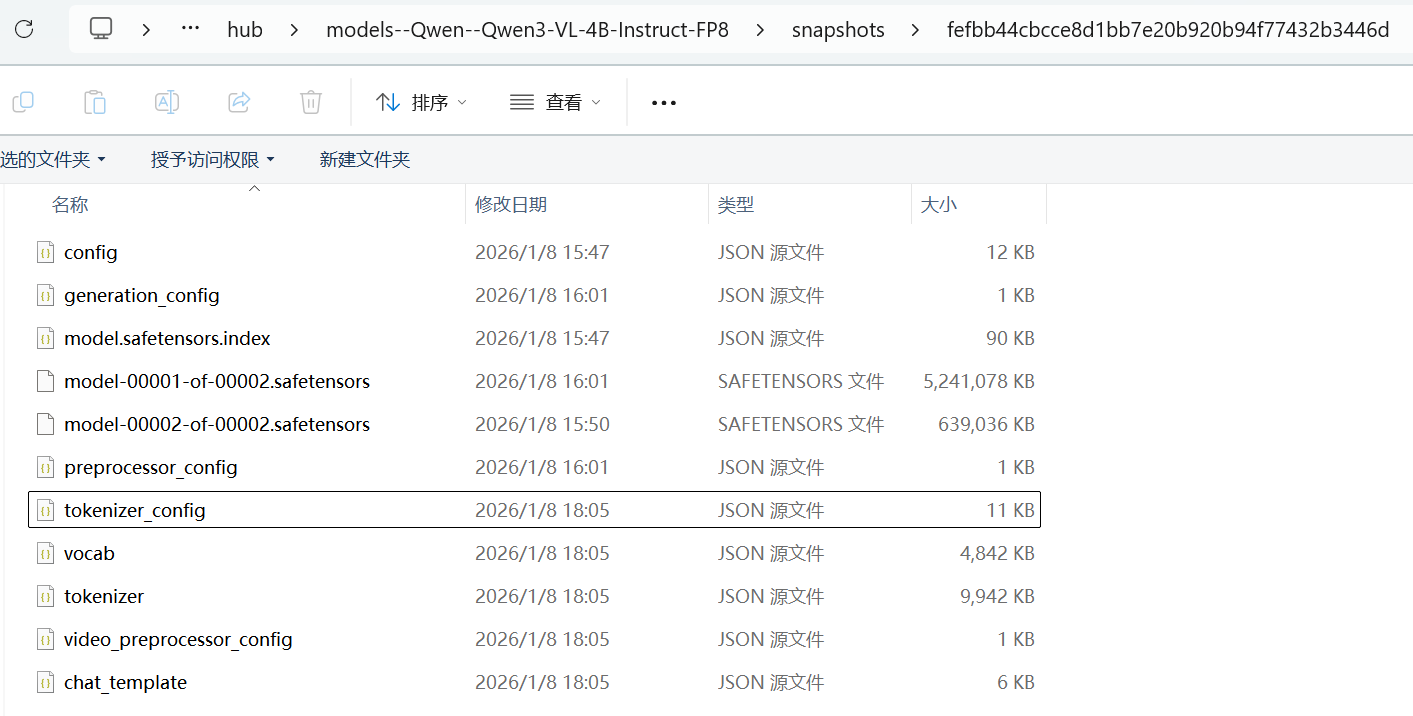
Every time Qwen3VLForConditionalGeneration and AutoProcessor start up and load model files, they compare the MD5 hashes of the locally downloaded model files against those in the Hugging Face Hub repository. This process can take a relatively long time. Therefore, once the initial model download is complete, you can use the following code to set the HF Offline mode, avoiding the validation process on every load:
os.environ['HF_HUB_OFFLINE'] = '1'
os.environ['TRANSFORMERS_OFFLINE'] = '1'
Write an interface function to perform OCR recognition on a given image:
def ocr(model, processor, prompt, image_path):
    messages = [
        {
            'role': 'user',
            'content': [
                {
                    'type': 'image',
                    'image': image_path,
                },
                {'type': 'text', 'text': prompt},
            ],
        }
    ]

    inputs = processor.apply_chat_template(
        messages,
        tokenize=True,
        add_generation_prompt=True,
        return_dict=True,
        return_tensors='pt'
    )

    inputs = inputs.to(model.device)
    generated_ids = model.generate(**inputs, max_new_tokens=2048)
    # The following code removes the input portion, keeping only the model-generated portion
    generated_ids_trimmed = [
        out_ids[len(in_ids) :] for in_ids, out_ids in zip(inputs.input_ids, generated_ids)
    ]
    output_text = processor.batch_decode(
        generated_ids_trimmed, skip_special_tokens=True, clean_up_tokenization_spaces=False
    )
    return output_text
Pass an image to the interface function above and print the OCR recognition result:
image_path = 'D:/test/OCR.png'
prompt = """Give the OCR of this image without any additional context."""
output_text = ocr(model, processor, prompt, image_path)
print(output_text[0])
Here, an image of handwritten text is passed:
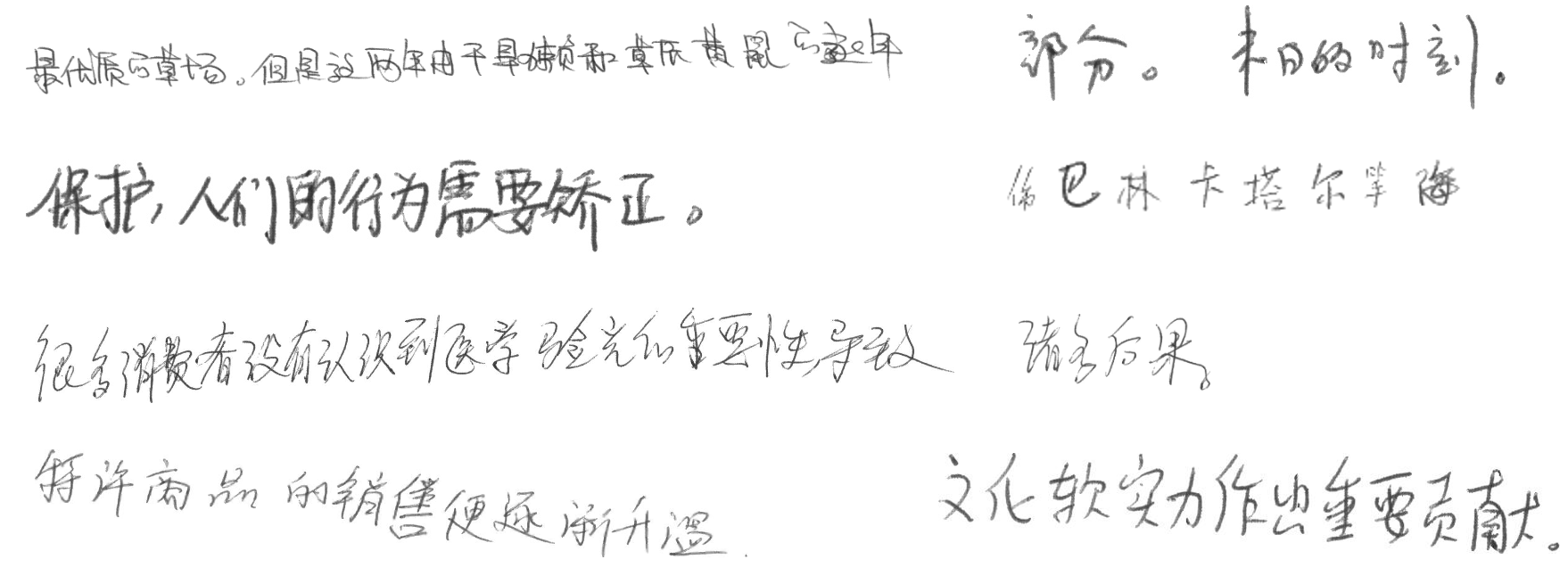
The final OCR recognition result is as follows: As can be seen, even when the handwriting in the image is very sloppy, the model’s recognition accuracy remains extremely high.
最优质的草场。但是这两年由于旱灾和草原黄鼠的逐年
部分。末日的时刻。
保护,人们的行为需要矫正。
俄巴林卡塔尔等海
很多消费者没有认识到医学验光的重要性,导致
诸多后果。
许多商品的销售便逐渐升温。
文化软实力作出重要贡献。
vLLM Production Deployment of Qwen3-VL
vLLM is currently the best-supported engine for the Qwen series. It can wrap Transformers models into a high-performance OpenAI-compatible interface, allowing subsequent access to the model directly via the HTTP protocol.
First, install vllm and the qwen_vl_utils support package. Because running vLLM has specific requirements for PyTorch and CUDA versions, it is best to install and run vLLM in an independent environment:
conda create -n qwen_deploy python=3.10 -y
conda activate qwen_deploy
pip install vllm qwen_vl_utils
Note: Installing vLLM in a Windows environment frequently throws configuration file errors, but this issue does not occur under Ubuntu. Since production deployments typically use Linux, I did not investigate this issue further.
Once the vLLM package installation is complete, use the following command to launch the deployment and execution of the Qwen3-VL model in vLLM with a single command:
python -m vllm.entrypoints.openai.api_server \
    --model /home/pavelhan/models/Qwen3-VL-4B-Instruct-FP8 \
    --served-model-name qwen3-vl \
    --trust-remote-code \
    --port 8000 \
    --gpu-memory-utilization 0.75 \
    --max-model-len 8192 \
    --limit-mm-per-prompt '{"image": 5}'
Where:
--model: Specifies the directory where the model files are located.--served-model-name: Specifies the model name used for subsequent HTTP API access.--trust-remote-code: Must be included because Qwen3-VL contains custom visual processing logic.--gpu-memory-utilization 0.75: Instructs vLLM to occupy 75% of the VRAM. vLLM pre-allocates the VRAM to manage PagedAttention. Lower this value if your GPU has limited VRAM.--max-model-len: Sets the maximum context length. Decrease this value if VRAM is limited.--limit-mm-per-prompt: Limits the maximum number of images allowed per conversation using JSON format.
If you see the following log output, it means the Qwen3-VL model deployed in the vLLM environment is successfully running:
(APIServer pid=3473) INFO:     Started server process [3473]
(APIServer pid=3473) INFO:     Waiting for application startup.
(APIServer pid=3473) INFO:     Application startup complete.
Test the locally deployed model using the following code:
import requests

url = "http://localhost:8000/v1/chat/completions"
headers = {"Content-Type": "application/json"}

data = {
    "modal": "qwen3-vl",
    "messages": [
        {
            "role": "user",
            "content": [
                {"type": "text", "text": "这张图片里描述了什么?"},
                {
                    "type": "image_url",
                    "image_url": {
                        "url": "https://dashscope.oss-cn-beijing.aliyuncs.com/images/dog_and_girl.jpeg"
                    }
                }
            ]
        }
    ]
}

response = requests.post(url, headers=headers, json=data)
print(response.json()['choices'][0]['message']['content'])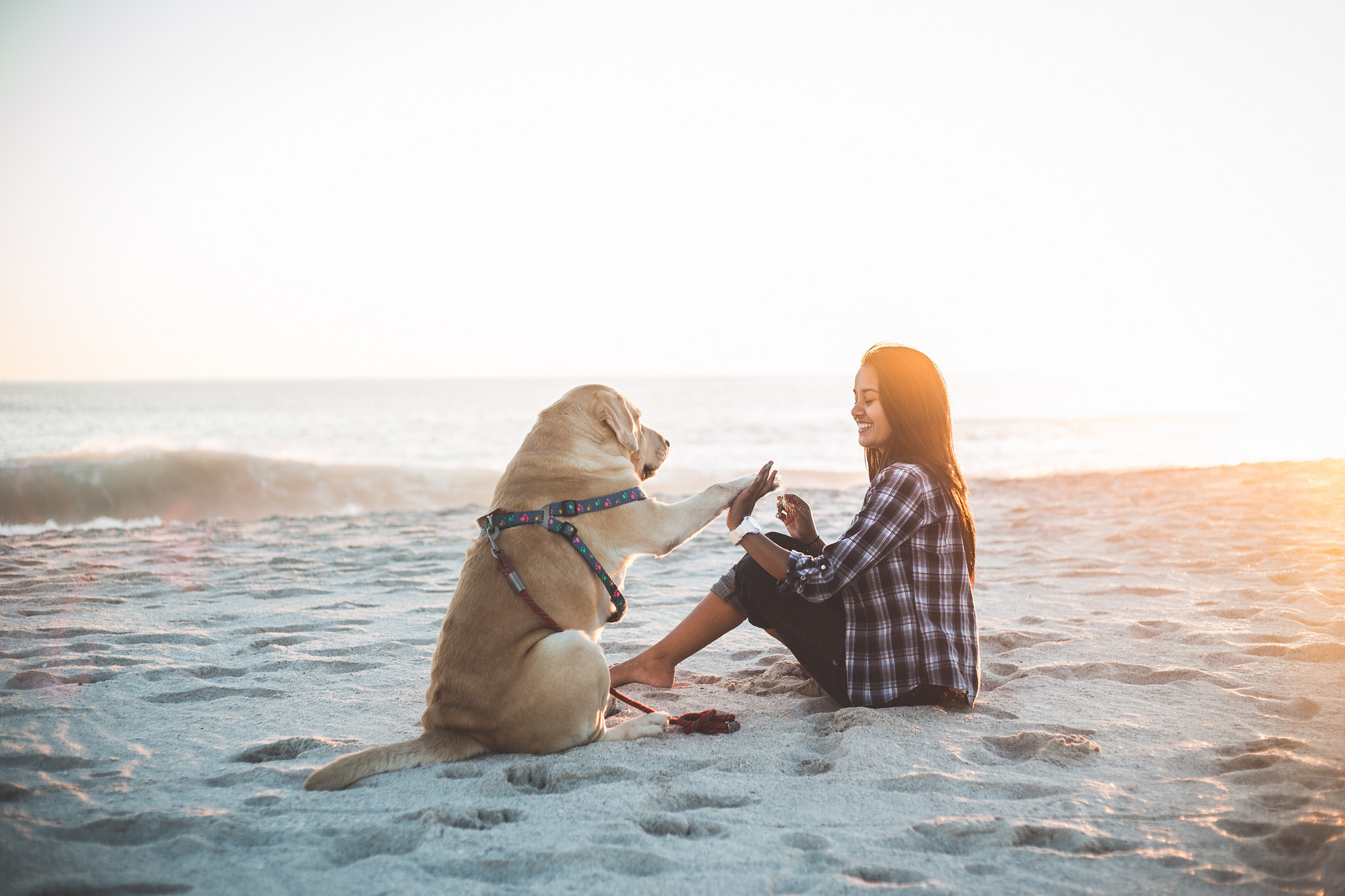
For the image specified by the URL parameter above, the response received from the model is as follows, indicating that the model deployment test and validation were successful:
(base) pavelhan@LAPTOP-P7UARMK0:~$ python test.py
这张图片描绘了一个温馨、宁静的海边场景,核心内容是**一位年轻女子和一只金毛犬在沙滩上进行“击掌”互动**。

具体细节如下:

1.  **人物与动物**:画面中有一位留着长发的年轻女子,她穿着一件蓝白格子衬衫和深色裤子,赤脚坐在沙滩上。她面前是一只戴着彩色花纹背带的金毛犬,正坐着,前爪抬起,与女子的手掌相碰。

2.  **互动行为**:女子和狗狗正在做一个“击掌”的动作,这是宠物与主人之间常见的互动方式,象征着亲密、信任和快乐。女子脸上带着灿烂的笑容,眼神专注地看着狗狗,充满了爱意和喜悦。

3.  **环境背景**:场景位于海滩上,背景是平静的海面和远处的海浪。天空呈现出柔和的暖色调,阳光从画面右侧斜射过来,给整个场景镀上了一层金色的光晕,营造出日落或日出时分的温暖、宁静氛围。

4.  **整体氛围**:整张图片充满了幸福感和治愈感,展现了人与宠物之间深厚的感情纽带,以及在自然美景中放松、享受生活的惬意时刻。画面构图简洁,焦点集中,光影效果柔和,非常具有感染力。

总而言之,这张图片生动地捕捉了人与宠物在海边共享美好时光的温馨瞬间。