Open-Source Dataset Management Tool: FiftyOne
- 04 Feb, 2026
This article summarizes the working features, environment setup, and common application scenarios of FiftyOne, an open-source dataset visualization and management engine developed by Voxel51.
FiftyOne is an open-source dataset visualization and management engine developed by Voxel51. Its official website is: Maximize your Computer Vision Performance | Try Voxel51.
When it comes to dataset management, FiftyOne’s core features include:
- Dataset Visualization (The App): FiftyOne provides a web interface that allows you to browse images and their overlaid bounding boxes just like scrolling through a social media feed, enabling you to inspect and audit the quality of annotated data.
- Efficient Filtering (Querying): Allows you to quickly filter data using Python expressions. For example, you can use simple code to quickly retrieve all images in a dataset that contain a specified target category and have a resolution higher than a given threshold.
- Model Analysis: After training your own model (such as YOLO), you can feed the prediction results back into FiftyOne to directly compare ground truth labels with model predictions. This makes it easy to spot where the model misses or misclassifies objects, helping you improve data quality in a targeted manner.
Environment Preparation
First, you need to install FiftyOne and its dependencies. It is recommended to perform this in an independent virtual environment.
conda create -n fiftyone python=3.12
conda activate fiftyone
pip install fiftyone
Browsing Datasets
Browsing local and online datasets using FiftyOne is very intuitive. By using FiftyOne, you can not only view the images and their annotation information contained in the dataset through its web interface, but also filter and manipulate these visual data just like operating a database using powerful query statements.
The following code demonstrates the workflow for accessing an online dataset maintained by FiftyOne and a local YOLOv5-format dataset, respectively.
import fiftyone as fo
import fiftyone.zoo as foz

# dataset is an online dataset from the FiftyOne dataset zoo, which will be downloaded first
# dataset = foz.load_zoo_dataset("quickstart")

# dataset is a local dataset
dataset = fo.Dataset.from_dir(
    dataset_dir="./my_yolo_dataset/coco_subset/train",
    dataset_type=fo.types.YOLOv5Dataset,
    label_field="ground_truth",
)

session = fo.launch_app(dataset)
session.wait()
After executing the code above, you can access http://localhost:5151/ locally via a browser to browse and manage the corresponding dataset and its annotations.
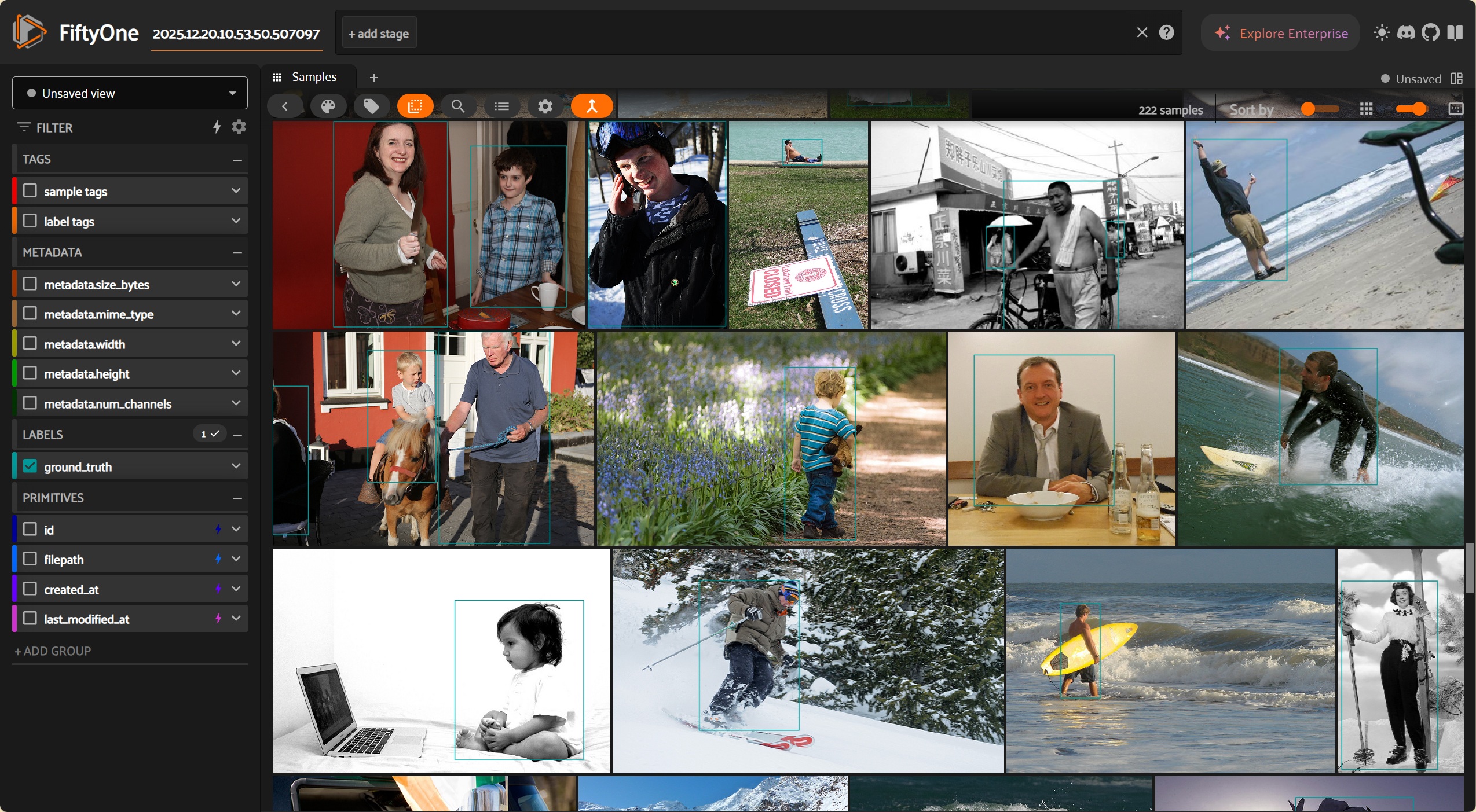
Actually, the code for accessing datasets with FiftyOne is well-suited to run in Jupyter Notebook. As shown in the figure above, after starting FiftyOne via launch_app, you can browse the dataset in its Web UI. Furthermore, launch_app returns a session variable. When running the code above in Jupyter Notebook, you can use this session to access the opened dataset and perform online processing and operations programmatically.
For example, we can select low-quality images in the Web UI, and then execute deletion operations on these selected images within the notebook, exporting them to a new dataset:
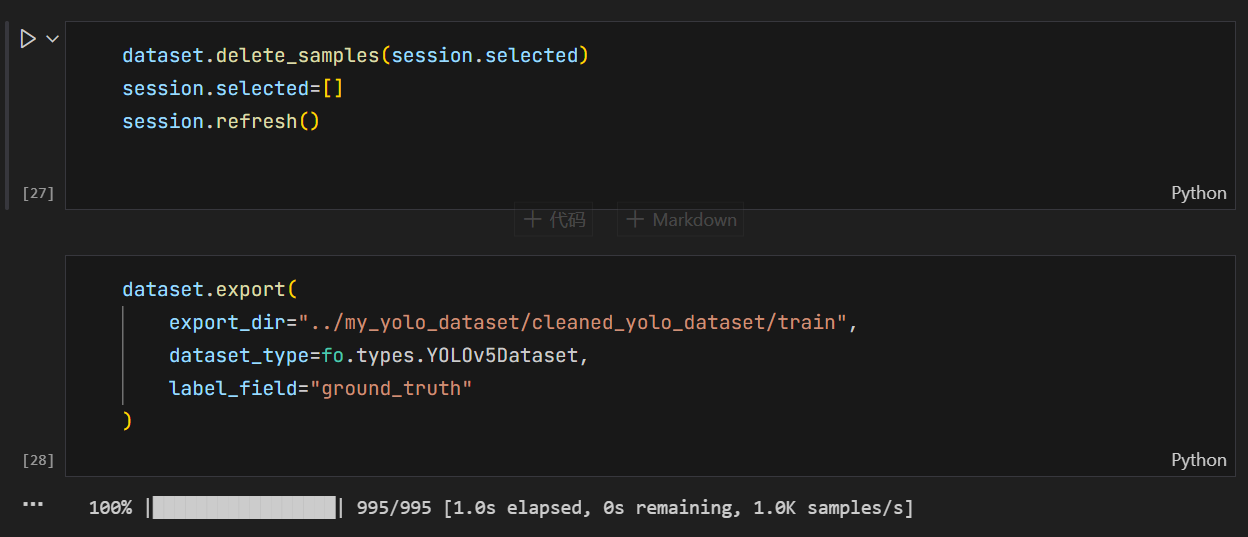
The session supports many options. Through this approach, you can achieve dynamic interaction with the opened dataset.
Downloading and Cleaning Data from Public Datasets
FiftyOne has a built-in module called Dataset Zoo. This module contains pre-written download and parsing scripts for dozens of mainstream public datasets such as COCO, Open Images, and VOC. Without FiftyOne, accessing and using these public datasets often requires registering on official websites, downloading dozens of gigabytes of compressed archives, studying their complex JSON or CSV formats, and writing scripts to parse and convert coordinates and annotation information of different formats. With the help of FiftyOne, a single command like foz.load_zoo_dataset("coco-2017", ...) automatically handles filtering, downloading, extracting, and format alignment.
By using the code below, you can automatically download the first 1,000 annotated images of people from the COCO-2017 dataset on the FiftyOne website, automatically convert the annotation format to YOLOv5 format, and save them in the ./my_yolo_dataset/coco_subset/train/ subdirectory of the current script’s directory.
Note: According to the workflow in the code below, when downloading a specified quantity (1,000 images) of a specific category (“person”) from a designated dataset (
coco-2017), FiftyOne only streams the subset of images requested by the user (first downloading toC:\Users\<username>\fiftyone, then organizing them into the current script’s directory). There is no need to download the entire hundreds-of-gigabytes dataset. This on-demand download approach dramatically saves local disk space and download time.
import fiftyone as fo
import fiftyone.zoo as foz

dataset_train = foz.load_zoo_dataset(
    "coco-2017",
    splits=["train"],
    label_types=["detections"],
    classes=["person"],
    max_samples=1000,  # 1000 samples for the train dataset
    only_matching=True
)

dataset_train.export(
    export_dir="./my_yolo_dataset/coco_subset/train/",
    dataset_type=fo.types.YOLOv5Dataset,
    label_field="ground_truth",
    splits="train",
)
Additionally, during the process of downloading data from online datasets, to improve dataset quality, you can clean the downloaded data to a certain extent before exporting. For example, the following code removes samples without any bounding boxes from the downloaded dataset, as well as annotations with bounding boxes that are too small:
# Data cleaning step 1: Remove all samples from the downloaded data that have empty bounding boxes or exceed label_max_detections per sample
label_max_detections = 5 # Maximum of label_max_detections boxes per sample

filtered_train = dataset_train.exists("ground_truth").match(
    (F("ground_truth.detections").length() >= 1) &
    (F("ground_truth.detections").length() <= label_max_detections)
)

# Data cleaning step 2: Remove all annotation information whose bounding box area is smaller than size_threshold from the downloaded samples

size_threshold = 0.008 # Keep only bounding boxes with an area greater than size_threshold

filtered_train = filtered_train.filter_labels(
    "ground_truth",
    F("bounding_box")[2] * F("bounding_box")[3] > size_threshold
)
After performing the above cleaning operations on the data and then exporting the cleaned data using the export command, you can effectively improve the quality of the training dataset.
Assisting YOLOv8 Model Fine-Tuning
FiftyOne not only simplifies the processes of downloading training datasets, cleaning data, and browsing datasets, but it can also be combined with model inference to visually display the model’s performance on inference data and analyze its failure modes. For example, by combining FiftyOne and YOLO models, after the YOLO model training is complete, you can visualize and evaluate the model’s prediction results on the validation dataset. This helps you better understand where the model’s predictive capabilities fail and enables targeted improvements to the training data and metrics.
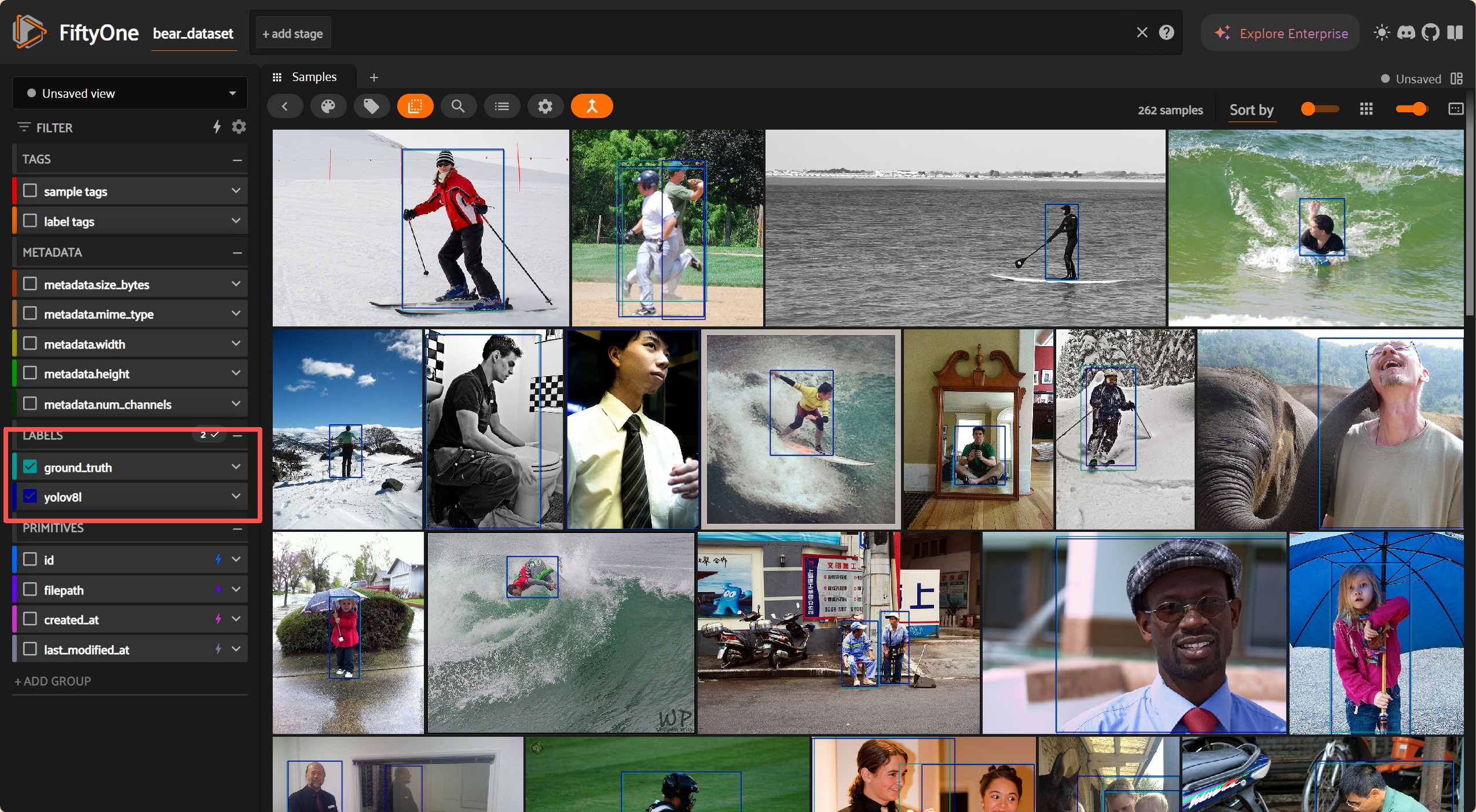
The following code demonstrates the workflow of importing validation set data from a YOLO model into FiftyOne, allowing FiftyOne to simultaneously display ground truth boxes and prediction boxes. This enables training personnel to intuitively view the ground truth boxes and model inference boxes on the validation set through FiftyOne’s Web UI, and directly understand which data samples cause the current model to fail:
import fiftyone as fo
from ultralytics import YOLO

# Validation dataset
dataset_dir = r'D:/Datasets/Bear/Bear-Dataset-1/valid_human'
dataset = fo.Dataset.from_dir(
    dataset_dir=dataset_dir,
    dataset_type=fo.types.YOLOv5Dataset,
    label_field="ground_truth"
)

# Load the YOLO model
model_path = r'D:/Code/ultralytics/runs/train/bear/exp12/weights/best.pt'
model = YOLO(model_path)

# Apply the model to the dataset
dataset.apply_model(model, label_field="yolov8l")

# Launch the App to visualize the results
session = fo.launch_app(dataset)
session.wait()
Below is the visualization effect of displaying YOLO model validation data, labels, and inference results in FiftyOne: