A Practical Guide to OpenAI's Lightweight Multi-modal Model: CLIP
- 03 Feb, 2026
Released by OpenAI in early 2021, the CLIP (Contrastive Language-Image Pre-Training) model is a pre-trained neural network designed to match images and text, representing a classic milestone in recent multi-modal research.
What Problem Does CLIP Solve?
As one of the most milestone models in the field of Computer Vision (CV), CLIP—released by OpenAI in 2021—completely broke the limitations of traditional vision models that relied on fixed category labels and classes. Therefore, it is not just a model, but a paradigm shift that deeply aligns vision with language.
Before CLIP, mainstream models in fields such as image recognition and object detection (e.g., ResNet, VGGNet, SSD, YOLO) were typically trained on manually annotated datasets like ImageNet or COCO. If a model was trained as a 1,000-class classifier, it could only recognize those 1,000 categories. To add a new category, one had to recollect data and retrain the model from scratch.
In contrast, CLIP leverages massive off-the-shelf internet images combined with descriptive text to train the model’s understanding of images/text, establishing a semantic association between the two. Specifically, it maps the visual features of an image and its corresponding textual description in a shared semantic space. This means that once the CLIP model is trained, you do not need to train any parameters for new tasks; as long as something can be described in language, CLIP can recognize it.
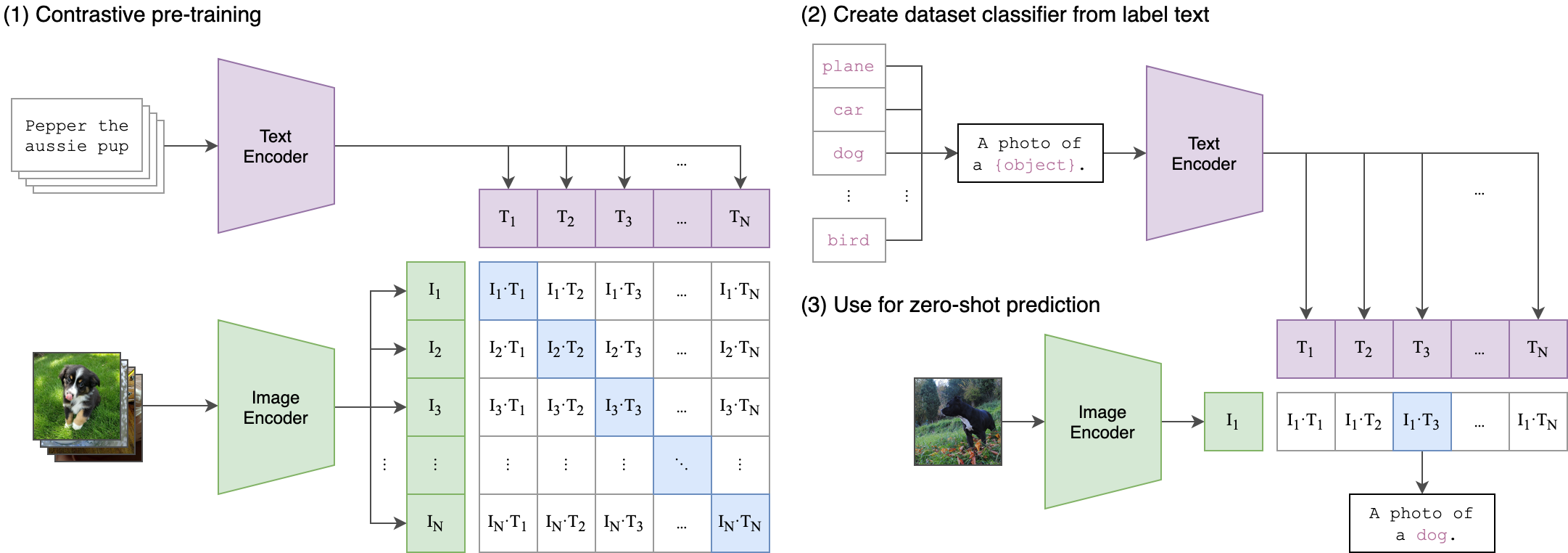
Below is a practical case study demonstrating how to build a natural language-based search engine for a local dataset using the CLIP model and Meta’s Faiss vector database. This example will reinforce your understanding of the CLIP model’s concepts and workflow.
The example mainly consists of three parts:
- Encoding image files into embedding vectors using CLIP
- Saving the image vector data to a local Faiss vector database
- Querying and displaying images from the vector database using natural language text commands
Image Embedding
To encode image files, we use the preprocessing and encoding functions of the CLIP model. First, import the CLIP model:
from CLIP.clip import clip

device = "cuda" if torch.cuda.is_available() else "cpu"
print(clip.available_models())
model, preprocess = clip.load("ViT-B/32", device=device, jit=False)
The CLIP model supports different architectural variants, whose primary differences lie in the architecture and scale of the visual encoder.
Different architecture variants of the CLIP model: ‘RN50’, ‘RN101’, ‘RN50x4’, ‘RN50x16’, ‘RN50x64’, ‘ViT-B/32’, ‘ViT-B/16’, ‘ViT-L/14’, ‘ViT-L/14@336px’
Here, models with the RN prefix belong to the ResNet series, while those with the ViT prefix belong to the Vision Transformer series. Generally speaking, ViT architectures consistently outperform ResNet architectures of the same scale, and larger models typically provide better zero-shot classification performance, albeit at the cost of higher computational resources. In this tutorial, we use ViT-B/32, the smallest model in the ViT series, utilizing 32x32 patches.
Next, we call the model and preprocess methods of the CLIP model to vectorize images and text respectively:
def get_image_embedding(model, images):
    image_preproc = torch.stack([preprocess(image) for image in images]).to(device)

    with torch.no_grad():
        image_embeddings = model.encode_image(image_preproc)
        image_embeddings = image_embeddings / image_embeddings.norm(dim = -1, keepdim = True)

    return image_embeddings.cpu().numpy()

def get_text_embedding(model, text_query):
    with torch.no_grad():
        text_embedding = model.encode_text(clip.tokenize(text_query).to(device))
        text_embedding = text_embedding / text_embedding.norm(dim=-1, keepdim=True)

    return text_embedding.cpu().numpy()
As we can see, the encoding process for images and text in CLIP is quite similar. Both involve encoding followed by normalization. The only differences are:
- Encoding images calls the
encode_imageinterface, while encoding text calls theencode_textinterface. - Text information must first be tokenized using CLIP’s
tokenizefunction before being encoded into vectors.
Saving Image Vectors Using Faiss
The image vectors obtained via the get_image_embedding interface need to be stored in a vector database. This way, the next time the program starts, it can load and search directly from the database without needing to regenerate the image vectors from scratch.
Here, we use Faiss (Facebook AI Similarity Search), a high-performance vector search library developed by Meta. The general idea and workflow are: Use faiss.write_index to save the image vector index into a .index file, while using pickle or json to save the list of all image paths as metadata. During subsequent searches, get_text_embedding is used to generate the vector for the query text, and Faiss’s Inner Product search is utilized to perform cosine similarity matching between the image and text vectors. By retrieving the image file ID, the image path can be easily found in the metadata list.
Every time the program starts, it attempts to load the existing vector database index file and image path file from the hard drive. On the first run, these files do not yet exist, so a vector database file in IndexFlatIP format needs to be created. Faiss supports various vector indexing modes, and IndexFlatIP is the most fundamental and accurate mode among them. This mode does not compress vectors, nor does it build complex tree or graph structures; instead, it stores all raw vector data (typically float32) as-is. During a query, it computes the query vector (the vector converted from the search text) against every single vector in the database one by one. Although this method is the slowest, its recall rate is 100%, meaning the results are absolutely precise. It is generally sufficient for image libraries containing fewer than 50,000 images. If the image library exceeds 100,000 images and the query speed drops noticeably, you can switch to the IndexIVFFlat mode, which can accelerate query speeds by 10 to 100 times.
# Try to load existing index and path mappings upon startup
        if os.path.exists(self.index_path) and os.path.exists(self.metadata_path):
            print("Loading existing index...")
            self.index = faiss.read_index(self.index_path)
            with open(self.metadata_path, 'rb') as f:
                self.image_paths = pickle.load(f)
        else:
            print("Creating new index...")
            # Use FlatIP (Inner Product) index; combined with normalized vectors, this equates to cosine similarity
            d = 512 if model_name == "ViT-B/32" else 768 # Depends on model dimensions
            self.index = faiss.IndexFlatIP(d)
            self.image_paths = []
The following code vectorizes image files from the local hard drive in batches (by calling get_image_embedding), and finally saves the list of image vectors and the list of image file paths into the vector database file specified by index_path and the image path list file specified by image_paths, respectively.
print(f"Processing {len(new_files)} new images...")
        for i in tqdm(range(0, len(new_files), batch_size)):
            batch_paths = new_files[i : i + batch_size]
            embeddings = []

            for path in batch_paths:
                try:
                    emb = self.get_image_embedding(path)
                    embeddings.append(emb)
                    self.image_paths.append(path) # Update path list
                except Exception as e:
                    print(f"Error processing {path}: {e}")

            if embeddings:
                embeddings_np = np.vstack(embeddings)
                self.index.add(embeddings_np) # Add to Faiss index

        # Save updated index and metadata
        faiss.write_index(self.index, self.index_path)
        with open(self.metadata_path, 'wb') as f:
            pickle.dump(self.image_paths, f)
Image Search
With the previous steps completed, our local image library has been converted into vectors and stored in the vector database. Next, we can use text search commands to query specific images from this vector database.
This part is relatively straightforward and can be broken down into three steps:
- Perform tokenization, vectorization, and normalization on the text content, which follows the same workflow as the earlier image vectorization process.
- Call the
searchinterface of the Faiss vector database using the search text’s vector as a parameter. The return values are the similarity scores and the indices of the matched images in the image library. - Display the retrieved list of images.
def search(self, text_query, top_k=3):
        """Query the index using text"""
        # 1. Encode the text
        text_tokens = clip.tokenize([text_query]).to(self.device)

        with torch.no_grad():
            text_features = self.model.encode_text(text_tokens)
            text_features /= text_features.norm(dim=-1, keepdim=True) # Normalize feature vector

        query_vector = text_features.cpu().numpy().astype('float32')

        # 2. Search in Faiss; returns similarity scores and indices in the image library
        similarities, indices = self.index.search(query_vector, top_k)

        # 3. Display results
        results = []
        plt.figure(figsize=(15, 7))

        for i in range(top_k):
            idx = indices[0][i]

            if idx == -1: continue # Prevent insufficient matches

            img_path = self.image_paths[idx]
            score = similarities[0][i]
            results.append((img_path, score))

            plt.subplot(1, top_k, i + 1)
            plt.imshow(Image.open(img_path))
            plt.title(f"Score: {score:.4f}")
            plt.axis('off')

        plt.tight_layout()
        plt.show()

        return results
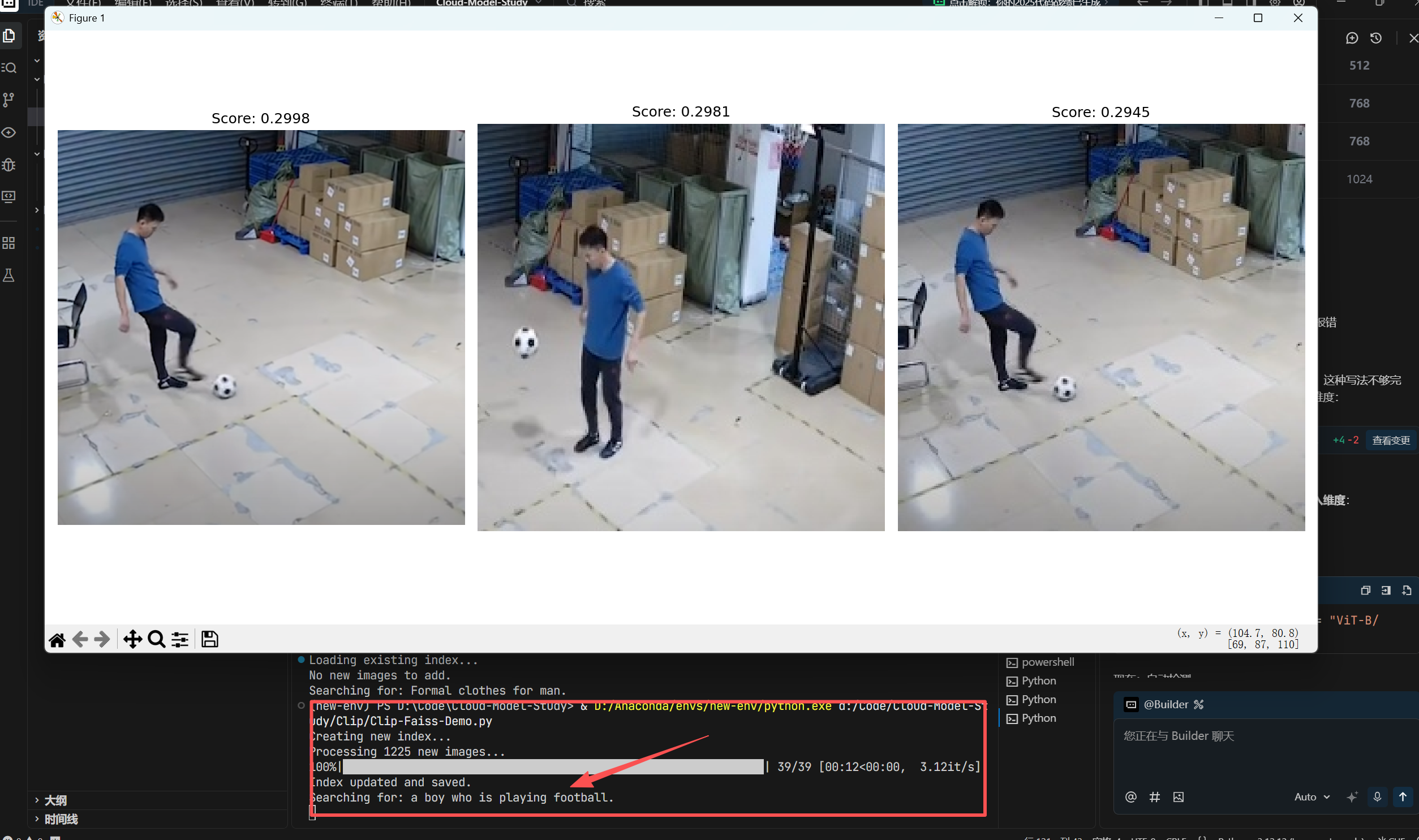
Finally, querying “a boy who is playing football” in my dataset yields the following results: