The Open-Source VLM Model MoonDream
- 01 Feb, 2026
This article provides a detailed introduction to MoonDream, a very popular open-source lightweight Vision-Language Model in the industry, summarizing its core feature list, basic testing workflow, and licensing details.
Moondream is an open-source, lightweight Vision-Language Model (VLM) initiated and maintained by developer Vikhyat Korrapati. The model is positioned as a high-performance VLM specifically designed for edge devices and resource-constrained environments. Its core advantage is the ability to achieve visual understanding capabilities comparable to—and in specific tasks even surpassing—large models (such as LLaVA or early GPT-4V), all with extremely low energy consumption and memory footprint (running smoothly with less than 4GB VRAM or even on a CPU).
MoonDream Official Website: Moondream
By the end of 2025, MoonDream has evolved into its third generation. The parameter scale of its first two generations, Moondream 1/2, was approximately 1.6B - 2B, with a 0.5B parameter version even provided for more resource-constrained applications. The latest Moondream 3 model adopts the MoE (Mixture of Experts) architecture, reaching a total parameter count of 9B, while the activated parameters per single inference are only 2B.
What is a VLM?
First, to gain a deeper understanding of what a Vision-Language Model (VLM) actually is: simply put, a VLM (Vision Language Model) is a class of AI models capable of simultaneously understanding images and text to achieve cross-modal interaction.
To put it more colloquially, a VLM model can be understood from its overall structure and workflow as follows:
- At the input end, its input can be considered to consist of two parts: an image, and a natural language command corresponding to that image.
- At the output end, the output of a VLM is a piece of text information (such as text content encapsulated in JSON format). Even when outputting numerical content such as position coordinates, the output remains a text string containing numbers.
- Model workflow: The model describes and explains the input image, performs object search and localization, etc., according to the natural language command, and ultimately outputs text describing the image content and other retrieval information.
- The most typical applications include describing image contents, detecting the positional coordinates of specific objects within an image, and generating OCR detection results for images.
Other VLM models include: Alibaba’s Qwen2-VL, the open-source LLaVA series, Microsoft’s Phi-3.5/Phi-4 Vision and Florence-2, Google’s PaliGemma, and InternVL 2 from domestic AI Labs.
Environment Setup and Core Feature Demonstration of MoonDream
The following describes the environment setup and feature demonstration using MoonDream2, which is the most mature in application and has the most lenient license.
First, download the Moondream2 model repository and weight files from Hugging Face. The model repository address is: vikhyatk/moondream2 at main. However, the weight files of Moondream2 are close to 4GB, making direct downloads from Hugging Face very time-consuming. In regions with domestic network restrictions, downloads can be made from the Hugging Face mirror site hf-mirror.com.
Below is the download code for the model and its weight files. The related model files will be downloaded to D:\models\moondream2:
import os
from huggingface_hub import snapshot_download, login

# Set the Hugging Face endpoint to use the mirror
os.environ['HF_ENDPOINT'] = 'https://hf-mirror.com'

# Define model options
MODEL_OPTIONS = {
    'moondream2': 'vikhyatk/moondream2',  # Non-gated, works without HF_TOKEN
    'moondream3-preview': 'moondream/moondream3-preview'  # Gated, requires access and HF_TOKEN
}

# Default to moondream2 which doesn't require authentication
selected_model = 'moondream2'
model_id = MODEL_OPTIONS[selected_model]
download_path = 'D:/models/' + selected_model

# Ensure the download directory exists
os.makedirs(download_path, exist_ok=True)

snapshot_download(
	repo_id=model_id,
    local_dir=download_path,
    local_dir_use_symlinks=False,
    cache_dir=download_path + '/cache',
    token=os.environ.get('HF_TOKEN')
    )
The core feature matrix of Moondream includes four modes: caption, query, detect, and point. These four modes correspond to different granularities of image understanding (from holistic to local) and output formats (from unstructured text to structured coordinates). The following code demonstrates the inference workflow of these modes using the locally downloaded MoonDream2 model files.
First, install the dependency packages required for the demonstration code:
pip install transformers accelerateThe inference code is as follows:
import torch
from transformers import AutoModelForCausalLM, AutoTokenizer
from PIL import Image
import os

# Configure local paths
MODEL_PATH = "D:/models/moondream2"
IMAGE_PATH = "D:/test/Bear/122.jpg"

def run_inference():
    print(f"--- Loading model from local: {MODEL_PATH} ---")
    try:
        # Core setting: local_files_only=True completely disables networking
        model = AutoModelForCausalLM.from_pretrained(
            MODEL_PATH,
            trust_remote_code=True,
            local_files_only=True,
            device_map="auto", # Automatically select GPU/CPU
            dtype=torch.float16 if torch.cuda.is_available() else torch.float32
        )

        tokenizer = AutoTokenizer.from_pretrained(MODEL_PATH, local_files_only=True)
        print("✅ Model loaded successfully!")

        # Load and preprocess the image
        image = Image.open(IMAGE_PATH)
        image_embeds = model.encode_image(image)

        # 1. Execute Caption
        print("\n● [Captioning]...")
        caption = model.answer_question(image_embeds, "Describe this image using less than 15 words.", tokenizer)
        print(f"Result: {caption}")

        # 2. Execute Query (Visual Question Answering)
        print("\n● [Querying]...")
        question = "Is there a bear in the image? Answer yes or no."
        answer = model.answer_question(image_embeds, question, tokenizer)
        print(f"Question: {question}\nAnswer: {answer}")

        # 3. Execute Detection (Object Detection - Moondream2 Feature)
        # Note: Detection in Moondream2 is triggered via specific Prompts
        print("\n● [Detection]...")
        detect_prompt = "Find the bear."
        locations = model.answer_question(image_embeds, detect_prompt, tokenizer)
        print(f"Detected Locations (Text): {locations}")

    except Exception as e:
        print(f"Inference failed: {e}")
        print("\nTip: Please ensure that model.safetensors exists in the D:/models/moondream2 directory and the file is larger than 3GB.")

if __name__ == "__main__":
    run_inference()
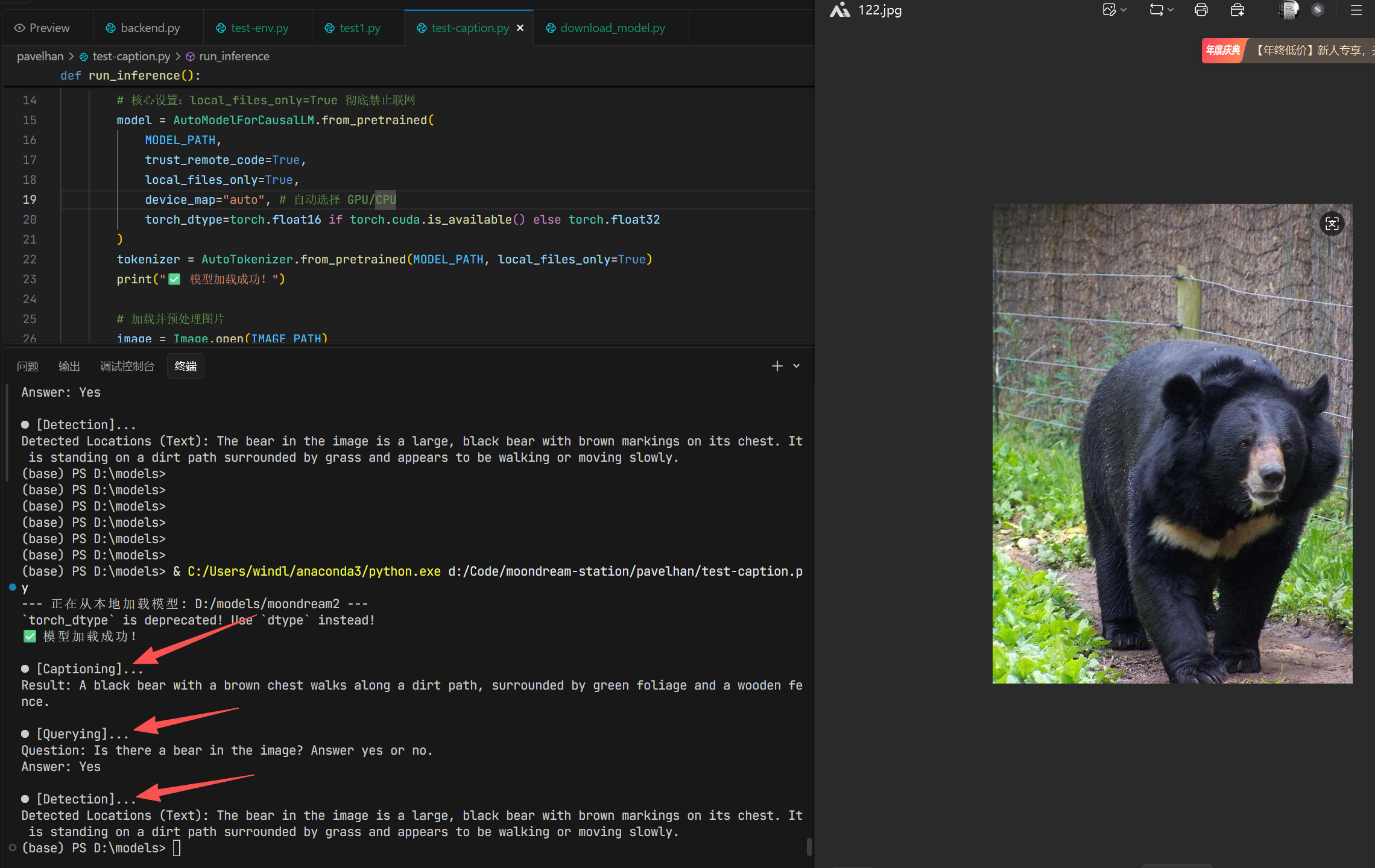
The execution result of the code is shown in the figure below:
MoonDream License
Different versions of Moondream adopt completely different licensing strategies.
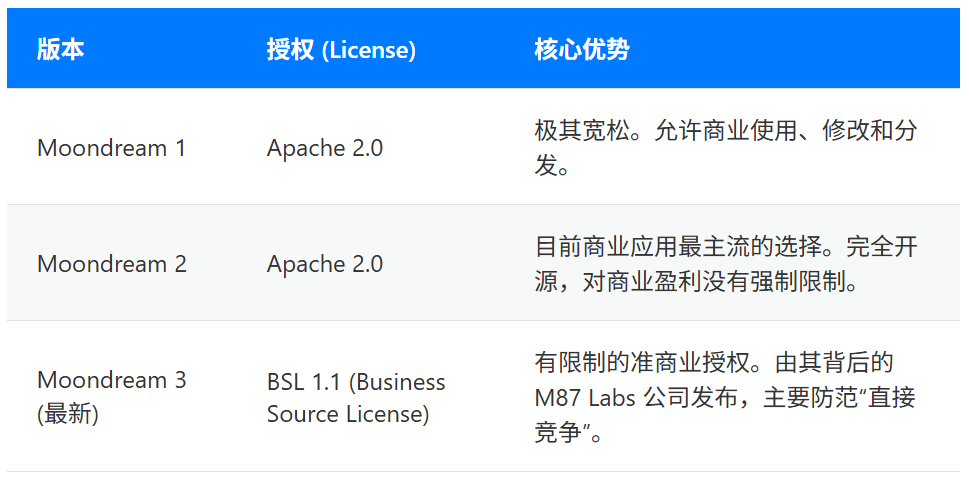
As can be seen, both Version 1 and Version 2 of Moondream adopt the most lenient Apache 2.0 license, allowing free use in commercial fields. However, the use of the latest MoonDream 3 in commercial fields comes with certain additional conditions:
- Free-to-use scenarios: Deployment on servers solely for internal company use, embedding as a feature within corporate products, as well as other non-profit and research uses.
- Prohibited scenarios (where a separate commercial license must be obtained): Setting up a server to provide paid services externally via APIs (such as HTTP or SDKs), or applications that heavily overlap with official paid services.