Detailed Explanation of YOLOv5 Model Configuration Files
- 30 Oct, 2025
Combined with the architecture diagram of the YOLOv5 model, this article provides a detailed summary and explanation of the configuration parameter details for each section of the model’s yaml configuration file, helping to gain a more granular understanding of the differences between various scale versions of the model.
In versions prior to YOLOv5, .cfg files were generally used to control various configuration parameters. Starting from YOLOv5, the .yaml configuration file format was officially adopted. The configuration files for YOLOv5 are located in the models subdirectory of its source code. By default, this directory contains five model configuration files: yolov5n.yaml, yolov5s.yaml, yolov5m.yaml, yolov5l.yaml, and yolov5x.yaml, corresponding to model structures of various scales respectively.
- For details on the differences between various versions of the YOLOv5 model, please refer to Summary of Different Versions of the YOLOv5 Model.
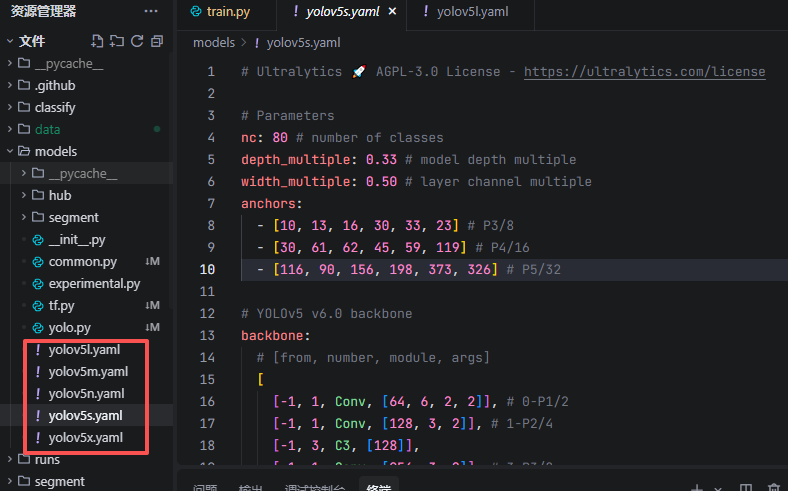
From the structure of this configuration file, the configuration parameters of YOLOv5 can be divided into global parameters and network structure parameters, while the network structure parameters can be further divided into two sub-sections: backbone and head.
Global Parameters
The global parameter section of the configuration file is shown below:
# Parameters
nc: 80 # number of classes
depth_multiple: 1.0 # model depth multiple
width_multiple: 1.0 # layer channel multiple
anchors:
  - [10, 13, 16, 30, 33, 23] # P3/8
  - [30, 61, 62, 45, 59, 119] # P4/16
  - [116, 90, 156, 198, 373, 326] # P5/32
nc
The nc (number of classes) parameter is relatively straightforward; it defines the number of target classes that the model needs to detect. Since the YOLOv5 model is trained on the COCO dataset by default, the default value of 80 here corresponds to the number of target classes supported by the COCO dataset. If you want to train a YOLOv5 model from scratch using a custom dataset, nc should correspond to the number of classes supported by your own dataset (set in the dataset configuration file, which overrides the nc setting in the network model configuration file).
depth_multiple
depth_multiple is a scaling factor used to control the number of residual blocks (Bottleneck modules) contained in each CSPBlock (referred to as the C3 module in YOLOv5 v6.0) within the backbone and neck networks of the network structure. The figure below shows the structure of the CSPBlock in the YOLOv5 network. Here, depth_multiple represents the quantity $n$ in the figure below (i.e., the number of DarknetBottleneck residual blocks). Naturally, a greater number of DarknetBottleneck residual blocks contained in each CSPBlock implies a deeper network depth, which is the origin of the term “depth”.
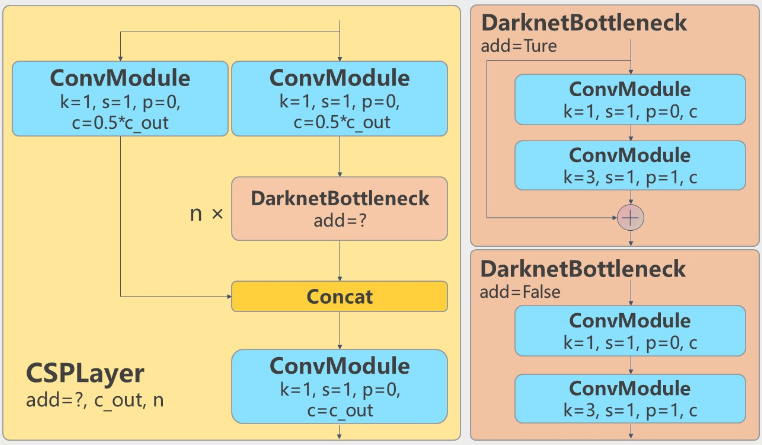
The calculation code related to the depth_multiple parameter is as follows:
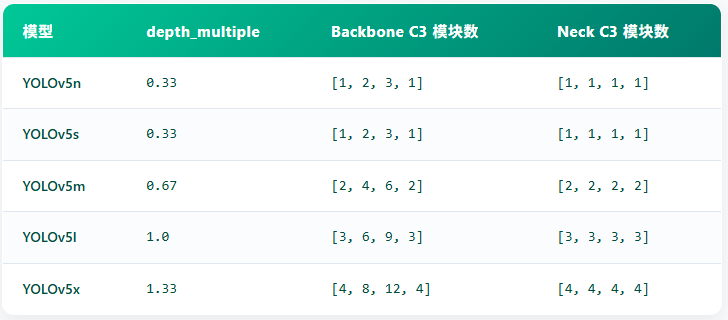
n = max(round(n * depth_multiple), 1) if n > 1 else n # depth gainWhere $n$ is the preset module repetition count in the configuration file, and the max() function is used to ensure that the calculated module count is an integer not less than 1. Taking YOLOv5s as an example, the configuration of the third CSP Layer in the backbone network is [-1, 9, C3, [512]], meaning this CSP Layer contains 9 consecutive DarknetBottleneck residual blocks. The depth_multiple of YOLOv5s is 0.33, so the actual number of residual blocks at this layer in YOLOv5s is $\max(\text{round}(9 \times 0.33), 1) = \max(\text{round}(2.97), 1) = 3$. This means that in YOLOv5s, the C3 module originally designed to repeat 9 times at this position is ultimately stacked only 3 times.
The depth_multiple parameters for various scale models of YOLOv5 and their corresponding number of CSP Layer residual blocks are shown in the figure below:
width_multiple
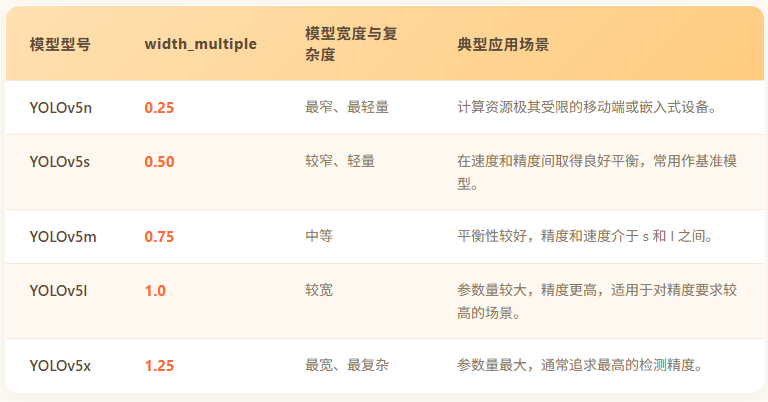
The logic of width_multiple is similar to that of depth_multiple. It generally controls the output channels (i.e., the number of convolution kernels in feature maps) of all convolutional layers and C3 modules (including both the backbone and neck networks) in the network in the form of a multiplier factor. During the model construction process of YOLOv5, the width_multiple parameter is multiplied by the preset channel count in the configuration file, and then ensured to be a multiple of 8 via the make_divisible function (for GPU computation efficiency):
c2 = make_divisible(c2 * width_multiple, 8)Taking the first convolutional layer of YOLOv5s as an example, the preset channel count in the configuration file is [64, 3, 2] (indicating a default output channel count of 64), and the width_multiple parameter corresponding to YOLOv5s is 0.50. In this case, the actual output channel count of the first convolutional layer is: $64 \times 0.50 = 32$. This means that in YOLOv5s, the convolutional layer originally designed to output 64 channels actually outputs only 32 channels.
The figure below shows the default width_multiple parameters for various scale models of YOLOv5:
anchor
Similar to YOLOv3 and v4, YOLOv5 also uses the Anchor mechanism to preset target detection bounding box dimensions, helping the model locate and recognize targets more accurately. The backbone network of the YOLOv5 model outputs feature maps of three different resolutions (large, medium, and small). Each grid cell on each feature map is assigned three anchor boxes of different sizes and aspect ratios:
anchors:
  - [10,13, 16,30, 33,23]  # P3/8 - Small object detection
  - [30,61, 62,45, 59,119] # P4/16 - Medium object detection
- [116,90, 156,198, 373,326] # P5/32 - Large object detection- The anchor configuration information in the configuration file consists of three rows in total, corresponding to feature maps of different scales: P3/8, P4/16, and P5/32, respectively.
- Each row contains 3 groups of width and height values, with each group representing the
[width, height]of an anchor. - Small feature maps (P3/8) use small anchors to detect small objects, medium feature maps (P4/16) use medium anchors to detect medium objects, and large feature maps (P5/32) use large anchors to detect large objects.
Comparing the default anchor parameters provided in the YOLOv5 model configuration file above, you will find that they are completely identical to the anchor box dimensions calculated using the k-means mechanism on the COCO dataset for the YOLOv3 model in Summary of YOLOv3 Output, Anchor, and Loss Function Evolution. In other words, the anchor box dimensions set in this configuration file are based on the COCO dataset.
In fact, when training with a custom dataset, the YOLOv5 model first uses an Auto Learning Bounding Box Anchors mechanism to check whether the dimensions of the anchor priors in the custom dataset roughly match the anchor parameter settings provided in the configuration file (which are based on the COCO dataset). If they match, training continues using the default anchor boxes specified in the parameter file; if they do not match, the k-means method is re-executed to calculate the anchors specific to this custom dataset, and these newly calculated anchors are used in subsequent training processes.
Conflicts with Dataset Configuration Options
In addition to the model configuration files for various YOLOv5 scales, when calling train.py to train the model on custom data, you also need to set the configuration file for the custom training dataset (dataset configuration files are located in the data directory). Since dataset configuration files also have configuration options like nc or anchors, what is the relationship between these configuration options of the dataset and those of the network model?
The answer is: The YOLO training script will prioritize the configuration options in the data configuration file. If the nc value in the model configuration file (such as yolov5s.yaml) differs from the nc option in the dataset configuration file, a warning message will be printed in the terminal: Overriding model.yaml nc=80 with nc=5. This indicates that the program is automatically overriding the number of classes in the model output layer from the default value (e.g., 80 classes for the COCO dataset) to the actual number of classes in the training dataset (e.g., 5 classes).
In the implementation of the DetectionModel class within the yolo.py source code file, there is the following code. As can be seen, when nc and anchors parameters are provided in the dataset configuration file, YOLO will use the configuration options in the dataset configuration file (such as data/VOC.yaml) to override those in the model configuration file (such as models/yolov5s.yaml):
# Define model
        ch = self.yaml["ch"] = self.yaml.get("ch", ch)  # input channels
        if nc and nc != self.yaml["nc"]:
            LOGGER.info(f"Overriding model.yaml nc={self.yaml['nc']} with nc={nc}")
            self.yaml["nc"] = nc  # override yaml value
        if anchors:
            LOGGER.info(f"Overriding model.yaml anchors with anchors={anchors}")
            self.yaml["anchors"] = round(anchors)  # override yaml value
Network Structure Parameters
The network structure of YOLOv5 defines each layer of the network in the form of the following list: [from, number, module, args]. Each parameter is explained and summarized in detail below.
from is used to specify which layer the input of the current layer comes from:
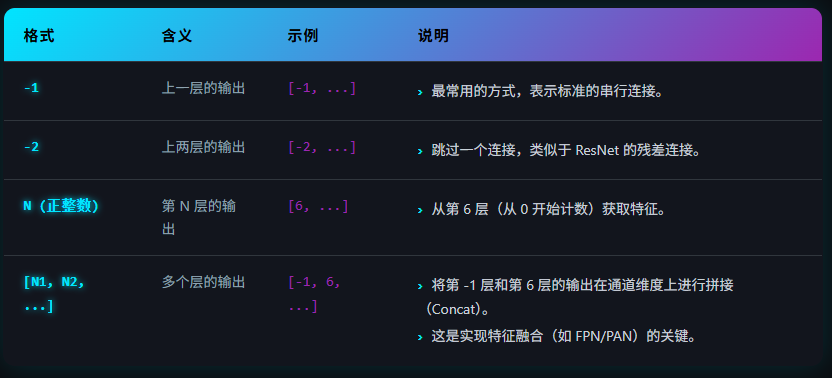
For the setup of the backbone network (backbone), almost every layer receives data from the previous layer, so from is simply set to -1 here. The neck network structure defined in the head section contains many settings like [-1, 6], which means concatenating the previous layer (usually the result after upsampling) with the 6th layer in the backbone network (a high-resolution feature map) to fuse deep semantic information with shallow positional information.
number defines the number of times the current module needs to be repeatedly stacked. For structures that do not require repeated stacking, such as ordinary convolutional layers (Conv) and SPPF, this parameter is set to 1. For the C3 module, this parameter works in coordination with the depth_multiple parameter explained in detail earlier, where the final stacking count = number $\times$ depth_multiple (the result is rounded to the nearest integer and is at least 1).
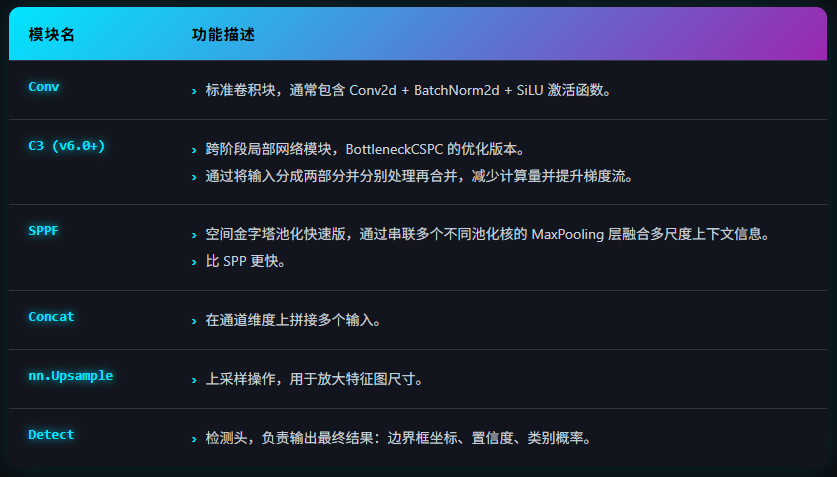
module specifies the network module used by that network layer. The types of network modules used in defining the YOLOv5 network structure are shown in the figure below:
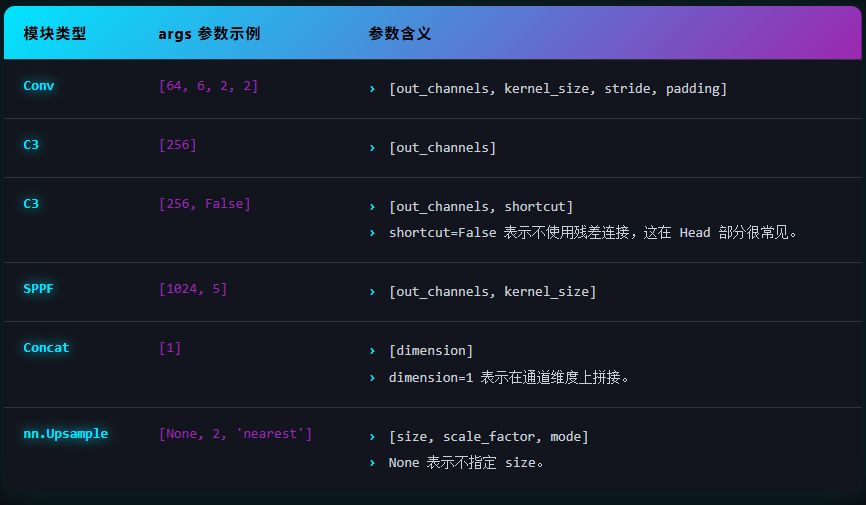
args defines the module parameters required by the module in detail using a list. The specific meaning of the parameters depends on the module type, and their setting format is shown in the figure below.
In the network structure parameter section of the configuration file, the structures of the backbone network and the neck network are defined using the backbone and head sections, respectively.
Backbone
The configuration of the backbone network structure is as follows:
# YOLOv5 v6.0 backbone
backbone:
  # [from, number, module, args]
  [
    [-1, 1, Conv, [64, 6, 2, 2]], # 0-P1/2
    [-1, 1, Conv, [128, 3, 2]], # 1-P2/4
    [-1, 3, C3, [128]],
    [-1, 1, Conv, [256, 3, 2]], # 3-P3/8
    [-1, 6, C3, [256]],
    [-1, 1, Conv, [512, 3, 2]], # 5-P4/16
    [-1, 9, C3, [512]],
    [-1, 1, Conv, [1024, 3, 2]], # 7-P5/32
    [-1, 3, C3, [1024]],
    [-1, 1, SPPF, [1024, 5]], # 9
  ]
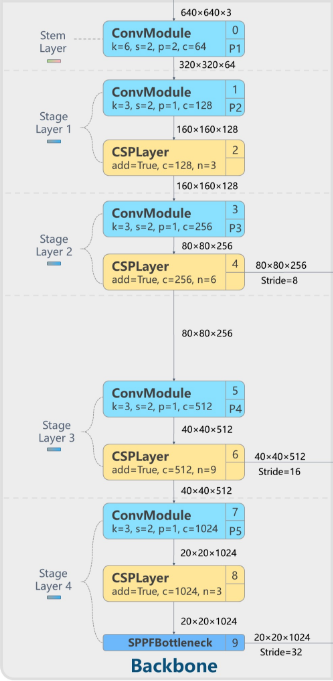
Comparing the above backbone configuration with the backbone architecture diagram makes it much easier to understand. The entire network structure flows from top to bottom:
- Convolution block, 6x6, stride=2, 64 channels
- Convolution block, 3x3, stride=2, 128 channels
- C3 block, 128 channels
- Convolution block, 3x3, stride=2, 256 channels
- C3 block, 256 channels
- Convolution block, 3x3, stride=2, 512 channels
- C3 block, 512 channels
- Convolution block, 3x3, stride=2, 1024 channels
- C3 block, 1024 channels
- Finally, an SPPF module, 1024 channels
Head
The head section actually defines the structure of the YOLOv5 neck network. Below are the default parameters of the head section in the YOLOv5 model configuration file:
# YOLOv5 v6.0 head
head: [
    [-1, 1, Conv, [512, 1, 1]],
    [-1, 1, nn.Upsample, [None, 2, "nearest"]],
    [[-1, 6], 1, Concat, [1]], # cat backbone P4
    [-1, 3, C3, [512, False]], # 13

    [-1, 1, Conv, [256, 1, 1]],
    [-1, 1, nn.Upsample, [None, 2, "nearest"]],
    [[-1, 4], 1, Concat, [1]], # cat backbone P3
    [-1, 3, C3, [256, False]], # 17 (P3/8-small)

    [-1, 1, Conv, [256, 3, 2]],
    [[-1, 14], 1, Concat, [1]], # cat head P4
    [-1, 3, C3, [512, False]], # 20 (P4/16-medium)

    [-1, 1, Conv, [512, 3, 2]],
    [[-1, 10], 1, Concat, [1]], # cat head P5
    [-1, 3, C3, [1024, False]], # 23 (P5/32-large)

    [[17, 20, 23], 1, Detect, [nc, anchors]], # Detect(P3, P4, P5)
  ]
This looks slightly harder to understand than the backbone section, but becomes quite clear when combined with the Neck network section in the YOLOv5 model network architecture diagram:
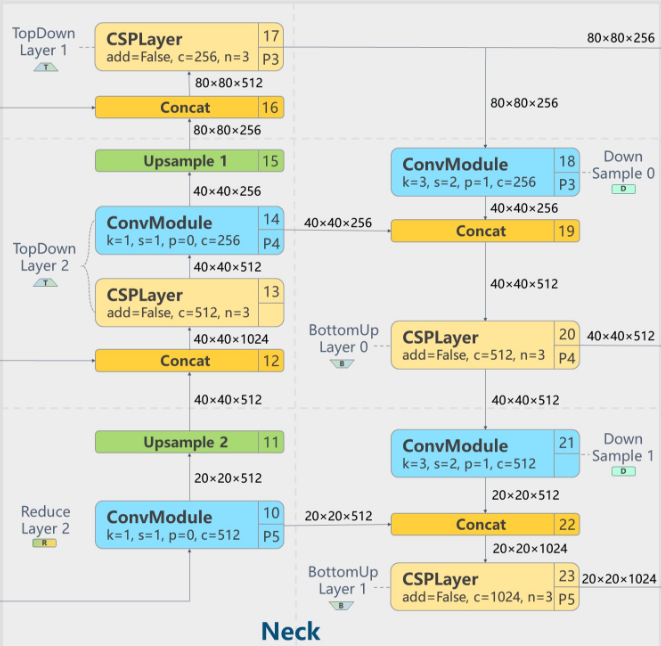
Interpreting the configuration information in the configuration file above, starting from the convolutional block at layer 10 in the lower-left corner of the architecture diagram, the from parameter of this convolutional layer is -1, indicating that it receives input from the final SPPF layer of the backbone network at layer 10 (i.e., the convolutional layer) for convolution processing, and then sends it to the upsampling module Upsample 2 at layer 11 for upsampling… and so on, until the final output at layer 23, which is the last CSP Layer.
The last statement in the configuration file, [[17, 20, 23], 1, Detect, [nc, anchors]], indicates that detection information is output from these three layers—17, 20, and 23—to ultimately output the final detection results at the model’s detection head.