Introduction to ONNX Export and Deployment of PyTorch Models
- 07 Aug, 2025
This article provides a detailed summary of the processes and steps for exporting models developed and trained using the PyTorch framework into universal ONNX files, and deploying them using ONNXRuntime with Python/C++ access.
The problem this article aims to solve is: How to export the network architecture and its parameters developed and trained in PyTorch into a deployable ONNX file? And how to deploy this ONNX file in other environments? This article uses the convolutional neural network trained in the article [[Implementing a Convolutional Neural Network for Handwritten Digit Recognition Based on PyTorch]] as an example to illustrate this complete process.
Exporting PyTorch Models to pt/pth Files
In the PyTorch framework, trained or training models and their parameters can be saved as .pt or .pth files. This allows developers to quickly restore the model and its trained parameter state later by loading these files, either to resume training or to directly perform inference on new data.
Generally speaking, files with the .pt extension are used to save only the model parameters, while files with the .pth extension save both the model architecture and the parameters. Therefore, the former results in a smaller file size, but requires building the model’s framework structure in advance before loading, because the .pt file does not contain the model architecture. The latter is more convenient to use as it contains both the model architecture and parameters internally, allowing direct loading upon use, though it comes with a larger file size.
Of course, in PyTorch, there is no official strict distinction or definition between
.ptand.pthfile extensions; they are mostly conventions adopted by the developer community. In other words, you can entirely use.ptto save a complete model, or.pthto save only the parameters.
Below is a code example for saving a trained model and its parameters in PyTorch, and reloading the model parameters into a new model object:
# Export the model
torch.save(net.state_dict(), "model.pt") # Parameters only
torch.save(net, "model.pth") # Parameters + Model

# For .pt files, create a model instance first, then load the parameters into the instance
net1 = ConvNet()
net1.load_state_dict(torch.load("model.pt"))
net1.eval()

# For .pth files, load directly using torch.load
net2 = torch.load('model.pth', weights_only=False)
net2.eval()
Exporting Models to ONNX
Compared to the .pt/.pth file formats used for exporting PyTorch model parameters, the ONNX file format is much more universal for model deployment, sharing, and conversion across different model development frameworks. Therefore, trained models and their parameters can also be exported as ONNX files for model deployment and conversion to other frameworks.
The prerequisites for exporting a PyTorch model to an ONNX file and performing inference on new samples using something like ONNXRuntime are installing a few dependency libraries:
pip install onnx protobuf onnxruntimeThe code workflow for exporting a trained model and its parameters to an ONNX file is as follows:
# Export the model using a single sample input
input_sample = torch.randn(1, 1, 28, 28)
torch.onnx.export(net, input_sample, "model.onnx")
As indicated by the input_sample variable in the code above, when exporting an ONNX file, you need to explicitly specify the data input format for subsequent inference. After executing the above code, a model.onnx file will be generated in the current directory, which can then be used for ONNX deployment and conversion/usage across different frameworks.
Verifying the ONNX File
The ONNX file exported above can be checked for validity using the following code:
# test onnx file if it is ok
onnx_model = onnx.load("model.onnx")
try:
    onnx.checker.check_model(onnx_model)
except Exception:
    print("Model incorrect")
else:
    print("Model correct")
The onnx.checker.check_model interface is used to verify the validity of the ONNX model file, ensuring it conforms to the ONNX specification and can be correctly loaded and executed by ONNX-compatible inference engines. This is a common pre-check step before performing inference with an ONNX model, which helps improve code robustness.
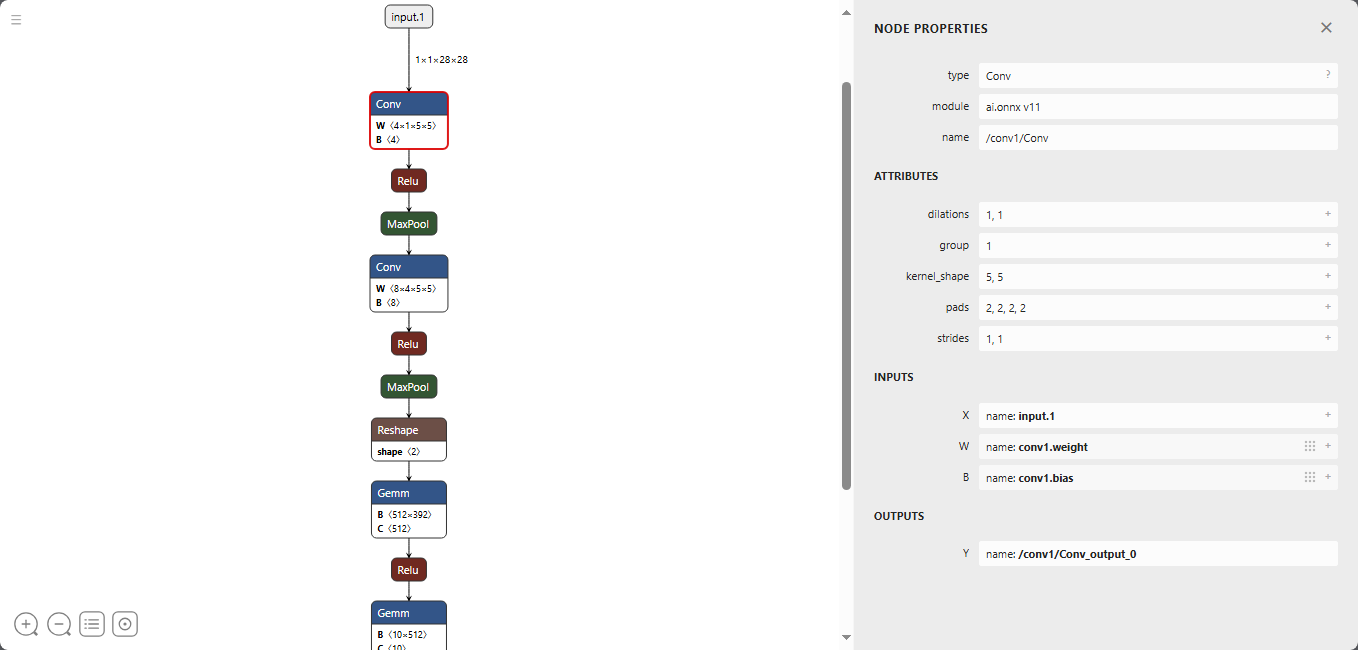
Additionally, you can directly use the netron.app tool to inspect the ONNX file. This tool provides a graphical representation displaying very detailed model and parameter information, allowing you to intuitively view the model architecture and the training parameter information of each layer described in the file:
Deploying and Testing the Model via ONNXRuntime
The model architecture and parameters stored in an ONNX file are static representations and cannot directly call the eval() and predict() methods available in the PT format. Once the model structure and parameters are loaded from the ONNX file, inference on new sample data must be executed through the ONNXRuntime engine. Therefore, you must first install the onnxruntime package to support the deployment and inference of ONNX files.
As mentioned earlier, using ONNXRuntime to import ONNX files and perform inference on new samples under the PyTorch framework requires installing both the
onnxruntimeandprotobufpackages via pip.
Taking the model ONNX file exported earlier as an example, the test code for performing ONNXRuntime inference on a sample from the MNIST dataset is as follows:
import onnx
import onnxruntime

import torchvision.datasets as dsets
import torchvision.transforms as transforms

import matplotlib.pyplot as plt
import numpy as np

import os
os.environ['KMP_DUPLICATE_LIB_OK'] = 'True'

# test onnx file if it is ok
onnx_model = onnx.load("model.onnx")
try:
    onnx.checker.check_model(onnx_model)
except Exception:
    print("Model incorrect")
else:
    print("Model correct")

train_dataset = dsets.MNIST(root='./data',  # File storage path
                            train=True,   # Extract training set
                            # Convert images to tensors; image preprocessing can be done while loading data
                            transform=transforms.ToTensor(),
                            download=True) # Automatically download if files are not found
index = 4
# Extract a sample from train_dataset and display it using plt
plt.imshow(train_dataset.data[index].numpy(), cmap='gray')
plt.show()

# Load the model.onnx model and call it to recognize the sample
session = onnxruntime.InferenceSession("model.onnx")
input_name = session.get_inputs()[0].name
output_name = session.get_outputs()[0].name
input_data = train_dataset.data[index].numpy()
input_data = input_data.reshape(1, 1, 28, 28)
input_data = input_data.astype(np.float32)
output_data = session.run([output_name], {input_name: input_data})
print(output_data)
# Use numpy to find the maximum value
result = np.argmax(output_data[0], axis=1)
print(f"Inference Result: {result[0]}")
As can be seen, aside from using torchvision.datasets and torchvision.transforms to access the dataset (in fact, other methods could easily be used to prepare data samples for model inference, as long as the data format matches the requirements of the ONNX input sample), the inference on new sample data in the above code relies solely on numpy and onnxruntime, completely independent of the PyTorch framework used to develop the model.