Quickly Implementing AI Conversations with Kimi Using Python
- 27 Feb, 2025
Preparation
For AI application development based on Large Language Models, user applications and LLMs like Kimi or OpenAI essentially communicate using standard HTTP requests. The Kimi and OpenAI servers respond to questions posed by user applications, and the results are encapsulated in HTTP response messages and sent back to the client application. The application then parses the result to present it to the user or passes it to more intelligent processing functions (such as an AI Agent).
Here, we choose the domestic LLM developer Moonshot AI (specifically Kimi) as an example to learn and summarize the interaction logic between AI applications and the LLM Server. The reasons for using Kimi include:
- Before Deepseek, Kimi had been my consistently used AI tool. Its stability and output quality have always been top-tier compared to other domestic large models.
- Moonshot provides a pre-recharge amount of 15 RMB for each registered user, which is generally sufficient for testing and development via API.
For developing Moonshot-based AI applications, the preliminary preparations mainly include two parts:
- Installing Python and its OpenAI library according to Moonshot’s requirements.
- Applying for an API Key to access the Moonshot server and configuring it as an environment variable on your development machine for security purposes.
Installing Python and its OpenAI Library
Before performing the following debugging and development, you need to install Python and the Python-based OpenAI library in your local development environment:
- The Moonshot API is directly compatible with OpenAI’s API and library. Therefore, you can use the OpenAI Python library, modify the targeted LLM endpoint, and communicate with the Moonshot server. This is a clever design that greatly reduces the workload of integrating different LLM servers for AI application development.
- Integration with the Moonshot Server requires Python version 3.7.1 or higher, and the OpenAI library version 1.0.0 or higher.
Visit the official Python website to download the version corresponding to your operating system: Download Python | Python.org. The current latest version is 3.13.2.
After installing Python, open your system terminal and run the following command to install the OpenAI library: pip install openai
Once the above is complete, check your terminal to verify that the current Python environment and OpenAI library version meet the requirements mentioned above:
Applying for and Configuring the Moonshot API Key
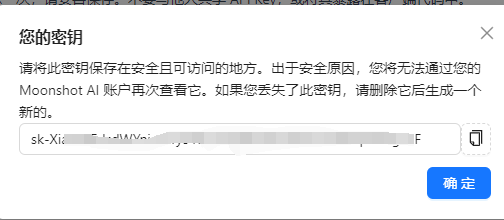
Visit the Moonshot User Center to apply for an API Key: Moonshot AI - Open Platform. Click the create button to apply for an API Key. You can name the API Key whatever you like based on your usage, and leave the project set to the default option. Confirming this will generate your API Key.
- Note that since the API Key grants access to the Moonshot Server and APIs associated with usage fees, any leakage and abuse will incur costs. For confidentiality and security, the generated API Key is only displayed and available for copy at this moment. Therefore, be sure to copy the API Key right now and save it in a secure place. ![[基于Python快速实现与Kimi的AI对话-Moonshot-Key.png]]
For more convenient and secure subsequent use, it is recommended to store the API Key as an environment variable named MOONSHOT_API_KEY.
Implementing Single-Turn Chat Communication
From a communication and code implementation perspective, the communication process for a single-turn chat between the AI application client and the Moonshot Server is very straightforward: the application encapsulates the query for the Moonshot Server into an HTTP Request message. Upon receiving it, the Server includes the reply in an HTTP Response message and sends it back to the client application, which then parses and displays the message. Both Request and Response messages are encapsulated in JSON-formatted text.
The specific code implementation workflow:
- Create a client to connect to the Moonshot Server based on the OpenAI library, specifying the correct API Key and Server URL;
- Format the query text string into a JSON structure using
role + contentformat; - Using the aforementioned client and formatted query JSON structure, call
client.chat.completions.createto initiate communication with the Moonshot Server; - The application parses the response from the Moonshot Server and displays it if successful.
The function of the following code is to implement a single-turn conversation with the Moonshot Server, querying the current date and China’s population up to the current date, while saving the response from the Moonshot Server into a JSON text file upon receipt:
import os
import datetime
from openai import OpenAI

# Retrieve the moonshot api key via environment variables
def get_api_key():
    api_key = os.getenv("MOONSHOT_API_KEY")
    if not api_key:
        raise ValueError("请设置 MOONSHOT_API_KEY 环境变量")
    return api_key

def oneshot_chat_completion(prompt):
    try:
        # Create a client connected to the Moonshot LLM endpoint
        client = OpenAI(
            api_key=get_api_key(),
            base_url="<https://api.moonshot.cn/v1>", # Moonshot Server communication endpoint
        )

        completion = client.chat.completions.create(
            model="moonshot-v1-8k", # Specify the Moonshot model; other models are available
            messages=[
                {
                    "role": "system",
                    "content": "你是 Kimi,由 Moonshot AI 提供的人工智能助手,你更擅长中文和英文的对话。你会为用户提供安全,有帮助,准确的回答。同时,你会拒绝一切涉及恐怖主义,种族歧视,黄色暴力等问题的回答。Moonshot AI 为专有名词,不可翻译成其他语言。"
                },
                {"role": "user", "content": prompt}
            ],

            temperature=0.3,
        )

        # Prepare JSON data
        response_data = {
            "timestamp": datetime.datetime.now().isoformat(),
            "user_input": prompt,
            "response": completion.model_dump()  # Convert response object to dictionary
        }

        # Save as JSON file
        json_file_path = 'c:\\\\Users\\\\Administrator\\\\Desktop\\\\test\\\\moonshot_response.json'

        # Read existing data (if any)
        existing_data = []
        if os.path.exists(json_file_path):
            try:
                with open(json_file_path, 'r', encoding='utf-8') as f:
                    existing_data = json.load(f)
            except json.JSONDecodeError:
                existing_data = []

        # Add new response
        existing_data.append(response_data)

        # Save updated data
        with open(json_file_path, 'w', encoding='utf-8') as f:
            json.dump(existing_data, f, ensure_ascii=False, indent=2)

        return completion.choices[0].message.content

    except Exception as e:
        print(f"错误:{str(e)}")
        return None

def main():
    user_prompt = "你好,我叫pavel,请查询今天的日期,并查询中国截至今天有多少人口?"
    response = oneshot_chat_completion(user_prompt)
    if response:
        print(response)

if __name__ == "__main__":
    main()
It is worth mentioning that the request messages contained in messages in the code above default to three roles when sending inquiries to the Moonshot Server. If you have a basic understanding of prompt engineering, it will be easier to understand the meaning of each role.
- system role: This part defines the role and identity of the Server through text strings. Giving the Server a clear identity and role definition helps it provide more accurate and helpful responses. Of course, this part is optional.
- user role: This is the question submitted by the user to the Server in the form of a text string.
- assistant role: This is the Server’s response to the user’s question, also in the form of a text string.
After executing the above code, the Server response message saved in the JSON file is as follows:
{
    "timestamp": "2025-02-24T09:09:23.876503",
    "user_input": "你好,我叫pavel,请查询今天的日期,中国在当前有多少人口?",
    "response": {
      "id": "chatcmpl-67bbc6c1f856367ab0a31c72",
      "choices": [
        {
          "finish_reason": "stop",
          "index": 0,
          "logprobs": null,
          "message": {
            "content": "你好,Pavel!今天是2023年11月24日。\\n\\n关于中国人口的问题,根据中国国家统计局的数据,截至2021年底,中国总人口约为14.13亿人。需要注意的是,人口数据会随着时间推移而发生变化,因此这个数字可能会有所更新。如果需要最新的人口数据,可以查看国家统计局发布的最新统计年鉴或相关公告。",
            "refusal": null,
            "role": "assistant",
            "audio": null,
            "function_call": null,
            "tool_calls": null
          }
        }
      ],
      "created": 1740359362,
      "model": "moonshot-v1-8k",
      "object": "chat.completion",
      "service_tier": null,
      "system_fingerprint": null,
      "usage": {
        "completion_tokens": 77,
        "prompt_tokens": 91,
        "total_tokens": 168,
        "completion_tokens_details": null,
        "prompt_tokens_details": null
      }
    }
  }
]
As you can see, the time information returned by the Moonshot server used in this test is incorrect, and multiple calls return different times. This shows that application code should not rely on responses from this service for tasks requiring high temporal accuracy.
Implementing Multi-Turn Interactive Chat Communication
The above section implemented single-turn chat functionality between the application and the Server. So, how do we implement multi-turn conversations? As is well known, the HTTP protocol is stateless and stateless/memoryless, meaning the server neither maintains connection states nor caches multi-turn conversation contexts. Therefore, the biggest difference between multi-turn and single-turn chats is that the client must manage and maintain the conversation context itself, aggregating all prompt-related context information and sending it to the Server for queries. Upon receiving it, the Server learns and reasons over the multi-turn conversation content to generate a response to the latest question.
The following code demonstrates simply how a client aggregates and organizes multi-turn conversation information and sends it to the Server for the latest query in a multi-turn session.
import os
import datetime
from openai import OpenAI

def get_api_key():
    api_key = os.getenv("MOONSHOT_API_KEY")
    if not api_key:
        raise ValueError("请设置 MOONSHOT_API_KEY 环境变量")
    return api_key

history = [
    {"role": "system", "content": "你是 Kimi,由 Moonshot AI 提供的人工智能助手,你更擅长中文和英文的对话。你会为用户提供安全,有帮助,准确的回答。同时,你会拒绝一切涉及恐怖主义,种族歧视,黄色暴力等问题的回答。Moonshot AI 为专有名词,不可翻译成其他语言。"}
]

def multi_chat_completion(query, history):
    client = OpenAI(
            api_key=get_api_key(),
            base_url="<https://api.moonshot.cn/v1>",
        )

    history.append({
        "role": "user",
        "content": query
    })

    completion = client.chat.completions.create(
        model="moonshot-v1-8k",
        messages=history,
        temperature=0.3,
    )

    result = completion.choices[0].message.content
    history.append({
        "role": "assistant",
        "content": result
    })

    result

def main():
    response = multi_chat_completion("唐朝的起讫时间是什么?", history)
    if response:
        print(response)
    response = multi_chat_completion("宋朝呢?", history)
    if response:
        print(response)

if __name__ == "__main__":
    main()
Conclusion
- Essentially, developing LLM-based AI applications involves interacting with the LLM Server using the HTTP protocol. Because the HTTP protocol itself is stateless and memoryless, the client (i.e., the AI application) must send the complete historical conversation information to the LLM Server for parsing, comprehension, and answer generation during every single HTTP communication round. Therefore, for AI application development, you can either use the Python-based OpenAI SDK mentioned above to interact with the LLM Server, or use any HTTP library and framework (for example, Kimi’s open platform website also provides reference code for HTTP communication processes using cURL) to achieve communication and interaction with the LLM Server.
- Overall, since Large Language Model servers expose APIs via the HTTP protocol, developing workflows to access LLM Servers using this protocol is very straightforward. The next step is to unleash your imagination, design reasonable prompts based on the application scenarios and problems your product faces (Prompt Engineering), and leverage the powerful text reasoning and generation capabilities of the LLM Server to build problem-solving AI applications.