Nuvoton ISD9160 Local Voice Recognition Solution
- 30 Mar, 2022
The Nuvoton ISD9160 processor itself is essentially a 32-bit general-purpose low-power processor based on the ARM Cortex-M0 core. Compared with other ARM MCUs, its standout feature is an embedded high-precision audio codec, making it well-suited for low-cost audio recording and playback applications.
- Maximum operating frequency of 50 MHz, with built-in 145 KB Flash and 12 KB SRAM.
The reason the ISD9160 can perform local voice recognition—beyond its hardware capabilities—is primarily that Cyberon, a third-party voice algorithm company, specifically developed a speech recognition algorithm that runs entirely on the ISD9160. Furthermore, based on this algorithm, Nuvoton built a complete local voice recognition solution around the ISD9160. For product developers, integrating local voice recognition into their products requires minimal effort.
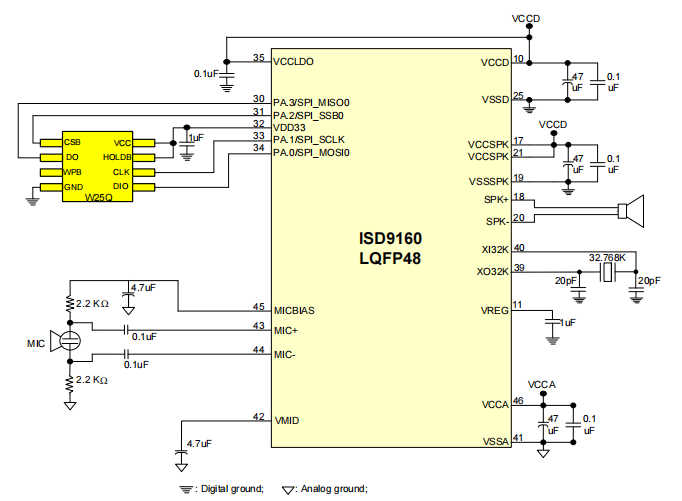
- Developing voice-based products with the ISD9160 requires very simple peripheral circuits: the microphone and speaker connect directly to the chip’s MIC and SPK pins, and an external Flash memory is required to store audio files played back through the speaker. Combined with a crystal oscillator and power supply, this forms a complete schematic for the product.
- If the ISD9160 needs to be integrated into a more complex product as an audio recognition module, it can be connected to the host processor via UART. Audio acquisition, recognition, and playback are entirely handled by the ISD9160, and the recognition results are sent to the host processor over the serial interface.
General Development Workflow for Voice Recognition using ISD9160
- Based on the functional requirements of the product, first define the supported voice command list during the product specification phase (e.g., “turn on light”, “start recording”, etc.). Nuvoton then generates a binary pack file (
..pack.bin) based on the selected voice command list, which will later be flashed to a designated location in the ISD9160’s internal Flash memory. - During runtime, the ISD9160 captures audio from the microphone in 16-bit, 16 kHz sampling rate, mono format. The application code then feeds the captured audio data into Cyberon’s algorithm for recognition and executes different commands based on the recognition results.
- During product development, the pack file is initially generated by Cyberon based on the user’s voice command list. To improve the recognition rate and accuracy, developers need to perform fine-tuning during development—a process referred to as “Adaptation” in this solution.
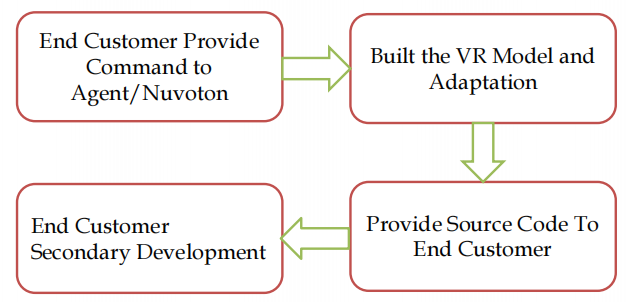
In practice, if the product does not demand extremely high recognition accuracy, or if user pronunciation is sufficiently standardized, using the Voice Recognition model file (pack file) directly provided by Nuvoton/Cyberon is sufficient. However, if higher accuracy is required, developers must perform further optimizations on the original pack file, specifically using software tools provided by Cyberon to fine-tune the algorithm model.
Operating Requirements for Cyberon Voice Recognition Algorithm
For the Cyberon voice recognition algorithm to function properly, there are specific signal-to-noise ratio (SNR) requirements for the input audio signal: Cyberon requires the audio signal SNR to be greater than 10 dB.
So, how can you measure the SNR of the audio signal on developed hardware to determine whether the audio quality in a specific environment meets Cyberon’s requirements?
- The video course provides a general approach utilizing several software tools:
- Nuvoton
Record_16kHz_PCM_Uartsample code: After flashing this sample program into the ISD9160, it captures 16-bit, 16 kHz sampling rate, mono audio data from the microphone and streams it out via UART (baud rate: 921,600 bps).- For test audio data collection, the Automatic Gain Control (AGC) feature during MIC initialization in the firmware must be disabled to prevent AGC from affecting the volume level.
- Cyberon’s VoiceRecorder: Receives the audio data sent from the sample code via the serial port, allowing it to be saved or played back.
- CoolEdit Audio Analysis Tool: Used for analyzing audio waveforms and SNR.
- Nuvoton
- Testing procedure: Run the
Record_16kHz_PCM_Uartsample on the ISD9160, open VoiceRecorder on the PC to receive and save test audio recordings via UART, and then use CoolEdit to analyze the saved audio files. By comparing the average SNR between background noise and voice commands, you can evaluate whether voice commands can be accurately recognized in that test scenario.
Fine-Tuning Workflow for the Voice Recognition Algorithm
Software tools required for optimizing algorithm accuracy:
- Nuvoton
Record_16kHz_PCM_Uartsample: Collects test audio data directly from the target hardware board. - Voice Collector: Works in conjunction with the Nuvoton
Record_16kHz_PCM_Uartsample to automate the collection and saving of training audio files from the target hardware. - AutoResampler: If the training audio data was captured using other tools, its format might not meet the training tool’s requirements; AutoResampler converts it into the standard format.
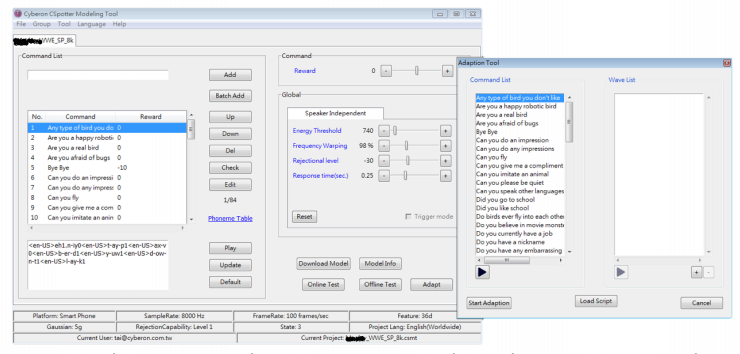
- CSpotter Offline Modeling Tool: An offline optimization tool for voice recognition models. It optimizes the model using training audio data captured from the target board or converted from other sources.
Model Optimization Workflow:
- Training Data Collection and Preparation:
- Using the target hardware board + Nuvoton
Record_16kHz_PCM_Uartsample + Voice Collector, record multiple samples for each command to be supported. The recorded audio files are automatically saved in a directory specified by Voice Collector. - If training audio comes from other sources, convert it using the AutoResampler tool.
- Using the target hardware board + Nuvoton
- Import the collected training audio data into Cyberon’s CSpotter Offline Modeling Tool, and perform model training and parameter optimization for each voice command. This Adaptation process effectively increases the recognition rate while reducing false triggers (false positives).
Additional Optimization Strategies:
- Improving Recognition Rate: The ISD9160 supports up to 20 voice commands. If your application does not require that many commands, mapping phonetically similar pronunciations to the same command can effectively improve recognition rates.
- Reducing False Triggers: To decrease false trigger rates, set a negative reward value for sounds or words phonetically similar to valid voice commands, suppressing misrecognitions caused by similar pronunciations.
Preparation of Audio Files for Playback
In addition to voice recognition, practical product designs may require the ISD9160 to play embedded audio files.
To handle playback audio files, Nuvoton provides an “Audio Tool” utility for audio conversion and ROM packaging.
The Audio Tool converts audio formats such as .wav into .md4 compressed audio data and packages all .md4 files into a single ROM binary. Once this ROM image is flashed to external Flash memory, the application code can play specific audio files by specifying their index.
- You can also configure build settings in Keil MDK to automatically invoke the Audio Tool during firmware compilation to convert audio formats and package audio files.
- Raw
.wavaudio files can be generated using Text-to-Speech (TTS) engines or recorded directly using theRecord_16kHz_PCM_Uartsample combined with VoiceRecorder.
References
- Nuvoton ISD9160 Design Guide.
- Nuvoton ISD9160 Voice Recognition Development Video Tutorials.