UVC Video Format Negotiation Workflow: Video Probe & Commit Requests
- 10 Mar, 2022
The communication workflow for video transmission format negotiation between a UVC device and a Host takes place via the Video Streaming Interface of the UVC device. The packet formats used in this communication are detailed in the VideoStreaming Requests section of the article UVC Protocol SET/GET Request Structure Analysis.
Probe & Commit Workflow
The Video Streaming Interface uses a Probe + Commit mechanism between the Host and the UVC camera to negotiate the streaming video format parameters.
The general workflow is as follows:
- In the USB descriptors of the UVC device, the Video Streaming Interface declaration contains a list of all supported video formats (such as YUV, MJPEG, and H.264) along with various resolutions and frame rates. The Host primarily selects parameters from this list.
- During negotiation, the Host selects a desired set of video format parameters based on its capabilities and the format, resolution, and frame rate information from the USB descriptors, and sends this to the Device via a Video Probe Control/SET_CUR request.
- Upon receiving the video format parameters from the Host, the Device checks whether it can fully support them:
- If supported, it keeps the parameters sent by the Host intact within the parameter structure.
- If unsupported, it sets the corresponding parameter fields to 0, indicating to the Host upon reading that the Device cannot support those settings.
- Next, the Host reads back the verified parameters from the Device using a Video Probe Control/GET_CUR request:
- If the parameters read back by the Host match what was set via SET_CUR, negotiation is successful. The Host can then issue a Commit command to confirm these negotiated parameters and signal the Device to start streaming.
- If some parameter fields read back are set to 0 by the Device, it indicates non-support. The Host must return to step 2, lower the parameter values that the Device couldn’t support, and re-negotiate using Probe/SET_CUR and Probe/GET_CUR requests until an agreement is reached.
- Once the Host and Device agree via the Probe negotiation workflow, the Host issues a Commit/SET_CUR request to finalize the negotiated parameters and initiate image streaming.
A simplified workflow diagram is shown below:
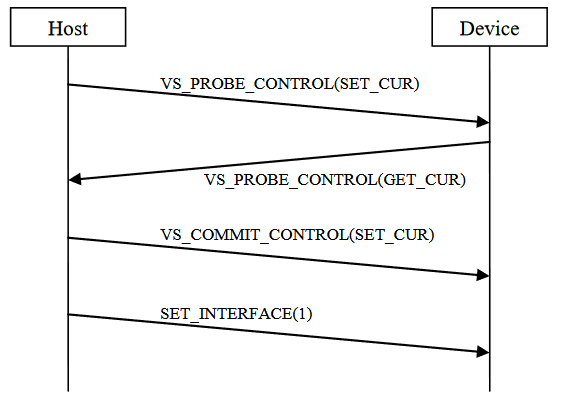
- In the workflow above, the Host and Device reached agreement after a single negotiation round.
A more complete negotiation workflow diagram is shown below:
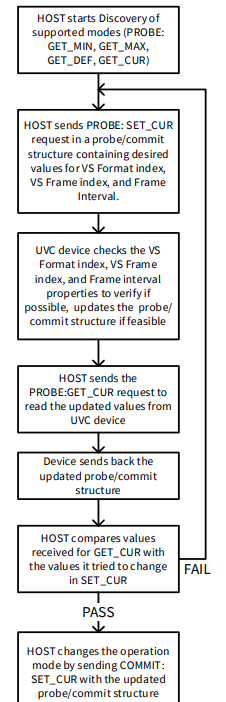
- If the negotiation data structure read back by the Host reveals an incompatibility, negotiation must restart from the beginning.
Negotiation Data Structure
| Offset | Field | Size | Description |
|---|---|---|---|
| 0 | bmHint | 2 | Used to specify which properties should remain unchanged during negotiation if parameters do not match and further negotiation is needed. Specified by the Host and read-only for the Device. |
| 2 | bFormatIndex | 1 | Format index selected by the Host for this negotiation (YUV/MJPEG/H.264). The list of formats supported by the Device and their indices are defined in the USB Configuration Descriptor. Specified by the Host. |
| 3 | bFrameIndex | 1 | Frame resolution index selected by the Host for this negotiation. The list of resolutions supported by the Device and their indices are defined in the USB Configuration Descriptor. Specified by the Host. |
| 4 | dwFrameInterval | 4 | Frame interval selected by the Host for this negotiation, in 100 ns units. |
| 8 | wKeyFrameRate | 2 | Keyframe interval (in number of frames) selected by the Host for this negotiation. |
| 10 | wPFrameRate | 2 | Number of P-frames between two keyframes selected by the Host for this negotiation. The remaining frames besides keyframes and P-frames are B-frames. |
| 12 | wCompQuality | 2 | Compression quality selected by the Host for this negotiation. Range: 1 (lowest quality) to 10000 (highest quality). |
| 14 | wCompWindowSize | 2 | Number of frames used by the Host to calculate the average bitrate. For example, in UVC 1.5, if the target bitrate is set to 100 Kbps and wCompWindowSize is set to 10, individual frame sizes can be larger or smaller than 100 Kbps, but the average bitrate over 10 consecutive frames will be approximately 100 Kbps. |
| 16 | wDelay | 2 | Latency from video capture to display, in milliseconds (ms). |
| 18 | dwMaxVideoFrameSize | 4 | Maximum size of a single video frame during video transmission between Device and Host. |
| 22 | dwMaxPayloadTransferSize | 4 | Maximum size of data contained in a single packet during video payload transfer. Set by the Device; read-only for the Host. |
| 26 | dwClockFrequency | 4 | Clock frequency set by the Device, in Hz. Used to calculate timestamp information in the Payload Header of the streaming video sent to the Host. Set by the Device; read-only for the Host. |
| 30 | bmFramingInfo | 1 | Bit flags related to the settings of the payload header for each video frame sent by the Device to the Host. |
| 31 | bPreferedVersion | 1 | Payload format version used for encapsulating video frame data transmitted to the Host. Each format may support multiple payload format specifications, and both sides must agree on a version. The Host sets bPreferedVersion, bMinVersion, and bMaxVersion to 0 during the initial Probe/SET. The Device fills in the supported values. The Host then reads the Device’s settings via Probe/GET and sets its preferred bPreferedVersion (between min and max) in the next SET request, while bMinVersion and bMaxVersion must retain the values set by the Device. |
| 32 | bMinVersion | 1 | See explanation for bPreferedVersion. |
| 33 | bMaxVersion | 1 | See explanation for bPreferedVersion. |
| 34 | bUsage | 1 | Stream usage mode for video transmission between Device and Host, including streaming, broadcast, file storage, etc. |
| 35 | bBitDepthLuma | 1 | bit_depth_luma_minus8 + 8 |
| 36 | bmSettings | 1 | Specific to temporally encoded video streams (e.g., H.264), related to payload settings for such stream transmissions. |
| 37 | bMaxNumberOfRefFramesPlus1 | 1 | Maximum number of reference frames the Host needs to store. |
| 38 | bmRateControlModes | 2 | Bitrate control mode settings. Supports up to 4 independent video streams simultaneously. The bitrate control mode for each stream can be set individually (4 bits per stream, total of 2 bytes). Set to 0 if rate control is not supported. |
| 40 | bmLayoutPerStream | 8 | Hierarchical structure settings for video encoding algorithms. Supports up to 4 independent video streams simultaneously. The layout setting for each stream uses 2 bytes (total of 8 bytes). Should be set to 0 if there are no enhancement layers. |
The negotiation data structure defines the format used for data exchange between the Host and Device during Probe/Commit requests.
- The definition of this data structure varies between UVC 1.5 (48 bytes) and UVC 1.1 (34 bytes). The field explanations above are based on UVC 1.5.
Question
Since the UVC device’s video format capabilities are already included in its Video Streaming Interface USB configuration descriptors, why can’t the Host simply select one and set it directly via Commit? Why is it necessary to go through this back-and-forth negotiation with Probe/SET and Probe/GET requests?
The answer is clear from the field definitions in the negotiation structure: the video/image parameters negotiated through the Probe & Commit mechanism differ from the static information provided in the USB configuration descriptors.
This media format negotiation mechanism builds upon the base formats and frames declared by the device, providing a complete communication workflow to further negotiate, clarify, and fine-tune specific operational parameters.