USB Transfer Types: Interrupt, Bulk, and Isochronous Transfers
- 03 Mar, 2022
Based on my study of the relevant chapters in USB in a Nutshell, this article summarizes the workflows and packet compositions of three USB transfer types: Interrupt, Bulk, and Isochronous. Control transfers were previously summarized in USB Transfer Types: Control Transfer.
In short, Interrupt, Bulk, and Isochronous transfers are relatively simpler compared to Control transfers.
A complete Control transfer consists of three stages, with each stage containing multiple packets.
In contrast, Interrupt, Bulk, and Isochronous transfers do not have the concept of “stages”; a single complete transaction consists of 2 to 3 consecutive packets.
Interrupt
In the other three USB transfer types, the Host initiates reading from or writing to the Device. The Interrupt transfer type addresses scenarios where the Device needs to send data to the Host. Typical examples include USB mice and keyboards. It is impossible to predict when a mouse or keyboard event will occur, but the Device knows immediately when it happens. On a USB bus where all communication is Host-initiated, how can the Host fetch and process data as quickly as possible to ensure real-time responsiveness? This is precisely the use case for Interrupt transfers.
Simply put, for an Interrupt endpoint registered on the USB bus, the Host reserves bandwidth and periodically polls the endpoint according to the polling interval defined during USB enumeration. If data is available, the Host reads and processes it immediately; if not, it waits for the next polling cycle. A sufficiently short polling interval guarantees real-time application responsiveness.
For USB 2.0 High-Speed devices, a single Interrupt transfer can accommodate up to 1024 bytes of data.
Interrupt endpoints support both IN and OUT directions. However, as described in the use case above, Interrupt transfers mainly solve the problem of uploading real-time data from the Device to the Host. Therefore, the most common mode for Interrupt endpoints is IN mode; its OUT mode is quite similar to Bulk OUT.
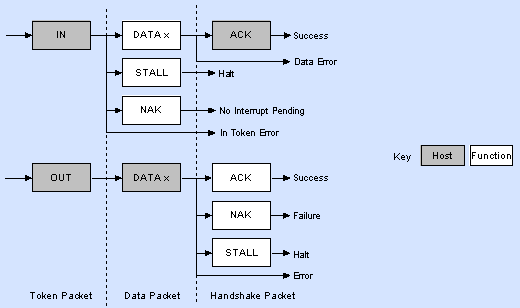
- Interrupt IN:
- A normal workflow consists of three packets: IN Token + Data Packet + ACK Packet.
- The Host periodically polls this IN Interrupt endpoint based on the interval defined in the endpoint descriptor to check if the Device has data to send:
- When the Device has data to send, it responds with a Data Packet. Once the Host receives and processes it successfully, it returns an ACK packet to the Device. The transfer is then complete.
- If the Device has no data to send during the poll, it directly responds with a NAK handshake packet. Upon receiving this, the Host waits for the next polling cycle to query the endpoint again.
- Interrupt OUT:
- The workflow for OUT transfers is relatively straightforward. When the Host has data to send to the Device, it first issues an OUT Token Packet, followed by a Data Packet. The Device then responds with an ACK packet upon receipt.
- In this scenario, Interrupt OUT is virtually identical to Bulk OUT, making distinct use cases for Interrupt OUT quite rare.
Bulk
Bulk transfer is the most widely used of the four USB transfer types.
The key characteristics of Bulk transfer are reliable delivery and best-effort service.
- Reliable delivery means that for both IN and OUT transfers, every Data Packet sent by the transmitter is acknowledged with an ACK packet by the receiver. This lets the sender know if the data was successfully received. If an ACK is not received, the sender retries the transmission, ensuring that the receiver always gets the data packets in order, reliably, and correctly.
- Best-effort service means that Bulk transfers do not reserve bus bandwidth. Instead, whenever there is data to transfer and bandwidth available, Bulk transfers will utilize all remaining bandwidth. If higher-priority traffic is present on the USB bus—such as Interrupt or Isochronous transfers—the bus prioritizes those. Therefore, Bulk transfers are suited for applications with large data volumes that do not require real-time transmission.
For USB 2.0 High-Speed devices, each Data Packet in a Bulk transfer can hold up to 512 bytes.
- If the data length to be sent is less than 512 bytes, padding with zeros is not required.
In Bulk transfers, the receiver considers the overall transfer complete under any of the following three conditions:
- The receiver gets the total expected data length it requested.
- The received Data Packet size is less than 512 bytes.
- The received Data Packet is a zero-length packet (ZLP).

- Bulk IN:
- A normal Bulk IN transaction consists of three packets: IN Token + Data Packet + ACK Packet.
- When the Host reads data from a Device via Bulk IN, it first issues an IN Token. The Device responds with a Data Packet containing the data. Upon receiving it, the Host sends an ACK. The transaction is then complete.
- Error handling:
- If the Device receives a corrupted IN Token, it ignores it and takes no action.
- If the IN endpoint experiences a functional error, the Device returns a STALL packet.
- If the IN endpoint currently has no data to send, the Device returns a NAK packet.
- Bulk OUT:
- A normal Bulk OUT transaction also consists of three packets: OUT Token + Data Packet + ACK Packet.
- When the Host sends data to the Device via Bulk OUT, it first issues an OUT Token, followed by a Data Packet containing the data. After receiving it, the Device responds with an ACK. The transaction is then complete.
- Error handling:
- If the Device receives a corrupted OUT Token or Data Packet, it ignores it completely.
- If the OUT endpoint encounters a functional error, the Device returns a STALL packet.
- If the OUT endpoint buffer is not empty (e.g., previous data hasn’t been read yet) and cannot process the new data, the Device returns a NAK packet.
Isochronous
Among the four USB transfer types, Isochronous transfer is the only one where the receiver does not send an ACK packet after receiving data. This implies that a certain level of packet loss is acceptable. Even if packet loss occurs, retransmission is not performed; in fact, the sender has no way of knowing whether the receiver successfully received the data. This absence of handshaking is the defining characteristic of Isochronous transfer.
As a result, Isochronous transfer is ideal for real-time audio and video streaming—applications highly sensitive to latency but tolerant of occasional packet drops. For instance, audio and video streams from UVC webcams are typically transmitted to the Host using this transfer mode.
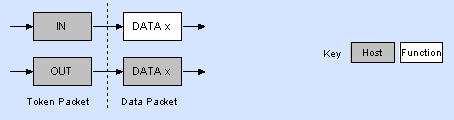
The workflow for Isochronous IN and OUT transfers is straightforward: the Host issues an IN/OUT Token, immediately followed by a Data Packet sent by either the Host or Device. The receiver sends no handshake or response, so the sender cannot verify delivery success, and no retransmission mechanism exists.
The payload size for an Isochronous transfer is specified in its endpoint descriptor, typically under 1024 bytes per transaction. Note, however, that a larger packet size is not always better. A larger setting means each Isochronous transaction takes longer and consumes more bandwidth, increasing the likelihood of packet loss when the USB bus is heavily loaded.
Therefore, packet loss during Isochronous transfers is managed by the Host based on current bus utilization. When the bus is busy, the Host selects an alternate setting with a smaller packet size to avoid overwhelming the bus and causing packet drops. When the bus is idle, the Host selects a larger packet size to improve transfer efficiency.
As mentioned earlier, the payload size of an Isochronous endpoint is specified in its descriptor. How then does the Host select or adjust this payload size?
The answer lies in using Alternate Settings (alternative interfaces). Within the interface descriptor containing the Isochronous endpoint, multiple Alternate Settings are declared—each pairing an interface descriptor with an endpoint descriptor specifying a different max packet size. The Host can then select and activate the appropriate setting.
For example, below is a snippet of USB enumeration data from the built-in UVC camera on a ThinkPad X260. The Video Streaming Interface, which transfers audio and video data, uses Isochronous endpoints. Its descriptor configuration is defined as follows:
---------------- Interface Descriptor -----------------
bLength                  : 0x09 (9 bytes)
bDescriptorType          : 0x04 (Interface Descriptor)
bInterfaceNumber         : 0x01
bAlternateSetting        : 0x01
bNumEndpoints            : 0x01 (1 Endpoint)
bInterfaceClass          : 0x0E (Video)
bInterfaceSubClass       : 0x02 (Video Streaming)
bInterfaceProtocol       : 0x00
iInterface               : 0x00 (No String Descriptor)
Data (HexDump)           : 09 04 01 01 01 0E 02 00 00                        .........


        ----------------- Endpoint Descriptor -----------------
bLength                  : 0x07 (7 bytes)
bDescriptorType          : 0x05 (Endpoint Descriptor)
bEndpointAddress         : 0x81 (Direction=IN EndpointID=1)
bmAttributes             : 0x05 (TransferType=Isochronous  SyncType=Asynchronous  EndpointType=Data)
wMaxPacketSize           : 0x0080
Bits 15..13             : 0x00 (reserved, must be zero)
Bits 12..11             : 0x00 (0 additional transactions per microframe -> allows 1..1024 bytes per packet)
Bits 10..0              : 0x80 (128 bytes per packet)
bInterval                : 0x01 (1 ms)
Data (HexDump)           : 07 05 81 05 80 00 01                              .......


        ---------------- Interface Descriptor -----------------
bLength                  : 0x09 (9 bytes)
bDescriptorType          : 0x04 (Interface Descriptor)
bInterfaceNumber         : 0x01
bAlternateSetting        : 0x02
bNumEndpoints            : 0x01 (1 Endpoint)
bInterfaceClass          : 0x0E (Video)
bInterfaceSubClass       : 0x02 (Video Streaming)
bInterfaceProtocol       : 0x00
iInterface               : 0x00 (No String Descriptor)
Data (HexDump)           : 09 04 01 02 01 0E 02 00 00                        .........


        ----------------- Endpoint Descriptor -----------------
bLength                  : 0x07 (7 bytes)
bDescriptorType          : 0x05 (Endpoint Descriptor)
bEndpointAddress         : 0x81 (Direction=IN EndpointID=1)
bmAttributes             : 0x05 (TransferType=Isochronous  SyncType=Asynchronous  EndpointType=Data)
wMaxPacketSize           : 0x0200
Bits 15..13             : 0x00 (reserved, must be zero)
Bits 12..11             : 0x00 (0 additional transactions per microframe -> allows 1..1024 bytes per packet)
Bits 10..0              : 0x200 (512 bytes per packet)
bInterval                : 0x01 (1 ms)
Data (HexDump)           : 07 05 81 05 00 02 01                              .......


        ---------------- Interface Descriptor -----------------
bLength                  : 0x09 (9 bytes)
bDescriptorType          : 0x04 (Interface Descriptor)
bInterfaceNumber         : 0x01
bAlternateSetting        : 0x03
bNumEndpoints            : 0x01 (1 Endpoint)
bInterfaceClass          : 0x0E (Video)
bInterfaceSubClass       : 0x02 (Video Streaming)
bInterfaceProtocol       : 0x00
iInterface               : 0x00 (No String Descriptor)
Data (HexDump)           : 09 04 01 03 01 0E 02 00 00                        .........


        ----------------- Endpoint Descriptor -----------------
bLength                  : 0x07 (7 bytes)
bDescriptorType          : 0x05 (Endpoint Descriptor)
bEndpointAddress         : 0x81 (Direction=IN EndpointID=1)
bmAttributes             : 0x05 (TransferType=Isochronous  SyncType=Asynchronous  EndpointType=Data)
wMaxPacketSize           : 0x0400
Bits 15..13             : 0x00 (reserved, must be zero)
Bits 12..11             : 0x00 (0 additional transactions per microframe -> allows 1..1024 bytes per packet)
Bits 10..0              : 0x400 (1024 bytes per packet)
bInterval                : 0x01 (1 ms)
Data (HexDump)           : 07 05 81 05 00 04 01                              .......


        ---------------- Interface Descriptor -----------------
bLength                  : 0x09 (9 bytes)
bDescriptorType          : 0x04 (Interface Descriptor)
bInterfaceNumber         : 0x01
bAlternateSetting        : 0x04
bNumEndpoints            : 0x01 (1 Endpoint)
bInterfaceClass          : 0x0E (Video)
bInterfaceSubClass       : 0x02 (Video Streaming)
bInterfaceProtocol       : 0x00
iInterface               : 0x00 (No String Descriptor)
Data (HexDump)           : 09 04 01 04 01 0E 02 00 00                        .........


        ----------------- Endpoint Descriptor -----------------
bLength                  : 0x07 (7 bytes)
bDescriptorType          : 0x05 (Endpoint Descriptor)
bEndpointAddress         : 0x81 (Direction=IN EndpointID=1)
bmAttributes             : 0x05 (TransferType=Isochronous  SyncType=Asynchronous  EndpointType=Data)
wMaxPacketSize           : 0x0B00
Bits 15..13             : 0x00 (reserved, must be zero)
Bits 12..11             : 0x01 (1 additional transactions per microframe -> allows 513..1024 byte per packet)
Bits 10..0              : 0x300 (768 bytes per packet)
bInterval                : 0x01 (1 ms)
Data (HexDump)           : 07 05 81 05 00 0B 01                              .......


        ---------------- Interface Descriptor -----------------
bLength                  : 0x09 (9 bytes)
bDescriptorType          : 0x04 (Interface Descriptor)
bInterfaceNumber         : 0x01
bAlternateSetting        : 0x05
bNumEndpoints            : 0x01 (1 Endpoint)
bInterfaceClass          : 0x0E (Video)
bInterfaceSubClass       : 0x02 (Video Streaming)
bInterfaceProtocol       : 0x00
iInterface               : 0x00 (No String Descriptor)
Data (HexDump)           : 09 04 01 05 01 0E 02 00 00                        .........


        ----------------- Endpoint Descriptor -----------------
bLength                  : 0x07 (7 bytes)
bDescriptorType          : 0x05 (Endpoint Descriptor)
bEndpointAddress         : 0x81 (Direction=IN EndpointID=1)
bmAttributes             : 0x05 (TransferType=Isochronous  SyncType=Asynchronous  EndpointType=Data)
wMaxPacketSize           : 0x0C00
Bits 15..13             : 0x00 (reserved, must be zero)
Bits 12..11             : 0x01 (1 additional transactions per microframe -> allows 513..1024 byte per packet)
Bits 10..0              : 0x400 (1024 bytes per packet)
bInterval                : 0x01 (1 ms)
Data (HexDump)           : 07 05 81 05 00 0C 01                              .......


        ---------------- Interface Descriptor -----------------
bLength                  : 0x09 (9 bytes)
bDescriptorType          : 0x04 (Interface Descriptor)
bInterfaceNumber         : 0x01
bAlternateSetting        : 0x06
bNumEndpoints            : 0x01 (1 Endpoint)
bInterfaceClass          : 0x0E (Video)
bInterfaceSubClass       : 0x02 (Video Streaming)
bInterfaceProtocol       : 0x00
iInterface               : 0x00 (No String Descriptor)
Data (HexDump)           : 09 04 01 06 01 0E 02 00 00                        .........


        ----------------- Endpoint Descriptor -----------------
bLength                  : 0x07 (7 bytes)
bDescriptorType          : 0x05 (Endpoint Descriptor)
bEndpointAddress         : 0x81 (Direction=IN EndpointID=1)
bmAttributes             : 0x05 (TransferType=Isochronous  SyncType=Asynchronous  EndpointType=Data)
wMaxPacketSize           : 0x1380
Bits 15..13             : 0x00 (reserved, must be zero)
Bits 12..11             : 0x02 (2 additional transactions per microframe -> allows 683..1024 bytes per packet)
Bits 10..0              : 0x380 (896 bytes per packet)
bInterval                : 0x01 (1 ms)
Data (HexDump)           : 07 05 81 05 80 13 01                              .......


        ---------------- Interface Descriptor -----------------
bLength                  : 0x09 (9 bytes)
bDescriptorType          : 0x04 (Interface Descriptor)
bInterfaceNumber         : 0x01
bAlternateSetting        : 0x07
bNumEndpoints            : 0x01 (1 Endpoint)
bInterfaceClass          : 0x0E (Video)
bInterfaceSubClass       : 0x02 (Video Streaming)
bInterfaceProtocol       : 0x00
iInterface               : 0x00 (No String Descriptor)
Data (HexDump)           : 09 04 01 07 01 0E 02 00 00                        .........


        ----------------- Endpoint Descriptor -----------------
bLength                  : 0x07 (7 bytes)
bDescriptorType          : 0x05 (Endpoint Descriptor)
bEndpointAddress         : 0x81 (Direction=IN EndpointID=1)
bmAttributes             : 0x05 (TransferType=Isochronous  SyncType=Asynchronous  EndpointType=Data)
wMaxPacketSize           : 0x1400
Bits 15..13             : 0x00 (reserved, must be zero)
Bits 12..11             : 0x02 (2 additional transactions per microframe -> allows 683..1024 bytes per packet)
Bits 10..0              : 0x400 (1024 bytes per packet)
bInterval                : 0x01 (1 ms)
Data (HexDump)           : 07 05 81 05 00 14 01                              .......
As shown above, the Isochronous endpoint definition under the Video Streaming Interface includes seven sets of descriptors with different packet sizes. This allows the Host to dynamically select the appropriate packet size configuration based on current bus conditions.