Webhooks and HTTP Push Features of Security Cameras
- 22 Jul, 2026
This article introduces the Webhooks and HTTP Push features supported by some security camera products for third-party alarm platforms, along with the implementation architecture and communication workflow best practices.
Camera Webhooks and HTTP Push Alarm Features
Conventional cameras, upon detecting events via PIR or AI (such as human detection, facial recognition, license plate recognition), can push event messages and recorded videos to their own cloud platforms, which then forward them to the user’s mobile app. All event pushing workflows and related event recording files are confined within the closed ecosystem of the camera manufacturer.
Compared to this traditional closed ecosystem that only binds to proprietary apps, pushing event notifications externally via Webhook or HTTP Push means that the camera device can directly integrate into third-party central control systems or security alarm platforms.
In fact, Webhook itself is not an advanced new protocol or technology; its underlying logic is simply: When a specific event occurs, the system automatically sends an HTTP request (usually POST) to a pre-configured HTTP Server to notify it of the event information. Therefore, in some system configurations, this feature is also referred to as HTTP PUSH or Alarm Upload.
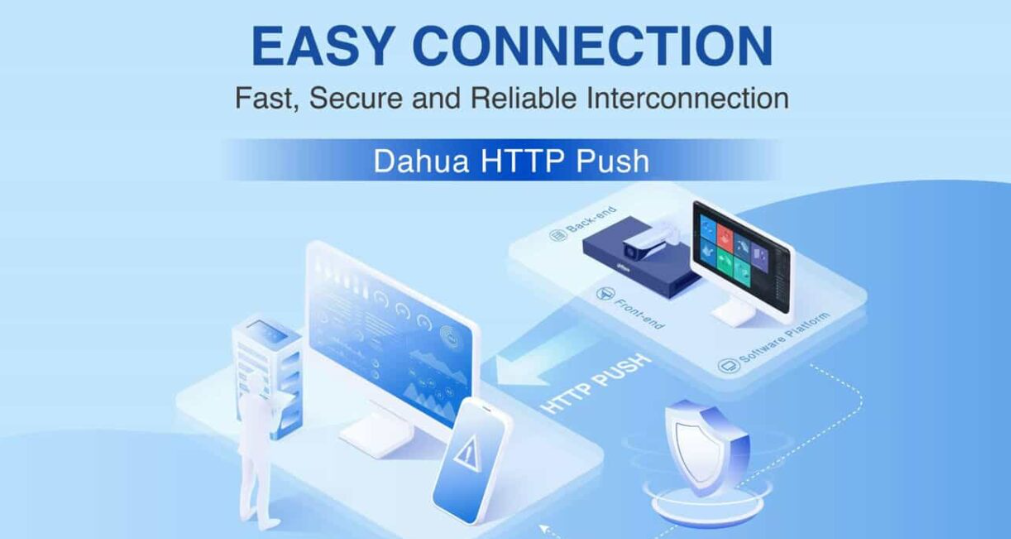
In reality, the vast majority of enterprise-grade (B2B/SMB) and high-end commercial brands (such as Hikvision, Dahua, Axis, Meraki) natively support Webhook/HTTP request pushing, while pure consumer-grade (B2C) brands (such as Ring, Arlo, Nest, Eufy, Wyze) tend to build closed ecosystems and do not natively open Webhooks, thereby locking users into their own app ecosystems and promoting cloud storage subscription services.
The following is a typical Webhooks configuration interface for a security camera system:
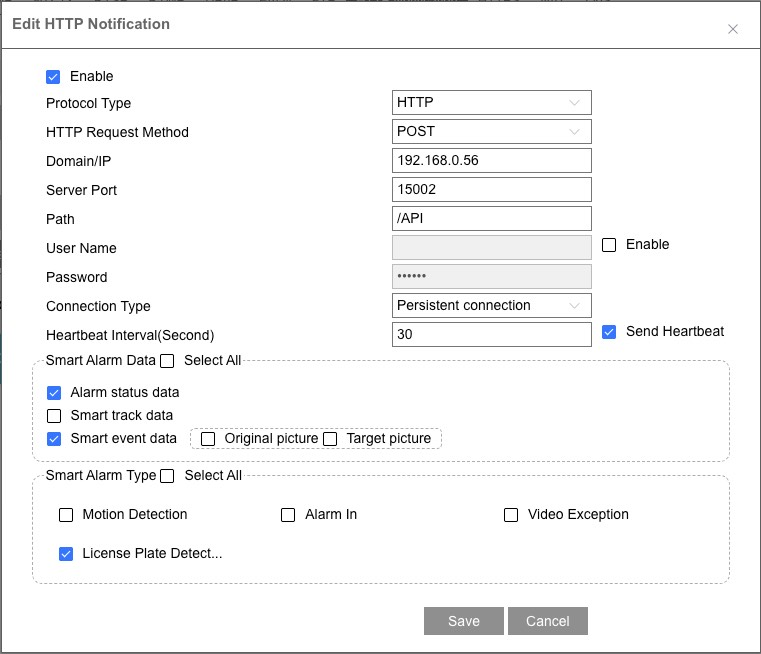
Two Architectural Solutions for Webhook Implementation
Regarding the specific implementation of Webhooks or HTTP Push, there are two main technical approaches: edge-side direct push and cloud-side forwarding, tailored for different application scenarios.
Edge-Side Direct Push
The architecture of the edge-side direct push solution is as follows: The URL of the third-party alarm server is directly configured on the camera. The internal firmware of the camera directly initiates an HTTP POST request, pushing the data directly to the third-party URL via its own network.
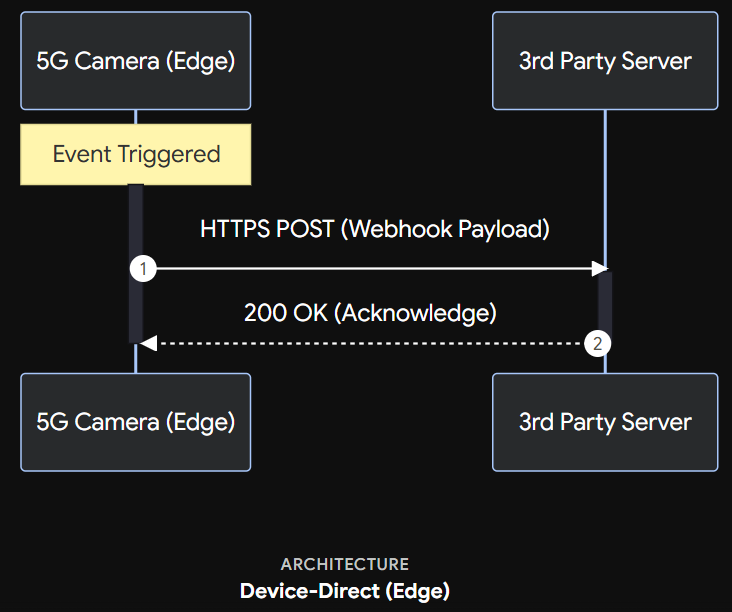
This solution is applicable to scenarios with extremely high data privacy requirements (pure LAN or prohibited data passing through third-party clouds) and permanently powered IPC devices.
Its advantage lies in having the simplest architectural design. This feature does not rely on dedicated cloud services deployed by the manufacturer, and customer data does not pass through intermediate cloud servers, offering the best privacy.
The disadvantages are also obvious: every triggered alarm event requires establishing a TLS/HTTPS handshake on the edge side, a process that is extremely power-consuming for low-power battery-powered IPCs. Moreover, if the third-party server goes down, the internal system on the camera edge side struggles to maintain a long-term exponential backoff retry queue, making message loss very likely.
Cloud-Side Forwarding
The architecture of the cloud-side forwarding solution is as follows: The URL of the third-party server is configured in the cloud. The camera sends alarm signals to the manufacturer’s cloud server using a lightweight persistent connection protocol (such as MQTT or WebSocket), and the manufacturer’s cloud server then organizes a standard HTTP POST Webhook to push to the third-party client server.
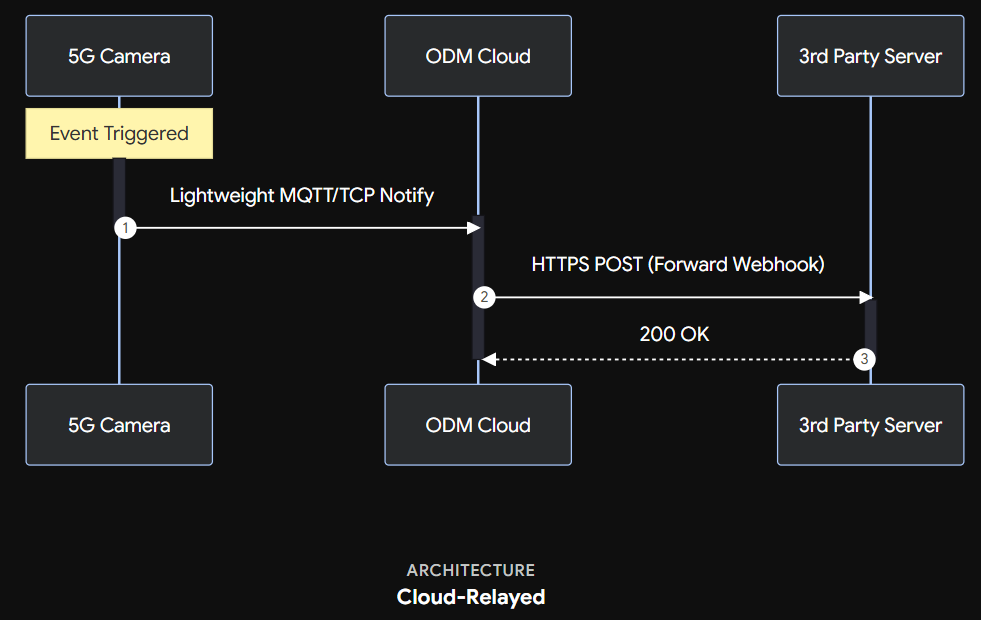
This solution is suitable for scenarios such as battery-powered low-power cameras and commercial projects requiring high-reliability message delivery. Naturally, it is also the more reliable option by comparison.
Its advantages include better power efficiency; the camera edge side only needs to send a very small MQTT payload (or even just a trigger signal) and can then quickly re-enter sleep mode. Furthermore, the cloud possesses powerful message queue processing capabilities (such as Kafka or RabbitMQ), easily implementing failure retries and dead-letter queues to ensure 100% delivery of alarm messages to third-party servers. Additionally, this cloud-to-cloud interaction approach offers better security, allowing the cloud to centrally manage Webhook URLs, keys, and certificates for various batches of devices.
Security Mechanisms of Webhooks Features
Since communication takes place with third-party servers, a major security risk when receiving event alarm notifications via Webhook is malicious alarm spoofing.
Therefore, the system design for third-party alarm integration must include at least the following security mechanisms (primarily designed on the third-party alarm server side):
- Mandatory HTTPS Encryption: This means the Webhook target URL must use
https://to prevent man-in-the-middle attacks on the communication link. Communication between the camera/ODM manufacturer’s server and the third-party alarm server must be encrypted via HTTPS, and the server’s identity must be verified. - Alarm Message Encryption Protection via Signature Mechanism (HMAC-SHA256): Typically, an
X-Signaturefield is included in the HTTP message header. This field is calculated by performing an HMAC-SHA256 operation on the Request Body using theSecret Keyconfigured by the customer in the backend. Upon receiving the message, the third-party server uses the same key to verify the signature, confirming that the message genuinely originates from a legitimate device or the ODM manufacturer’s cloud.
The Webhook payload needs to be clearly structured for easy parsing by the server side. In addition, because event thumbnails and video files associated with alarm events are relatively large, Webhook JSON structures typically contain only thumbnail URLs or video download links. After receiving the Webhook, the third-party system fetches media files on demand using the links included in the payload.
The following is a reference for the current industry-standard JSON definition:
{
  "eventId": "evt_123456789",
  "timestamp": 1716382910,
  "deviceSn": "CAM-5G-889900",
  "eventType": "human_detection", // Event type: PIR, motion, human, vehicle, face
  "data": {
    "snapshotUrl": "https://cdn.your-odm.com/xxx.jpg", // Event screenshot
    "videoClipUrl": "https://cdn.your-odm.com/xxx.mp4", // Event video recording file
    "batteryLevel": 85, // Battery level
    "signalStrength": 4 // WiFi signal strength
  }
}