Summary of Learning Amazon AWS CloudFront Service
- 10 Jun, 2026
Workflow of CloudFront
Amazon CloudFront Service is positioned as AWS’s global Content Delivery Network (CDN) service (currently generally available/GA across all AWS Regions). Its core function is to cache static resources and accelerate the transmission and distribution of both static and dynamic content through AWS’s globally deployed backbone network.
The underlying network of CloudFront Service is based on hundreds of POPs (Edge Locations) deployed by AWS worldwide. In this scenario, when a user or device initiates a network request, traffic is routed by AWS Anycast to the physically closest node, significantly accelerating the transmission of static and dynamic content.
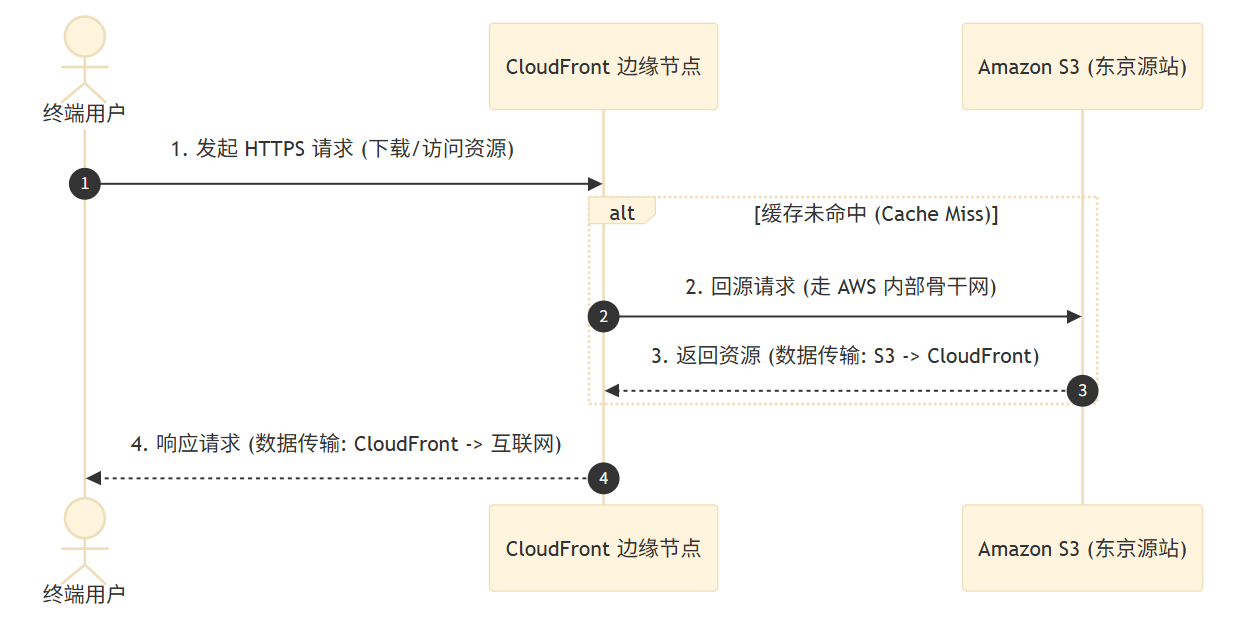
The following flowchart illustrates the workflow of CloudFront Service by taking the example of downloading a file from an S3 Bucket in the AWS Tokyo Region via CloudFront Service.
Every time an end-user initiates a request to the CloudFront URL, the request is first routed by AWS Anycast to the CloudFront network node closest to the request initiator. CloudFront then checks for a cache hit (i.e., whether CloudFront’s own cache contains the static resource file required by the request):
- On a cache hit—meaning the CloudFront cache contains the requested file—it jumps directly to step four to return the file to the end-user.
- On a cache miss, CloudFront makes an origin request to the bucket deployed in the S3 Tokyo station via AWS’s globally deployed backbone network, reads the file from the S3 Bucket into CloudFront’s cache, returns the file to the end-user, and simultaneously stores it in the CloudFront cache. This ensures that subsequent visits will result in cache hits, returning the file directly to the end-user from the cache.
As can be seen from the above workflow, the primary function of CloudFront as AWS’s CDN service is to enable global network acceleration and distribution for static resource files (especially hot resources). Hot resources receive a high volume of requests in a short period. Using a CDN service leverages cache servers distributed across different geographical nodes to rapidly distribute resources to user terminals closest to them. This not only effectively improves the user experience but also avoids the stability issues and network routing inefficiencies caused by all user requests concentrating on a single node.
Even for dynamic resources that result in cache misses, because the communication between the CDN cache servers (CloudFront) and the origin servers where dynamic resources are actually stored (such as the S3 Bucket in the Tokyo Region mentioned above) traverses AWS’s internal backbone network, response speeds for user requests are still significantly improved compared to users accessing the origin server directly.
How Does CloudFront Manage Caches?
CloudFront does not limit the size of a single file (object) stored at its edge locations, meaning it can cache everything from a few KB of script files to tens of GB of software installation packages.
AWS has multiple edge locations deployed worldwide, each with specific hardware storage capacity limits. Naturally, CloudFront cannot keep previously accessed cache files in its cache servers indefinitely.
Generally speaking, CloudFront uses the Least Recently Used (LRU) algorithm to dynamically manage the files stored in its cache servers. If a file is stored at an edge location for a long time and is rarely accessed, it may be deleted when current storage space becomes insufficient to free up space. In this case, the next new request for this file will be forwarded back to the origin server to request the data.
Of course, besides the LRU algorithm mentioned above, cache invalidation is also related to the file’s own TTL (Time to Live) lifecycle duration.
Cache Time Limit (TTL)
The validity period of a file in the CloudFront cache can also be set via the origin station’s TTL parameters.
By default, CloudFront respects the HTTP caching header parameters returned by the origin station (such as S3, EC2, or API Gateway), namely Cache-Control: max-age=<seconds> and Expires: <http-date>, to set the file’s validity period in the cache.
Therefore, if we have specific requirements for the time validity of files, we can configure these headers in the origin server configuration or S3 object metadata to more precisely control the caching duration of each file.
High TTL (Long Cache Time):
- Pros: Increases the cache hit ratio. A longer retention time of files at edge locations means that when users request them, they are more likely to be served directly from the edge location, drastically reducing origin requests and cutting down data transfer costs from the origin to CloudFront.
- Cons: Content updates more slowly, and users may request outdated files. Therefore, if there are high requirements for the lifecycle of the files themselves, a excessively high TTL should not be set.
Low TTL (Short Cache Time) or 0 TTL (No Caching):
- Pros: The content of the data files obtained with every request is always the most up-to-date.
- Cons (More Expensive): Decreases the cache hit ratio, leading a large volume of user requests to hit the origin server for data, which increases request volume and costs.
Therefore, whether to set a high or low TTL parameter depends on the design requirements of your files and application: if the timeliness requirements for data file contents are relatively high, a low TTL should be chosen, at the cost of higher expenses; otherwise, a high TTL setting should be used to minimize origin request counts as much as possible.
CloudFront Pricing Model
Below is a comparison of how adding CloudFront impacts cloud service usage costs, based on a typical application of downloading files from S3.
Overall, for the workflow of downloading files from S3, the components related to cloud service usage costs primarily include: Storage, Data Transfer Out, and Requests (API/HTTP).
- Storage: Refers to static object storage fees on S3, billed based on the amount of data stored in S3 (GB/month). Standard storage class first 50 TB: $0.023/GB/month.
- Data Transfer Out (DTO):
- DTO to Internet: This is the largest cost component, representing the traffic fees for sending data from AWS cloud services to the internet.
- For the direct S3 download model, it is billed in tiers, with the first 10 TB at $0.09 / GB.
- For the CloudFront download model, it is billed by region + tier. The cost in North America/Europe environments is $0.085 / GB (which is 5.5% cheaper than direct S3 downloads).
- S3 to CF (Origin Transfer Fee): The cost of downloading data from S3 storage buckets to CloudFront edge locations; this internal AWS traffic is free.
- DTO to Internet: This is the largest cost component, representing the traffic fees for sending data from AWS cloud services to the internet.
- Request Fees:
- S3 API Request Fees (GET): Incurred when users request downloads directly from the S3 Bucket, billed based on the number of API calls made to the S3 bucket, such as GET/HEAD requests. The fee is $0.0004 / 1,000 requests.
- Under the CloudFront model, on a cache miss, the API requests made from CloudFront to S3 incur the same fees as above. Therefore, this cost is correlated with the cache hit ratio. Under a high hit ratio, this cost approaches 0.
- CF HTTP/HTTPS Request Fees: Billed based on the number of requests sent by users to CloudFront edge nodes. HTTPS requests in North America cost $0.0010 / 1,000 requests, which is more expensive than S3, but provides CDN capabilities.
- S3 API Request Fees (GET): Incurred when users request downloads directly from the S3 Bucket, billed based on the number of API calls made to the S3 bucket, such as GET/HEAD requests. The fee is $0.0004 / 1,000 requests.
Regarding the cost models of downloading directly from S3 versus downloading from S3 via CloudFront:
- Storage costs are completely identical for both, depending solely on the amount of data stored in S3.
- Regarding outbound data transfer, given the same volume of outbound traffic, downloading from S3 is 5.5% cheaper than downloading via CloudFront.
- As for network request fees, downloading via CloudFront is actually more expensive:
- Direct downloads from S3 only include the cost of S3 API requests initiated by the user, at a rate of $0.0004 / 1,000 requests.
- Downloads via CloudFront involve two parts: first, the CloudFront API request fees initiated by users at a rate of $0.0010 / 1,000 requests, which is higher than S3 APIs; second, in the event of a cache miss, it includes the origin request fees back to S3. Combining these two, CloudFront’s costs in this category are significantly higher than accessing S3 directly, especially when the cache miss rate is high.
However, even if costs are comparable or slightly higher, using the CloudFront model is still recommended:
- Performance Enhancement: Faster network response times for users, leading to a better user experience.
- Security: By combining WAF + OAC (Origin Access Control) to make S3 private, financial security vulnerabilities caused by malicious traffic scraping can be completely eliminated.
CloudFront Flat-Rate Pricing Plan
If the traffic accessed through CloudFront is relatively high, you can also participate in AWS’s flat-rate pricing plans to further reduce CloudFront usage costs:
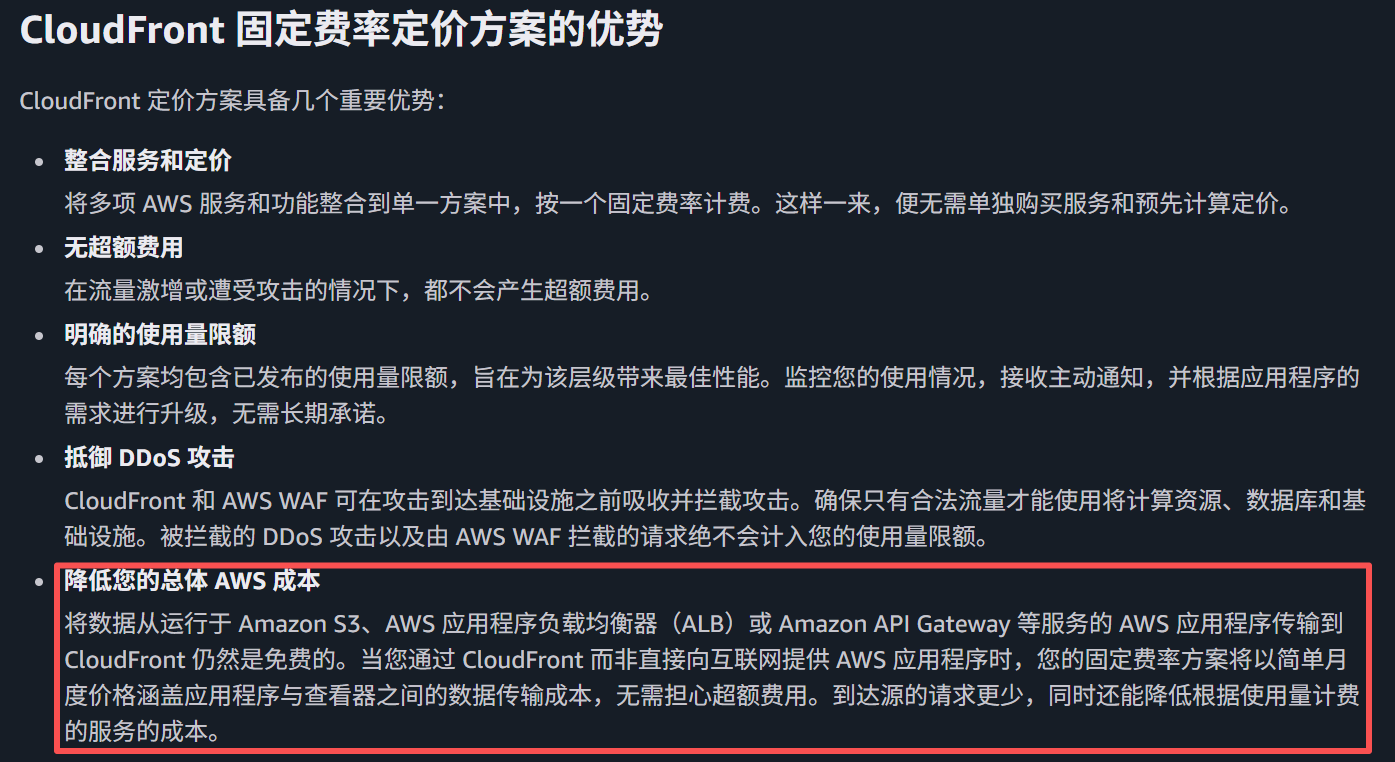
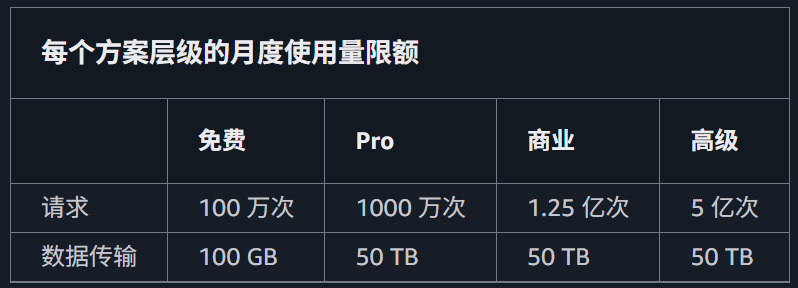
In this pricing plan, AWS offers a fixed-fee model with extremely low bundled pricing, which includes massive free allowances for CloudFront usage (no overage fees; excesses will be throttled or require an upgrade). Taking the Pro user plan at a fixed monthly fee of $15 as an example, the free allowances included in this package are:
- Outbound Data Transfer: Up to 50 TB, which is valued at approximately $4,000+ under the traditional on-demand model.
- Access Request Count: 10,000,000 requests (10 million).
- Value-Added Security (Included for Free): AWS WAF (Web Application Firewall) is mandatory and included, featuring 25 built-in rules and DDoS protection.
- S3 Storage Credit: An additional 50 GB of Amazon S3 Standard storage allowance is granted each month.
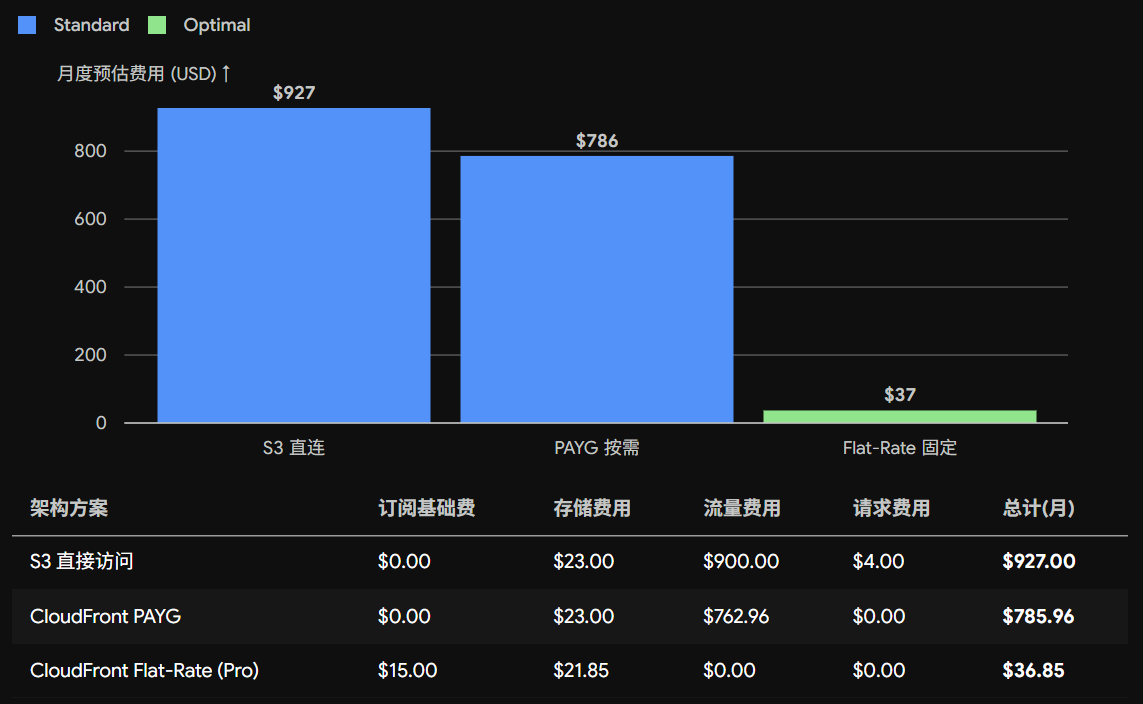
Powered by this flat-rate pricing plan, the cost of using CloudFront will be substantially reduced. Below is a cost comparison among three scenarios—accessing S3 directly, accessing S3 via CloudFront (standard pricing model), and accessing S3 via CloudFront (flat-rate pricing model)—assuming an S3 storage capacity of 1 TB, monthly outbound traffic of 10 TB, 10 million requests, and a 90% cache hit ratio: