The Adaptation Process of QWen3-VL-4B Multimodal Large Model on RK3588
- 21 Mar, 2026
This article provides a detailed log of the complete adaptation process for the Qwen3-VL-4B-Instruct multimodal large model on Rockchip RK3588, along with key considerations and common pitfalls during adaptation.
Download and Testing of the QWen3-VL-4B Model
Alibaba released the Qwen3-VL series of vision-language models in September 2025. Compared to its predecessors (such as Qwen2-VL), the release of Qwen3-VL marks a significant milestone where multimodal large models have officially transitioned from simple visual perception to a new phase of deep logical reasoning and autonomous agent interaction. Continuing Alibaba’s open-source spirit, Qwen3-VL offers multiple model scales ranging from edge to cloud.
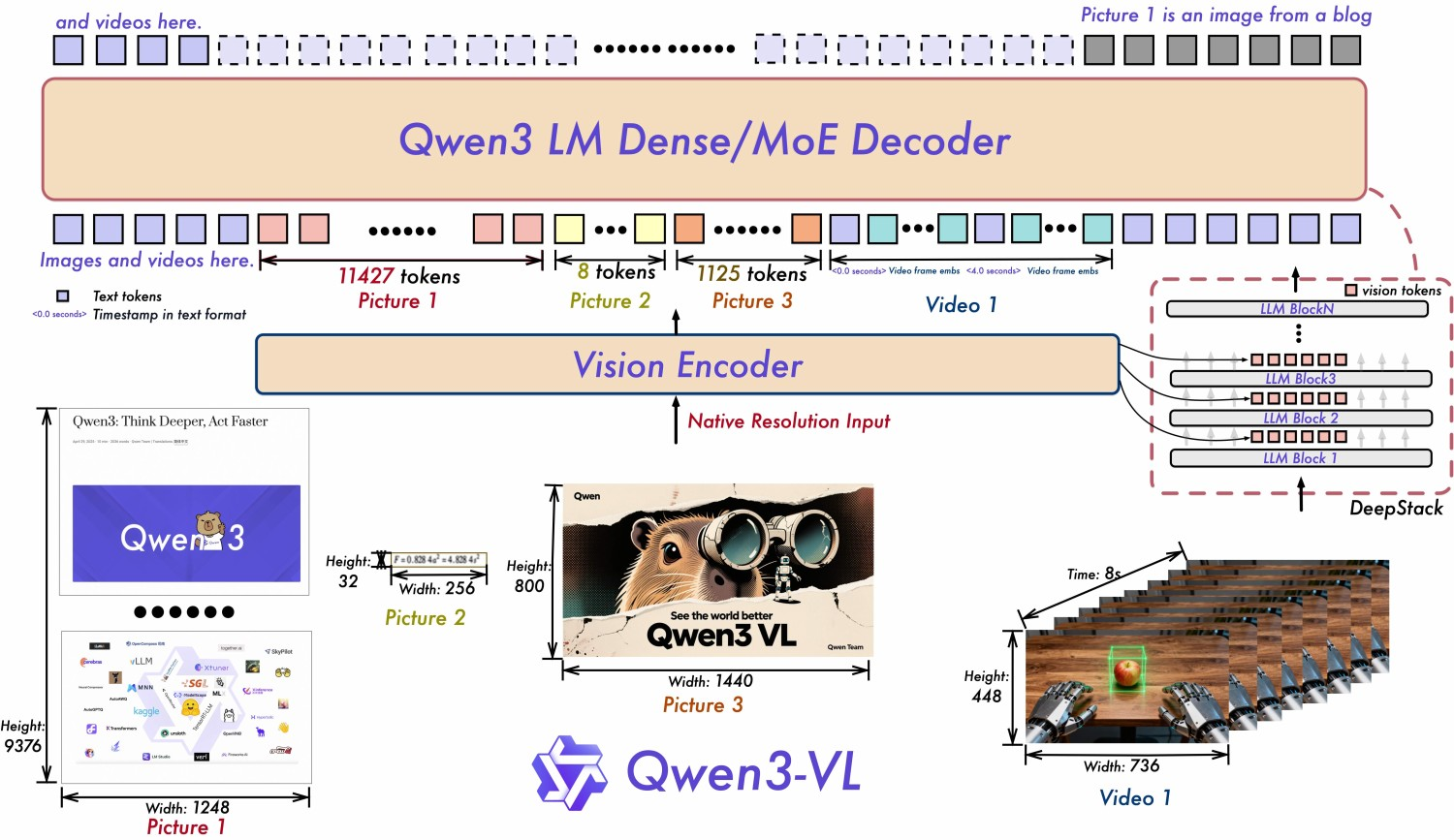
To adapt the Qwen3-VL-4B-Instruct model on the Rockchip platform, you first need to download the model files and perform basic inference testing on a PC to verify the correctness of the downloaded files. This part of the work has been detailed in the article Detailed Explanation of QWen3-VL Model Testing and vLLM Production Environment Deployment Workflow.
The HuggingFace link path for the Qwen3-VL-4B-Instruct model is shown below. Follow the aforementioned article to download it using the transformers library and perform local inference verification:
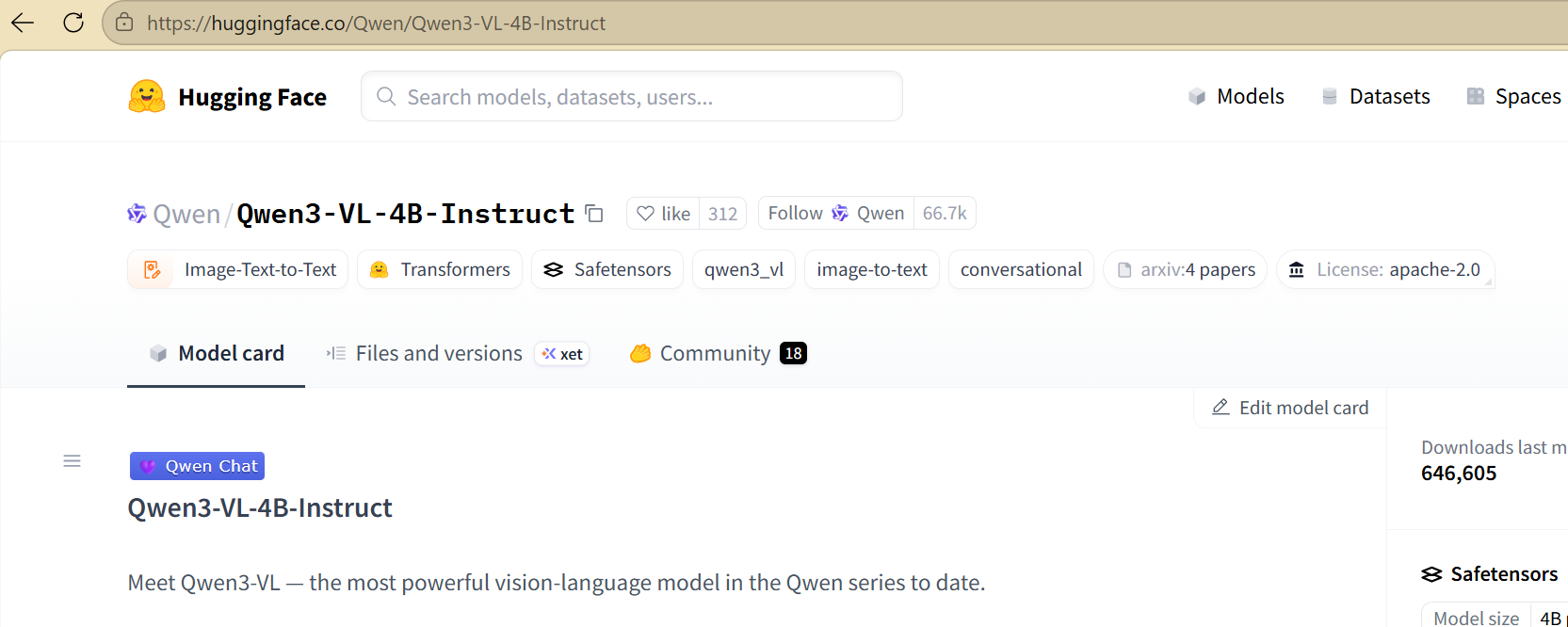
Note: The local path of the downloaded model files used in the following text is
/mnt/d/HuggingFace/hub/models--Qwen--Qwen3-VL-4B-Instruct/snapshots/ebb281ec70b05090aa6165b016eac8ec08e71b17/
Environment Setup
Adapting multimodal large models on Rockchip NPU platforms requires both Rockchip’s rknn-llm and rknn-toolkit2 toolkits. As of January 2026, the latest versions of these two toolkits on GitHub are:
- rknn-llm: 1.2.3
- rknn-toolkit2: 2.3.2
The following work is based on these two versions. Oddly enough, the Python version requirements of the latest versions of these two toolkits conflict with each other. Therefore, it is best to set up separate development environments (rknn and rkllm) based on the two toolkits respectively, and switch between them during different subsequent steps.
For the environment setup of rknn-toolkit2, refer to Rockchip RK3588 NPU Development Environment Setup Notes. For the environment setup flow of rkllm, refer to Adaptation Process of Lightweight LLM Model QWen2.5-0.5B on RK3588.
Overall, the adaptation of the QWen3-VL-4B-Instruct model on the RK3588 development board is mainly carried out based on the files contained in the rknn-llm-main/examples/multimodal_model_demo directory within the rknn-llm repository.
- There is a
README.mdunder this directory that can serve as a reference, but it lacks some details.
Model Conversion
The conversion of multimodal models like Qwen3-VL-4B-Instruct is actually divided into two steps, corresponding to the conversion of the RKNN model and the RKLLM model respectively. The final on-board demo requires loading independent RKNN and RKLLM model files simultaneously, and also depends on their respective runtime libraries: librkllmrt.so and librknnrt.so.
RKNN Model Conversion
This conversion operation is executed in the rknn environment (i.e., the environment where the rknn-toolkit2 toolkit is installed). This part is divided into two sub-steps: converting the Vision part of the model into an ONNX file, and then converting the ONNX format model file into an RKNN model file for on-board execution.
Execute the export_vision.py script in the export sub-directory under rknn-llm-main/examples/multimodal_model_demo to convert the Vision part of the model into an ONNX file:
conda activate rknn
cd export
python export_vision.py --path=/mnt/d/HuggingFace/hub/models--Qwen--Qwen3-VL-4B-Instruct/snapshots/ebb281ec70b05090aa6165b016eac8ec08e71b17/ --model_name=qwen3-vl --height=448 --width=448
After the execution above is complete, an onnx sub-directory will be generated in the current export directory, containing the converted ONNX file for the Vision part of the model:
(rknn) pavelhan@LAPTOP-P7UARMK0:~/rkllm/rknn-llm-main/examples/multimodal_model_demo/export$ ls -l onnx/
total 1623076
-rw-rw-r-- 1 pavelhan pavelhan 1662022334 Jan 28 16:11 qwen3-vl_vision.onnx
Next, continue using the export_vision_rknn.py script in the same directory to convert this ONNX file into an RKNN model file that can run on the board:
python export_vision_rknn.py --path=./onnx/qwen3-vl_vision.onnx --model_name=qwen3-vl --height=448 --width=448After the execution above is complete, an rknn sub-directory will be generated in the current export directory, containing the on-board RKNN model file for the Vision part of the model:
(rknn) pavelhan@LAPTOP-P7UARMK0:~/rkllm/rknn-llm-main/examples/multimodal_model_demo/export/rknn$ ls -l
total 848888
-rw-rw-r-- 1 pavelhan pavelhan 869260061 Jan 28 16:22 qwen3-vl_vision_rk3588.rknn
At this point, the model file for the Vision part (qwen3-vl_vision_rk3588.rknn) is ready.
RKLLM Model Conversion
This conversion operation is executed in the rkllm environment (i.e., the environment where the rknn-llm toolkit is installed). This part can also be divided into two sub-steps: preparation of calibration data and conversion of the RKLLM on-board model.
The calibration data preparation work is mainly carried out in the data sub-directory. This directory contains a make_input_embeds_for_quantize.py script used to prepare calibration data, but this script is tailored for Qwen2-VL and will throw an error if used directly on the Qwen3-VL model. Therefore, I modified the script based on the original one to create make_input_embeds_for_quantize_qwen3-vl.py specifically for generating calibration data for the Qwen3-VL model. Then execute under export:
python ./data/make_input_embeds_for_quantize_qwen3-vl.py --path=/mnt/d/HuggingFace/hub/models--Qwen--Qwen3-VL-4B-Instruct/snapshots/ebb281ec70b05090aa6165b016eac8ec08e71b17/After the above execution completes, calibration data will be generated in data/inputs.json and data/inputs_embeds/, which will be used in the subsequent RKLLM on-board model conversion process.
Next is the final and most time-consuming step of model conversion (mainly because my graphics card model is relatively new and conflicts with the torch and cuda versions in the rkllm environment, forcing me to perform model conversion using the CPU): converting the RKLLM on-board model file. This primarily uses the export_rkllm.py script under export:
python export/export_rkllm.py --path /mnt/d/HuggingFace/hub/models--Qwen--Qwen3-VL-4B-Instruct/snapshots/ebb281ec70b05090aa6165b016eac8ec08e71b17/ --target-platform rk3588 --num_npu_core 3 --quantized_dtype w8a8 --device cpu --savepath ./export/save/qwen3-vl-4B_rk3588.rkllmNote that the execution of the above script has huge memory requirements. If executed in WSL, it will result in a “Killed” error due to out-of-memory (OOM). At this point, you need to modify the memory and swap configuration of WSL: create a .wslconfig file in your user directory C:\Users\[Username], write the following content into it, restart WSL, and then re-run the above conversion command:
[wsl2]
memory=24GB  # Try allocating 24GB or more
swap=16GB    # Increase swap space as a buffer
Once the execution above is complete, the RKLLM on-board execution file _w8a8_rk3588.rkllm will be generated in the current directory:
(rkllm) pavelhan@LAPTOP-P7UARMK0:~/rkllm/rknn-llm-main/examples/multimodal_model_demo/rkllm$ ls -l
total 4733196
-rw-rw-r-- 1 pavelhan pavelhan 4846784612 Jan 28 17:26 _w8a8_rk3588.rkllm
At this point, the two on-board model files required to run the on-board inference demo—qwen3-vl_vision_rk3588.rknn and _w8a8_rk3588.rkllm—are ready.
Compilation of the On-Board Inference Application
The general on-board inference application code is located in the deploy directory. Note that RKLLM v1.2.3 requires a cross-compilation GCC version of 10.2 or higher. You need to download the toolchain gcc-arm-10.2-2020.11-x86_64-aarch64-none-linux-gnu first:
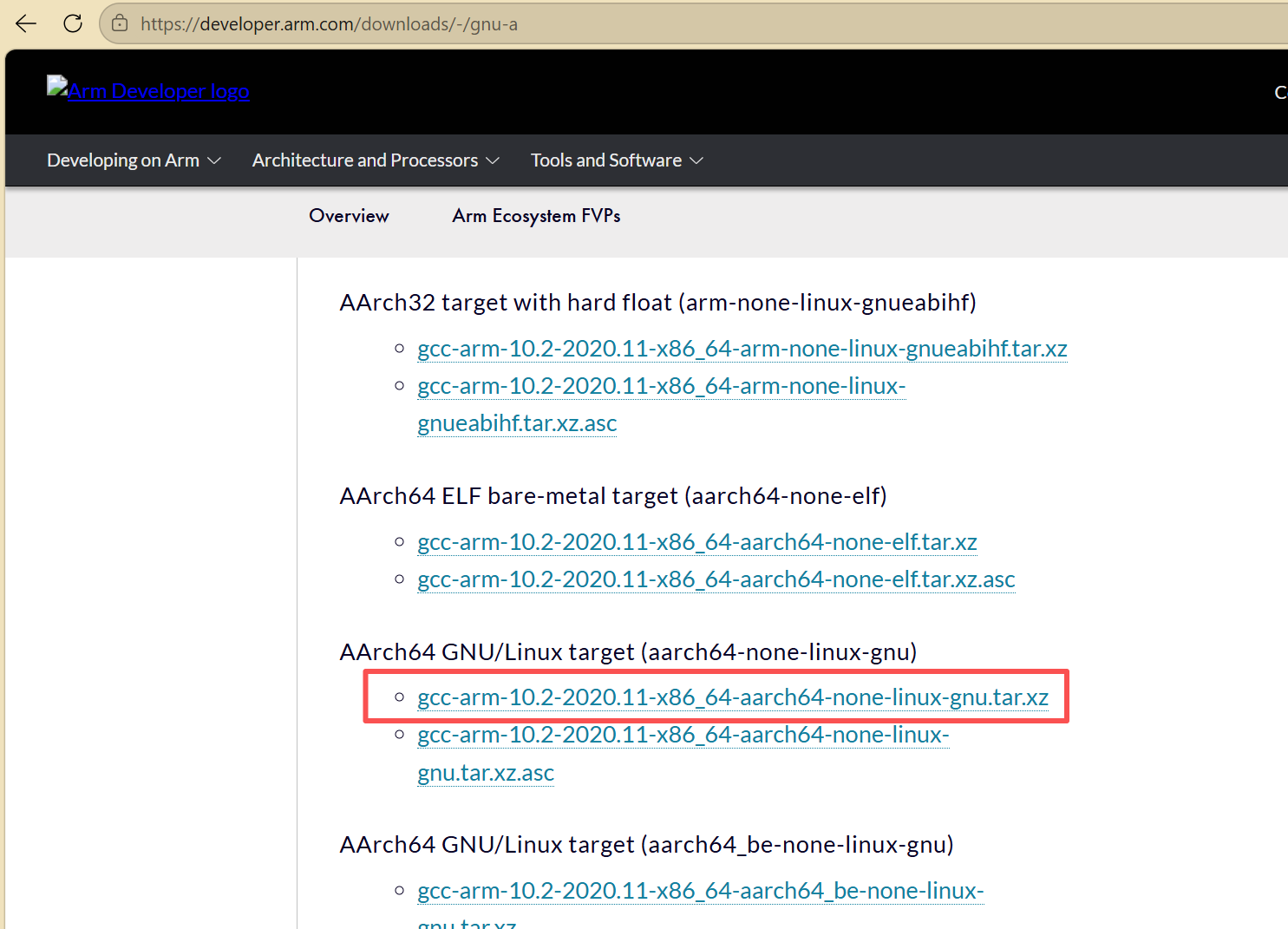
In the deploy directory, modify the cross-compilation toolchain path GCC_COMPILER in the build-linux.sh file, and then run the build-linux.sh script to compile the on-board execution files. Once this compilation process is finished, all files required for on-board execution (except for the two model files mentioned above) will be placed in an install directory.
On-Board Execution Testing
To perform the on-board execution test, upload the install directory and the two on-board model files (qwen3-vl_vision_rk3588.rknn and _w8a8_rk3588.rkllm) to the board’s models directory. Then execute:
cd /home/cat/install/demo_Linux_aarch64
export LD_LIBRARY_PATH=./lib
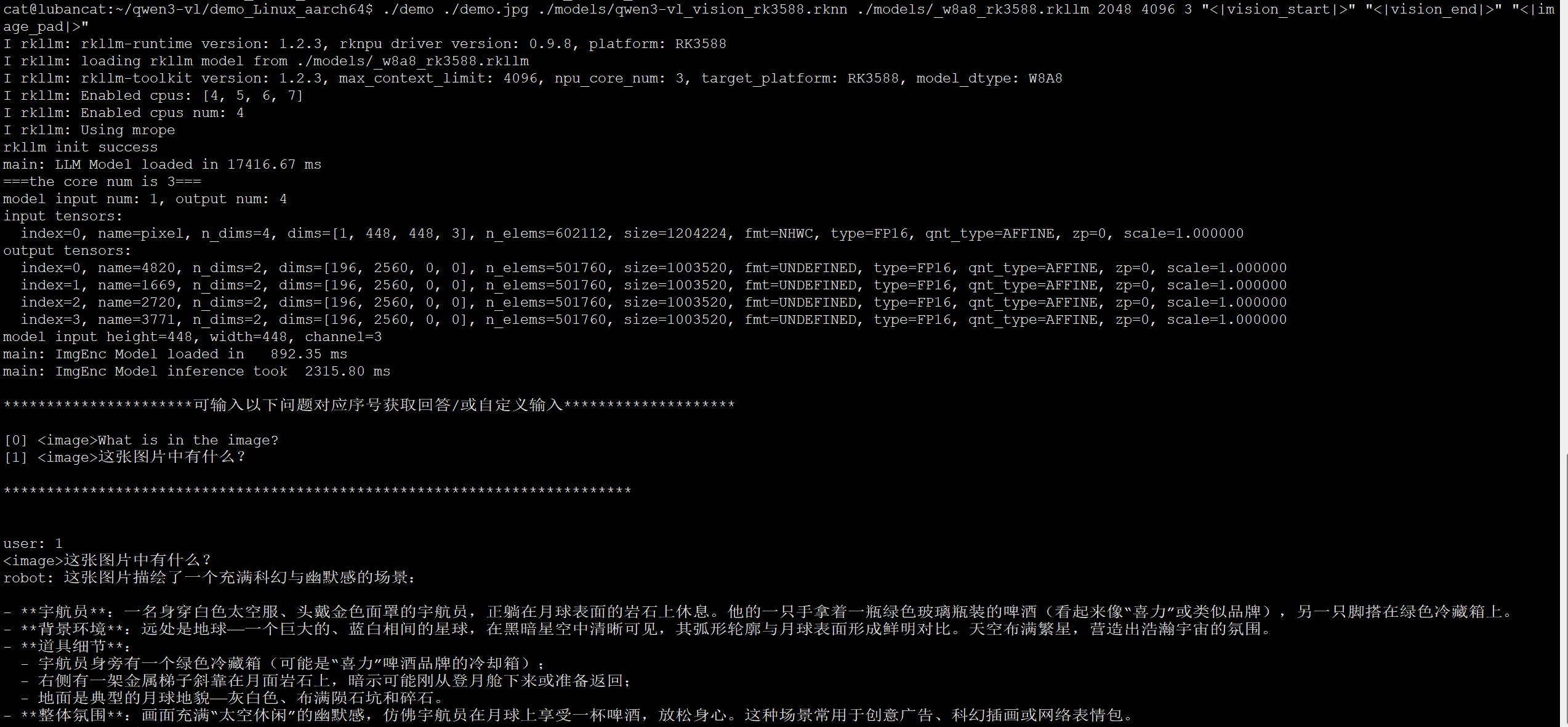
./demo ./demo.jpg ./models/qwen3-vl_vision_rk3588.rknn ./models/_w8a8_rk3588.rkllm 2048 4096 3 "<|vision_start|>" "<|vision_end|>" "<|image_pad|>"
The final running effect of the demo on the RK3588 is shown in the figure below:
References
- airockchip/rknn-llm
- airockchip/rknn-toolkit2
- 【Hardcore Deployment】Deployment of Qwen3-VL on RK3588 - CSDN Blog
Attempting to understand and explain technical issues from the perspective of underlying principles: Audio/Video/Cameras/Smart Home/Bluetooth/WiFi/Wireless Communication/AI. Please follow the WeChat Official Account: Pavel Han.