Notes on Setting Up the Rockchip RK3588 NPU Development Environment
- 11 Mar, 2026
This article details setting up the NPU development and on-board inference environment on the Rockchip platform based on RK3588 + Debian Linux, using the YOLOv5 model from the Model Zoo as an example to summarize the end-to-end deployment workflow.
Rockchip NPU Application Development Framework
The overall workflow for Rockchip NPU application development is largely consistent with the post-processing workflow of Junchen AI applications. First, models are developed and trained on a PC using PyTorch or TensorFlow. Once training is complete, the model (in ONNX or PT format) is converted into the RKNN format using the RKNN-Toolkit2 tool. This RKNN format is the edge model format capable of running on Rockchip chips, which is then invoked via C/C++ in the production environment for forward inference.
The RKNN software architecture is illustrated in the diagram below:
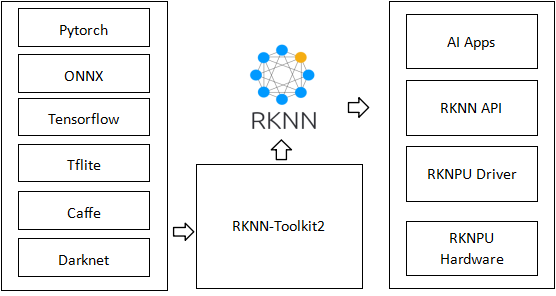
Relationship between RKNN-Toolkit2, RKNN-Toolkit-Lite2, and RKNPU2 C++ API:
RKNN-Toolkit2is used to convert models trained on a PC or server into the RKNN format runnable on Rockchip NPUs. It runs on the PC side.RKNN-Toolkit-Lite2is a tool that allows forward inference based on RKNN-format models directly on Rockchip NPUs. It runs on the Rockchip processor.RKNN-Toolkit-Lite2is essentially a Python package running on the Rockchip processor, meaning the forward inference it executes runs within a Python environment on the Rockchip hardware. If higher performance is required, the RKNPU2 C++ API should be used for AI execution instead ofRKNN-Toolkit-Lite2.- Therefore:
RKNN-Toolkit2is used for model conversion;RKNN-Toolkit-Lite2is used for rapid verification and testing of converted models on the board; and theRKNPU2 C++ APIis reserved for final project deployment.
Personal opinion: For on-board inference, the efficiency of C/C++ code is vastly superior to Python. Therefore, there is little practical necessity to use Python scripts with
RKNN-Toolkit-Lite2for inference verification on the board. The most mature and direct approach is to useRKNN-Toolkit2for model conversion, followed by C/C++ inference directly on the board. Of course, the advantage of usingRKNN-Toolkit-Lite2Python scripts for on-board inference verification lies in the support of numerous Python packages and consistency with the PC environment, making it easier to write inference code.
List of Chip Platforms Supported by RKNN-Toolkit2:
- RK3588 Series
- RK3576 Series
- RK3566/RK3568 Series
- RK3562 Series
- RV1103/RV1106
- RV1103B/RV1106B
- RV1126B
- RK2118
As mentioned above, Rockchip NPU application development relies primarily on the RKNN ecosystem. Application development on Rockchip NPU chips relies mainly on the following two GitHub-maintained repositories:
- RKNN-Toolkit2: airockchip/rknn-toolkit2, the model conversion tool.
- RK Model Zoo: airockchip/rknn_model_zoo, support examples for running models on-board.
Setting Up the RKNN-Toolkit2 Development Environment
As of early 2026, the latest version of RKNN-Toolkit2 is 2.3.2.
To develop and test applications within the Rockchip RKNN NPU ecosystem, you must first set up the RKNN-Toolkit2 development environment. Clone the RKNN-Toolkit2 and RKModel Zoo repositories from GitHub:
git clone https://github.com/airockchip/rknn-toolkit2.git --depth 1
git clone https://github.com/airockchip/rknn_model_zoo.git --depth 1
Python Environment for Model Conversion
Create a dedicated rknn environment (specifying Python version 3.12) and install RKNN-Toolkit2 along with all its dependency packages (rknn-toolkit2-master/rknn-toolkit2/packages/x86_64):
conda create -n rknn python=3.12
conda activate rknn
pip install -r requirements_cp312-2.3.2.txt
pip install rknn_toolkit2-2.3.2-cp312-cp312-manylinux_2_17_x86_64.manylinux2014_x86_64.whl
Note: Installing the Python 3.12 environment according to the steps above will result in an error when subsequently converting the YOLOv5 ONNX file to RKNN in the Model Zoo:
AttributeError: module 'onnx' has no attribute 'mapping'. This occurs because theonnxlibrary version installed in the Python environment is too high and incompatible with the currentrknn-toolkit2 (v2.3.2). You should modify theonnxdependency version inrequirements_cp312-2.3.2.txttoonnx==1.16.1rather than installing the latest version ofonnx.
Cross-Compilation Environment
The cross-compilation tool for board-side C/C++ code (RK3588 uses the aarch64 architecture, so install the 64-bit compilation tool): https://releases.linaro.org/components/toolchain/binaries/6.3-2017.05/aarch64-linux-gnu/gcc-linaro-6.3.1-2017.05-x86_64_aarch64-linux-gnu.tar.xz. This will be needed later when compiling C/C++ demos for on-board model inference.
Board-Side NPU Driver Environment
Furthermore, as shown in the RKNN software architecture diagram above, AI inference executed on the RK3588 board also requires support from the board-side NPU environment. This includes the kernel-level NPU driver, the Rockchip RKNN runtime libraries, and other supporting libraries.
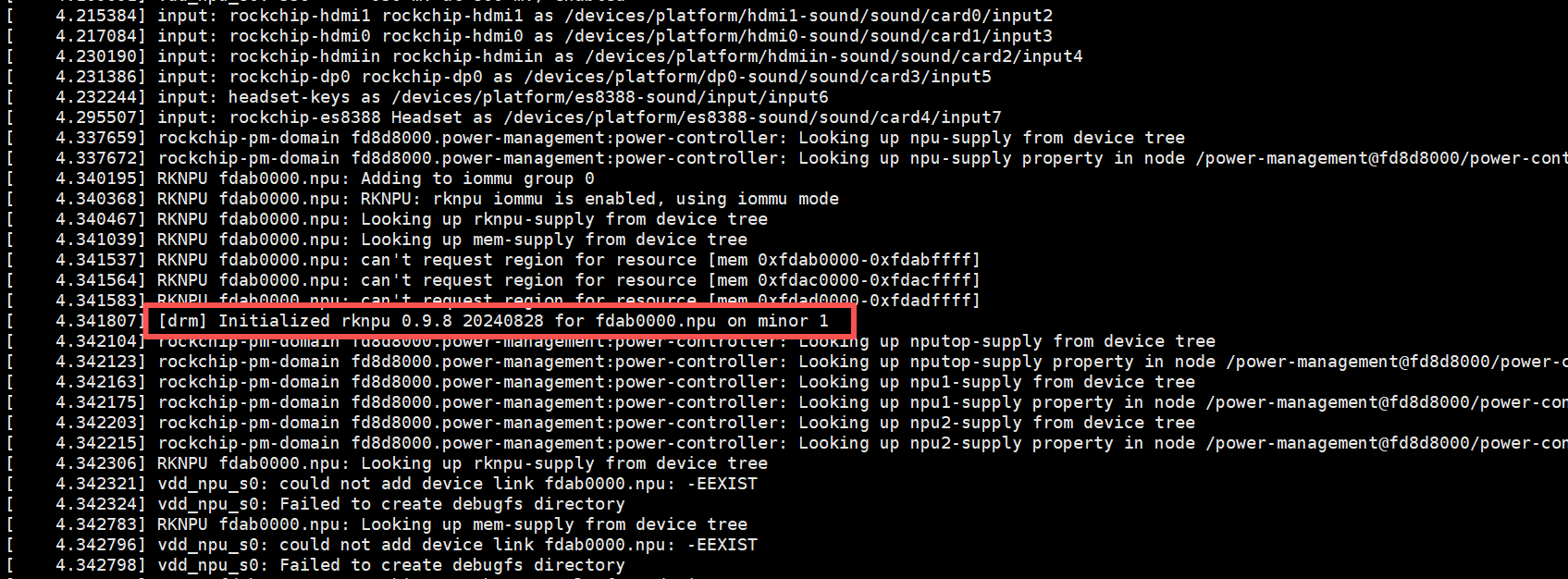
First, you must enable NPU driver support in the board’s kernel and ensure that the kernel’s NPU driver version matches the version of RKNN-Toolkit2 and its runtime libraries. You can check the NPU driver version in the kernel boot messages or via dmesg:
In addition to the NPU driver support mentioned above, board-side applications executing inference on the NPU also require the runtime library librknnrt.so. librknnrt.so is located at rknn-toolkit2-master/rknpu2/runtime/Linux/librknn_api/aarch64. When compiling the C/C++ demo for board-side inference, you should link against this dynamic library and place it beforehand in the LD_LIBRARY_PATH of the board’s system.
Additionally, running the C/C++ demo for on-board model inference may require other multimedia and hardware acceleration libraries in addition to the NPU driver and the librknnrt.so runtime support library:
- RGA (Rockchip Graphics Architecture): Used for hardware-accelerated image scaling, cropping, and format conversion (e.g., converting YUV frames from a camera to the RGB format required by the NPU). Requires the
librga.solibrary file and its header files. - MPP (Media Process Platform): Used for hardware video encoding/decoding (H.264/H.265). Requires
librockchip_mpp.so.
At this point, the Python, C/C++ cross-compilation environment and board-side runtime environment for NPU development on the Rockchip platform are fully prepared. Next, we will use the YOLOv5 demo from the Model Zoo to summarize the environment and NPU development workflow.
On-Board Testing Based on YOLOv5 in the Model Zoo
The examples directory of the previously downloaded Model Zoo repository (rknn_model_zoo-main) contains multiple model samples already adapted for the Rockchip platform. After minor modifications and compilation, they can be run and tested on the board. The entire workflow can be divided into two steps: model conversion and board-side C/C++ demo compilation.
Model Conversion
Navigate to the examples/yolov5/model directory and run download_model.sh. The purpose of this script is to download a YOLOv5s ONNX model from a specified network address. Therefore, if you already have your own trained YOLOv5s model, you can completely substitute it here.
Next, navigate to the examples/yolov5/python directory and run the convert.sh script to perform model conversion (.onnx -> .rknn). The convert.sh script specifies the dataset description file path DATASET_PATH and the model conversion output path DEFAULT_RKNN_PATH. You can modify these values if necessary. Then, run python convert.py ../model/yolov5s_relu.onnx rk3588 to execute model conversion. The converted model will be saved to the path specified by DEFAULT_RKNN_PATH (with the .rknn extension).
At this point, the model file for on-board execution is successfully converted.
C/C++ Inference Demo
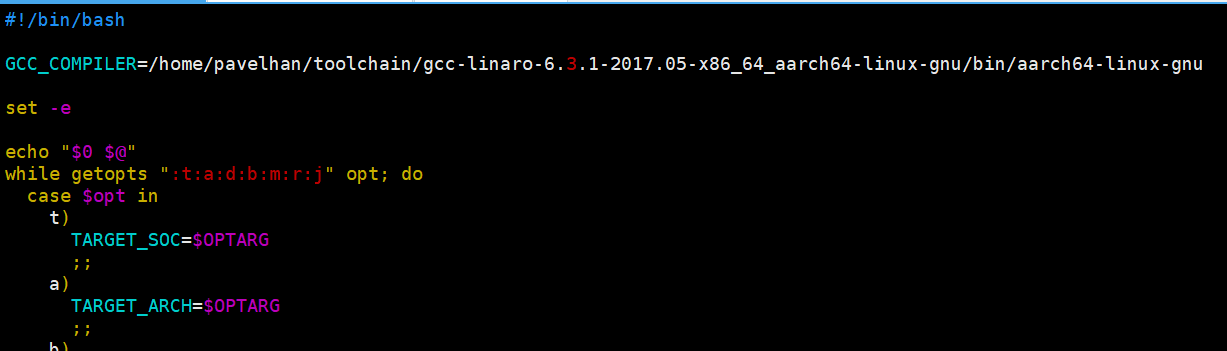
There are two build script files in the rknn_model_zoo-main directory: build-linux.sh and build-android.sh, used to compile C/C++ inference demos for Linux and Android environments on the board, respectively. Taking the RK3588 Debian Linux environment as an example, first modify build-linux.sh by adding the path to the cross-compilation toolchain at the very beginning:
Then, invoke the build-linux.sh script to compile the YOLOv5 on-board inference demo program: ./build-linux.sh -t rk3588 -a aarch64 -d yolov5 -b Release. build-linux.sh will actually navigate to the examples/yolov5/cpp/ directory, locate the CMakeLists.txt file, and invoke cmake to perform the full compilation process.
The parameter descriptions for build-linux.sh are as follows:
./build-linux.sh -t <target> -a <arch> -d <build_demo_name> [-b <build_type>] [-m] [-r] [-j]

    -t : target (rk356x/rk3588/rk3576/rv1126b/rv1106/rk1808/rv1126)
    -a : arch (aarch64/armhf)
    -d : demo name
    -b : build_type(Debug/Release)
    -m : enable address sanitizer, build_type need set to Debug
    -r : disable rga, use cpu resize image
    -j : disable libjpeg to avoid conflicts between libjpeg and opencv
such as: ./build-linux.sh -t rk3588 -a aarch64 -d mobilenet
Once build-linux.sh finishes execution, it will generate an install directory under the rknn_model_zoo-main root directory, containing all files required for the demo to run on the board: the demo executable, the runtime dependency library librknnrt.so, the board-side RKNN model file, and test image files. You simply need to package this install directory, upload it to the board, and execute the demo program:
cat@lubancat:~/install/rk3588_linux_aarch64/rknn_yolov5_demo$ ./rknn_yolov5_demo model/yolov5.rknn model/bus.jpg
load lable ./model/coco_80_labels_list.txt
model input num: 1, output num: 3
input tensors:
  index=0, name=images, n_dims=4, dims=[1, 640, 640, 3], n_elems=1228800, size=1228800, fmt=NHWC, type=INT8, qnt_type=AFFINE, zp=-128, scale=0.003922
output tensors:
  index=0, name=output0, n_dims=4, dims=[1, 255, 80, 80], n_elems=1632000, size=1632000, fmt=NCHW, type=INT8, qnt_type=AFFINE, zp=-128, scale=0.003922
  index=1, name=286, n_dims=4, dims=[1, 255, 40, 40], n_elems=408000, size=408000, fmt=NCHW, type=INT8, qnt_type=AFFINE, zp=-128, scale=0.003922
  index=2, name=288, n_dims=4, dims=[1, 255, 20, 20], n_elems=102000, size=102000, fmt=NCHW, type=INT8, qnt_type=AFFINE, zp=-128, scale=0.003922
model is NHWC input fmt
model input height=640, width=640, channel=3
origin size=640x640 crop size=640x640
input image: 640 x 640, subsampling: 4:2:0, colorspace: YCbCr, orientation: 1
scale=1.000000 dst_box=(0 0 639 639) allow_slight_change=1 _left_offset=0 _top_offset=0 padding_w=0 padding_h=0
rga_api version 1.10.1_[0]
rknn_run
person @ (209 243 286 510) 0.880
person @ (479 238 560 526) 0.871
person @ (109 238 231 534) 0.840
bus @ (91 129 555 464) 0.692
person @ (79 353 121 517) 0.301
write_image path: out.png width=640 height=640 channel=3 data=0x34f9c120