Best Practices for Source Code Management in Open Source Software Projects
- 03 Mar, 2026
When performing secondary development or preliminary research on active and frequently updated open-source software on GitHub (such as Ultralytics), the most frustrating challenge is that upstream code in the source repository is constantly changing, while my own modifications during study and research are scattered everywhere. Eventually, I lose track of what I changed, leading to massive merge conflicts that are extremely inefficient to resolve.
Based on online learning and research, this article presents a rational technical path to solve these problems. This workflow is a standard practice adopted by many teams during open-source project research. In short: By tackling both Git version control and software project code architecture, we use Fork + Branch Isolation + Modular Intrusion to ensure high efficiency in open-source software learning and research. This article uses the project qiuqiangkong/audioset_tagging_cnn on GitHub to summarize the specific practices of this entire workflow in detail.
1. Isolation of Git Repositories and Branch Architecture
First, do not directly clone the original repository from GitHub and push your own modifications simply to the main branch. Instead, leverage Git’s Fork and Upstream mechanisms. Fork the original repository while maintaining the relationship between the upstream and downstream repositories.
Click the Fork button on the audioset_tagging_cnn project on GitHub to fork it into your own GitHub account. Then create an independent research branch based on its main master branch:
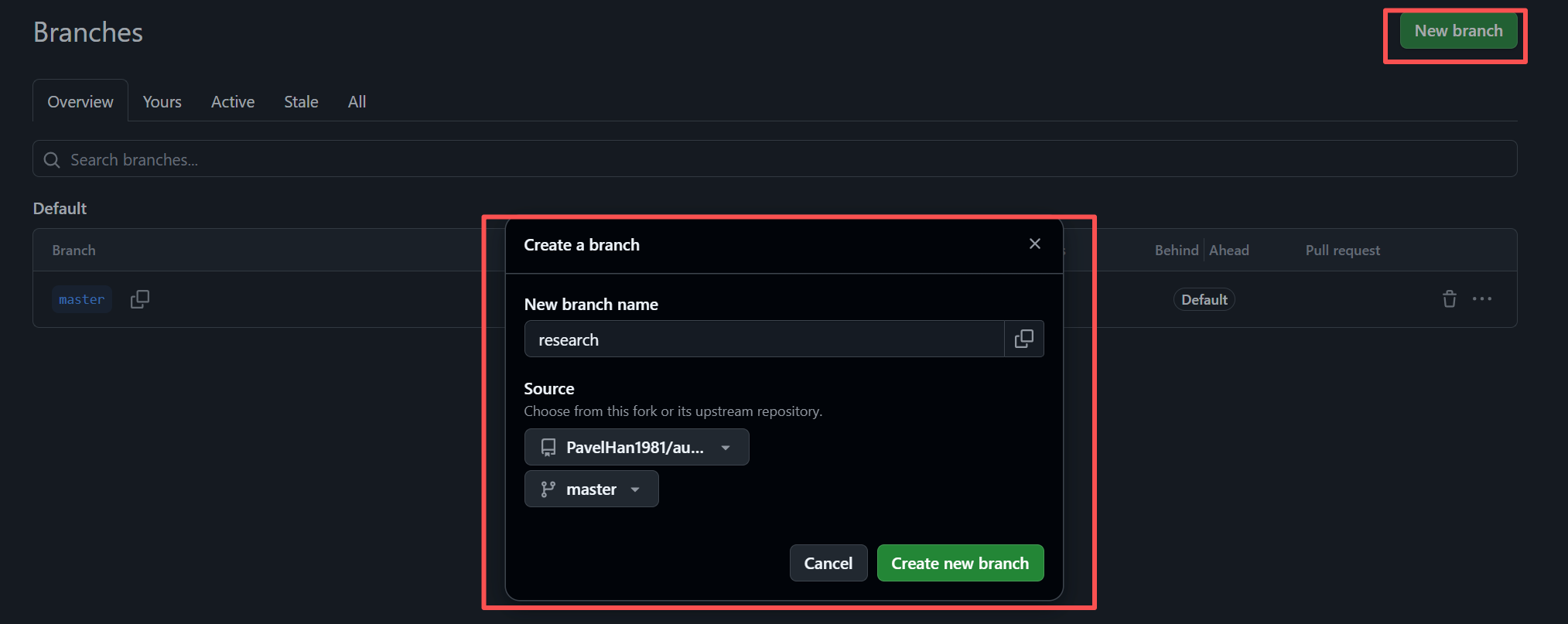
Establish strict branch usage conventions for subsequent study and research:
masterbranch: Never modify code on this branch! This branch is strictly used to synchronize the latest code from the official repository.researchbranch: This is a dedicated workspace for preliminary research and learning. All code experiments and modifications are managed and maintained on this branch.
Next, clone the forked audioset_tagging_cnn project from your GitHub account to your local machine:
git clone https://github.com/YourAccount/audioset_tagging_cnn.git
cd audioset_tagging_cnn
At this point, a crucial step remains: you need to bind the original official repository as the upstream for your master branch, so that the master branch can later pull the latest code from this upstream:
(new-env) PS D:\Code\Github\audioset_tagging_cnn> git remote add upstream https://github.com/qiuqiangkong/audioset_tagging_cnn.git
(new-env) PS D:\Code\Github\audioset_tagging_cnn> git remote
origin
upstream
2. Workflow for Synchronizing Upstream Repository Updates
Through the process above, the original repository qiuqiangkong/audioset_tagging_cnn has been set as the upstream repository path. Whenever the original repository is updated, you can use the following workflow to synchronize the updated code to your local master and research branches:
# 1. Switch back to the master branch
git checkout master
# 2. Fetch the latest official code into the master branch
git fetch upstream
git merge upstream/master
# 3. Push the latest local master branch to your own GitHub repository for backup
git push origin master
# 4. Switch back to the research branch, and rebase or merge the official updates
git checkout research
git merge master  # or git rebase master
In the future, whenever there are updates in the upstream original repository, running the above process periodically will merge the upstream updates into the master and research branches of your own repository.
3. Isolation of Directory Structures
Even within the research branch, you should avoid casually throwing your test scripts or other files into the root directory or the official source code package.
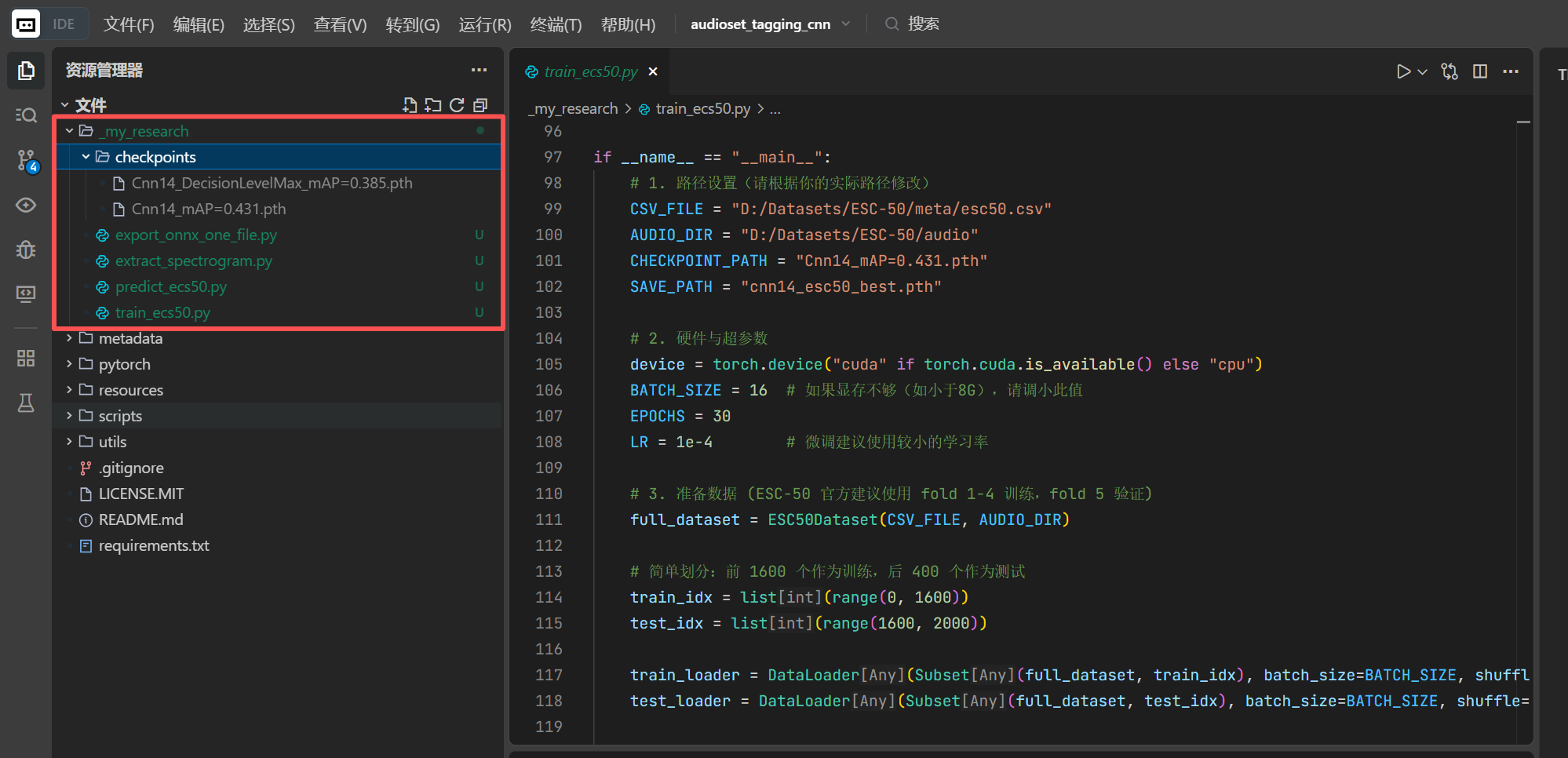
A more sensible approach is to create a folder with a special prefix in the project’s root directory (for example, _my_research/; the underscore places it at the top of the directory tree for easy access), and place your test scripts, inference code, and custom configuration files uniformly inside this directory.
As shown in the figure below, all files generated during your preliminary research and development should be placed collectively in this special folder to avoid interfering with the code and files in the original repository.
4. Installing in Editable Mode (for Python Projects)
In some Python open-source projects, debugging and development require installing and executing software packages within the current Python environment (for example, the Ultralytics project requires executing the yolo command in the terminal, which means installing the ultralytics package). Such projects generally contain a setup.py or pyproject.toml file in their root directory.
To ensure that the code written in _my_research/ can directly reference the modules implemented in the official source code, and that any modifications you make to the official source take effect immediately, you should install the package in editable mode within your virtual environment:
pip install -e .The difference between editable mode installation (pip install -e .) and standard installation (pip install .) is as follows:
- When performing a standard installation,
pipcopies all Python files from the current source directory into thesite-packagespath of the system (or virtual environment). In this case, if you add a line of codeprint("Hello CV")to the originalultralytics/engine/trainer.py, running the code again will not print this message. This is because the system is executing the previously copied old code version. Therefore, during debugging, every time you modify the code, you must rerun the installation command for the changes to take effect, which is very cumbersome. - On the other hand, if you use the
-eflag during package installation,pipdoes not directly copy the source files. Instead, it creates a shortcut (usually a.egg-linkfile) in the system’ssite-packagesdirectory, pointing directly to the current source code directory. In this scenario, any modifications you make to the local source code will take effect immediately the next time you run the code as soon as you save them. There is no need to reinstall repeatedly, making the debugging process much more developer-friendly.