Detailed Explanation of YOLO Model Configuration Parameters
- 25 Nov, 2025
This article provides a detailed summary and explanation of all parameters contained in the default.yaml configuration file in the ultralytics/YOLO project (excluding visualization and export-related parameters).
The path to the configuration parameter file in the ultralytics/YOLO project is ultralytics/cfg/default.yaml. The default.yaml file is the core configuration file of the Ultralytics project. Understanding the meanings of its parameters is crucial for successfully training custom datasets, as well as performing inference, exporting, and deployment.
task and mode
At the beginning of the default.yaml configuration file, the task and mode parameters are used to set the basic running mode of the model. These two parameters jointly determine how the YOLO model operates. Different tasks load different model architectures and loss functions, while different modes execute corresponding workflows (training, validation, inference, etc.).
The task parameter is used to specify the model’s task type. Once the task parameter is designated, the project will build the network structure based on the specified task type. The current implementation of the Ultralytics project includes five task types:
- detect: Object detection task, used for detecting and localizing target objects in images.
detectis the most commonly used task type in this project and is also the default task indefault.yaml. - segment: Instance segmentation task, which not only detects object locations but also provides pixel-level segmentation masks.
- classify: Image classification task, which classifies the entire image only.
- pose: Pose estimation task, used to recognize keypoints/joint positions of humans or animals, providing stick-figure-like recognition and detection results.
- obb: Oriented bounding box detection task, used to detect non-axis-aligned targets (such as objects from a drone’s perspective).
For more details on these different types of tasks, please refer to the article Summary of Computer Vision AI Application Fields and Their Mainstream Models.
The mode parameter is used to specify the current running mode:
- train: Training mode, used to execute the model training process.
- val: Validation mode, used to evaluate the performance of the currently trained model on the validation set and generate validation metric files.
- predict: Prediction/inference mode, used to perform inference on designated data using a trained model.
- export: Export mode, used to export the model into various deployment formats (such as ONNX, TensorRT, etc.).
- track: Enables tracking mode on the
detectmodel, which can assign a unique ID to each detected object in a video and continuously track its motion trajectory. When enabled, the tracking configuration file must be specified via thetrackerparameter. - benchmark: Benchmark mode, used to more comprehensively evaluate the model’s performance, speed, and accuracy across different hardware and configurations.
Training-Related Parameters
The parameters related to the model training process in the default.yaml file and their explanations are shown in the table below:
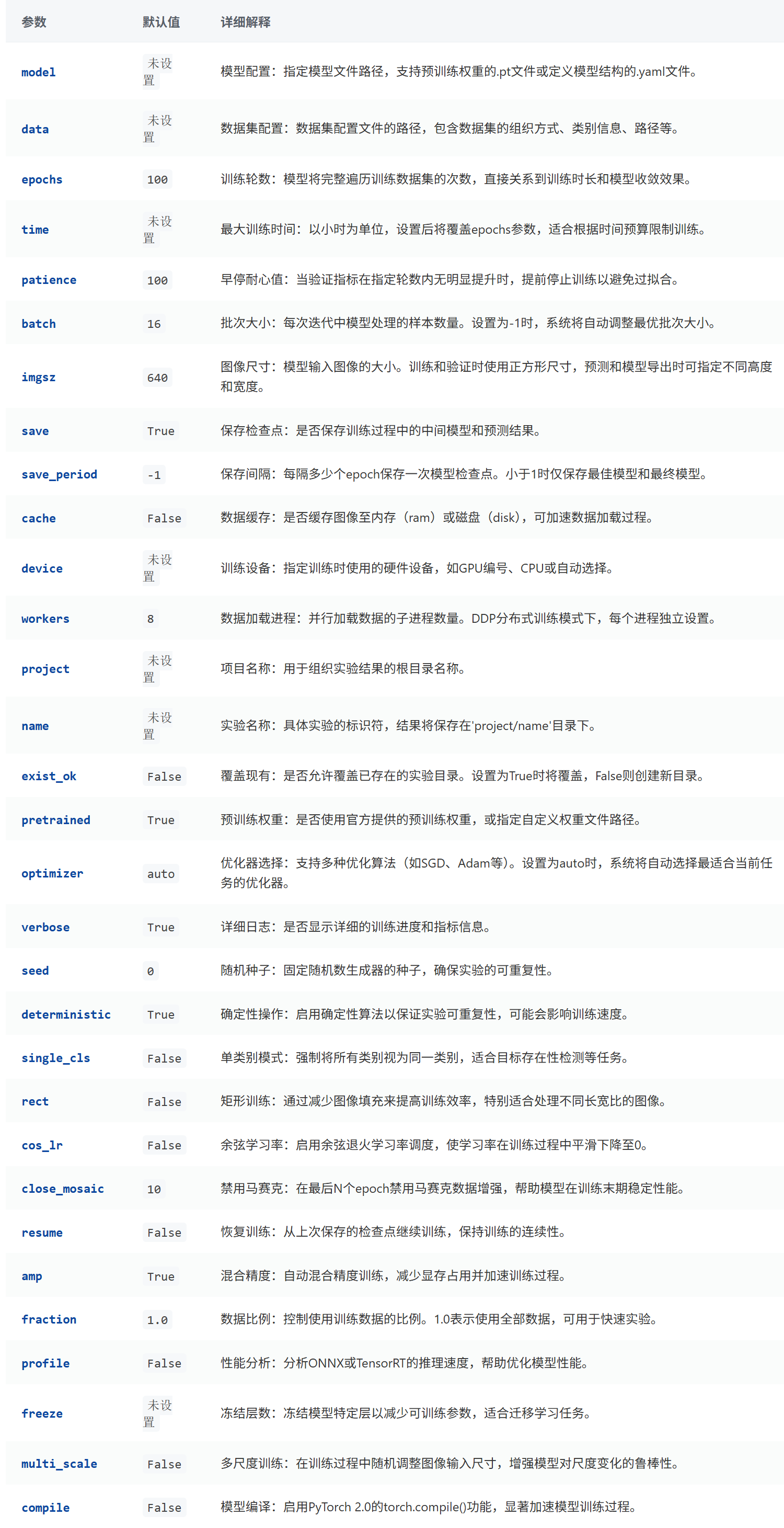
Below is a more detailed explanation and description of some of the parameters above.
The save (default True) and save_period (default -1) parameters are used to specify whether to save the trained weight files to the save_dir/weights/ directory. When save is set to true, the current training weights are overwritten and saved in the last.pt file at the end of each epoch. If the current training performance surpasses previous metrics, the weight file is also saved as best.pt. When save_period is set to N (where N is not -1), an intermediate training weight file named epoch_N.pt is additionally saved in the save_dir/weights/ directory every N epochs.
The cache parameter determines whether and how the dataset is preloaded and cached at the beginning of training, avoiding time-consuming disk reads and data processing operations repeatedly during training. Setting it to False (the default value) means no caching, loading a new batch of training data from the disk every time; setting it to True or 'ram' means caching the training set data in RAM in advance, fetching data from RAM each time; setting it to 'disk' means that during the first epoch, the training program saves the processed images in a special format (.npy) to a temporary directory on the hard drive, and subsequent epochs read from this cache.
The project and name parameters can be combined to customize the save path for model training files. If these two parameters are not set, the files generated by the default training process are saved in a directory like runs/detect/train/exp. Once set, the save path for these files becomes project/name. The exist_ok option determines whether multiple executions should overwrite this project/name or append an execution index suffix to the directory name specified by name to distinguish between multiple execution results.
When the pretrained parameter is set to False, model training uses only the model specified by the model parameter, and the weights of each layer are initialized with completely random parameters; when pretrained is set to True, it directly uses the weights in the model file specified by the model parameter; when pretrained is set to the path of a specific weight file, it uses the model specified by the model parameter, but initializes and sets each layer’s parameters using the parameter file specified by pretrained.
The seed and deterministic parameters are used to control the randomness and reproducibility of the model training process and results. Under the default configuration (seed=0, deterministic=False), the training process and results retain a certain degree of randomness, which is suitable for daily development scenarios. For applications requiring stricter rigor (such as academic paper publication), model training must provide strict determinism and reproducibility. In this case, these parameters should be set to seed=42, deterministic=True.
The single_cls parameter is a boolean value with a default of True. When set to True, the model’s output forces all objects to be treated as a single class, meaning the model outputs only one class. If your application only cares about whether an object of a certain category exists in the frame, you can set this parameter to True to simplify the complex multi-class detection problem into a more basic object presence detection problem.
The rect parameter is used to specify whether to use a fixed square aspect ratio as input for model training images. When rect=False (default value), all training images, regardless of their aspect ratio, are first converted to squares via scaling + padding before being fed into the model for training. This mode is generally targeted at datasets where aspect ratios are inconsistent and vary significantly. When rect=True, YOLO first counts the aspect ratio information of each batch of images to find the most suitable aspect ratio, and then during training, converts all images in this batch to the new aspect ratio before feeding them into the model. For datasets where the aspect ratios of all images are basically the same (such as surveillance cameras, which are typically 4:3 or 16:9), this approach can improve training efficiency. The main purpose of setting the rect parameter is to adjust the input image size according to the dataset’s aspect ratio, minimizing GPU computation waste and improving training efficiency and speed.
The close_mosaic parameter is used to specify disabling the mosaic data augmentation function for the last N epochs of the training process. Mosaic data augmentation cuts and combines four training images in a random manner per batch to form a new training image for parameter training. This technique enhances training results through the diversity of training data. However, in the late stages of training, we generally hope that parameters stabilize as quickly as possible, whereas mosaic augmentation causes parameters to fluctuate too violently. Therefore, by setting the close_mosaic parameter, you can disable mosaic augmentation N rounds early to ensure parameters stabilize quickly during the final stage of training.
The amp parameter is used to control the data types and computational precision used during training. In traditional model training, FP32 precision is generally used throughout the entire workflow. When AMP (Automatic Mixed Precision) mode is enabled, memory-saving FP16 precision is used for forward and backward passes, while higher FP32 precision is reserved only for gradient-related calculations. The advantage of this is that it can drastically reduce memory requirements and accelerate training speed while keeping training metrics basically unchanged. Enabling AMP mode is generally recommended by default, but note that some older hardware does not support AMP.
The fraction parameter is used to specify the proportion of training data participating in training relative to the total dataset size. Normally, model training involves feeding 100% of the training set into the model. However, in scenarios requiring rapid validation with very large datasets, the fraction parameter can be set to train the model using only a specific proportion of the training data. In this case, each epoch will randomly extract a fraction of data as specified by the parameter for training.
The Profile parameter is used to control whether to enable performance metrics profiling during training. When enabled (Profile=true), the training process performs fine-grained statistics and analysis on every step, ultimately outputting extremely detailed performance analysis data. Consequently, this process requires more memory to store these statistical information and will significantly slow down training speed. Therefore, unless you are adjusting the model framework and need to understand execution efficiency at a very granular level, enabling profile mode is not recommended.
The freeze parameter is used to specify which layers’ weights should be frozen during training, meaning their parameters will not be updated. When fine-tuning a model on your own dataset using an officially pretrained YOLO model, official parameters have already undergone thorough training on large datasets like COCO and contain extremely powerful feature extraction capabilities. If your dataset is relatively small (within a few thousand images) and the detection task is similar, it is recommended to use the freeze parameter to freeze the backbone network, training only the neck and detection head on your own data. You can control the freezing of the first N layers or freeze specific layer parameters using a list.
The multi_scale parameter is used to control the input image size during training. If multi_scale is set to False, the input image size during training is fixed to the imgsz setting of 640x640. When multi_scale is set to True, an image size is randomly chosen for each batch (must be a multiple of 32), and images in that batch are resized to this new dimension before being fed into the model. Since input image sizes vary across batches, this randomly adjusts training data diversity, thereby enhancing the model’s adaptability and generalization capabilities.
The compile parameter is a new feature introduced in YOLOv8 based on PyTorch 2.0’s torch.compile. When enabled, it optimizes the model’s computational graph code during training to accelerate code execution efficiency and reduce training time. If your training dataset is relatively large and your hardware specifications are modern, you can enable this option to accelerate the training process.
Image Segmentation and Classification Parameters
The following three parameters (overlap_mask, mask_ratio, and dropout) are only valid for image segmentation and image classification tasks.
# Segmentation
overlap_mask: True # (bool) merge instance masks into one mask during training (segment only)
mask_ratio: 4 # (int) mask downsample ratio (segment only)

# Classification
dropout: 0.0 # (float) dropout for classification head (classify only)
Validation and Testing Parameters
The table below lists the configuration parameters, default values, and brief descriptions for the Val/Test settings section in the default.yaml configuration file.
Note: Although some parameters in the table below are categorized under the
Val/Test settingssection of the configuration file, they are also used during thepredictprocess—for example, NMS algorithm-related parameters such asiou,max_det, andconf.
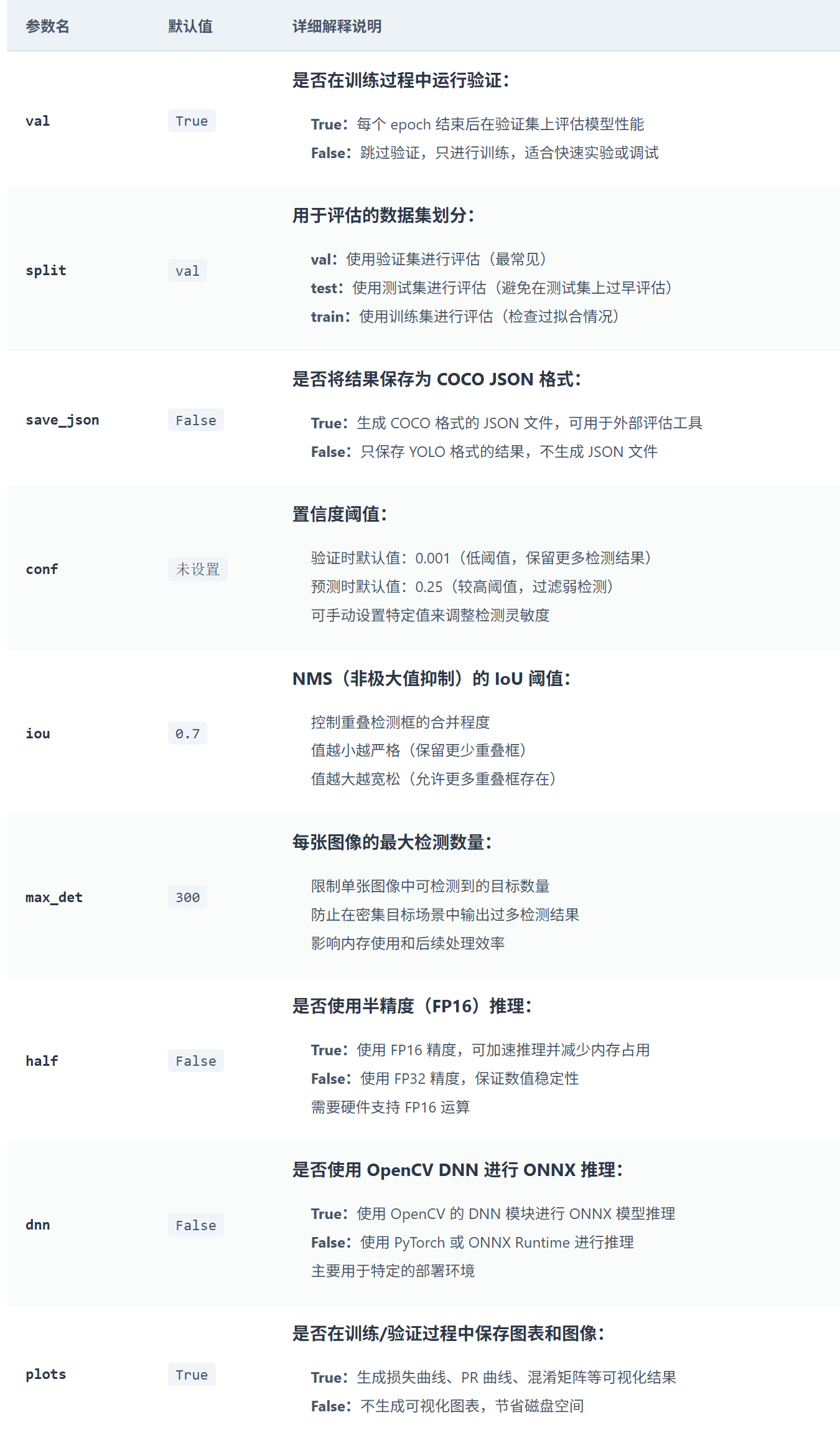
The split parameter is used to specify the dataset to be used when validation is enabled (i.e., val parameter is set to True). Its values range over [val, test, train], representing evaluation using the validation, test, or training set respectively. In the vast majority of cases, it should be set to val to avoid test set data leakage and ensure fair evaluation.
The conf, iou, and max_det parameters are filtering parameters for the NMS (Non-Maximum Suppression) algorithm. conf is the object detection confidence threshold, iou is used to filter overlapping boxes, and max_det limits the maximum number of detection results output per image.
The half parameter specifies whether FP32 or FP16 precision is used during model forward inference. The dnn parameter specifies whether OpenCV’s DNN module or the PyTorch framework is used for model forward inference.
Prediction Parameters
The table below lists the configuration parameters, default values, and brief descriptions for the Predict settings section in the default.yaml configuration file.
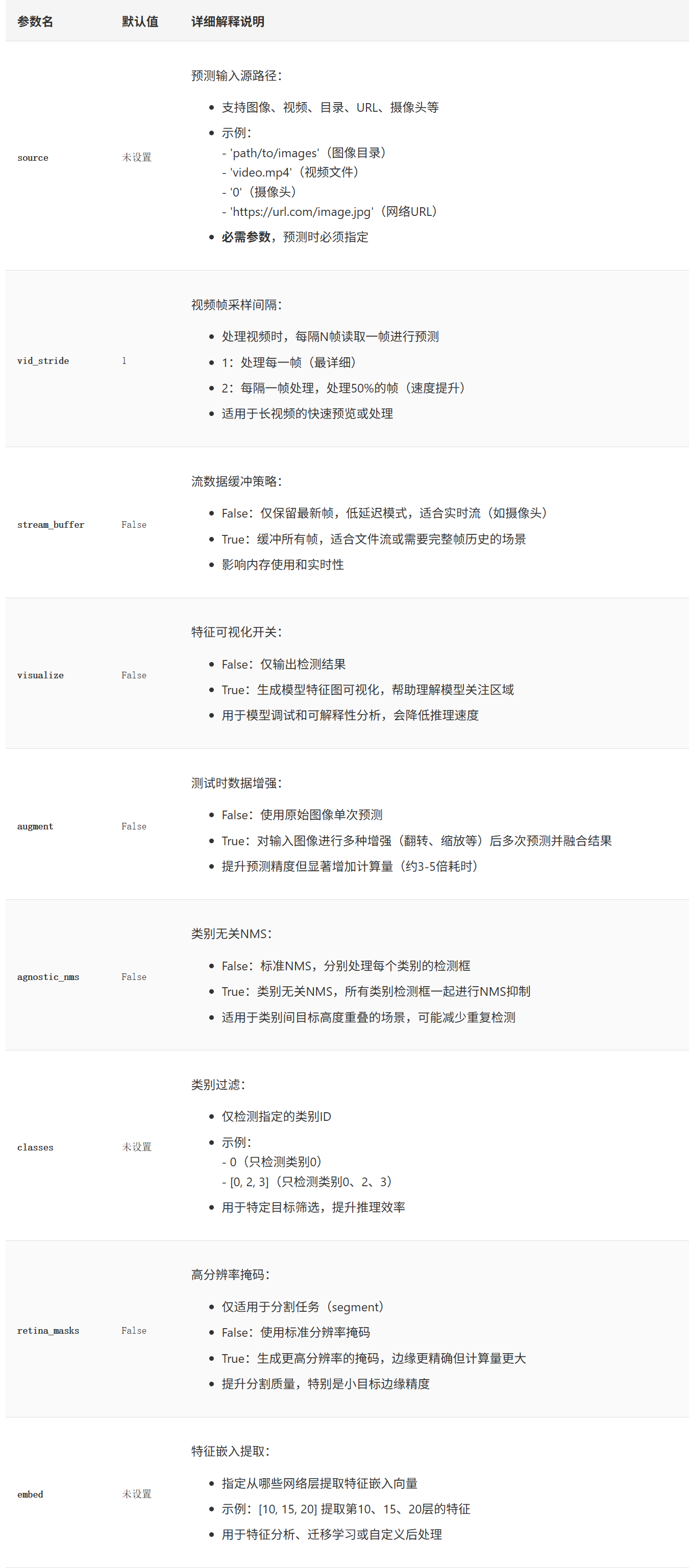
The visualize parameter controls whether to generate visual statistical analysis results, intermediate layer feature maps of image recognition, heatmaps, and other information during validation and inference execution. Viewing these results can assist in debugging and locating issues within the model. When set to True, because these extra files must be generated and written to disk, it will significantly increase memory requirements and affect inference speed.
The augment parameter controls whether to perform augmentation operations on input images during inference. When augment=False, the model simply takes the original image and performs a single inference pass to yield results. If set to True, the model applies various augmentation operations (such as flipping, scaling) to the input image, performs multiple inference passes, and finally merges the results into the final output. Consequently, prediction accuracy improves, but processing time increases substantially.
The agnostic_nms parameter is a parameter within the NMS algorithm execution flow, determining whether different classes should be distinguished during the duplicate box filtering process. In standard NMS where agnostic_nms=False, the NMS algorithm distinguishes between classes, and detection boxes of different classes do not affect each other. If set to True, NMS processes all classes together during filtering. In this case, two objects of different categories located close to each other might risk being mistakenly suppressed.
The classes parameter specifies a list of target category indices to be detected during inference. When this parameter is left unset, it means all target categories supported by the model will be detected and outputted; when set to a specific list, it indicates that during NMS filtering, only target categories in this list are prioritized, and all other targets are filtered out.
Hyperparameters
The learning rate and optimizer parameters, default values, and explanations during model training are shown below:
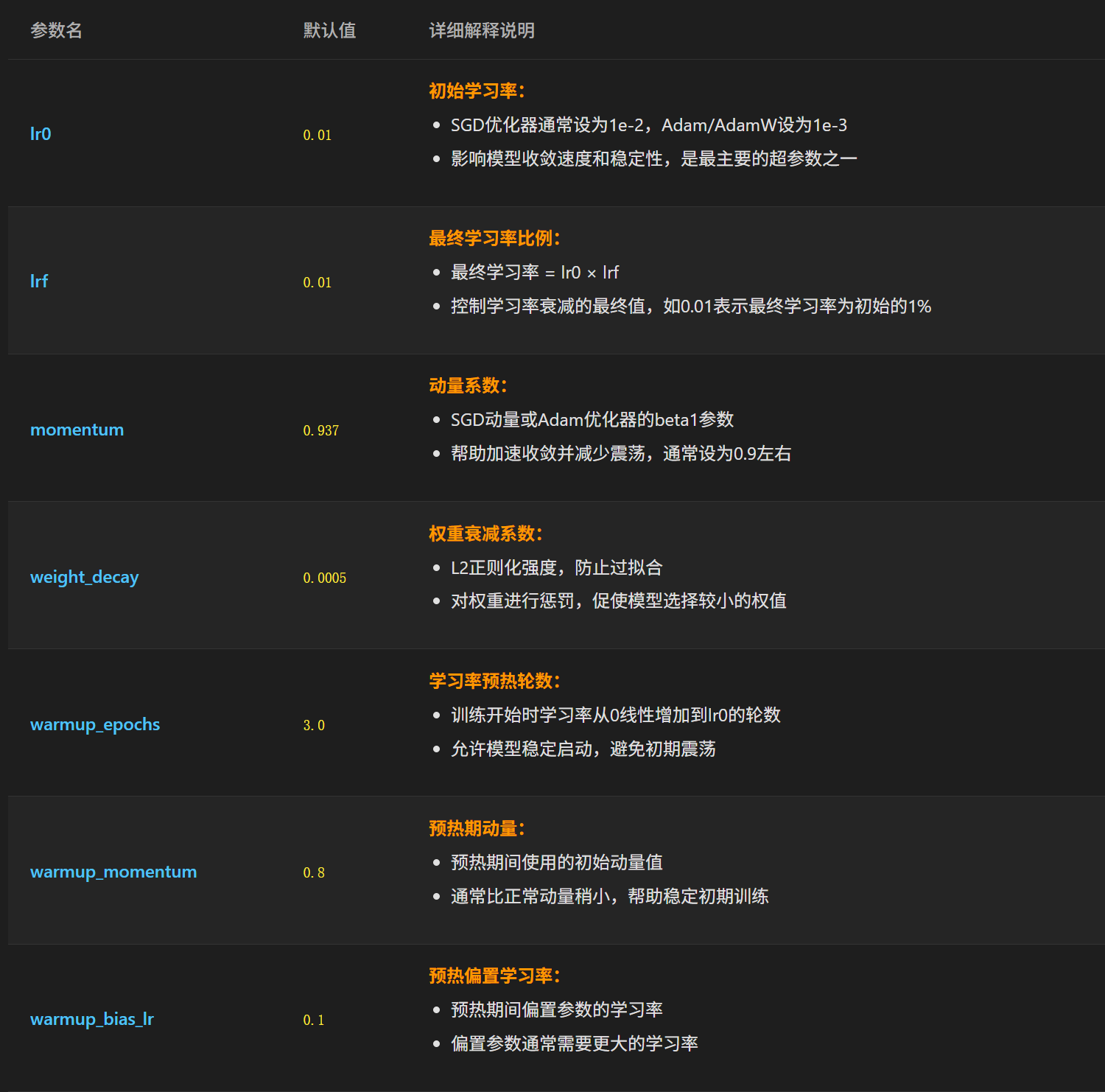
The lr0 and lrf parameters are learning rate parameters that adjust parameters during backward passes in model training. The learning rate during training dynamically adjusts according to the chosen optimizer, where lr0 is the initial learning rate at the start of training. Afterward, the learning rate gradually decreases, eventually dropping to lr0 * lrf. The momentum parameter is another optimizer algorithm technique for adjusting model parameters. After introducing the momentum mechanism, each parameter update relies not only on the currently calculated gradient and learning rate but also on historical gradients. The momentum parameter specifies the weighting coefficient of historical gradients in the current parameter adjustment. The higher the value of momentum, the more significant the impact of historical gradients on parameter updates.
The weight_decay parameter is used to control the magnitude of weight parameters, preventing overfitting caused by excessively large weights. Specifically, during training, weight_decay and the model’s overall weight information are added to the loss calculated by the loss function and the parameter adjustment magnitude, intentionally suppressing parameter sizes if weights become too large.
When model training starts, some internal parameters are in a randomly initialized state. Using the maximum learning rate lr0 directly to adjust parameters at this stage can easily cause parameter adjustments to be too large, leading to instability. Therefore, the warmup mechanism of the YOLO model means that during the first few epochs of training, the learning rate is linearly increased from 0 to the value set by lr0. Starting with a very low learning rate and gradually increasing it to lr0 helps model parameters quickly reach a relatively stable state before formal training begins. The warmup_epochs, warmup_momentum, and warmup_bias_lr parameters are all related configuration parameters for the warmup execution flow. Among them, warmup_epochs specifies the number of epochs the mechanism acts for. During the warmup stage, momentum increases linearly from warmup_momentum to the momentum setting, the learning rate (non-bias terms) increases from 0 to lr0, and the bias learning rate increases from 0 to warmup_bias_lr. Once the warmup stage completes, formal training officially commences starting uniformly from the learning rate lr0.
The parameters, default values, and explanations related to loss functions are shown below:
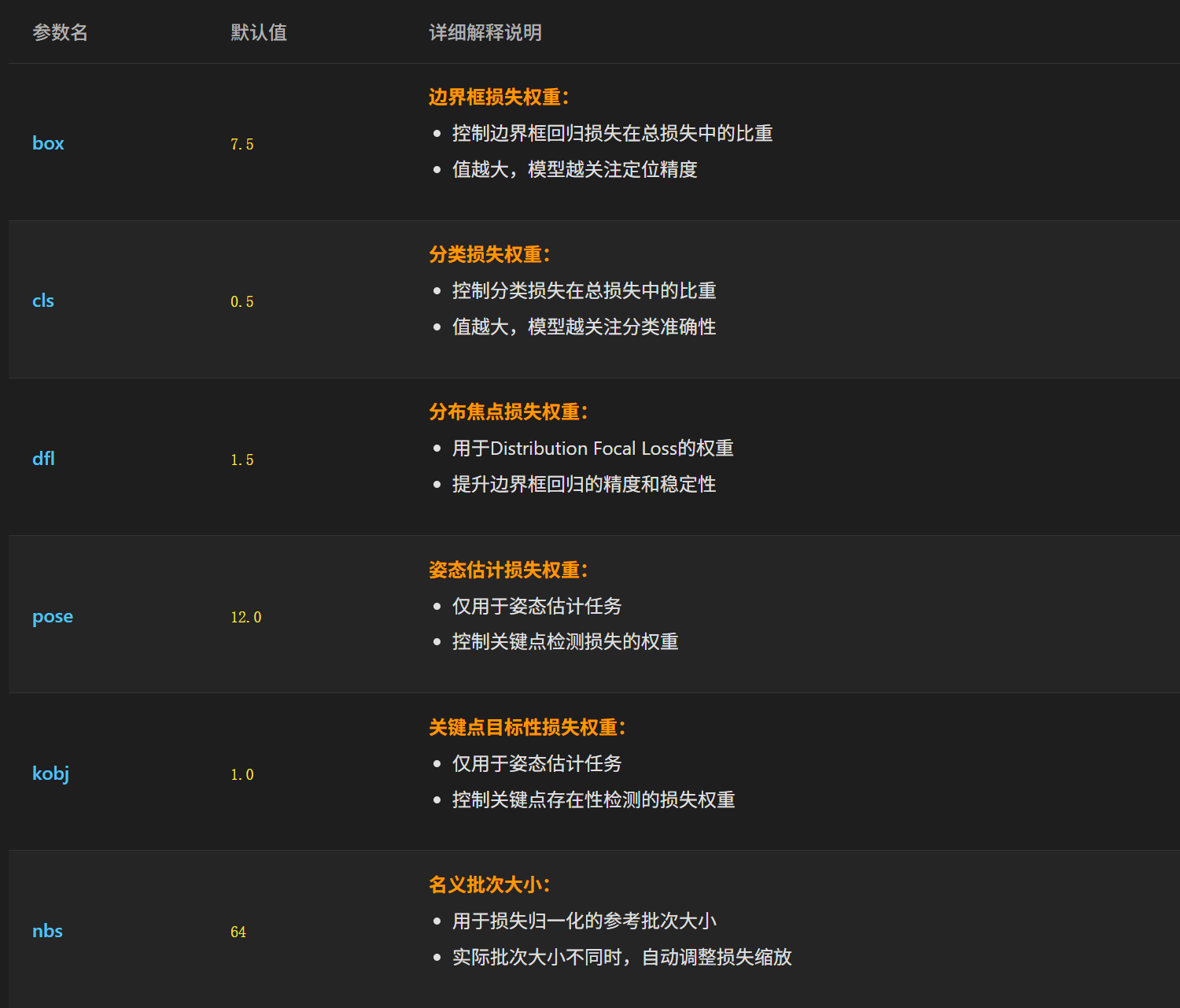
The box, cls, and dfl parameters correspond respectively to the loss function weights of the three components in the YOLO model. cls corresponds to the loss value for classification accuracy, while box and dfl together correspond to the loss value for predicted box location accuracy. box primarily evaluates the overlap between predicted and ground-truth boxes from an IoU perspective, whereas dfl evaluates localization accuracy from the perspective of top, bottom, left, and right coordinate offsets. Appropriately tuning box, cls, and dfl parameters allows adjusting the proportion of different loss types in the overall loss, thereby tuning the metrics corresponding to different losses.
The nbs parameter stands for nominal batch size. During actual training, due to hardware limitations, the batch size often cannot be set very large and is typically set to 16. When the batch size is relatively small, the model often suffers from high fluctuations and difficulty in convergence during training. An ideal configuration is a batch size like 64. To address hardware-limited batch sizes, the actual image batch fed into the model follows the actual configured batch size (e.g., 16), and the resulting loss values are scaled according to the ratio of nominal batch size to actual batch size. When nbs is set to 64, the difference is 4x, so the loss value is multiplied by 4 before backpropagation for parameter updates. This method solves model training stability issues caused by insufficient actual batch sizes.
The parameters, default values, and explanations related to training data color and geometric augmentation are shown below:
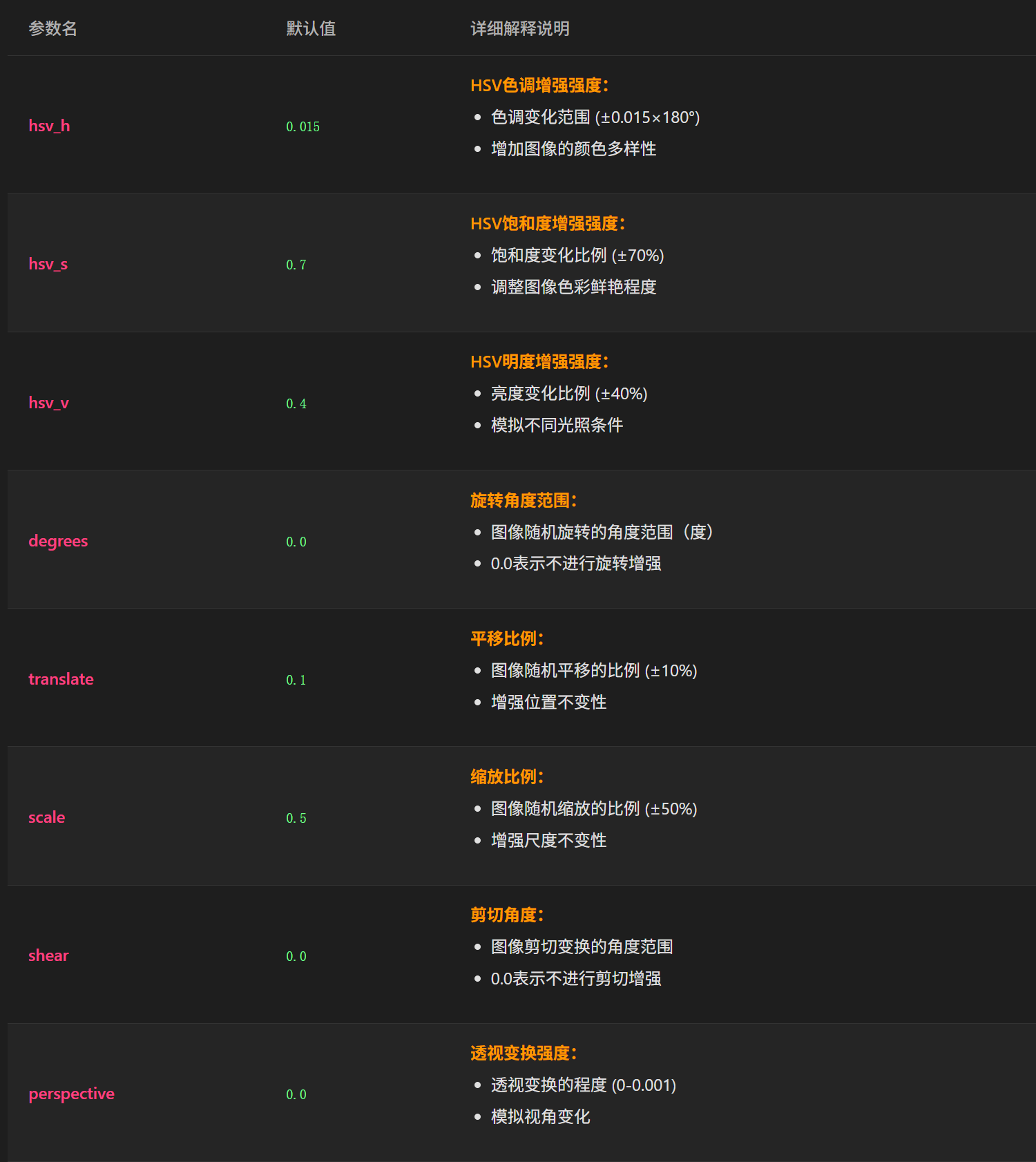
The hsv_h, hsv_s, and hsv_v parameters correspond to color augmentation parameters for input training images. The HSV color space contains three dimensions: Hue (H), Saturation (S), and Value (V). The three parameters above define, as scale factors, the random adjustment range applied to the training images’ hue, saturation, and brightness relative to the original image during training. Through this dynamic random adjustment across the three dimensions of the HSV space, the model’s generalization capability under various lighting and color environments is enhanced.
The degree parameter specifies the magnitude of random rotation applied to training set images based on their original angles before being fed into the model. The translate parameter specifies the ratio by which training images are randomly translated horizontally and vertically relative to the original image. The scale parameter specifies the random scaling range applied to the original training images before training.
The shear and perspective parameters control geometric distortion for image augmentation, designed to handle motion scenarios such as autonomous driving and drones. shear refers to a stretching action that distorts the original rectangular image into a parallelogram, while perspective refers to a pitching-perspective distortion where the original rectangular image gradually shrinks from top to bottom or bottom to top. The values of these two parameters specify the magnitude of their respective distortions.
The parameter names, default values, and explanations for the image transformation augmentation section are shown below:
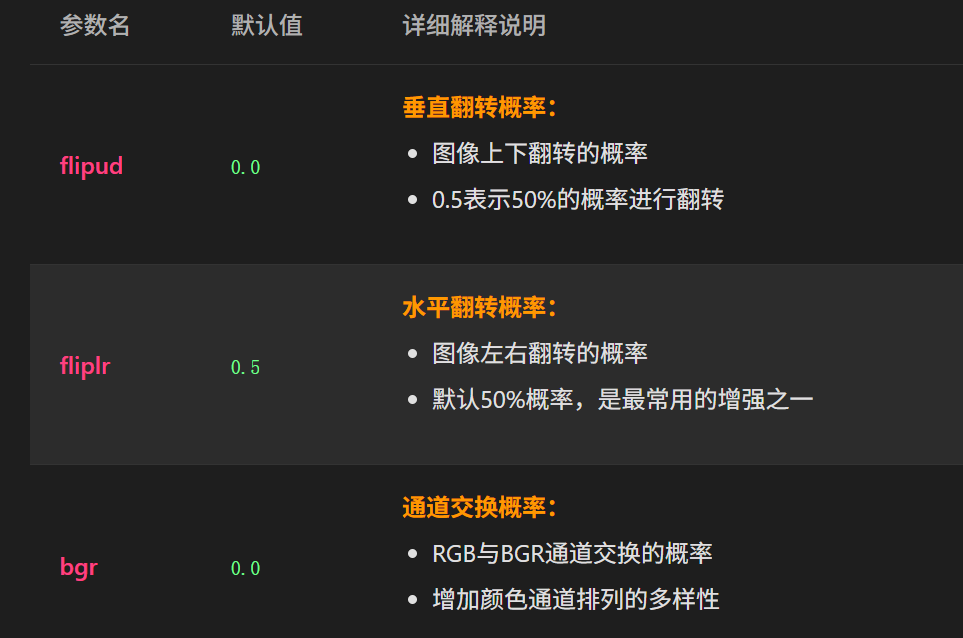
The above three parameters are relatively straightforward. flipud indicates the probability that training images are flipped vertically before being fed into the model, fliplr indicates the proportion of horizontal flips, and bgr indicates the proportion of training images whose channel order is converted from RGB to BGR prior to training. All three parameters are used to enhance image diversity and model generalization based on existing images.
The parameter names, default values, and explanations for the advanced mixed augmentation section are shown below:
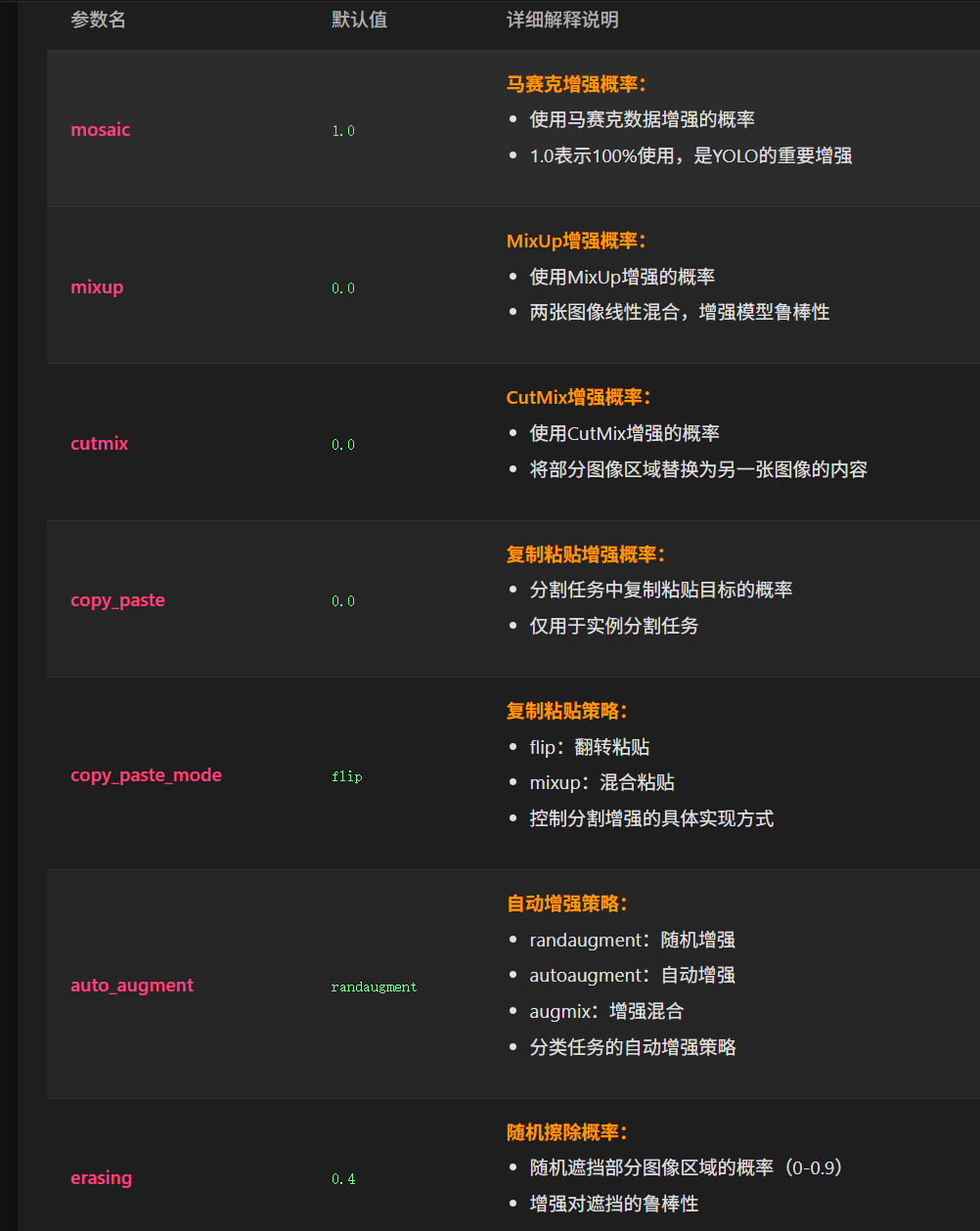
The mosaic parameter controls the proportion of the training process that applies mosaic augmentation. Mosaic augmentation scales, crops, and stitches four training images in a 2x2 layout into a single image to be fed into the model for training. Setting this parameter to 1.0 means 100% of the training data uses mosaic-stitched images, 0 means mosaic augmentation is disabled, and a value between 0 and 1 represents the proportion of training data using mosaic augmentation.
The mixup parameter controls the proportion of training images that undergo mixup augmentation prior to training. Mixup multiplies the pixel values of two images by randomly sized proportions and overlays their pixels to form a single image (with label confidences processed in the same proportion) before feeding it into the model. The cutmix parameter controls the proportion of training images that undergo cutmix augmentation prior to training. Cutmix randomly crops a rectangular region from one image and pastes it onto another image to form a new training image.
The copy_paste and copy_paste_mode parameters are used exclusively for image segmentation models.
The auto_augment and erasing parameters are used exclusively for image classification models.
Configuration File-Related Parameters
If the cfg parameter is set via the command line or here, the parameters in the YAML-format cfg configuration file configured here will be merged into default.yaml when executing various YOLO model tasks. Parameters with the same name will prioritize the values passed in the cfg configuration file.
# Custom config.yaml ---------------------------------------------------------------------------------------------------
cfg: # (str, optional) path to a config.yaml that overrides defaults
Additionally, as explained earlier for the track mode option under mode, track mode is used to enable tracking on the detect model. In this case, you must specify the tracking configuration file required for running tracking mode using the tracker parameter here:
tracker: botsort.yamlThe directory where the configuration file corresponding to the tracker parameter is located is ultralytics/cfg/trackers. The current version includes two tracking modes: botsort and bytetrack. The former is the default tracking mode with higher tracking accuracy; the latter is primarily aimed at high real-time tracking scenarios, offering faster tracking computation speed.