An Interpretation of the YOLOv1 Model Network Architecture
- 01 Oct, 2025
Overview of the YOLOv1 Architecture
The design logic of YOLOv1 is to use a single, complete convolutional neural network to detect objects and their locations in an image end-to-end. Compared to the dominant two-stage paradigm represented by the R-CNN series at the time, YOLOv1 pioneered the architectural design philosophy of using a one-stage approach to achieve both object localization and classification.
The network architecture of YOLOv1 draws inspiration from GoogLeNet to design its backbone network. However, instead of adopting GoogLeNet’s Inception modules, it uses blocks composed of cascaded 1x1 and 3x3 convolutional layers, making the backbone architecture remarkably simple.
The architecture diagram of the YOLOv1 network is shown below:
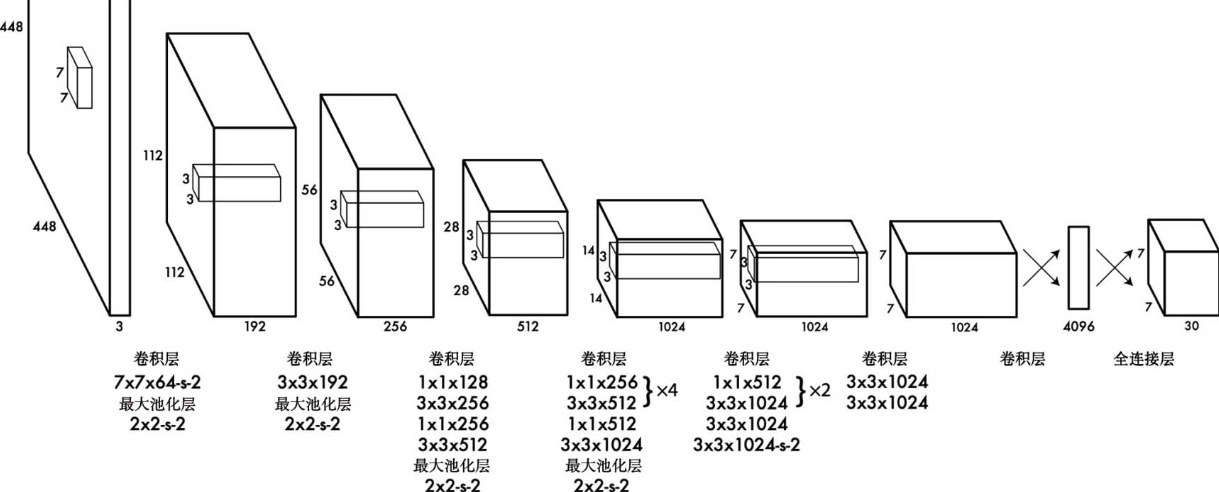
As seen in the YOLOv1 architecture diagram above, the YOLOv1 model consists of 24 convolutional layers for extracting feature information from the input image, followed by two fully connected layers for predicting the target’s location, confidence score, and class probabilities. In the convolutional layers, multiple 1x1 convolutional layers are used to compress the number of feature map channels. As for the activation function, Leaky ReLU is used across all layers except for the final layer, which employs a linear activation.
The overall network architecture does not differ significantly from various classical CNN-based image recognition models; the differences primarily lie in the classification and output stages. The final convolutional layer outputs a feature map with 1024 channels and a 7x7 spatial resolution. This feature map is flattened into a 1D vector of size 7x7x1024, which is then processed by two consecutive fully connected layers (containing 4096 and 1470 neurons, respectively). The final fully connected layer with 1470 neurons outputs the final predictions. Because the object detection task performed by YOLOv1 is a spatial task, the 1470 output values of this fully connected layer are reshaped into a 3D tensor of size 7x7x30, where 7x7 is the spatial resolution of this 3D tensor, and 30 is the number of channels. Subsequent sections will explain the object detection information represented by this 7x7x30 tensor in detail.
Because detecting and recognizing object locations and classes requires finer-grained visual information, YOLOv1 increased the input image resolution from the standard 224x224 resolution used in various image recognition models to 448x448.
Parameter Count of YOLOv1
One obvious issue with the YOLOv1 model is that its parameter count is exceptionally large.
Considering only the connections between the output of the final convolutional layer (with dimensions of 7x7x1024) and the first fully connected layer (4096 neurons), the number of parameters reaches: $7 \times 7 \times 1024 \times 4096$, which is approximately 200 million parameters. This inevitably leads to a very slow inference speed and a large memory footprint during model execution.
However, this was unavoidable at the time. After all, back in 2015 when YOLOv1 was introduced, the standard design for convolutional neural networks involved connecting convolutional layers to fully connected layers, each with distinct responsibilities. Consequently, the problem of an excessive number of parameters in fully connected layers was difficult to avoid—until the advent of Global Average Pooling layers, which ultimately resolved this issue.
Execution Flow of YOLOv1
The object detection workflow for inference images in YOLOv1 can be broken down into several steps: input image preprocessing, feature extraction via the convolutional neural network, object and location detection via fully connected layers, and final output of the detection results.

The input image preprocessing stage mainly involves two aspects. First, as mentioned above, the input image for YOLOv1 is an RGB image with a resolution of 448x448, so images of varying resolutions must first be resized to this dimensions. Meanwhile, to avoid aspect ratio distortion in the input image, non-1:1 aspect ratio images also need to be processed using techniques like padding. After completing resolution scaling and other steps, pixel normalization is performed to scale each pixel value in the input image from the range $[0, 255]$ to $[0, 1]$, or further standardized to a distribution with a mean of 0 and a variance of 1.
Next, the preprocessed 3-channel RGB image with a resolution of 448x448 passes through 24 consecutive convolutional layers (including their corresponding pooling layers) to progressively extract contained features, outputting a 7x7x1024 feature map. This 7x7x1024 feature map is flattened and then passed through two fully connected layers to detect object categories and locations based on the feature data. The detection results are resized into a 3D tensor of size 7x7x30. Parsing this output 3D tensor yields the object categories and their locations within the image.
The key to the entire execution flow actually lies in the mapping between the information contained in the 7x7x1024 feature map output by the convolutional layers and the 7x7x30 3D tensor output by the model.
Based on this, the entire process can be viewed as dividing the input 448x448 image into a $7 \times 7$ grid. Whether it is the 7x7x1024 feature map output by the convolutional layers or the final 7x7x30 3D tensor output, the 1024 and 30 dimensions both correspond to the feature information and detection results of each grid cell: for each grid cell, processing through 24 convolutional layers yields a feature vector of length 1024, which contains high-level feature information for that grid. Then, the fully connected layer iterates over these grid cells, processes the feature information within them to predict whether there is an object center coordinate at each grid cell, and predicts the corresponding object category, outputting the result as a vector of length 30 to represent the detection information for that grid.
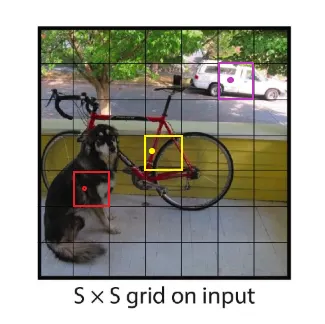
Therefore, as seen from the above process, image input and convolutional layer detection are no different from previous image recognition models like VGG and GoogLeNet. The biggest difference in YOLOv1 lies in the processing results of the fully connected layers, which need to be resized into a 3D tensor for output. The data contained in this 3D tensor corresponds to the object categories and locations detected from the input image.
Interpreting YOLOv1 Output Information
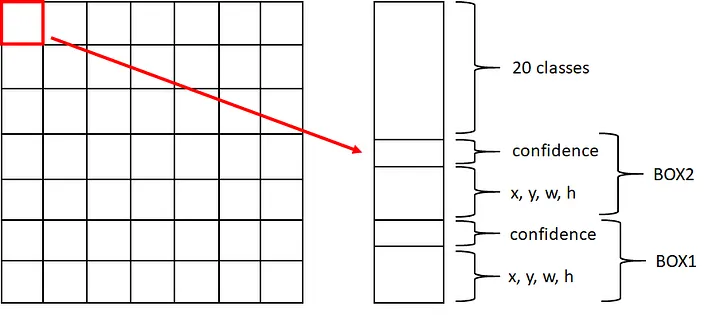
As described above, the output of YOLOv1 is a 3D tensor of size 7x7x30, corresponding to a $7 \times 7$ grid, meaning the output information contained in each grid cell is a 1D vector of length 30. This 1D vector contains the following information: the parameters for two object detection bounding boxes, BOX1 and BOX2, along with the recognition probabilities for 20 object detection classes.
The parameters for each BOX include its center coordinates $(x, y)$, width and height $(w, h)$, and the confidence score of the detection made by this BOX, totaling 5 parameters per BOX. The 5 parameters for two BOXes, plus the recognition probabilities for 20 target detection classes, combine to form a 1D vector of length 30, as illustrated in the figure below.
Why 20 classes? This is because the original YOLOv1 paper was trained using the VOC dataset. The VOC dataset supports the detection of 20 object classes in total, so the output of the YOLOv1 model defaults to the recognition rates of these 20 classes. If the COCO dataset, which supports 80 classes, were used, the output length for each grid cell would be $2 \times 5 + 80 = 90$.
How Does Detection Work?
YOLOv1 has a core design regarding the question of “who is responsible for object prediction”: Whichever grid cell contains the center point of the object to be detected, that cell is responsible for finding that object. This point is crucial for understanding the output of YOLOv1.
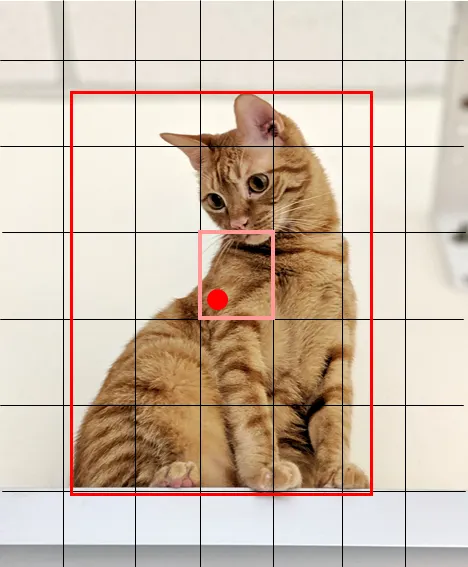
Taking the image below as an example, although the kitten spans across multiple grid cells, its center point lies within the pink grid cell. Therefore, in the output of the YOLOv1 model, only the BOX output by the pink grid cell contains the relevant detection information for the kitten, while all other grid cells serve as background boxes.
BOX Coordinate Position Parameters
As mentioned above, each grid cell contains detection results for two BOXes, with each BOX representing its position within the grid using $x, y, w, h$. Using the kitten image above to explain the $x, y, w, h$ parameters:
One of the BOXes output by the pink grid corresponds to the detection box information for the kitten, where $(x, y)$ represents the offset of the predicted BOX’s center relative to the top-left corner of its containing grid cell. Taking the kitten in the image above as an example, the red dot in the pink box is the center point of the kitten. Thus, the $(x, y)$ corresponding to this kitten detection box (the large red box) is the offset of the red dot relative to the top-left corner of the pink box. $w$ and $h$ represent the proportions of the width and height of this predicted BOX (the large red box) relative to the width and height of the entire image (448x448 resolution).
How to Understand BOX Confidence?
The confidence parameter of a BOX bounding box is essentially used to determine whether the BOX contains the center point of an object to be detected. Ideally, according to YOLOv1’s design, bounding boxes output by grid cells containing an object’s center point will have a high confidence score, while grid cells not containing a center point will output low confidence scores, or even zero.
The BOX confidence directly determines whether a grid cell contains the center point of a target object to be detected.
During post-processing, by checking the confidence parameter, one can determine whether the current grid cell contains the center point of a target object. Once confirmed, the recognition probabilities of the 20 object detection classes are checked to determine the category of the target object.
What if the Same Grid Cell Contains Center Points of Two Objects?
According to YOLOv1’s design, the output information of each grid cell can only mark the better of the two prediction boxes as a “positive sample” and assign it only 1 class label.
Therefore, when the center points of two different objects happen to fall into the same grid cell, the YOLOv1 network can only:
- Select one of the objects (usually the one with a higher IoU with the default box) as the regression/classification target for that grid cell;
- Treat the other object as if it does not exist—during training, it incurs neither coordinate loss nor class loss;
- During the inference stage, this grid cell can at most output the detection box for the first object, and the second object will inevitably be missed.
This is the root cause of YOLOv1’s sharp drop in recall rates in scenarios with dense, small objects.
References
- YOLOv1 詳細解讀. 設計概念: | by Steven Meng | Medium
- YOLO Object Detection, Chapter 3: YOLOv1
- YOLO演進 — 1. 在上篇文章有提到過 YOLO 的作法以及如何訓練,在這篇再更詳細的說明YOLO… | by 李謦伊 | 謦伊的閱讀筆記 | Medium