Lens Shading Issues in Camera Imaging
- 01 May, 2025
This article provides a detailed summary of the pervasive Lens Shading issue in optical imaging, analyzing the root causes and organizing the strategies for resolving it during camera product image tuning.
Lens Shading Issues in Lenses
By definition, Lens Shading is a phenomenon in optical imaging systems where image brightness or color is uneven due to the physical characteristics of the lens. Depending on its specific manifestation on the image, Lens Shading can be divided into two types: Luma Shading and Color Shading.
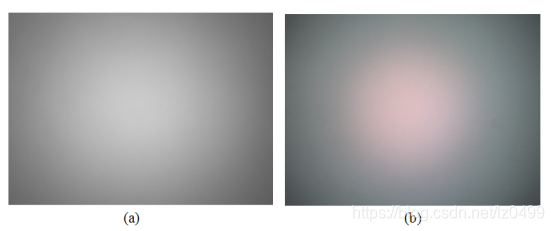
In the Luma Shading example on the left, it is clearly observable that the central area of the image formed through the lens is brighter, gradually darkening towards the periphery to form a “vignetting” effect, with the edges of the image being the darkest.
Color Shading, shown on the right, occurs when the colors at the center and edges of the image do not match, manifesting, for instance, as reddish or bluish corners.
Summary of Causes for Luma Shading
The main factors leading to lens Luma Shading include the following.
Natural Optical Attenuation
A lens is essentially a convex lens whose light-gathering capability at the center is superior to that at the edges, thereby causing the light intensity to attenuate from the center to the surroundings. As shown in the figure below, comparing parallel light rays and oblique light rays :
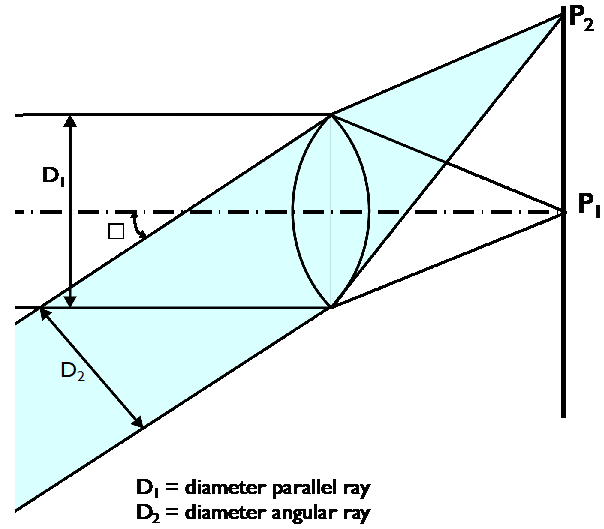
For a camera without distortion, the illumination attenuation at the periphery of the image follows a attenuation law.
For parallel light rays (), since the light originating from point is parallel to the optical axis, its incident angle . At this point, its light intensity follows the formula , which represents an unattenuated state.
For oblique light rays (), the light originating from point forms an angle with the optical axis, and its light intensity will thus attenuate to . For example, when , the light intensity emitted at this angle will only be about 56% (), resulting in edge brightness that is significantly lower than the center.
Mechanical Obstruction by the Lens Structure
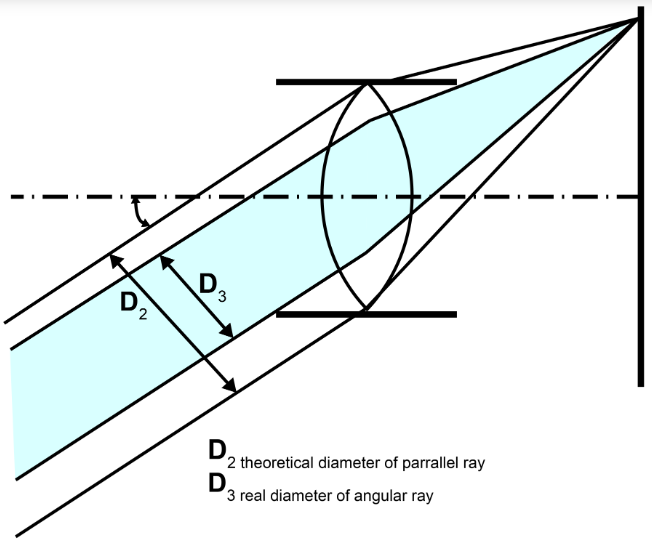
The structural components of the lens itself and the lens holder may obstruct some of the obliquely incident light, preventing these light rays from reaching the peripheral areas of the image. Consequently, more light enters and brightens the central area, while less light reaches and darkens the edge areas.
As shown in the figure below.
CRA Matching Issues Between Lens and Image Sensor
Luma Shading problems caused by CRA mismatches between the lens and the image sensor have been explained in great detail in the article [[Explanation and Matching of CRA Parameters for Image Sensors and Lenses]]. Specifically, when Lens CRA < Sensor CRA, the light transmitted by the lens cannot cover the edges of the pixels, resulting in a loss of photosensitive area (Luma Shading), which visually manifests as dark corners around the image. Therefore, lens selection should ensure CRA matching between the sensor and lens as much as possible; please refer to the aforementioned article for details.
In summary, the essence of Luma Shading is: the comprehensive attenuation caused by large-angle incident light (natural attenuation + mechanical obstruction + CRA optical mismatch) leads to a drop in brightness at the edges of the lens and sensor. Therefore, controlling the light incident angle , optimizing the lens barrel structure, and improving CRA matching accuracy are essential to fundamentally and thoroughly improve brightness uniformity.
Summary of Causes for Color Shading
The main factors leading to lens Color Shading include the following.
Light Dispersion Effect
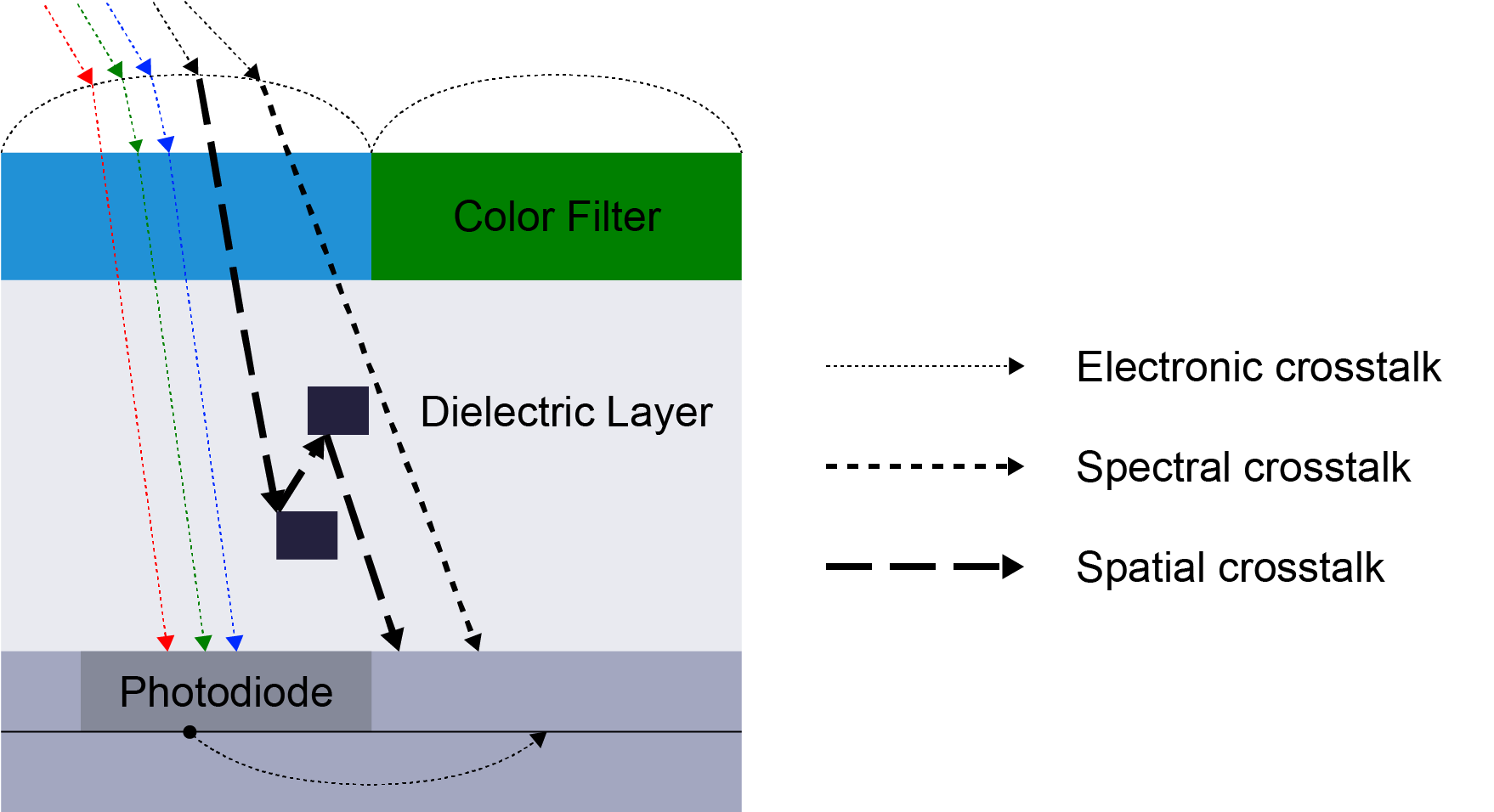
As learned in middle school physics, light of different wavelengths has different refractive indices when passing through a lens. This difference in refractive index causes white light to undergo dispersion after passing through the lens (white light is decomposed into multiple colors, with each color having a different refractive index). This causes the positions of various colored light rays on the sensor to shift differently, thereby inducing uneven color distribution, as shown in the figure below. After entering the lens, white light is decomposed into light of different colors, creating deviations in their projected positions on the sensor.
Impact of the IR-Cut Filter
The IR-Cut filter between the lens and the sensor is used to filter out infrared light, preventing color distortion caused by the sensor receiving invisible infrared light (such as a reddish green hue). Therefore, the IRCut filter serves as an infrared cutoff filter.
Current mainstream filters generally include two types:
- White Glass: Low cost; coatings are applied to ordinary optical glass to reflect infrared light, allowing visible light to pass through while infrared light is reflected. However, this reflective property of white glass is sensitive to the angle of light incidence. When large-angle light hits the filter, the reflection path of the infrared light changes, potentially preventing it from being effectively filtered out and allowing it to enter the sensor. This causes abnormal R-channel values, resulting in reddish corners.
- Blue Glass: Employs a dual mechanism of blue glass substrate absorption plus coating reflection to reduce infrared light reflection, eliminating false colors and offering better performance than white glass.
CRA Matching Issues Between Lens and Image Sensor
CRA mismatches between the lens and image sensor can also lead to Color Shading. If the lens CRA is excessively larger than the sensor’s CRA, the CRA of the light penetrating to the pixels at the edge area of the sensor becomes too large. After being refracted by the microlenses on the sensor’s edge pixels, these light rays scatter onto neighboring pixels of other colors, causing cross-talk between pixels. This is the problem of Color Shading.
Regarding this issue, you can also refer to another article: [[Explanation and Matching of CRA Parameters for Image Sensors and Lenses].
Debugging and Optimization Strategies for Lens Shading
Having summarized the causes of Luma Shading and Color Shading, the next step is how to optimize and resolve these issues in practice.
1. Hardware Design and Optical Optimization
Ensure CRA matching between the sensor and the lens. By adjusting the lens exit light angle to match the microlens CRA of the sensor (with deviation controlled within ), edge color shifts caused by excessively large light incident angles can be reduced.
Using blue glass (absorptive IR cutoff filter) instead of ordinary white glass (reflective IRCF) for the IR-Cut filter reduces the interference of large-angle infrared light reflection on the R channel, which can decrease edge reddening by up to 30%.
2. ISP Lens Shading Correction
As mentioned above, some causes of Lens Shading are related to the inherent defects of the optical system, and the selection of optical components in product applications is often limited by various factors, making it impossible to avoid entirely. Therefore, an LSC (Lens Shading Correction) module is specifically designed in the ISP to handle Lens Shading issues.
After the ISP receives the RAW Data output by the Image Sensor, it typically performs Black Level Correction (BLC) first, followed by LSC processing.
The processing workflow of LSC is roughly divided into two stages: calibration and correction.
LSC calibration is an important part of ISP Tuning, mainly used to calibrate the parameters of the LSC gain compensation tables for each image channel. The calibration workflow is as follows:
- First, use the camera to capture a white light source with uniformity > 95% to obtain its RAW format image.
- Decompose the RAW image into four channels (R, Gr, Gb, B) according to its Bayer arrangement. If the size of a RAW image is , the size of each channel will be .
- Divide the RAW image of each channel into multiple grids horizontally and vertically, and then calculate the average brightness of each grid per channel.
- Based on the brightness of the center grid of each channel image as a reference (gain = 1), calculate the compensation gain for the peripheral grids according to the attenuation ratio. The approximate formula is: .
- According to the above formula, calculate independent gain tables for each grid of each channel separately (e.g., a grid) and store them in the ISP’s LUT (Lookup Table). Subsequent LSC gain compensation for the RAW image will be based on this table.
After completing the LSC calibration in ISP Tuning, subsequent LSC correction on the RAW image output by the Sensor applies the corresponding gain tables to the R, Gr, Gb, and B channels of the RAW image separately for gain compensation, avoiding color cross-talk caused by shared parameters. Under high-demand scenarios, calibrations are often performed multiple times under different color temperatures (such as 3000K, 5000K, 7500K) to generate multiple sets of gain tables for different color temperatures. During subsequent LSC correction, these tables are dynamically switched based on the current color temperature to adapt to the ambient light source, achieving a better LSC effect.