An Analysis of the Secure Boot Workflow Implementation on the Ingenic IPC Platform
- 02 Apr, 2025
This article provides a comprehensive summary and explanation of the Secure Boot function workflow used on the domestic Ingenic IPC platform.
Boot Workflow of the Ingenic IPC Platform
Similar to the power-on startup, boot image loading, and execution workflow of most embedded hardware platforms, the Ingenic IPC platform also goes through a multi-stage process of image loading and execution after power-on.
Reference 2 provides an excellent flowchart explaining the boot image loading process of the Ingenic IPC platform.
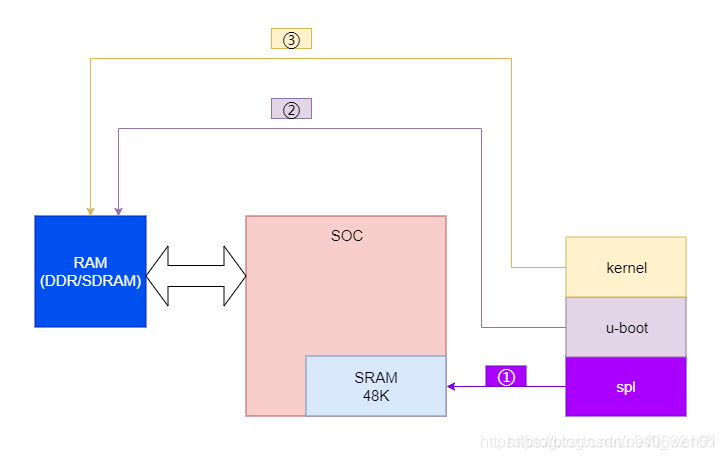
- Upon chip power-on, the internal hardwired Rom Loader executes first. Based on the detection of the current Power On Pin, the Rom loader determines the boot mode (Flash, SD card, or USB).
- When booting from Flash, the Rom loader first reads the first-stage bootloader saved at the header of the Flash according to specific rules, which is the SPL Image.
- The Rom loader loads the SPL image into its internal SRAM and then hands over control to the SPL. The SPL is responsible for performing further initialization, particularly configuring the DDR. Once initialization is complete, it loads the second-stage bootloader from the Flash—namely, U-Boot—into the DDR to start execution.
- U-Boot serves as the primary bootloader, performing more comprehensive initialization settings for the system, loading the Kernel and Rootfs images into the DDR, and launching the Linux Kernel. At this point, the system is fully booted.
The main reason for adding an extra SPL stage between the Romloader and U-Boot is that the internal SRAM space of the Ingenic chip is too small, whereas the U-Boot image is too large for the SRAM to accommodate. Therefore, an intermediate bootloader is required to initialize the larger DDR space and then load the U-Boot image into the DDR for execution. Subsequent images such as the Kernel and Rootfs are all loaded into the DDR for execution.
Algorithms Used in the Ingenic IPC Secure Boot Workflow
In the Secure Boot implementation provided by the Ingenic IPC solution, two primary algorithms are utilized:
- RSA2048: An asymmetric encryption/decryption algorithm. It is primarily used to encrypt/decrypt and then match and compare the SHA256 digest information of the image contents for signature verification.
- SHA256: A hash algorithm. It is used to perform digest operations on the SPL Image and the public key of the RSA2048 algorithm.
Since the SHA256 hash algorithm does not require key storage, the only key-related information actually stored inside the Ingenic chip’s Efuse is the public key digest information of the RSA2048 algorithm.
Information Structures in Flash and Efuse
Information Structure in the Chip’s Efuse
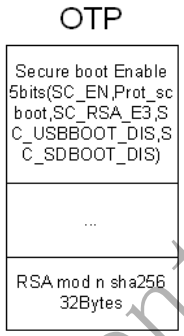
Within the EFuse (i.e., OTP) inside the Ingenic chip, the Secure Boot implementation mainly includes two parts: the Secure boot enable configuration information in otp4, and the SHA256 digest information of the RSA algorithm public key in otp9.
During chip power-on boot, the Rom loader checks the Secure boot enable configuration written in otp4 to determine whether to boot in Normal boot mode or Secure Boot mode.
As mentioned above, since the entire Secure Boot implementation only uses the RSA2048 and SHA256 algorithms—and SHA256 requires no key information to be stored—the OTP only needs to store information related to the RSA public key.
Flash Information Structure Related to Secure Boot
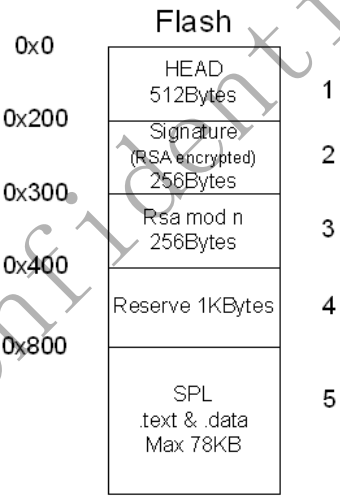
The figure below shows the Flash structure corresponding to the SPL Image generated by the PC-side script provided by Ingenic when the Secure Boot mode is enabled. The key points are:
- The SPL Image itself is stored starting at offset
0x800in the Flash, and the SPL Image is not encrypted. - The RSA algorithm public key is stored between Flash
0x300and0x400. - When generating the Secure Boot image file based on the raw SPL Image, the PC-side script performs a SHA256 digest operation on the SPL Image content, and then encrypts the result using the RSA private key. The encrypted digest of the SPL Image is stored between Flash
0x200and0x300to be used subsequently for verifying the SPL Image signature.
Secure Boot Startup Workflow on the Ingenic IPC Platform
Based on the above information, the following summarizes the startup workflow where the Rom Loader validates the SPL Image under Secure Boot mode after the Ingenic IPC platform is powered on. The complete startup flowchart is shown below:
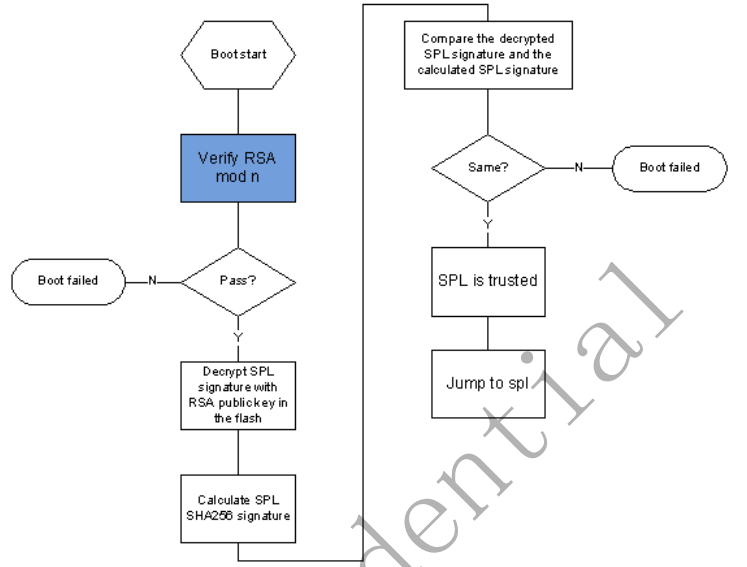
The above workflow can be divided into two stages: RSA Public Key Verification and SPL Image Digest Signature Verification.
RSA Public Key Verification
Upon power-on, the Rom Loader detects the Secure Boot configuration written in OTP4. In Secure Boot mode, it reads the SHA256 digest of the RSA public key burned during the production phase from OTP9.
Then, the Rom Loader reads the RSA public key from the Flash location 0x300-0x400, performs a SHA256 operation on it, and compares this calculation result with the public key SHA256 digest read from OTP9.
If the above comparison matches, it proves that the public key in the OTP matches the one in the Flash, and the boot process continues; otherwise, the boot fails.
SPL Image Digest Signature Verification
Next, the Rom Loader performs a SHA256 signature operation on the raw contents of the SPL Image to obtain its own calculation result.
It then reads the digest—which was encrypted by the PC-side script using the RSA private key—from Flash 0x200-0x300, and decrypts it using the RSA public key read from the Flash to obtain the decrypted SHA256 digest.
The two digests are then compared and matched. If they are identical, it indicates that the SPL Image signature verification has passed, and this image was indeed officially released by the hardware vendor (since only the official party possesses the RSA private key used to encrypt and sign the image file).
Summary
Overall, compared to the relatively complete and comprehensive Secure Boot functionality implemented on the Novatek IPC platform, the Secure Boot feature on the Ingenic platform is much simpler, requiring downstream developers to do a fair amount of work to achieve a fully realized Secure Boot.
While the Novatek platform’s SDK standardizes full-access protection for the first-stage bootloader, U-Boot, and Kernel images in the boot workflow, the Ingenic platform’s Secure Boot protects only the SPL Image by default. Of course, because the RSA verification public key information is already stored in the Ingenic chip’s Efuse under Secure Boot mode, downstream developers can easily implement signature verification protection for U-Boot and Kernel images themselves based on the same logic. It is just that this process is not provided by default in Ingenic’s SDK and must be implemented by developers independently.
Furthermore, in Ingenic’s original Secure Boot implementation, only the RSA public key is stored in the Efuse, providing only signature verification protection for the image contents without cryptographic encryption protection. Compared to the Novatek platform, the security level is lower in this regard, as the Novatek platform encrypts the image file contents concurrently with signature verification.
Fortunately, Ingenic has opened up a portion of the storage space within the Efuse for downstream developers. Developers can leverage this Efuse storage space to perform customized Secure Boot development, including adding encryption functions specifically for U-Boot, Kernel, and other images.
References
- Ingenic Secure Boot User Guide
- Ingenic Zeratul Development (2) — U-Boot Boot Analysis_Ingenic T41 SDK Package - CSDN Blog