Detailed Analysis of the Secure Boot Workflow on the Novatek IPC Platform
- 20 Mar, 2025
Based on the study of materials related to the Novatek NT98567, this article outlines the complete process of encryption, decryption, and protection across various boot stages in the platform’s Secure Boot workflow, providing an excellent practical case study for deeply understanding the concepts and procedures of Secure Boot in embedded systems.
Previously, another note detailed the workflow and concepts of Secure Boot: Summary of the Secure Boot Startup Process in Embedded Products.
Novatek NT98567
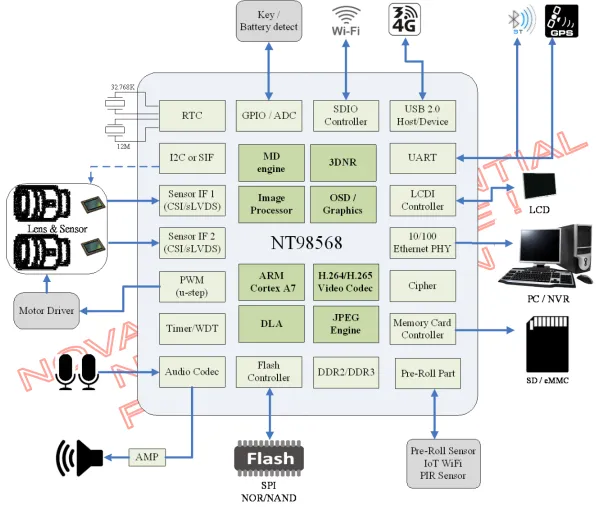
The diagram below shows the block diagram of the Novatek NT98567/98568. Generally, its specifications feature a dual-core ARM A7, up to 2Gb embedded DDR, an ISP and encoding capability of up to 5M at 30fps, support for H.264 and H.265, support for independent dual cameras, and 0.5T of AI computing power. Overall, while the specifications are not exceptionally groundbreaking, a unique feature is its support for EIS (Electronic Image Stabilization), making it suitable for applications such as car DVRs and action cameras.
ARM TrustZone Support on the NT98567
As mentioned above, the CPU configuration of the NT98567/98568 is a dual-core ARM Cortex-A7, which belongs to the ARMv7-A architecture. This architecture fully supports the ARM TrustZone security specifications. Consequently, the system can be divided into two independent subsystems—the Secure World and the Non-Secure World—during application design, which is the implementation of a TEE (Trusted Execution Environment).
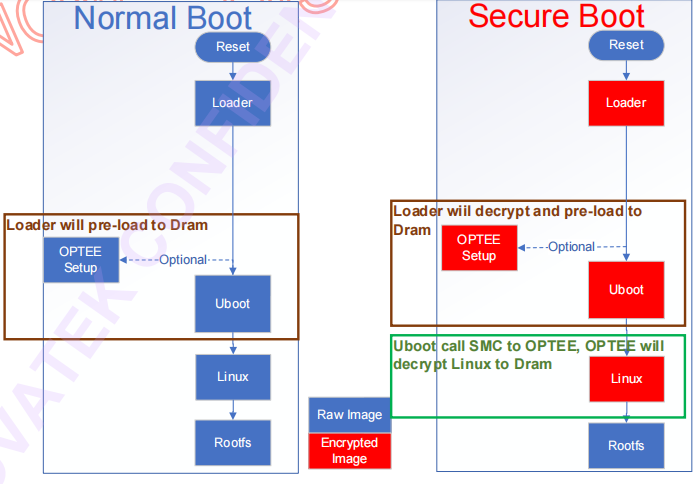
The SDK for the Novatek NT98567/98568 platform itself also provides OPTEE support under the ARM TrustZone architecture, though OPTEE is optional in the SDK. In other words:
- If user applications require privacy and security-sensitive application logic to run in the Secure World, it is best to enable OPTEE, implement these functions within the OPTEE secure environment, and provide interfaces for the non-secure Linux system to access;
- If the goal is simply to enable Secure Boot, there is no need to enable the OPTEE option.
Enabling OPTEE is essentially independent of the Secure Boot workflow:
For knowledge related to the ARM TrustZone technology domain, you can refer to my other note: An Introduction to TEE and ARM TrustZone Security Technology.
EFuse Structure of the NT98567
To enable Secure Boot, keys related to this mechanism must be stored in the chip’s secure storage, which can be written only once and cannot be revoked or modified. This is implemented via the chip’s built-in EFuse structure.
The Secure Boot implementation on the NT98567 primarily utilizes two cryptographic algorithms and their corresponding keys:
- AES128: A symmetric key algorithm with a key length of 128 bits, used to provide AES128 encryption protection for the contents of image files.
- RSA2048: An asymmetric key algorithm with a key length of 2048 bits, used to verify the signatures of image files.
The storage structure of these two keys in the NT98567 EFuse is shown below:
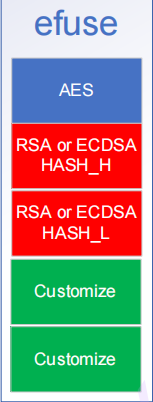
It is worth noting here that the size of a single EFuse block on the NT98567 is 16 bytes. Therefore, the AES128 key is stored in the first block, while the RSA2048 key is too long to fit directly; instead, the SHA256 signature of the corresponding public key is stored in the EFuse, occupying two EFuse blocks. Ideally, if there were no EFuse size limitations, the public key of the RSA2048 algorithm used for signature verification should be stored here.
Encryption Protection of Image Files
For the image files loaded at various stages during the Secure Boot process, encryption and signature protection must be applied using the two keys stored in the EFuse:
- The AES128 key stored in the EFuse is used to encrypt the data content of the image file.
- The RSA2048 public key stored in the EFuse (actually, only the SHA256 signature of the public key is stored in the EFuse) is used to provide asymmetric signature protection for the contents of the image file.
Through the above data encryption and signing operations, as long as the keys are not compromised, it can be ensured that the contents of the image files required for the normal operation of the Secure Boot process are both encrypted and officially released.
In concrete implementation, each image file in the Secure Boot process is prepended with an image header, which stores the public key of the RSA2048 signature algorithm and the signature calculated from the image data content using the RSA2048 private key:
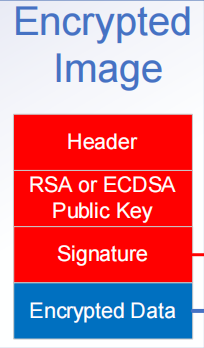
Within the image file header above, the foremost Header is a fixed-size structure containing primarily the RSA2048 public key, the signature, the address offset of the encrypted data within the image file, the size of the encrypted data content, and the checksum of the entire image file.
The second part stores the public key of the RSA2048 algorithm. How is the legitimacy of this public key verified? A SHA256 signature operation is performed on this public key, and the result is compared with the public key signature stored in the EFuse. If they match, it indicates that the public key is legitimate.
The third part is generated when the PC tool packages the image file: it first calculates a SHA256 signature on the plaintext of the image data content, then encrypts this signature using the RSA2048 private key to obtain the final Signature, which is written into the image header information.
The fourth and final part is the ciphertext generated by encrypting the plaintext of the image data content using the same AES128 key stored in the EFuse. This is also the most crucial part of the entire image file.
Therefore, when the PC tool packages and encrypts the original image file, it needs to: prepend a fixed-size Header containing the public key, signature, and positional pointer information for the data content; place the public key portion of the RSA2048 algorithm into the second part of the header; calculate a SHA256 signature based on the plaintext of the original image content, encrypt the signature result with the RSA2048 private key, and place it in the third part of the header; and finally, perform AES128 encryption on the original image content, placing the resulting ciphertext in the fourth part.
Secure Boot Startup Workflow
As described in the second section regarding the ARM TrustZone mechanism supported by the NT98567, when OPTEE is not enabled, the entire Secure Boot startup workflow is as follows:
- Upon powering on, the ROM Loader inside the NT98567 runs first;
- The ROM Loader loads the first-stage boot image loader stored in the flash, decrypts it, verifies its signature, and then loads U-Boot;
- After loading U-Boot, the Loader similarly decrypts and verifies the signature of U-Boot’s contents based on the key in the EFuse and the key, signature, and other information in the U-Boot image header. Once verification passes, U-Boot is executed, which in turn is responsible for loading the Kernel image;
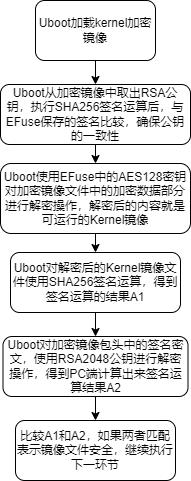
- After loading the Kernel, U-Boot similarly decrypts and verifies the signature of the kernel contents based on the key in the EFuse and the key, signature, and other information in the Kernel image header. Once verification passes, the Linux system can boot normally. (Note that the Rootfs image is not protected by Secure Boot here.)
The following diagram illustrates how U-Boot decrypts and verifies the encrypted Kernel image during the process of U-Boot booting the Kernel:
References
- NT98567 Secure Boot Flow User Guide
- NT98567_Secure_boot_User_Guide_en
- Information Security: RSA-2048 Performance - Zhihu