A Detailed Guide to Function Calling with Code Examples
- 11 Mar, 2025
What is Function Calling?
As is well known, Large Language Models (LLMs) are fundamentally text-generation tools. While they possess powerful text generation and logical reasoning capabilities, LLMs lack the ability to directly execute external functional operations. Therefore, if we intend to deploy large models in practical product scenarios and rely solely on them to generate text, the overall problem-solving capability of the system will be severely limited.
By combining the natural language processing capabilities of LLMs with external tool/API invocation functions, we can significantly enhance their problem-solving power in real-world application scenarios. The function calling feature provided by large models establishes precisely this mechanism, bridging text processing with local function execution and greatly expanding the application potential of LLMs.
The core working logic of LLM function calling is to leverage the reasoning capabilities of the large model within an AI system centered around the LLM, automatically invoking local/external tools or APIs based on the model’s responses during runtime, thereby expanding the capabilities of the AI system.
Parsing the Function Calling Workflow
The following explanation of the execution flow of LLM function calling is illustrated using a flowchart from Reference 1.
In this workflow scenario, when a user queries the model about “today’s temperature in Beijing,” the LLM alone cannot directly output the correct result because it involves real-time information retrieval. This necessitates the use of an external tool, such as function calling.
For the function calling mechanism to work in this scenario, the large model needs to know in advance which external function names and parameter lists should be called when encountering such queries. This information (provided to the model as the Tools parameter set) is passed to the model along with the user’s query.
When the LLM parses the user’s query (along with the external function descriptions contained within the Tools), it determines whether an external function from the Tools parameter needs to be invoked. If an external function call is deemed necessary, the model includes the corresponding parameter list in its returned text response, as shown in step two of the diagram below.
Upon receiving the model’s response, the user’s application locally invokes the specified external function using the returned parameter list. It then encapsulates the execution result within a JSON structure and sends it back to the large model, as illustrated in steps three and four below.
After receiving the execution result of the external function, the large model performs data format conversion. Combining the semantic intent of the user’s question with the execution results returned by the external function, the model regenerates a final text response for the user, as shown in steps five and six below.
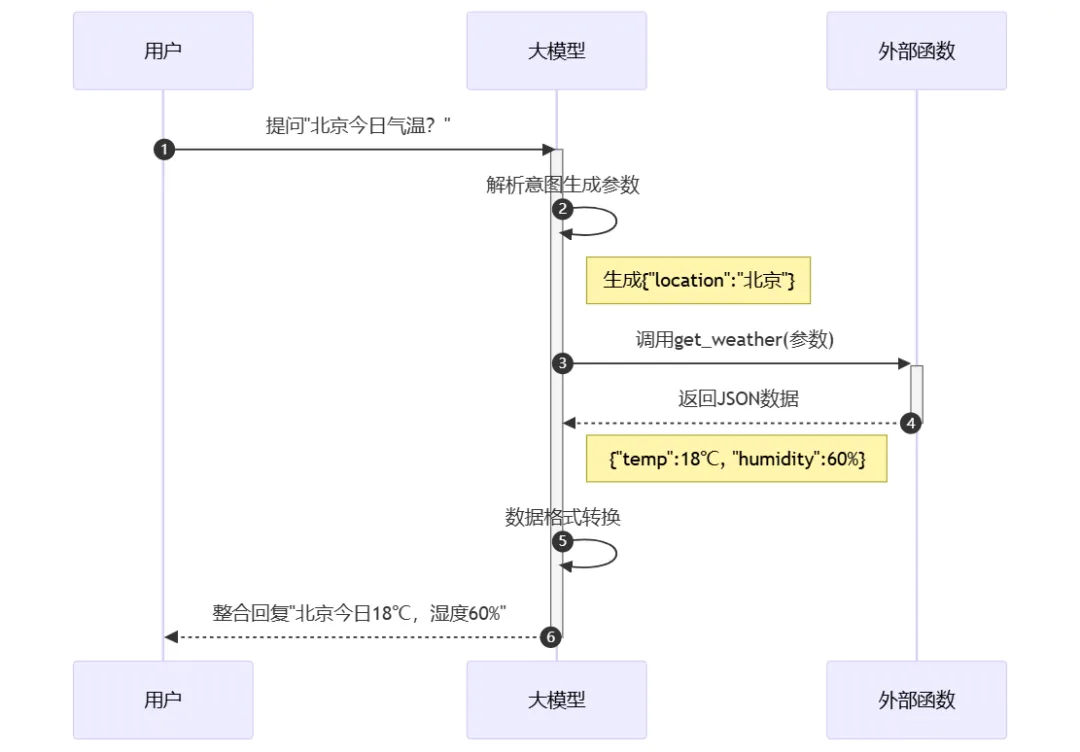
Summary of Core Function Calling Mechanisms
The successful execution of the complete function calling workflow described above relies on three pillars: external function capability description, LLM semantic parsing, and the external function invocation process.
External Function Capability Description
To enable a large model to automatically generate external function invocation information for specific problems within an application, we must first provide the model with descriptions of these external functions. Consequently, developers need to pre-define a list of functions that the LLM application can invoke during execution. This list includes API descriptions, parameter specifications (type/format descriptions), and return structures for each function. This ensures that when the LLM encounters a relevant problem, it knows which external function to call and what parameter list to use.
Below is an example of an external function description provided to the large model in the context alongside a user query. This function calculates the product of two floating-point numbers, and the invocation requires two floating-point arguments provided as strings.
"function": {
	"name": "get_multiply_result",
	"description": "计算两个浮点数的乘积",
	"parameters": {
		"type": "object",
		"properties": {
			"str1": {
				"type": "string",
				"description": "第一个数字字符串"
			},
			"str2": {
				"type": "string",
				"description": "第个数字字符串"
			}
		},
		"required": ["str1", "str2"]
	}
}
LLM Semantic Parsing
In this phase, the large model parses the user’s input alongside the external tool function set included in the context:
- Determines whether the query should be processed via standard LLM generation or if it requires invoking external functions provided in the context.
- If an external function call is needed, parses the user query against the function descriptions to identify the matching external function.
- If a matching function is found, further analyzes the semantics to extract and format the parameter list required to invoke this function according to its description.
Once this information is fully obtained, the large model returns it to the application within its response. The next step requires the user’s application to locally execute the external function specified by the model.
External Function Invocation Workflow
This phase involves coordination between the large model and the local application. After receiving the model’s response, the local application extracts the target external function and its parameter list, executes the function locally or via an API, and sends the execution result back to the LLM—along with the complete context of the previous steps (to reiterate: LLMs are stateless and lack memory; every request must include the full context so the LLM can maintain a clear and complete understanding of the interaction). Finally, the large model generates the ultimate answer and returns it to the user.
An Example of Function Calling
Talk is cheap, show me the CODE.
The following Python code example demonstrates the function calling capabilities of a large model. The general execution flow is as follows: queries that can be handled by a traditional LLM are processed through the standard workflow, while queries requiring unsupported real-time or computational capabilities—declared within the function calling tools (in this example, querying daily weather and calculating complex floating-point multiplication)—trigger the function call mechanism for local execution. The results are then fed back to the LLM, which ultimately produces the final answer.
- The blue modules are executed by the application, while the red modules are executed by the large model. LLM-function-call-workflow.png
import os
import json
import time
from openai import OpenAI

def get_api_key():
    api_key = os.getenv("MOONSHOT_API_KEY")
    if not api_key:
        raise ValueError("请设置 MOONSHOT_API_KEY 环境变量")
    return api_key

#定义乘法函数:将两个字符串转换为浮点数相乘,并返回结果字符串
def get_multiply_result(str1: str, str2: str) -> str:
    try:
        # 将字符串转换为浮点数
        num1 = float(str1)
        num2 = float(str2)

        # 计算乘积
        result = num1 * num2

        # 将结果转换回字符串
        # 使用字符串格式化去除不必要的小数位
        if result.is_integer():
            return str(int(result))
        return str(result)

    except ValueError as e:
        raise ValueError("输入的字符串无法转换为数字") from e

# 定义天气查询函数
def get_weather(location: str, unit: str = "celsius"):
    """模拟获取指定城市的天气信息"""

    # 这里使用模拟数据,实际应用中应该调用真实的天气API
    weather_data = {
        "北京": {"temperature": 20, "condition": "晴朗"},
        "上海": {"temperature": 25, "condition": "多云"},
        "广州": {"temperature": 30, "condition": "雨"},
    }

    if location not in weather_data:
        return f"抱歉,没有找到{location}的天气信息"

    temp = weather_data[location]["temperature"]
    if unit == "fahrenheit":
        temp = (temp * 9/5) + 32

    return f"{location}的天气{weather_data[location]['condition']},温度{temp}{'°C' if unit == 'celsius' else '°F'}"

# 定义函数调用的参数模式
weather_function = {
    "name": "get_weather",
    "description": "获取指定城市的天气信息",
    "parameters": {
        "type": "object",
        "properties": {
            "location": {
                "type": "string",
                "description": "城市名称,例如:北京、上海、广州"
            },
            "unit": {
                "type": "string",
                "enum": ["celsius", "fahrenheit"],
                "description": "温度单位,可选摄氏度(celsius)或华氏度(fahrenheit)"
            }
        },
        "required": ["location"]
    }
}

def main(user_input):
    try:
        client = OpenAI(
            api_key=get_api_key(),
            base_url="https://api.moonshot.cn/v1"
        )

        # 用户输入
        #user_input = "3.567乘以25.345等于多少"
        print(f"用户问题:{user_input}")

        # 创建聊天完成请求
        response = client.chat.completions.create(
            model="moonshot-v1-8k",
            messages=[{
                "role": "user",
                "content": user_input
            }],

            tools = [{
                "type": "function",
                "function": {
                    "name": "get_multiply_result",
                    "description": "计算两个浮点数的乘积",
                    "parameters": {
                        "type": "object",
                        "properties": {
                            "str1": {
                                "type": "string",
                                "description": "第一个数字字符串"
                            },
                            "str2": {
                                "type": "string",
                                "description": "第二个数字字符串"
                            }
                        },
                        "required": ["str1", "str2"]
                    }
                }
            },
            {
                "type": "function",
                "function": {
                    "name": "get_weather",
                    "description": "获取指定城市的天气信息",
                    "parameters": {
                        "type": "object",
                        "properties": {
                            "location": {
                                "type": "string",
                                "description": "城市名称,例如:北京、上海、广州"
                            },
                            "unit": {
                                "type": "string",
                                "enum": ["celsius", "fahrenheit"],
                                "description": "温度单位,可选摄氏度(celsius)或华氏度(fahrenheit)"
                            }
                        },
                        "required": ["location"]
                    }
                }
            }],
            temperature = 0.3,
        )

        time.sleep(3) ## 避免访问LLM过于频繁报错

        print(response.choices[0].message.content)
        # 获取工具调用信息
        if response.choices[0].message.tool_calls:
            tool_call = response.choices[0].message.tool_calls[0]

            if tool_call.type == "function":
                # 解析函数参数
                args = json.loads(tool_call.function.arguments)

                if tool_call.function.name == 'get_weather':
                    # 调用函数并获取结果
                    result = get_weather(**args)
                elif tool_call.function.name == 'get_multiply_result':
                    # 调用函数并获取结果
                    result = get_multiply_result(**args)

				print(f"\n函数调用结果:{result}")

                # 将函数调用结果发送回AI继续对话
                final_response = client.chat.completions.create(
                    model="moonshot-v1-8k",
                    messages=[
                        {"role": "user", "content": user_input},
                        {"role": "assistant", "content": None, "tool_calls": [tool_call]},
                        {"role": "tool", "tool_call_id": tool_call.id, "name": "get_weather", "content": result}
                    ]
                )

                print(f"\nAI回复;{final_response.choices[0].message.content}")

    except Exception as e:
        print(f"发生错误:{str(e)}")

if __name__ == "__main__":
    main("陕西省的省会是哪个城市?")
    time.sleep(3)
    main("北京今天天气怎么样?")
    time.sleep(3)
    main("3.567乘以25.345等于多少")
The output printed when running the above code is:
用户问题:陕西省的省会是哪个城市?
陕西省的省会是西安市。
用户问题:北京今天天气怎么样?

get_weather:{
    "location": "北京",
    "unit": "celsius"
}

函数调用结果:北京的天气晴朗,温度20°C

AI回复:北京今天的天气晴朗,温度为20°C。
用户问题:3.567乘以25.345等于多少

get_multiply_result:{
  "str1": "3.567",
  "str2": "25.345"
}

函数调用结果:90.405615

AI回复:3.567乘以25.345等于90.405615
As we can see, the program’s execution flow completely aligns with the design expectations:
- When the user asks, “What is the capital city of Shaanxi Province?”, the question falls within the knowledge scope and capabilities of the large language model. Therefore, the LLM directly provides the answer without triggering function calling.
- When the user asks, “How is the weather in Beijing today?”, querying real-time information clearly exceeds the capabilities of the LLM. Furthermore, since we provided the description of the
get_weatherinterface during the model call, we instructed the LLM to return the parameter list required to invoke this function within its response text. Upon receiving this, the application automatically calls theget_weatherfunction with the parameter list, retrieves the current weather status, and supplies it to the LLM to generate the final answer. - Similarly, when the user inputs a complex floating-point multiplication problem such as “What is 3.567 multiplied by 25.345?”, this also clearly exceeds the native capabilities of the LLM. Following the same logic, the large model returns the target function name
get_multiply_resultand the calculation parameter list. The application then automatically invokes the localget_multiply_resultfunction to obtain the calculation result, feeds it back to the LLM, and lets the model generate the final answer.