Detailed Analysis of the Complete Initialization Flow After SD Card Insertion Detection
- 09 Mar, 2025
This article provides a comprehensive analysis and explanation of the complete initialization flow between the SD host controller and the SD card after insertion. For any consumer electronic product that supports SD cards, it details the complete initialization communication flow between the SD host controller and the SD card once inserted into the slot, and how this initialization configuration prepares the system for subsequent SD card read and write operations.
- This article focuses exclusively on the SD mode of the SD card and does not cover the SPI mode.
From the moment an SD card is inserted into the slot until the host controller finally reads and writes data contents to the card, there are primarily five distinct stages. The subsequent sections provide a detailed explanation of these five stages:
- Physical Detection and Power-Up Stage
- Card Identification Initialization Stage (Identification Mode)
- Card Identification Configuration Stage
- Data Transfer Mode Preparation
- Data Communication Stage
To understand this article, one must first grasp the concept of communication data via CMD and its response messages exchanged between the SD card and its host controller through the CMD pin. For more details on this aspect, please refer to another note: [[SD Card CMD Commands and Their Response Message Data Structures]].
The diagram below shows the overall initialization configuration flow for a UHS-I type SD card from the SD protocol specification. The narrative framework of this article is a detailed summary and explanation of the specific execution steps in this flowchart.
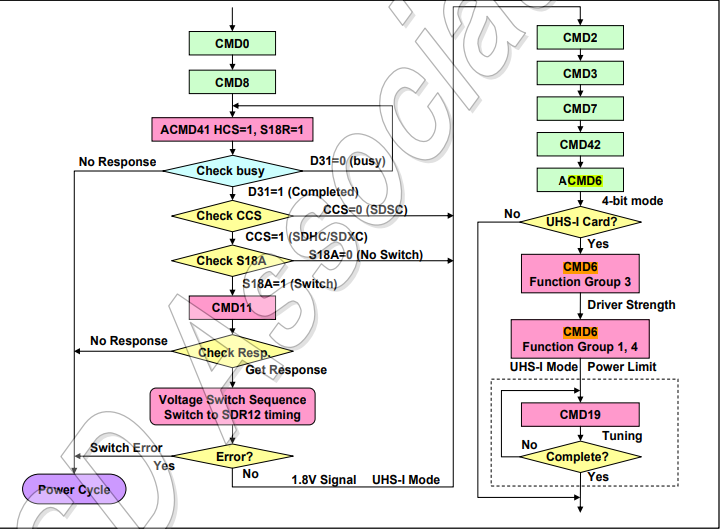
1. Physical Detection and Power-Up Stage
In the initial uninserted state, controlled by the SD host, the power pin on the SD interface is disabled, and the CLK has no clock output. In designs utilizing the CD/DAT3 pin for card insertion detection, the CD pin is pulled high at this time.
When the SD card is inserted, the CD pin is pulled low, triggering the SD card detection interrupt.
- Once the host detects the card insertion, it enables the power pin of the SD interface to supply power to the SD card (typically providing a 3.3V power supply).
- Simultaneously, the SD interface begins outputting a slow clock to initialize access to the card. The SD protocol requires the initial clock to be <400 kHz.
At this point, the SD host controller controls the power pin of the SD interface to supply 3.3V power to the SD card and controls the CLK pin to output a slow clock no higher than 400 kHz.
2. Card Identification Initialization Stage (Identification Mode)
CMD0
In this stage, starting from the 75th clock cycle output by the CLK pin, the SD host issues a CMD0 command to the SD card.
Referring to the understanding of the CMD data structure above, the command index of CMD0 is 0, all 32 bits of the argument (Arg) portion are set to 0, and the CRC7 checksum calculated is 0x97. Upon receiving the CMD0 message, the SD card performs an internal reset operation and enters the idle state. Additionally, according to the definition of the SD specification, after receiving the CMD0 message, the SD card must reply with an R1 message on the CMD pin to return its current status.
CMD8
Next, the SD host issues a CMD8 command to the SD card to query the protocol version supported by the SD card and to negotiate the voltage mutually supported by both parties.
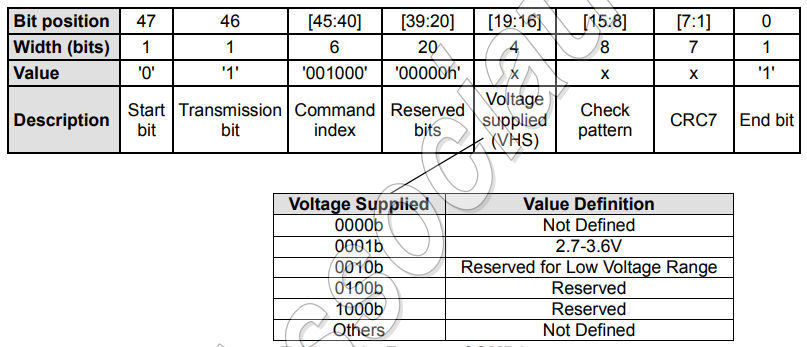
In the command structure of CMD8, the command index is 8, and the 32 bits of the command argument are divided into three parts according to the following structure: the Check pattern can be any 8-bit data (typically 0xAA), and the response message sent back by the SD card will contain the exact same Check pattern byte; the Reserved Bits are reserved bits and must be all set to 0; the only part that requires attention is the Voltage Supplied portion for negotiating voltage support, which contains two bits indicating whether the SD host supports 3.3V and 1.8V voltages respectively (supported = 1, not supported = 0). For the SD host, supporting 3.3V is mandatory, whereas supporting 1.8V is optional.
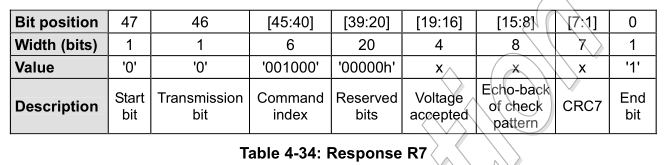
When the SD card receives the above CMD8 command, it responds with an R7 data structure. R7 is also a 48-bit data structure specifically designed to respond to the CMD8 command issued by the host. The details of the R7 data structure are shown in the figure below. The Check pattern between bits [15:8] must match the Check pattern of the received CMD8 command, otherwise the SD host will consider the communication link to be faulty; bits [19:16] indicate the voltage mutually supported by both parties (3.3V or 3.3V + 1.8V). If the card does not support the voltage provided in the SD host’s CMD8 command, the SD card will not send a response message.
ACMD41
Regarding the specific communication flow of CMD41 (which is an application-specific command ACMD41), the SD host first issues a CMD55 to the SD card, requesting it to enter the APP_CMD state and wait for an ACMD command. Upon receiving it, the SD card returns an R1 response message, using the APP_CMD status bit to indicate that it has entered application mode and is waiting for an ACMD command. The SD host then issues an ACMD41 command to the SD card, and upon receipt, the SD card replies with an R3 response message.
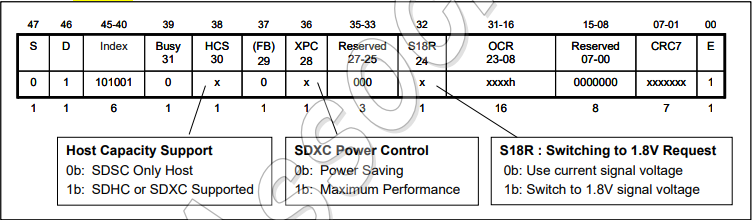
The data structure of the ACMD41 command is shown in the figure below. The main point of attention here is that the HCS bit is set to 1 for cards supporting SDHC or SDXC (which the vast majority of current SD hosts can support), and S18R is used to specify whether a switch to 1.8V voltage is required.
The structure of the R3 response message for the ACMD41 command is as follows. The R3 structure uses the CCS and UHS-II bits to indicate its capacity category and whether it is a UHS-II card. Furthermore, the S18A bit indicates whether it is ready to switch to 1.8V. Upon receiving this S18A bit, the SD host can decide whether to switch to 1.8V voltage or continue using 3.3V voltage.
- If a switch to 1.8V voltage is required, after the
ACMD41command sequence is completed, the SD host then executes this voltage-switching action via theCMD11-R1command sequence. If it continues to maintain 3.3V, there is no need to execute thisCMD11-R1sequence.
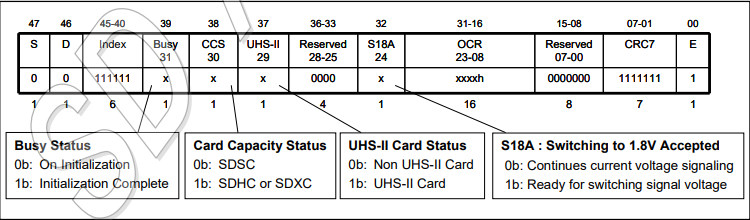
In addition, attention must be paid to the Busy Status of R3. For the execution of ACMD41, one must wait until the Busy Status of R3 is 0, which signifies that the current initialization stage is complete. Otherwise, the SD host needs to re-execute the complete CMD55-R1-ACMD41-R3 sequence and re-check whether the Busy Status is 1, until this Busy Status becomes 0.
The C code for the above judgment logic is as follows:
uint32_t ocr = 0;
do {
    // Send CMD55
    send_command(CMD55, 0x0000);
    if (response.app_cmd != 1) break; // Check APP_CMD bit in R1 response

    // Send ACMD41 (i.e., CMD41 with HCS and voltage parameters)
    send_command(CMD41, 0x40100000); // HCS=1, Voltages=3.3V
    ocr = get_ocr_from_r3();
} while (ocr & 0x80000000); // Check bit 31 (Busy flag)
Once the busy status bit returned in the R3 message is 0, the card identification initialization stage is complete.
3. Card Identification Configuration Stage
This step implements reading the 128-bit card identification and setting the data bus width through two command sequences, CMD2 and CMD3, respectively.
CMD2: Reading Card Identification
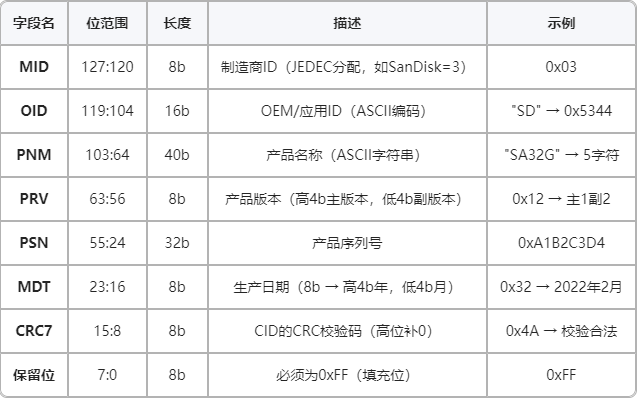
The CMD2 command is used to request the CID (Card Identification Register) of the SD card. Every SD card has a unique 128-bit CID, which contains information such as the manufacturer and product number. Note that the CID is a read-only register inside the SD card, burned by the manufacturer during production. In applications where a host manages multiple cards simultaneously, the CID is the core identifier used to distinguish different types of cards.
In the CMD2 data structure sent by the SD host to the SD card, the Command Index is 2, and all bits of the Argument are 0. After receiving the CMD2 command structure, the SD card returns an R2 response message to the SD host, whose structure is shown in the figure below.

The information of the CID and CSD registers contained therein is shown in the figure below. Note that the following structure is 128 bits. When packed into the R2 message response structure, the final bit is fixed to 1 as the end bit.
CMD3: Reading the RCA Address
Next, the RCA (Relative Card Address) of the SD card is obtained via the CMD3 command to support multi-card operations. The full name of CMD3 is SEND_RELATIVE_ADDR. Its primary function is for the SD host to assign a relative address (RCA) to the SD card. This address (rather than the 128-bit CID information) will be used in subsequent data communications to identify and distinguish different cards. This is extremely important in multi-card configurations; every SD card must be assigned a unique RCA during the initialization process so that the host can send commands to a specific card via this RCA address without conflicting with other cards.
- It should be noted that the RCA set in the
CMD3command sequence is not generated by the SD host, but is automatically generated by the card itself.
In the command structure of CMD3, the Command Index is 0x3, and the 32 bits of the Argument are all 0 (the RCA is not generated by the host). After receiving CMD3, the SD card sends back an R6 response message, which contains the RCA generated by the card itself and the current status information of the card. The structure of the R6 response message is shown in the figure below.
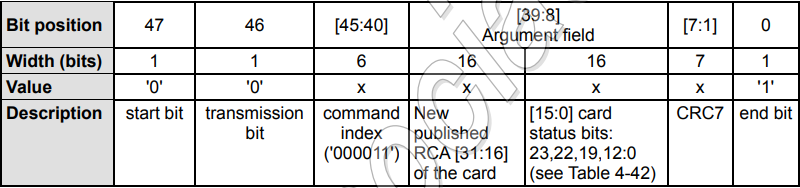
As can be seen, the R6 message structure contains two parts: the 16-bit RCA generated by the card itself, and the current status information of the card. The value range of the 16-bit RCA address generated by the card is 0x0001 to 0x7FFF, with 0x0000 reserved for cards whose initialization is incomplete. If the SD card detects an RCA conflict between two cards, it needs to re-send a CMD3 command to the cards.
4. SD Card Data Transfer Preparation Stage
In this stage, through multiple configurations, the selected card is set to the transfer state, the bus width and transfer block size are configured, and finally the card is switched to high-speed mode, officially entering the data transfer state.
CMD7: Setting the Specified Card to Transfer State
The CMD7 command is used to select a card from the SD bus and make it enter the Transfer State. Only one card can be in the transfer state on the SD bus at any given time.
In the CMD7 command structure, the Command Index is 0x07. In the 32-bit Argument, the upper 16 bits are the RCA address of the SD card to be selected (read during the preceding CMD3 stage; if 0, it means all cards are released to the non-transfer state), and the lower 16 bits are 0. After receiving the CMD7 command, the SD card switches its state to the Transfer State and then returns an R1 response message to the SD host, which contains its own status information.
ACMD6: Configuring the Bus Width for Communication State
The ACMD6 command is used to set the data bus width used during data transmission, with options of 1-bit and 4-bit (typically 4-bit is selected). The communication flow of the ACMD6 command is defined by the ACMD command specification, comprising the complete sequence of CMD55-R1-ACMD6-R1.
The CMD55 and R1 sequences have been described previously and will not be repeated here. The figure below shows the data structure of the CMD6 command. As can be seen, the Command Index of ACMD6 is 6. The upper 30 bits of the 32-bit Argument are padding bits forced to 0, and the lowest two bits are the bus width configuration bits (0b00 represents a 1-bit data bus, and 0b10 represents a 4-bit data bus). After receiving the ACMD6 command, the SD card returns an R1 response message containing its current status.
- The initial bus width of the SD card defaults to 1-bit, so if 4-bit is to be used for subsequent data communication, it must be configured as 4-bit via the
ACMDcommand here.

After setting the 4-bit data bus width, the CMD13-R2 command sequence can be used to read the SCR register of the SD card to verify whether the 4-bit bus width has been successfully set.
CMD6: Switching to High-Speed Mode
Because the CMD6 command (Switch Function Command) of the SD protocol is relatively complex, a separate note ([Parsing SD Communication Command Protocol - CMD6]) was previously used to organize the execution flow of CMD6.
According to the initialization execution flow of the SD card, the CMD6 command is subsequently used to configure parameters such as its drive strength and bus clock speed (function mode). Once the above CMD6 flow execution is completed, the SD bus clock switches to high-speed mode (such as 25 MHz, 50 MHz, etc.) and begins operation.
In addition to CMD6, for 1.8V-powered UHS-50 and UHS-104 high-speed cards, the CMD19 command also needs to be executed to send a 64-byte tuning block for adjusting sampling points.
At this point, the SD card has completed its initialization configuration preparations, entered high-speed clock and communication modes, and is ready for high-speed data communication.
References
- SD Specification Part 1 Physical Layer Simplified Specification Version 6.00
- Detailed Explanation of SD Card Bus Protocol - SDIO Protocol Introduction and Practice (Part 2)_SD Card Protocol - CSDN Blog
- Secure Digital Card Info