Detailed Explanation of Wi-Fi 6 OFDMA Feature
- 05 Feb, 2025
OFDMA: Short for Orthogonal Frequency Division Multiple Access.
OFDM vs OFDMA
In Wi-Fi 4, Wi-Fi 5, and even the earlier 802.11a protocols predating Wi-Fi 6, the OFDM mechanism was already adopted. This involves dividing the bandwidth of the entire communication channel into multiple overlapping yet orthogonal subcarriers to maximize data transmission rates and spectrum utilization, while overcoming multipath interference issues in wireless transmissions.
However, when using OFDM alone, each communication session between the Wi-Fi AP and STA is intended for a single user. This means that whenever data is transmitted, regardless of the user’s data volume, the communication with that user occupies all subcarriers. If we metaphorically view all subcarriers of the entire channel as a delivery cart, when a user needs to transmit a very small amount of data (such as instant messages or web browsing), the data volume cannot fully utilize all subcarriers, leaving the cart underfilled. Yet, according to OFDM’s working mechanism and flow, this underfilled cart can only contain data for that single user, and the remaining space in the cart (i.e., the leftover idle subcarriers) is simply wasted.
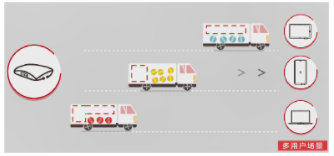
The OFDMA mechanism introduced in Wi-Fi 6 can effectively improve upon this situation. In the Wi-Fi 6 protocol, all subcarriers contained within the entire channel bandwidth are divided into multiple independent Resource Units (RUs). When transmitting data, through the unified negotiation and management of the AP, different users’ data will only occupy a specific RU rather than the entire channel. In this case, since the entire channel contains multiple RUs, it enables application scenarios where data can be simultaneously transmitted to multiple users at the same time using different RUs. Continuing with the delivery cart analogy, OFDMA is equivalent to partitioning dedicated compartments inside the cart and scheduling cargo for different users into each compartment. This way, a single trip of the cart can deliver goods to multiple receivers simultaneously, naturally greatly improving transportation efficiency (communication efficiency).
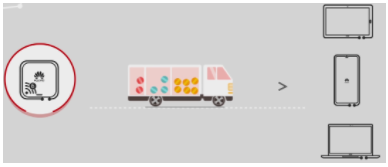
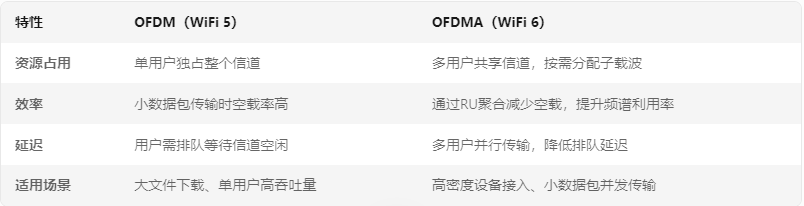
Below is a comparison between traditional OFDM and OFDMA:
The Concept of RU (Resource Unit)
As mentioned above, during the operation of the Wi-Fi 6 OFDMA mechanism, the RU is the minimum resource allocation unit of OFDMA. An RU consists of a group of consecutive subcarriers (tones). In the Wi-Fi 6 OFDMA mechanism, the smallest RU can contain 26-tones (i.e., 26 subcarriers), and other types of RUs include 52-tone, 106-tone, 242-tone, etc. The correspondence between the number of tones in an RU and its occupied bandwidth is as follows (Wi-Fi 6 subcarrier spacing is 78.125 kHz, making it easy to calculate):
- 26-tone RU ≈ 2 MHz
- 52-tone RU ≈ 4 MHz
- 106-tone RU ≈ 8 MHz
- 242-tone RU ≈ 20 MHz (For a 20 MHz bandwidth, this covers the entire channel)
Taking the 2.4 GHz frequency band with a 20 MHz bandwidth as an example:
- Wi-Fi 6 introduces a smaller subcarrier spacing (78.125 kHz), which is 4 times smaller than that of Wi-Fi 4/5 (312.5 kHz). Therefore, under the same bandwidth, the number of available subcarriers in Wi-Fi 6 increases significantly.
- For a 20 MHz channel bandwidth, the entire 20 MHz is divided into 256 subcarriers, of which 234 are used for data transmission, and the rest are guard subcarriers (11), null subcarriers (4), and direct current (DC) subcarriers (7).
- In a 20 MHz channel, a maximum of nine 26-tone RUs can be supported, meaning it can simultaneously serve 9 users.
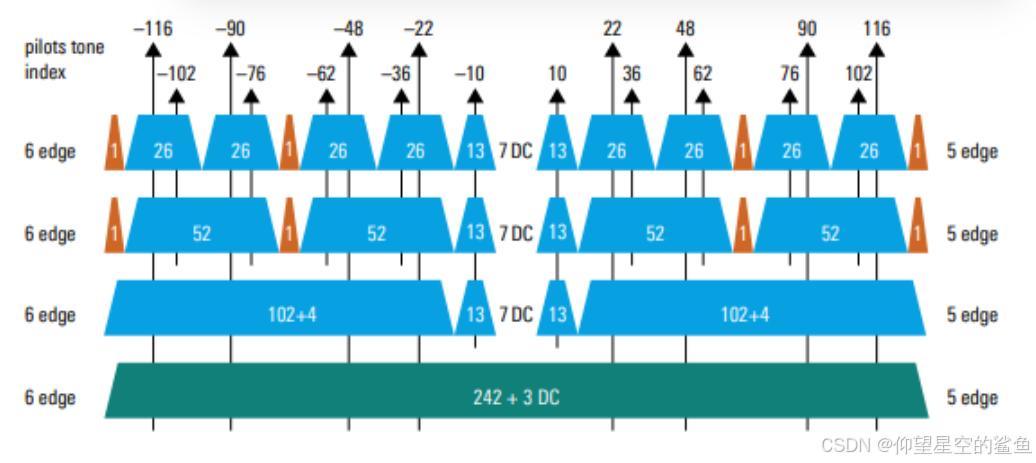
In specific execution, a complete 20 MHz channel can be flexibly and dynamically allocated into different RU combinations. For example, it can be divided into one 106-tone RU + five 26-tone RUs to simultaneously support 6 users; or it can be divided into four 52-tone RUs to simultaneously support 4 users. In addition, during operation, the AP will periodically probe the data traffic types (such as video, voice) and buffer status of currently connected terminal devices, dynamically allocating RUs among various devices to further optimize bandwidth utilization efficiency.
Note, however, that Wi-Fi 6 OFDMA RU allocation only supports assigning one RU to a single STA within the same time period. Therefore, no matter how flexibly the AP allocates RU resources to its connected STAs, each STA can only use one of these RUs.
Trigger Frame Structure
As mentioned above, during the operation of the Wi-Fi 6 OFDMA mechanism, the AP can dynamically allocate RUs among multiple nodes based on their communication requirements. What is the execution workflow for this dynamic RU allocation? The answer is:
- The AP relies on a Trigger Frame and management frame interaction mechanism to dynamically notify each terminal (STA) of the RU allocation results.
- For downlink communication between the AP and STAs, if the MU-RTS mechanism is not relied upon, the downlink communication RU information for each STA is directly included in the HE-SIG-B field of the data PPDU sent by the AP. Thus, downlink OFDMA communication does not rely on trigger frames to allocate RU resources. However, uplink OFDMA communication (where multiple STAs simultaneously send data to the AP using their respective RUs) must rely on trigger frames for RU negotiation and synchronization.
The trigger frame is a control frame structure (Type=1, SubType=2) introduced in the 802.11ax specification. For detailed information about trigger frames, please refer to [[Detailed Explanation of Wi-Fi 6 Trigger Frame Structure]].
Uplink and Downlink OFDMA Operation Workflows
In practical applications, Wi-Fi 6 OFDMA can be divided into two application scenarios and workflows: Downlink OFDMA and Uplink OFDMA:
- Downlink OFDMA refers to the scenario where the AP can simultaneously transmit data to multiple different STAs using multiple RUs, thereby increasing effective data throughput per unit time and improving spectrum utilization efficiency.
- Uplink OFDMA refers to the scenario where multiple STAs can transmit data to the AP by utilizing their assigned RUs. Consequently, STAs no longer need to contend for the wireless transmission medium through traditional channel contention methods, reducing latency and collision counts caused by channel contention when STAs upload data.
The downlink OFDMA communication workflow is summarized as follows (AP sends data to multiple STAs simultaneously):
- The AP sends a trigger frame of type MU-RTS Frame. Compared to traditional RTS (Request To Send) Frames, this MU-RTS Frame contains the Association IDs of multiple destination STAs and the RUs used by each STA in this session. All STAs within this AP’s BSS can receive and parse this MU-RTS Frame, thereby learning whether the AP has data to send to them in this session, whether they need to reply with a CTS response to the AP, and which RU their data is assigned to.
- STAs (specifically those designated in the MU-RTS) reply with a CTS Frame, confirming that the channel is available for receiving data. Since the Association IDs of each STA and their occupied RUs are specified in the MU-RTS, these STAs respond to the AP by sending back a CTS Frame via their assigned RUs upon receiving the MU-RTS Frame. Therefore, the RUs occupied by multiple STAs are mutually independent and can send replies back to the AP simultaneously.
- The AP transmits data to multiple STAs simultaneously. In this stage, the AP uses different RUs to send data to multiple STAs concurrently, and each STA only needs to receive the data transmitted within its own RU.
- The AP sequentially sends a BAR (Block ACK Request) frame to each STA. After data transmission completes, waiting for an SIFS interval, the AP sequentially sends a BAR Frame to each data-receiving STA to request their data reception acknowledgement frames and confirm whether the data was correctly received (Why a MU-BAR frame is not adopted here is primarily due to compatibility considerations, ensuring that other STAs that do not support OFDMA and trigger frames can still properly receive and respond to the BAR frame.)
- Multiple STAs simultaneously reply with a Block ACK frame using their own RUs. For each data-receiving STA in this downlink OFDMA communication session, the uplink OFDMA mechanism is used to simultaneously return a Block ACK Frame to the AP within its own RU, indicating that the preceding data has been properly received and parsed.
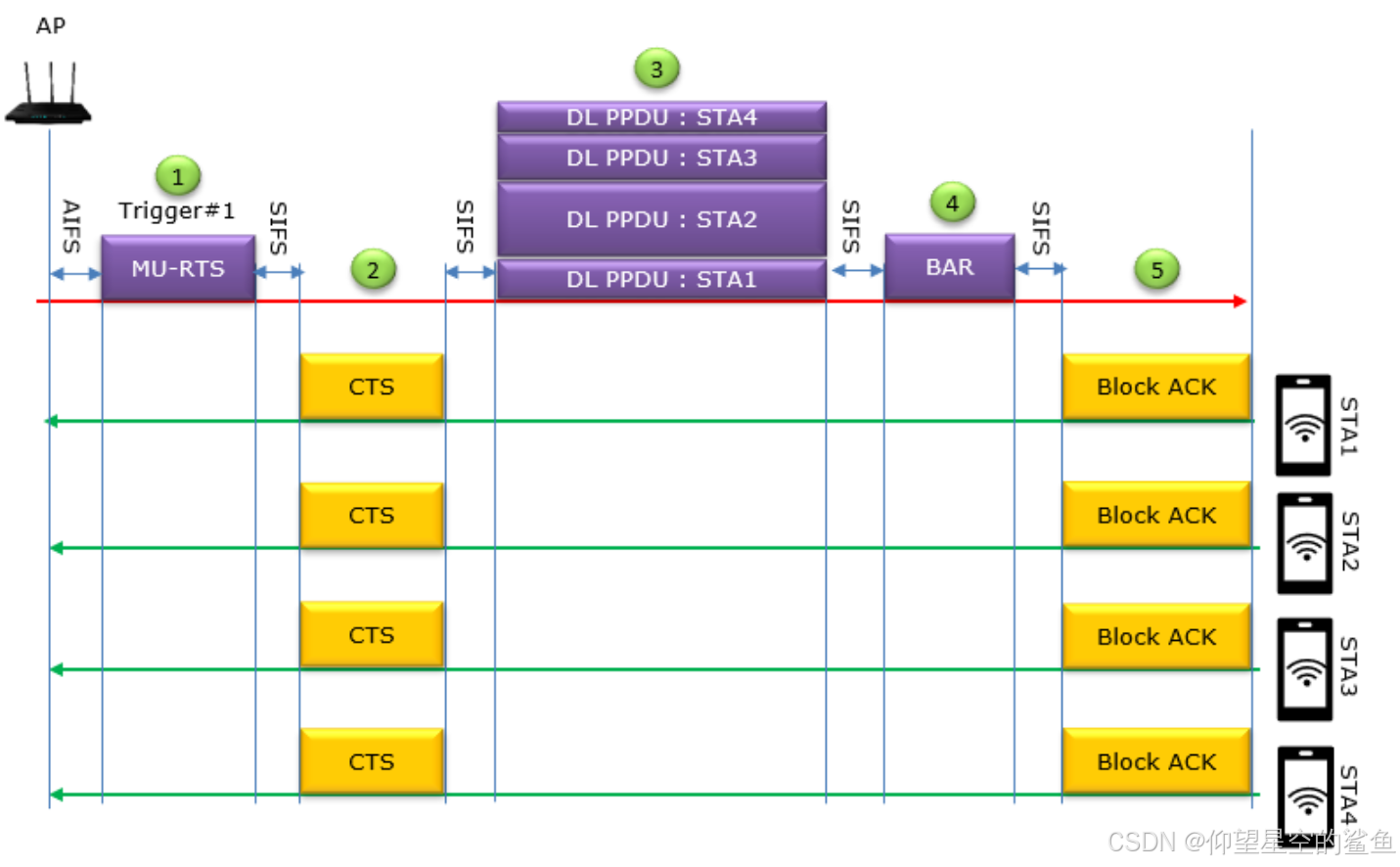
Of course, the MU-RTS and CTS phases above are optional workflows and are recommended for use in high-density deployments or applications involving sensitive data transmission. In general throughput-optimized application scenarios, the MU-RTS and CTS phases can be skipped to reduce control overhead. In this case, the RU allocation information for each STA in the current downlink transmission is contained in the downlink data PPDU preamble. The HE-SIG-A and HE-SIG-B fields included in the preamble describe the RU allocation information, and the STA parses the HE-SIG-B field after receiving the preamble to determine the RU where its data resides.
As for the uplink OFDMA workflow, it is slightly more complex than downlink communication. In the uplink workflow, the AP first needs to poll the data buffer status of each STA (to check for uplink communication demands) and then allocate RU resources based on the information from each STA. Therefore, in the uplink workflow, the AP first sends a BSRP trigger frame, STAs reply with a BSR (Buffer Status Report), and then the AP schedules resources by sending a Basic Trigger Frame based on this information.
The uplink OFDMA communication workflow is summarized as follows (multiple STAs send data to the AP simultaneously):
- First, the downlink OFDMA communication workflow is initiated by the AP, which sends a BSRP (Buffer Status Report Poll) trigger frame to all STAs to query whether each STA has data to send to it.
- Each STA returns a Qos Null Frame to the AP via its assigned RU, containing BSR (Buffer Status Report) information to inform the AP whether it has data to send.
- The AP then sends an MU-RTS Frame to all STAs to confirm whether each STA is ready to upload data, along with the RU allocation information for each STA.
- Multiple STAs reply with a CTS Frame to the AP via their respective RUs, indicating that they are ready to send data.
- The AP then sends a Basic Trigger Frame to all STAs, triggering multiple STAs to upload data to it. Upon receiving this Basic Trigger Frame, each STA simultaneously sends its data to the AP via its own RU.
- Finally, the AP sends a Multi-STA Block ACK acknowledgement packet to all STAs, indicating that it has successfully received and parsed the uplink data.
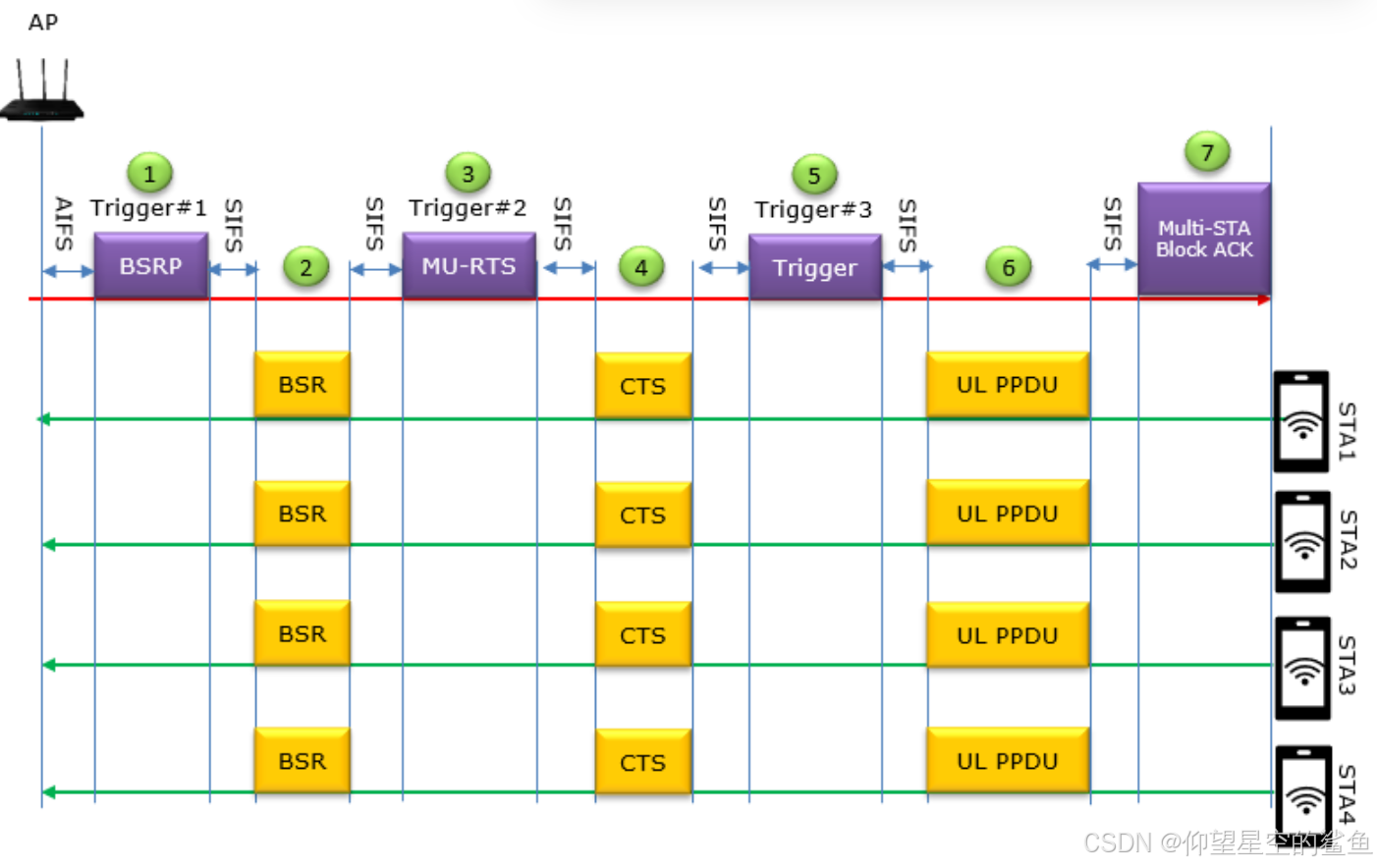
Similarly, the MU-RTS and CTS parts in the uplink OFDMA workflow above are also optional.
References
- Wi-Fi 6 (802.11ax) Analysis 2: OFDMA Resource Blocks - RU - Zhihu
- Introduction to Wi-Fi Technology (9) — Wi-Fi 6 High Performance OFDMA
- [WLAN from Beginner to Master - Wi-Fi 6] Episode 2 - Putting Resources to Good Use: OFDMA - Cloud Community - Huawei Cloud
- Wi-Fi 6 (802.11ax) Analysis 13-15: Trigger Frames and MAC Access Mechanisms, Downlink OFDMA Access Mechanism (DL-OFDMA), Uplink OFDMA Access Mechanism (UL-OFDMA) - CSDN Blog
- Application of Wi-Fi 6 Protocol Trigger Frame in OFDMA - CSDN Blog