How is the Antenna Shared Between Dual-Band WiFi and Bluetooth?
- 26 Dec, 2024
This note attempts to gain a more complete understanding of and answer the following three questions related to RF antenna multiplexing (sharing):
- All WiFi and Bluetooth chips have RF modules capable of transmitting and receiving data. How do they achieve transceiver functionality using a single antenna, and how do they avoid conflicts caused by simultaneous transmission and reception?
- Some 2.4GHz WiFi + Bluetooth combo modules use a single antenna for both WiFi and Bluetooth. How do WiFi and Bluetooth share the same antenna without causing interference?
- Dual-band WiFi supports both 2.4GHz and 5GHz frequency bands. Some modules support a single shared antenna for both bands, but the wavelength of the 5GHz band is less than half that of the 2.4GHz band. How is good RF performance guaranteed for a single antenna across both 2.4GHz and 5GHz?
WiFi/Bluetooth Antenna Transceiver Multiplexing Issue
In fact, using a single antenna for transmitting and receiving on both WiFi and Bluetooth is not an issue at all. This is because WiFi and Bluetooth TX and RX communications are inherently half-duplex, making simultaneous transmission and reception impossible. In other words, the active periods of TX and RX are strictly staggered. Therefore, conflict is never an issue when multiplexing transceiver antennas for WiFi and Bluetooth.
For BLE, the communication logic in a connected state is illustrated in the figure below:
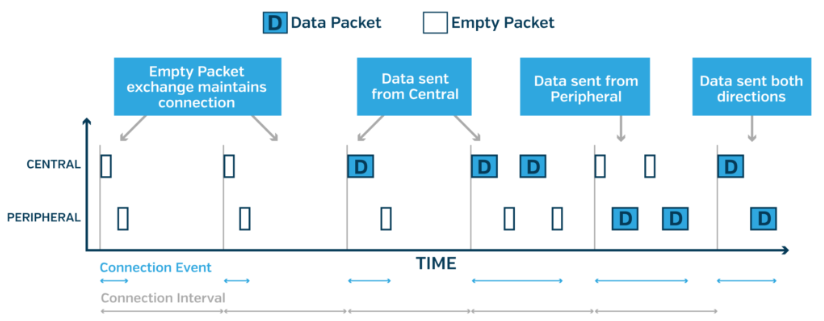
Every connection event always starts with the Central device turning on its TX to transmit a data packet, and the Peripheral device turning on its RX to wait for the packet. After sending the packet, the Central device turns on its RX to await an acknowledgment (ACK), while the Peripheral device, upon receiving the packet from the Central, turns on its TX to transmit an ACK packet.
The same applies to the broadcasting mode. The Peripheral device always turns on its TX first on the broadcast channel to send a broadcast packet, and then switches to RX to wait for the connection request packet from the Central device. Before establishing a connection, the Central device also first turns on its RX on the broadcast channel to listen for broadcast packets, and upon receiving one from the Peripheral device, switches to its TX to send a connection request.
Therefore, for both Central and Peripheral devices, data packet transmission and reception are strictly staggered in time sequence to ensure normal operation. For the RF modules at both ends, there is never a scenario where TX and RX need to be active simultaneously.
WiFi works similarly. WiFi’s medium access mechanism is based on CSMA-CA. When a source station wants to send a data packet, it first uses RX to listen to the current wireless channel. Once the channel is determined to be idle, it waits for a specific duration (SIFS/PIFS/DIFS) before transmitting its packet. Upon receiving the packet, the destination station waits for a specific duration (SIFS) to send back an ACK packet. During these transmission and response intervals, the wireless medium remains in an occupied state (NAV). If other stations have data to transmit during this time, they must wait for a designated period, re-listen to the medium, and then attempt to turn on their TX to send packets within the contention window.
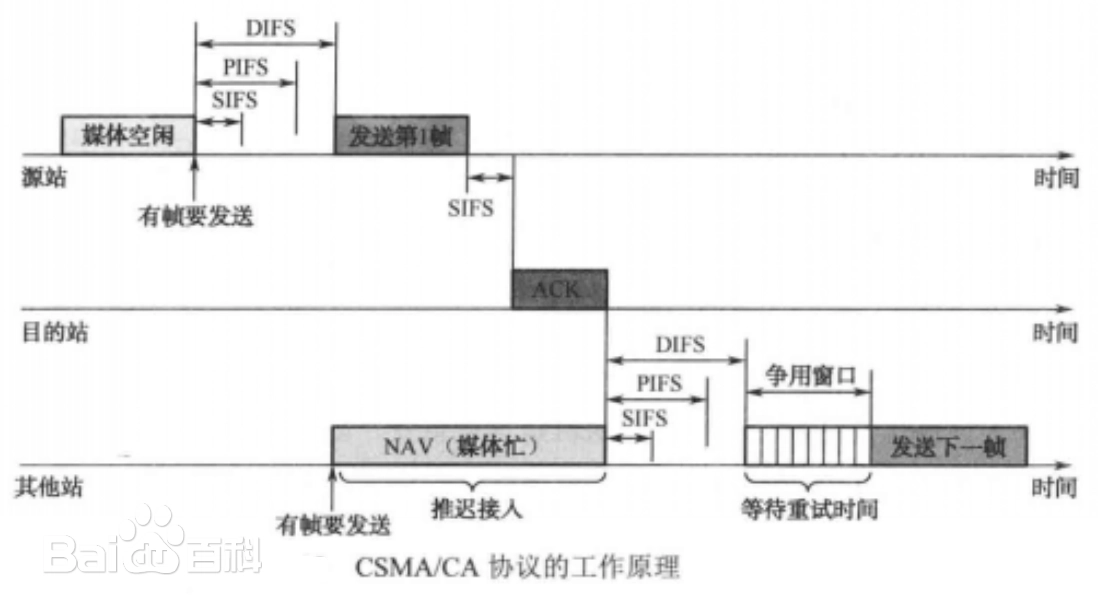
In the process described above, before any station turns on its TX to transmit data onto the wireless medium, it must first use its RX to monitor whether the medium is idle. Only when the medium is confirmed to be idle will it turn on its TX to transmit.
In reality, while a station is turning on its TX to send data, it cannot know whether another station is simultaneously transmitting on the same channel, which would cause an RF collision (this is why CSMA/CD cannot be used in wireless communications, necessitating CSMA-CA instead). As a result, it must wait for the peer to return an ACK packet to confirm whether the communication was successful. If no ACK is received, the packet is considered lost and must be retransmitted.
Following this working logic, the transmission and reception controls for each WiFi station are also staggered. Even when data needs to be sent, the station always uses RX first to ensure there is no collision on the wireless medium before opening TX to transmit.
In summary, for WiFi and Bluetooth communications, transmission and reception cannot happen concurrently. Therefore, they can naturally be controlled and switched via switches—opening RX when data needs to be received, and opening TX when data needs to be sent. Conflicts between the two are impossible.
In fact, this holds true for all wireless communication methods that use time-division duplexing for transmission and reception. Transmission and reception are inherently half-duplex and cannot occur simultaneously; nor is it possible to monitor for signal collisions while sending information. Therefore, systems must rely on ACKs returned by the peer to confirm communication success.
Below is a simplified block diagram of a wireless transceiver controlling RX and TX switching: RX receives wireless signals through the LNA path, while TX transmits signals through the PA path.
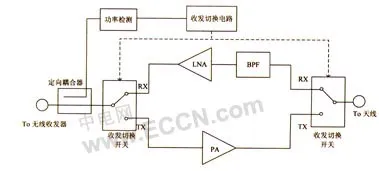
When the wireless transceiver is in the transmitting state, the power detector detects the signal emitted by the transceiver, thereby generating a switching signal to direct the RF switch toward the transmitting PA path. The LNA circuit is disconnected, the bidirectional power amplifier is placed in the transmitting state, and the TX signal is radiated outward through the antenna. When the wireless transceiver is in the receiving state, due to the unidirectional nature of the directional coupler, the power detector has almost no input signal. At this point, the switching signal switches the RF switch to the LNA path, disconnecting the PA path. The bidirectional power amplifier is then placed in the receiving state, and RX receives RF signals from the antenna and feeds them into the LNA path for processing.
Thus, as seen from the block diagram above, RX and TX are always in a state of automatic switching: TX is opened and switched to the PA path when data needs to be transmitted, and switched to RX to open the LNA path when data needs to be received. Through this switching mechanism, simultaneous transceiver conflicts are eliminated.
References:
Antenna Multiplexing Between 2.4GHz WiFi and Bluetooth
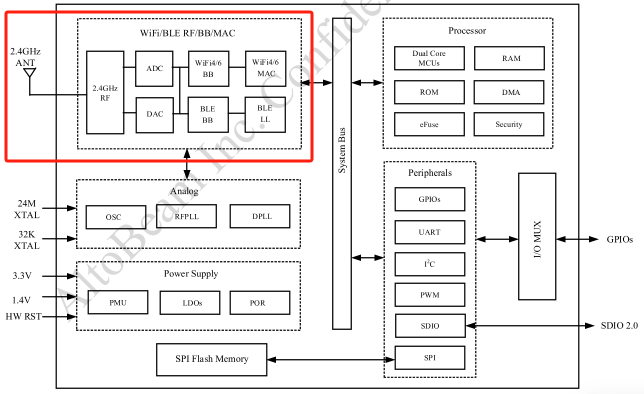
Some WiFi + Bluetooth combo modules integrate both WiFi and Bluetooth functions, and naturally include their respective RF circuits, yet they share a common 2.4GHz antenna. For example, the figure below shows HighTropic’s 2.4GHz single-band WiFi 6 + Bluetooth solution, the 6461. The questions are:
- When Bluetooth and WiFi communicate simultaneously and both have data to receive, does the data received by the antenna go to WiFi or Bluetooth?
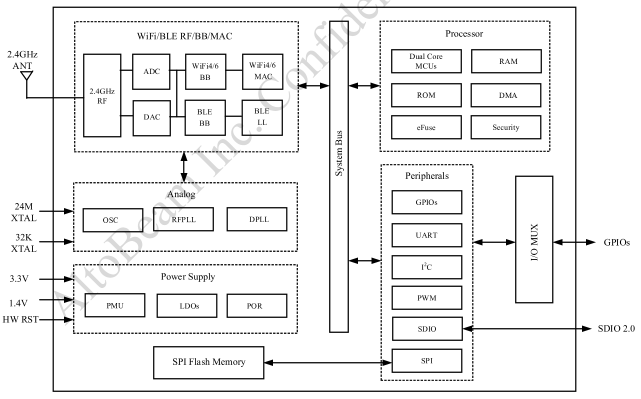
Bluetooth and 2.4GHz WiFi sharing a single antenna and RF circuit for communication relies on mechanisms such as PTA or EECI.
PTA
PTA (Packet Traffic Arbitration) is a packet traffic arbitration mechanism used to coordinate the operating states of Bluetooth and WiFi devices when they share the same RF circuit, minimizing mutual interference in the 2.4GHz band.
The 802.15.2 specification defines a framework for packet traffic arbitration between Bluetooth and WiFi when they share an antenna. Within this framework, the usage of RF and antennas by WiFi and Bluetooth is managed by an arbiter. When both require RF access, they submit requests to the arbiter via physical pins, and the arbiter decides which party gets to use the RF and antenna. Therefore, in such co-existence scenarios, the efficiency and stability of wireless communication depend heavily on the arbiter’s implementation, operating logic, and the information available from both ends.
In terms of specific implementation, the PTA arbiter module is generally placed inside the WiFi chip. The WiFi and Bluetooth chips exchange their current status and issue requests through dedicated PTA pins. The 802.15.2 standard recommends a 3-wire PTA communication architecture, though 2-wire and 4-wire implementations also exist.
Below is a typical PTA connection diagram showing RF and antenna sharing between WiFi and Bluetooth chips. The PTA connection uses a standard 3-wire setup: BT_PRIORITY_AND_STATUS, BT_ACTIVITY, and WLAN_ACTIVITY.
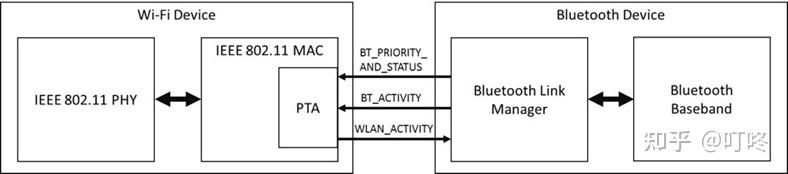
WLAN_ACTIVITY: Also known as the GRANT pin, it sends a signal from the WiFi chip to Bluetooth. When WiFi does not need to use the RF and antenna, it can notify the Bluetooth chip via this pin, allowing Bluetooth to request the arbiter for antenna access to transmit/receive Bluetooth data.BT_ACTIVITY: Also known as the REQUEST pin, it sends a request signal from the Bluetooth chip to the PTA arbiter. When Bluetooth has data to transmit or receive, it actively requests antenna access through this pin. Upon receiving the request, the PTA arbiter decides whether Bluetooth or WiFi should use the antenna based on its internal control logic.BT_PRIORITY_AND_STATUS: Also known as the PRIORITY pin, it emits a signal from the Bluetooth chip indicating whether the current data packet has high or low priority. Used in conjunction with the REQUEST pin, it characterizes the priority of the Bluetooth data, allowing the PTA arbiter to determine the ownership logic of the antenna usage.
Therefore, essentially, the PTA mechanism embeds a PTA arbiter inside the WiFi chip. The WiFi and Bluetooth chips use the Grant, Request, and Priority pins to notify and negotiate their respective usage demands for the 2.4G RF and antenna, and the PTA arbiter ultimately determines the ownership of the antenna. This avoids wireless conflicts that could occur if WiFi and Bluetooth accessed the antenna simultaneously.
The biggest issue with PTA is that information is transmitted via high and low logic levels on three pins, meaning the volume of information carried is extremely limited—restricted to requests, status, and data priority. This is far from enough for the PTA arbiter to make highly efficient arbitration decisions. Consequently, to share more information between the two systems and assist the PTA arbiter in achieving more efficient antenna control, ECI or SECI mechanisms can be employed.
SECI
SECI stands for Serial Enhanced Coexistence Interface. It is a 2.4GHz RF and antenna coexistence negotiation interface and protocol based on UART serial communication defined by Cypress, and is widely used in Cypress’s WiFi and Bluetooth products.
In practical applications, SECI uses a UART serial port to transmit arbitration data between the Bluetooth and WiFi chips, exchanging up to 64 bits of information via the serial interface—vastly exceeding the 3-bit information provided by the 3-wire PTA mechanism. This helps make more efficient decisions regarding RF and antenna multiplexing between the two systems.
- Naturally, because SECI is a proprietary protocol defined by Cypress, using SECI to share antennas between WiFi and Bluetooth is best achieved by using Cypress WiFi and Bluetooth chips simultaneously.
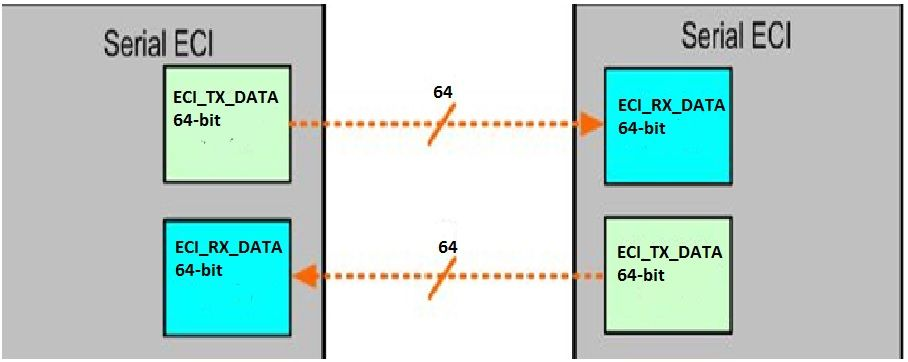
In short, whether PTA or SECI, both are essentially time-division multiplexing mechanisms for RF and antenna co-existence between Bluetooth and WiFi. WiFi and Bluetooth exchange status information, communication requirements, data priorities, and timing details via a communication mechanism, and an arbiter decides which party gets to use the antenna. Therefore, in any given time slice, only one party can use the antenna. This inevitably impacts the real-time performance and throughput of both communications, though with the assistance of the arbiter, the probability of wireless conflicts during communication is minimized.
WiFi+BT Combo
The PTA and SECI mechanisms discussed above are aimed at sharing a single antenna between independent WiFi and Bluetooth chips. To improve communication efficiency, a better approach is to choose a Combo module that integrates WiFi and Bluetooth into a single package. In this case, Bluetooth and WiFi reside within the same chip, allowing their status information to be fully shared without relying on external PTA and SECI interfaces. Consequently, scheduling RF and antenna resources between them becomes much more efficient. In fact, this approach has become the mainstream application trend, with many WiFi chips directly integrating Bluetooth functionality internally without requiring external interfaces for antenna negotiation. For example, HighTropic’s 6461 integrates both WiFi and Bluetooth inside the chip, providing native support for shared antenna usage, which is far more efficient than external PTA and SECI connections:
Conclusion
For scenarios where 2.4GHz WiFi and Bluetooth share a single antenna for data transmission and reception, multiple solutions exist—PTA, ECI, SECI, and Combo Modules—but their core principles are largely similar. Antenna sharing between the two relies on an arbiter. WiFi and Bluetooth submit requests to the arbiter when they need the antenna, and the arbiter allocates it based on data communication priorities. At any exact moment, only either WiFi or Bluetooth holds exclusive rights to the antenna.
Therefore, the presence of the arbiter, coupled with the competition between WiFi and Bluetooth for antenna access rights, will inevitably impact their respective data throughputs to varying degrees, with the extent of the impact depending on the arbiter’s operating logic.
References
- [Bluetooth Series] WiFi and BT Coexistence Mechanism - Zhihu
- What is PTA? BT-WIFI Coexistence_wifi pta - CSDN Blog
- Overview of SECI - Infineon Developer Community
Antenna Multiplexing Issues in 2.4G/5GHz Dual-Band WiFi
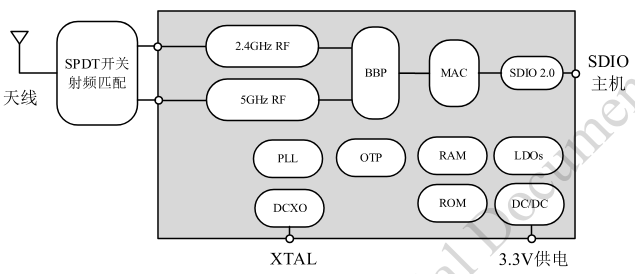
Current dual-band WiFi modules support WiFi communication across both 2.4GHz and 5GHz bands. In the circuit design of such modules, a similar antenna multiplexing issue arises for the two WiFi bands: the RF circuits for the 2.4GHz and 5GHz bands share a single antenna, matching antenna usage via switches. For instance, consider HighTropic’s dual-band WiFi 6132:
The questions are:
- Multiplexing logic issue: Similar to the Bluetooth and 2.4GHz WiFi antenna sharing problem, when both the WiFi 2.4GHz and 5GHz bands need to transmit data simultaneously, data can be cached in buffers and transmitted sequentially by switching the antenna. However, for reception, if data arrives simultaneously on both bands, when the antenna switches to 2.4GHz, data on the 5GHz band is inevitably dropped. How is this handled?
- Multiplexing performance issue: The antenna performance issue for 2.4GHz and 5GHz. Antenna length correlates with wavelength. Since the frequency of 5GHz is more than double that of 2.4GHz, the optimal RF antenna length should also differ by a factor of two. When sharing a single antenna, how can optimal RF performance be guaranteed across both bands?
Multiplexing Logic Issues
The logic behind dual-band WiFi antenna multiplexing is conceptually consistent with WiFi-Bluetooth antenna sharing: regardless of the multiplexing method, it is ultimately implemented via a time-division mechanism. At any given moment, either the 2.4GHz band or the 5GHz band is using the WiFi antenna.
As shown in the HighTropic 6132 block diagram above, the 5GHz and 2.4GHz bands of dual-band WiFi have their own respective RF processing circuits, switched via an SPDT (Single-Pole Double-Throw) switch. Only one band can use the WiFi antenna at any instant.
Since this is a time-division antenna multiplexing logic, it inevitably impacts the throughput of each band’s communication. Assuming the simplest proportional time-division multiplexing logic is used to toggle the SPDT switch, both the 2.4GHz and 5GHz bands get only half the time to own antenna access, significantly affecting their communication throughput. This is especially true for RF reception: if a received signal reaches the antenna while the SPDT switch has not yet toggled to the matching operating band, that packet will certainly be dropped, and recovery must rely on retransmission after the switch toggles. Therefore, the impact of such frequent switching on RF transceiver throughput is unavoidable.
Because time-division multiplexing noticeably affects RF throughput, applications requiring high communication speeds must consider the potential impact of 2.4GHz and 5GHz time-division multiplexing. This is likely why most routers separate 2.4GHz and 5GHz antennas in their designs. Independent 2.4GHz and 5GHz antennas paired with their respective dedicated RF circuits provide network services on their respective bands, eliminating the need for frequent switching between bands. For example, the teardown of a Xiaomi router shown below clearly divides the 2.4G and 5G antennas into two distinct groups:
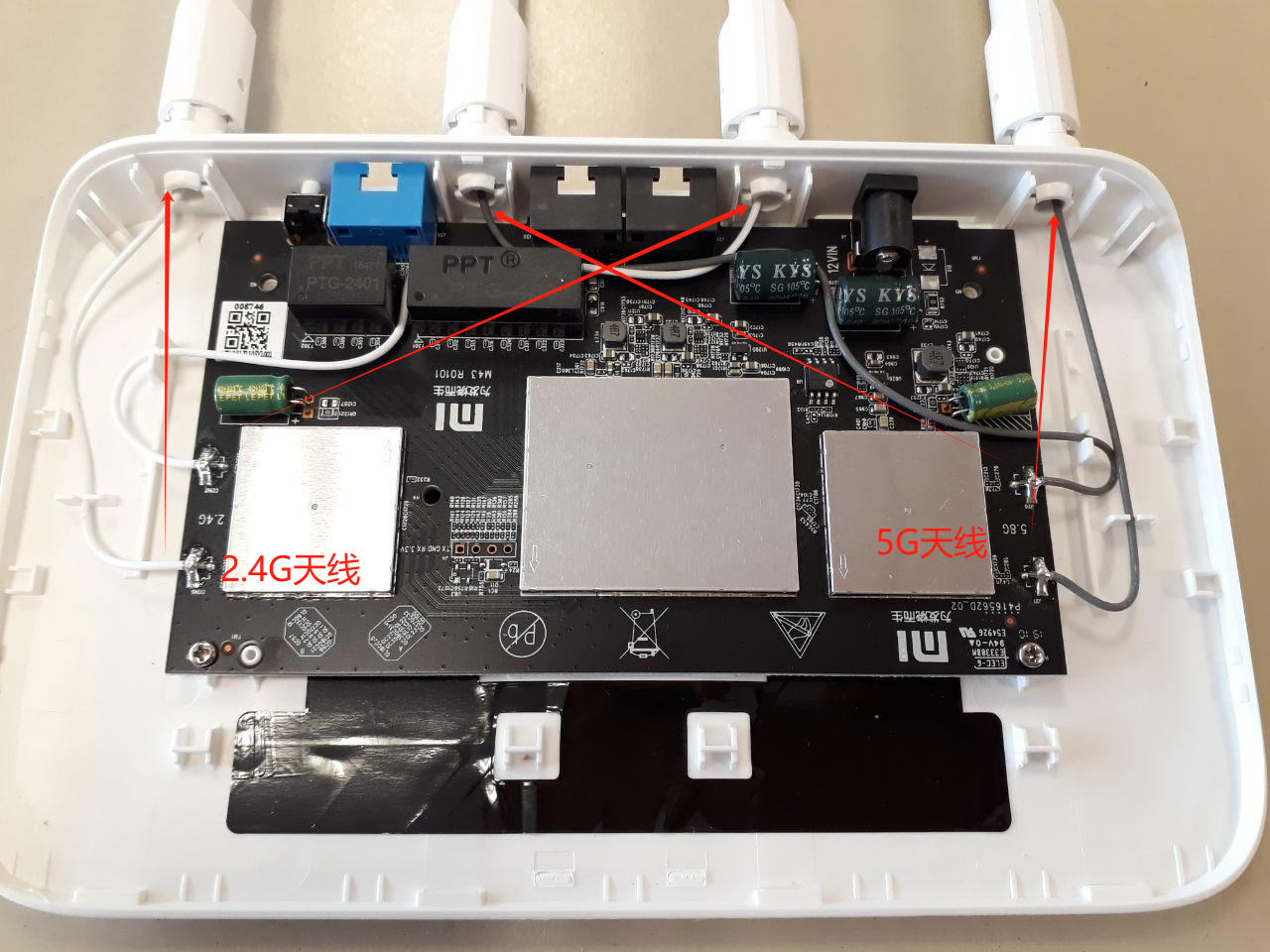
Another crucial point is that for IoT applications using dual-band WiFi in STA (Station) mode, dual-band WiFi generally operates in a “choose one of two” state, rendering the multiplexing logic issue non-existent. For instance, in an IP Camera using dual-band WiFi, the device connects to the router using either 2.4GHz or 5GHz during network provisioning. Once selected, all subsequent connections to the router consistently use solely that chosen band (either 2.4GHz or 5GHz). Consequently, the SPDT switch remains fixed to 2.4GHz or 5GHz according to the WiFi driver configuration, eliminating the need for frequent switching during operation and neutralizing any multiplexing logic concerns.
Multiplexing Performance Issues
The performance issue of dual-band antenna multiplexing is essentially a multi-band antenna design problem. An antenna designed for multi-band operations can support communication across multiple frequency bands using a single physical structure.
- Multi-band antenna design is even more prominent in the multi-mode support required by mobile phone LTE. Because LTE operates across multiple different frequency bands (Bands), and modern smartphones are essentially “full Netcom” devices supporting almost all bands, their internal antenna designs must accommodate diverse frequency bands. This makes multi-band design far more complex than supporting just dual-band WiFi’s 2.4GHz and 5GHz.
How to design an antenna that supports multiple frequency bands while meeting standard performance requirements across all of them is the primary focus of multi-band antenna design.
Current antenna design methods capable of simultaneously supporting multi-band wireless communication on a single antenna primarily include the resonant branch method, harmonic design method, and parasitic branch method. Reference Document 1 provides an excellent summary of this topic, which is briefly outlined below.
Resonant Branch Method
The resonant branch method involves creating an independent radiating branch for each frequency band the antenna needs to support. Because the branches for each band are independent, tuning the resonant frequency point of one branch does not affect the others, making debugging much simpler.
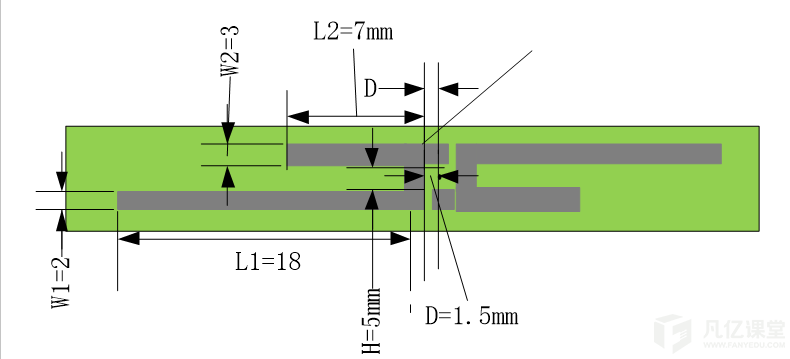
For example, the figure below shows a standard dual-band WiFi antenna design. The longer branch ($L1+H$) corresponds to the 2.4GHz band dipole antenna, while the shorter branch ($L2$) corresponds to the 5GHz band dipole antenna. Both antenna branches are independent, and their lengths can be tuned individually based on their respective target bands.
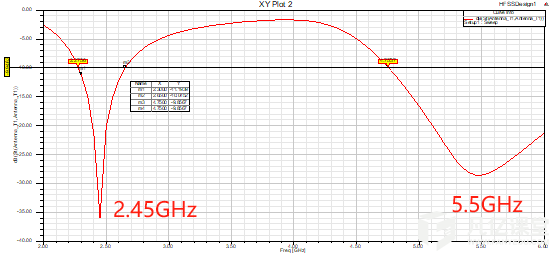
The figure below illustrates the simulated spectrum response of the antenna above, showing good impedance and bandwidth characteristics at both the 2.45GHz and 5.5GHz frequency points.
Multi-band antennas configured via the resonant branch method work best when applied to two bands. When the number of resonant branches exceeds three, mutual interference between branches increases, degrading performance across all bands. Therefore, this method is best suited for dual-band applications like dual-band WiFi.
Harmonic Design Method
Basic electromagnetic theory dictates that when an RF signal resonates at an antenna’s fundamental frequency, it simultaneously produces resonance at its odd harmonics (e.g., 3x, 5x, 7x… fundamental frequencies), while even harmonics do not resonate due to cancellation effects. The figure below demonstrates simulated harmonic resonances on a standard 900MHz dipole antenna. This characteristic of odd-harmonic resonance can be leveraged to design a single antenna supporting multiple distinct frequency bands—the underlying principle of harmonic design.
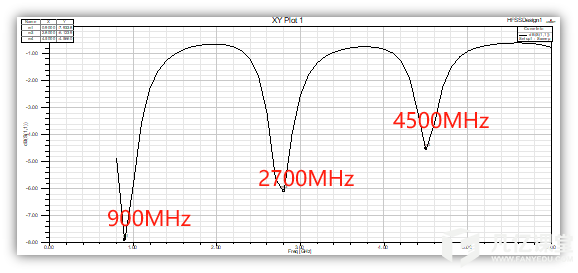
While the figure above shows standard odd-harmonic resonance, in real-world product applications, multiple frequency bands rarely align in exact odd-harmonic ratios. To address this, special treatments can be applied during antenna design. For instance, bending PCB antenna traces, adjusting spring antenna pitch coil radii, or tweaking other parameters allows the low-frequency fundamental frequency to remain unchanged while shifting the high-frequency harmonic points to the desired frequencies.
Parasitic Branch Method
Another multi-band antenna design approach is the parasitic branch method. The general working principle involves adding a parasitic branch alongside the antenna’s primary radiating branch. RF energy is fed into the primary branch from its feed point. Because the parasitic branch is placed in close proximity to the primary branch, a coupling effect occurs between them—effectively introducing a parasitic capacitance bridging the two branches. Radiation energy from the primary branch’s feed point is coupled through this parasitic capacitance and radiated via the parasitic branch. Designed with its own structure and dimensions, the parasitic branch features a corresponding resonant frequency point, thereby generating a radiation frequency independent of the primary branch.
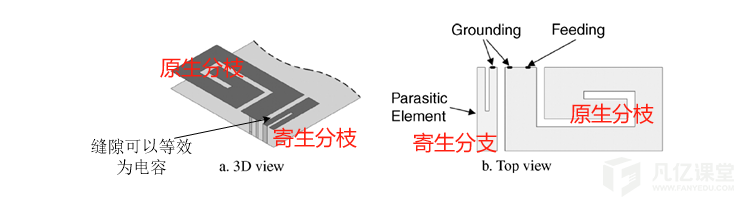
In addition to being placed near the feed port of the primary branch as shown above, parasitic branches can also be added at the tip of the primary branch:

They can even be added using direct coupling configurations, as illustrated below:

Designing an RF antenna to support multiple different frequency bands typically involves permutations and combinations of the three multi-band antenna design methods described above. Engineers first identify the target bands required by their product application, then select, combine, and simulate appropriate multi-band antenna design schemes to achieve the expected design goals. For example, the figure below depicts an antenna design that comprehensively utilizes multiple multi-band antenna design techniques:
