Detailed Analysis of BLE Device Pairing Modes and Processes
- 16 Dec, 2024
The BLE device pairing process primarily establishes a mutually trusted pairing and bonding relationship between two devices, generates keys for subsequent encrypted communication and identity authentication, and securely exchanges these keys for encrypted communication in later connection modes.
Because the details of the entire BLE pairing process are quite tedious, the complete pairing and bonding process is broken down and analyzed in-depth across three notes to build a more thorough understanding of Bluetooth security:
- A brief summary of the pairing and bonding process between BLE devices, along with the supported pairing modes, detailed with the implementation steps of the first phase of the pairing process.
- A detailed explanation and description of the execution flow of the second phase of the BLE pairing process, the LE Legacy Pairing mode.
- A detailed explanation and description of the execution flow of the second phase of the BLE pairing process under the LE Security Connections mode, as well as the key distribution process in the third phase.
Brief Overview of BLE Device Pairing and Bonding Processes
Since the primary function of the BLE pairing process is to generate and exchange keys, it is essential to ensure the security of the entire key exchange process; otherwise, if monitored by an attacker, the keys would be compromised. Furthermore, BLE devices must perform necessary hardware identity confirmation before pairing. Only after identity confirmation passes (confirming that the two devices executing the pairing process are legitimate and correct, thereby avoiding mispairing) can the subsequent pairing process proceed.
Associated with the Pairing process is the Bonding process. These two concepts occur sequentially; simply put, the pairing process establishes a trust relationship between two BLE devices and generates/exchanges keys for subsequent encrypted communication, while the bonding process saves the keys generated during the pairing process. When the two devices reconnect later, they can directly use the previously exchanged and saved keys, allowing the encrypted connection to be established much faster and providing a better user experience. Therefore, once the complete pairing + bonding process has been completed, the next time the two devices reconnect, they can skip the process of renegotiating and passing new keys, directly using the key information saved on both ends during the previous bonding process to encrypt and protect communication.
- In fact, automatically executing a bonding process after configuration offers better security because it eliminates the need to perform the complete identity authentication, key negotiation, and exchange processes every time a connection is established between the two devices, reducing the risk of keys and other sensitive information leaking.
BLE devices complying with Bluetooth 4.2 and later specifications can choose between two pairing processes: the classic LE Legacy Pairing and the more secure LE Secure Connections. The main difference between the two is that the latter has a more secure pairing key generation and exchange method and supports a more complete set of Association Models.
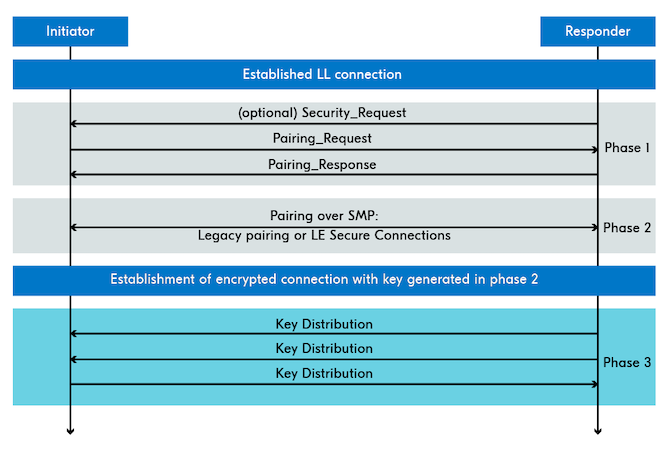
The entire BLE pairing process can be divided sequentially into three phases. Phase 1 and Phase 3 are identical for both LE Legacy Pairing and LE Secure Connections, with the main difference lying in Phase 2. Whether two BLE devices choose LE Legacy Pairing or LE Secure Connections during pairing depends on their supported Bluetooth specification versions (versions prior to 4.2 only support LE Legacy Pairing) and the SC (Secure Connections) option exchanged during the pairing feature negotiation: If both pairing parties support the SC option, the LE Secure Connections process is used; if even one party does not support the SC option, the LE Legacy Pairing process is used.
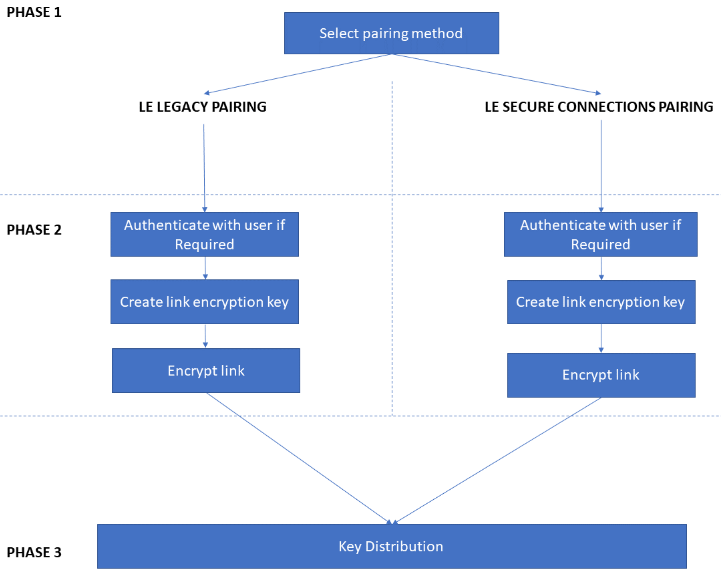
Pairing Process Phase 1: Mutual Pairing Feature/Capability Exchange
The execution of the entire BLE pairing process involves two roles: Initiator and Responder. The pairing process is always initiated by the Initiator, which sends a Pairing Request packet to the Responder. Upon receiving it, the Responder returns a Pairing Response message. These two messages contain information regarding the respective capabilities and features of both parties.
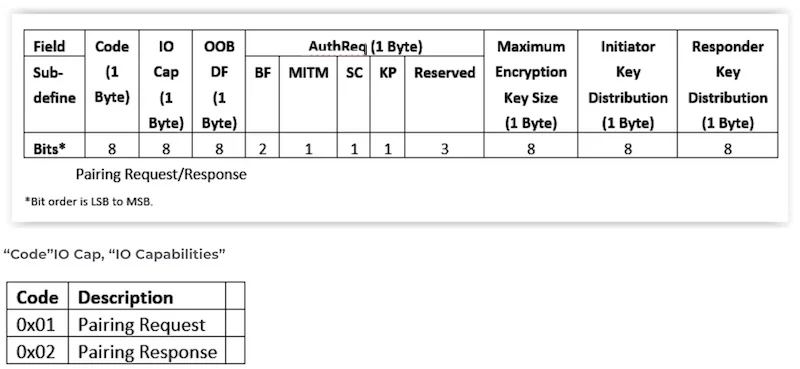
- IO Cap: Used to indicate the input capabilities (e.g., keyboards, buttons, etc.) or output capabilities (e.g., displays, etc.) possessed by both parties performing the pairing operation, which determines the security level and key generation method that can be adopted for subsequent pairing operations. Depending on the IO capabilities of both sides, supported IO options include:
DisplayOnly,DisplayYesNo,KeyboardOnly,NoInputNoOutput, andKeyboardDisplay.DisplayOnly: The device has only a display screen to show numeric strings and cannot accept inputs.KeyboardOnly: The device has the capability to input numbers.DisplayYesNo: The device has both a display screen to show numbers and allows the user to select YES or NO in some manner (e.g., confirmation buttons).NoInputNoOutput: The device lacks user-accessible input/output capabilities (display screen or keyboard/buttons).KeyboardDisplay: The device supports both inputting numbers/strings and has a display screen to show strings/numbers.
- OOB Data Flag: Used to mark whether both parties possess means other than BLE communication (i.e., Out-of-Band communication) to assist in this pairing and device authentication operation, such as NFC or QR codes. There are only two optional choices:
OOB Authentication Data Not PresentandOOB Authentication Data from a Remote Device Present. - AuthReq (Authentication Requirements): This field is used to define the security authentication requirements of the device for the pairing process, where each bit represents a requirement: BF (Bonding Flags), MITM (Man-In-The-Middle Protection), SC (Secure Connections), and KP (Keypress).
- BF (Bonding Flags): Used to determine whether the keys exchanged in this pairing process should be saved after the subsequent pairing process completes for future connection communication between the two—meaning whether the bonding process runs automatically.
- SC (Secure Connections): Used to determine whether the subsequent pairing process follows LE Legacy Pairing or LE Secure Connections.
- MITM (Man-In-The-Middle Protection): Used to mark that the device’s subsequent pairing process must be able to withstand man-in-the-middle attacks.
- Max Encryption Key Size: The maximum length of the encryption key during the pairing process, ranging from 7 to 16 bytes, which affects the encryption strength of subsequent communication connections.
- Initiator Key Distribution / Responder Key Distribution: The types of keys that the Initiator and Responder can support distributing. The keys that need to be exchanged and distributed between the two devices during the pairing process include three types: Long Term Key (LTK), Identity Resolving Key (IRK), and Connection Signature Resolving Key (CSRK). This setting indicates which end should distribute these keys during pairing.
After exchanging the Pairing Request and Pairing Response packets between the two BLE devices being paired, both sides become aware of each other’s IO interaction capabilities and security requirements for pairing. The next step is to decide the specific execution mode of the pairing process, namely the Association Model.
Negotiation of the Pairing Process Association Model
The specific execution flow of pairing depends on the IO capabilities possessed by both pairing parties and their specific security requirements for pairing, and can be categorized into the following Association Models:
- JW (Just Works): The pairing operation mode with the lowest security, suitable for cases where neither device has reasonable means to display pairing numbers and confirm the execution of the pairing process. It relies entirely on communication between the two devices without requiring user participation in the pairing interaction flow. This pairing method cannot resist MITM (Man-In-The-Middle) attacks.
- PKE (Passkey Entry): Requires at least one device to have a display screen and the other device to have input capabilities. During the pairing process, Device A displays a number, and then this number is entered on Device B to verify the device pairing relationship. Because it requires user physical interaction during this process, it helps prevent MITM attacks.
- In LE Secure Connections mode, it is also possible for neither device to have a display screen, but both have keyboards. In this case, both devices input the same number via their keyboards.
- NC (Numeric Comparison): Suitable for scenarios where both devices have display screens to show matching numbers and means to confirm that the numbers displayed on both ends are identical (e.g., confirmation buttons). During pairing, users ensure the secure execution of the pairing process by comparing whether the numbers displayed on both devices are consistent. Like PKE, it requires user participation in the pairing verification stage and can effectively counter man-in-the-middle attacks.
- NC mode only exists in LE Secure Connections mode and does not exist in LE Legacy Pairing mode.
- OOB (Out of Band): Suitable for scenarios where both devices have out-of-band communication capabilities other than Bluetooth. If both pairing parties possess out-of-band communication capabilities besides Bluetooth, they can use this non-Bluetooth communication method to exchange security information.
LE Legacy Pairing supports three association models (JW, PKE, and OOB), while LE Secure Connections supports all four of the above association models.
The next step is to select the appropriate pairing model based on the IO capabilities of the pairing devices exchanged in the Pairing Request and Pairing Response packets, as well as the security requirements for pairing (SC, MITM, etc.), following the logic below.
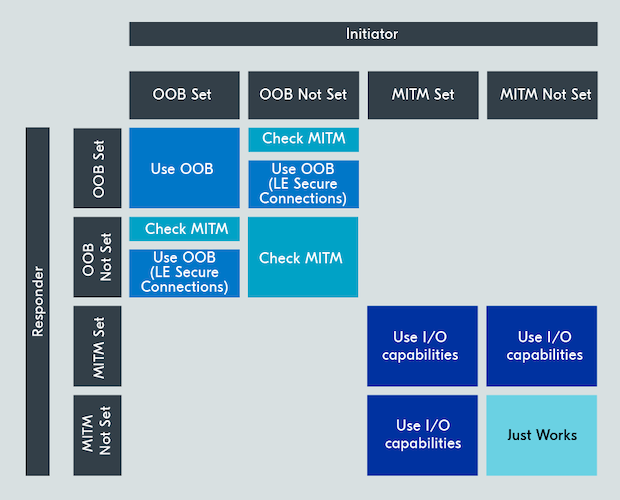
- First, check the SC (Secure Connections) flags of both devices. If both devices have set this flag, the subsequent pairing process follows LE Secure Connections; if either party has not set this flag, the LE Legacy Pairing process is followed. Regardless of which process is chosen, the next step is to select the appropriate association model.
- Next, check the OOB (Out of Band) flags of both devices. If both devices indicate via this flag that they possess out-of-band communication capabilities other than Bluetooth, the OOB association model is used. If either party lacks the OOB flag, OOB cannot be used, and the system proceeds to evaluate the MITM flag settings.
- If neither device has set the MITM (Man-In-The-Middle Protection) flag, the subsequent pairing process selects the JW association model; pairing under this condition cannot resist man-in-the-middle attacks. If one or both parties have set the MITM flag, the appropriate association model is selected based on the IO capabilities possessed by both ends to counter MITM attacks.
- Next, analyze the IO capabilities possessed by both ends: Is there a display screen to show numbers? Is there a keyboard to input numbers and characters? The specific selection is made according to the IO capabilities possessed by both sides.
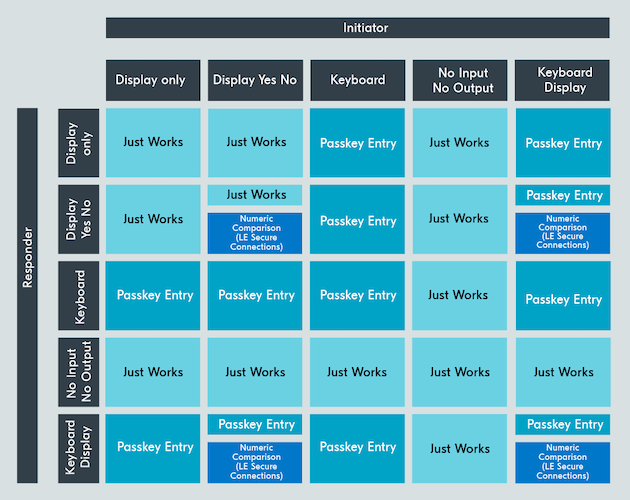
At this point, the first phase of Bluetooth pairing concludes. This phase primarily determines the pairing process, requirements, and Association Model through plaintext interaction of Pairing Request and Pairing Response messages between both parties.
Next, it enters the second phase, which mainly performs hardware identity authentication for both parties, followed by establishing an encrypted link to facilitate transmitting key information in the third phase.
Pairing Process Phase 2: Establishment of the Encrypted Link for Pairing (LE Legacy Pairing)
In the first phase, both parties completed the negotiation of the pairing method and Association Model by exchanging Pairing Request and Pairing Response messages.
The main functions of the second phase are:
- Complete the hardware identity authentication process for both parties to confirm that the peer is indeed the target device intended for pairing.
- Provide an encrypted link for the exchange and transmission of pairing keys between the two devices in the third phase.
As mentioned earlier, there are two modes for the BLE pairing process: LE Legacy Pairing and LE Secure Connections. The differences between the two in the second phase of the pairing process are drastic, so they must be described completely and separately. This section provides a detailed summary of the workflow of the second phase under LE Legacy Pairing mode.
For LE Legacy Pairing mode, the establishment of the encrypted link for the pairing process relies on a Short Term Key (STK). This STK is used solely for establishing the encrypted communication link during the pairing process and is not stored or used long-term between the two devices.
The execution flow of Phase 2 in LE Legacy Pairing mode is roughly as follows.
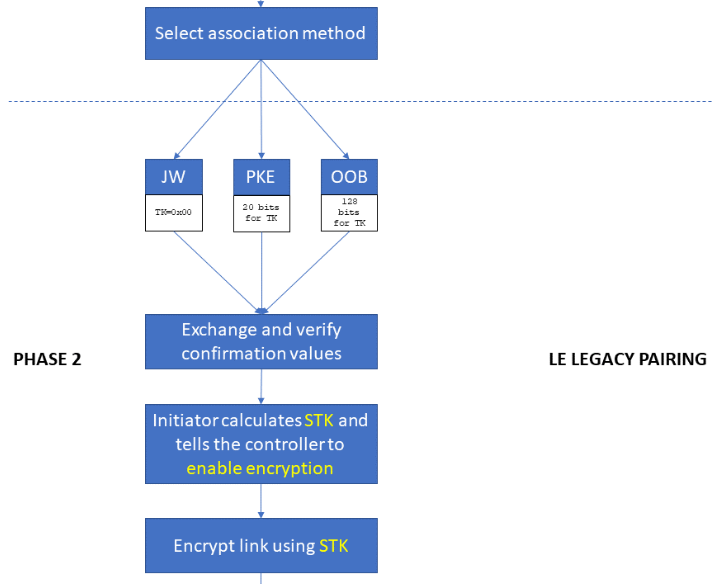
Generation of the Temporary Key (TK)
The generation of the STK relies on a Temporary Key (TK). This TK is 128 bits long and depends on the specific Association Model:
- For Just Works mode, the TK is all zeros, making it the least secure.
- For Passkey Entry mode, it is a 6-digit numeric password displayed on the screen by one end and entered by the user on the other device for confirmation. This numeric password occupies 20 bits of the TK, with the remaining 108 bits padded with zeros. Its security lies between JW and OOB.
- For OOB mode, the TK is a 128-bit random key transmitted between both sides via OOB methods, offering the best security.
Through this step, the pairing parties share the same TK, but this TK is not transmitted to the other party via the currently unsecured BLE link.
Device Identity Authentication
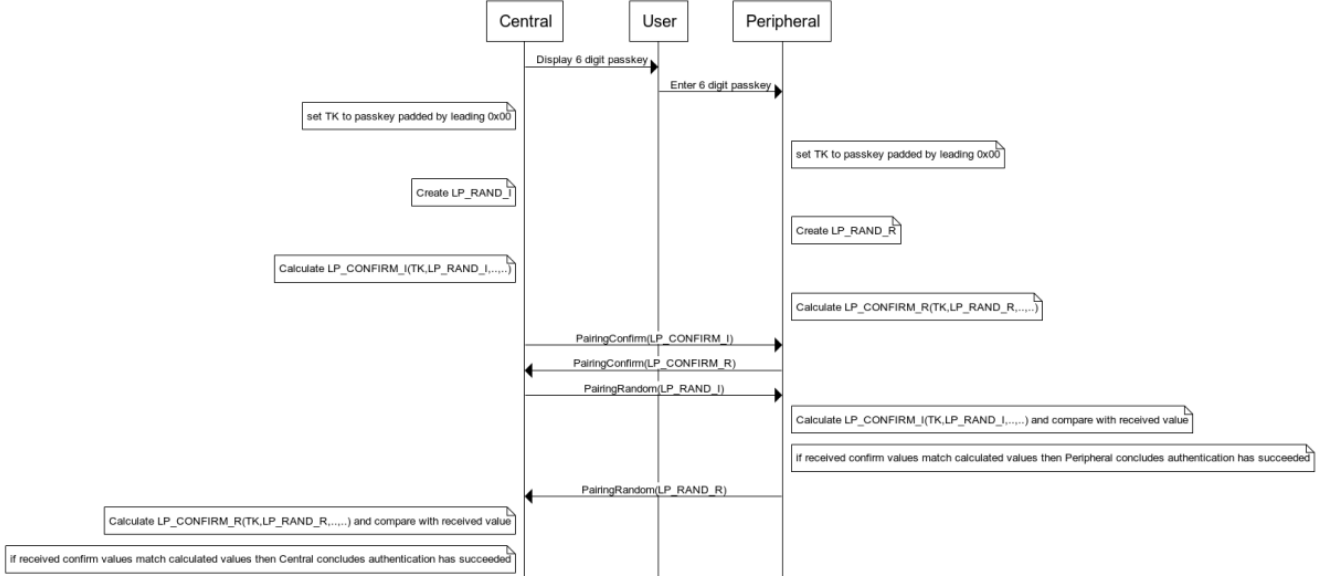
In this step, the two BLE devices each calculate a 128-bit confirm value. Calculating the confirm value requires a function c1, taking as parameters the TK shared between the BLE ends in the previous step, the randomly generated numbers produced by each side, and data shared between both in the Pairing Request and Pairing Response messages.
For the Central device, the random number it generates is LP_RAND_I, and the calculated confirm value is LP_CONFIRM_I; for the Peripheral device, the random number it generates is LP_RAND_R, and the calculated confirm value is LP_CONFIRM_R. The function participating in the calculation on both ends is c1. Except for LP_CONFIRM_I and LP_CONFIRM_R, the calculation parameters are identical, meaning the calculated LP_CONFIRM_I and LP_CONFIRM_R are different.

Next, the Central device sends its calculated confirm value (LP_CONFIRM_I) to the Peripheral device, while the Peripheral device sends its calculated LP_CONFIRM_R to the Central device.
Upon receiving the Peripheral device’s LP_CONFIRM_R, the Central device sends its c1 calculation random number LP_RAND_I back to the Peripheral device. At this point, the Peripheral device has both the Central device’s LP_RAND_I and LP_CONFIRM_I. The Peripheral device then performs another c1 calculation using its own TK and the received LP_RAND_I, and compares the calculation result with the received LP_CONFIRM_I. If they match, the Peripheral device can confirm that the TK participating in the c1 calculation on both ends is identical. At this point, the Peripheral device completes the authentication of the Central device’s identity.
Following the same logic next, the Peripheral device sends its random number LP_RAND_R to the Central device. At this point, the Central device has all the information needed to calculate LP_CONFIRM_R, executes a new c1 calculation, and compares the result with the previously received LP_CONFIRM_R. If they match, the Central device knows clearly that its TK is identical to the Peripheral device’s TK. At this point, the Central device completes the authentication of the Peripheral device’s identity.
Thus, by confirming that the TK on both sides is identical, mutual identity authentication is completed between the Central and Peripheral devices, determining that the peer is indeed the device intended for pairing and bonding. Of course, because the TK on both sides is all zeros in Just Works mode, this identity confirmation is meaningless. Therefore, Just Works mode actually lacks a device identity authentication process and cannot defend against MITM attacks. However, Just Works mode transmits two random numbers (LP_RAND_R and LP_RAND_I) across both ends through the above process, which are used later to generate the STK.
The figure below illustrates the complete communication and decision logic for identity authentication between two devices:
Generation of the STK Key
Next is the generation of the 128-bit short-term key (STK) used to encrypt the communication link during the pairing process. Generating the STK requires an s1 function.
STK = s1(TK, LP_RAND_R, LP_RAND_I)
Looking at the parameters of the s1 function above, TK, LP_RAND_R, and LP_RAND_I were all transmitted bi-directionally during the mutual authentication step between the devices. Therefore, both devices can independently use the s1 function to calculate the STK.
- For the calculation of the STK on both ends, the
s1function is identical, and the three shared parameters (TK,LP_RAND_R, andLP_RAND_I) are also identical, meaning the resulting STK will definitely be the same. - From a transmission security perspective, the random numbers
LP_RAND_RandLP_RAND_Iare transmitted over the unencrypted link during the device authentication phase, posing a risk of leakage. However, for OOB and Passkey modes, the TK is transmitted and confirmed via OOB and Passkey methods rather than the BLE link, so there is no risk of leakage. When the TK is not leaked, the calculation of the STK is naturally secure. - However, for Just Works mode, the TK is all zeros, and the random numbers
LP_RAND_RandLP_RAND_Iare transmitted over the unencrypted link during the device authentication phase, meaning the STK still carries a risk of leakage.
At this point, both the Central and Peripheral devices possess the STK key, which can be used to encrypt the pairing communication link. Phase 3 of the subsequent pairing process can then be protected with encryption based on the STK key.
Pairing Process Phase 2: Establishment of the Encrypted Link for Pairing (LE Secure Connections)
In stark contrast to LE Legacy Pairing, the LE Security Connections mode adopts a Public-Private Key pair system to handle the transmission of the communication link encryption key for the pairing process: this mode uses a public-private key pair system to generate and exchange a Long Term Key (LTK). This LTK is not only used to encrypt the communication link in Phase 3 of the pairing process, but is also saved for encrypting the data channel in subsequent connection states.
As mentioned earlier, in terms of general execution flow, LE Secure Connections also divides into three major phases, where Phase 1 and Phase 3 are identical to LE Legacy Pairing. The difference between the two is reflected primarily in this second phase, and because the execution flows differ significantly, they must be described completely separately.
The overall workflow of Phase 2 in LE Secure Connections mode is shown in the figure below.
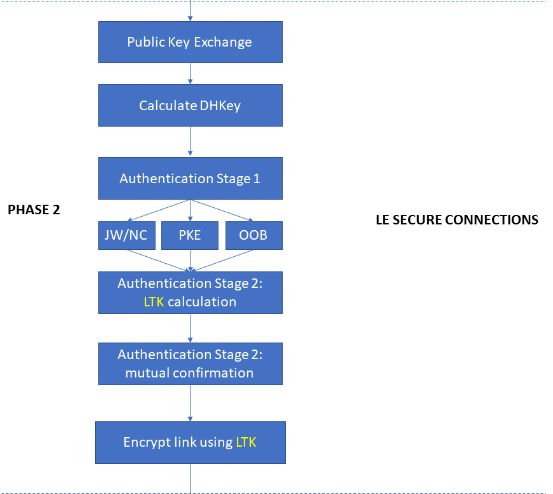
When the pairing process uses LE Secure Connections mode, based on the negotiation between both parties in Phase 1 (Pairing Request and Pairing Response), all four Association Models can be used: Just Works, Numerical Comparison, Passkey Entry, and OOB—adding Numerical Comparison compared to LE Legacy Pairing.
Phase 2 of LE Secure Connections mode can be broken down into four primary steps.
Public Key Exchange
Phase 2 of LE Secure Connections mode is first initiated by the Initiator of the pairing process (i.e., the party sending the Pairing Request, which is the Central device). The Initiator sends its public key PKa to the Responder (i.e., the party that sent the Pairing Response in Phase 1, which is the Peripheral device), and the Responder sends back its public key PKb to the Initiator. At this point, both communication parties possess each other’s public keys.
Both PKa and PKb are transmitted over unencrypted links, but because they are public keys, this poses no threat to security.
Calculating the DHKey
Next, both devices generate a DHKey independently based on the P-256 algorithm defined in the Bluetooth specification.
- Initiator device:
DHKey = P256(SKa, PKb).SKais the private key of the Initiator device, andPKbis the public key of the Responder device. - Responder device:
DHKey = P256(SKb, PKa).SKbis the private key of the Responder device, andPKais the public key of the Initiator device.
In other words, for both communication parties, the input parameters of this P-256 algorithm are their own private key and the peer’s public key. Through the clever design of the P-256 algorithm, the DHKey calculated by both ends using their respective private keys and the peer’s public key is identical. Thus, both communication parties compute the exact same DHKey.
Although PKa and PKb were previously transmitted in plaintext over an unencrypted link, the private keys SKa and SKb of the two devices are kept strictly inside their respective devices, making the calculation of the DHKey secure.
Device Hardware Identity Authentication
The specific execution of the device identity authentication step relates to the Association Model negotiated earlier based on both parties’ IO capabilities. The available Association Models include Just Works, Numerical Comparison, Passkey Entry, and OOB. The purpose of this step is to confirm the correctness of the identity of the devices participating in pairing. Of course, since Just Works lacks necessary identity authentication means, it effectively still lacks device identity authentication capability in LE Secure Connections mode and merely goes through the motions.
To facilitate describing the execution flow of the entire identity authentication stage, the pairing Initiator will be uniformly referred to as Device A, and the Responder as Device B below.
Device Identity Authentication: JW/NC
Device B generates a 128-bit random number Nb, and uses this Nb along with the public keys of both devices (obtained during the public key exchange step) as parameters to calculate a confirm value Cb using the f4 algorithm defined in the Bluetooth specification:
Cb = f4(PKa, PKb, Nb, 0)
Device B then sends this calculated Cb to Device A. (At this time, Device A does not yet know Nb.)
Next, Device A generates its own 128-bit random number Na, and sends this random number to Device B. Device B then returns its previously generated random number Nb to Device A. Now, Device A has all the parameters needed to calculate Cb. Therefore, Device A re-runs the f4 algorithm using the received Nb, and compares its calculated confirm value result with the Cb received earlier. If they match (matching indicates that the PKa and PKb information shared between both sides in the previous phase is identical), it proceeds; otherwise, it aborts the pairing process.
At this stage, for Just Works mode, the device identity authentication phase actually concludes. The subsequent steps here apply only to NC mode. As can be seen, the steps above merely have both communication parties generate and exchange random numbers and confirm the correctness of the public key information they hold; they actually provide no way to verify the legal hardware identity of the peer.
Now that both devices have confirmed each other’s public keys (PKa and PKb) and the random numbers (Na and Nb) generated by both sides, they both calculate their own confirm values using the g2 function defined in the Bluetooth specification with (PKa, PKb, Na, Nb) as parameters, and display them on their respective screens. Because the g2 function and the four parameters above are identical, the confirm values calculated and displayed by both ends will definitely be identical.
Next, the user needs to check whether the 6-digit numbers displayed on both screens are the same. If they are the same, they confirm via button operations, ensuring the legal status and correctness of the pairing identity between the two devices.

Device Identity Authentication: Passkey Entry
For Passkey Entry, the default standard usage workflow requires the two devices being paired to have a display screen on one end to show pairing numbers, and a keyboard on the other end to input those numbers to confirm the hardware identities of both pairing parties. In LE Secure Connections mode, Passkey Entry also supports scenarios where neither end has a display screen, but both have keyboards, allowing users to input identical numbers via keyboards on both ends during pairing to assist with device authentication.
The calculation process in the subsequent identity authentication stage is relatively complex. Based on every single bit of the 6-digit matched number on both ends, 20 rounds of iterative calculations and comparisons are performed (a 6-digit decimal number has a maximum value of 999999, corresponding to 0xF423F in hexadecimal, resulting in a maximum of 20 bits).
The entire iterative comparison workflow is as follows:
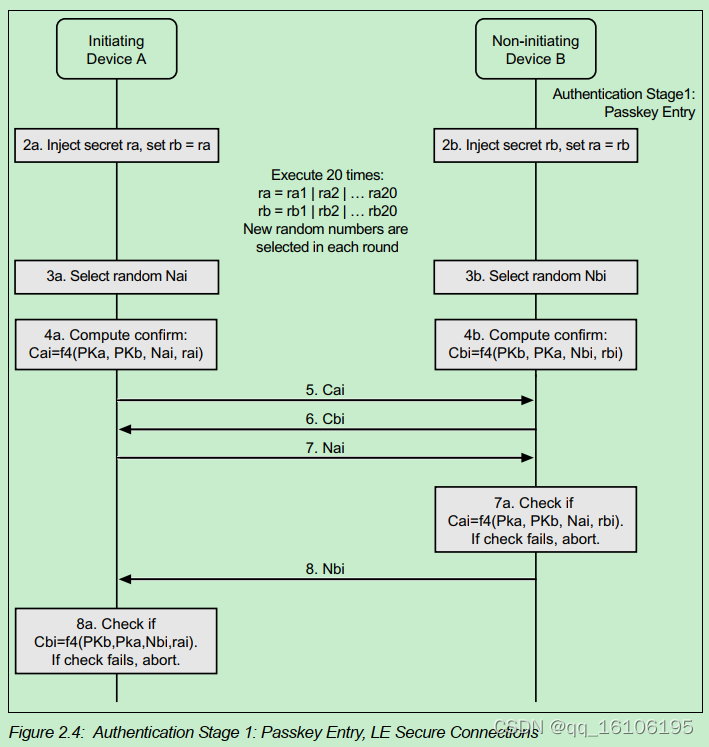
- Steps 2a and 2b involve inputting the same 6-digit pairing number
raandrbon Device A and Device B. When entered correctly, they should be identical. The numbersraandrbare then decomposed into binary form on both ends A and B into 20 bits, with one bit used in each subsequent round of iterative calculation. Each bit is namedraiandrbi, whereirepresents the iteration index. - Steps 3a and 3b generate 128-bit random numbers
NaandNbon ends A and B, respectively. A new random number is generated for each iteration, so the random numbers for each round areNaiandNbi. - Steps 4a and 4b use the
f4algorithm defined in the Bluetooth specification on both ends A and B, taking as parameters the public keysPKaandPKbexchanged in the previous phase, the random numbersNa/Nbgenerated by each side, and the single bitrai/rbiof the verification number for the current iteration. The Confirm Values for this round (CaiandCbi) are calculated on both ends. - Steps 5-8 involve exchanging the random numbers
NaiandNbigenerated in the current round across both ends, along with the calculatedCaiandCbi. Cross-calculations are then performed on both sides to compare and verify whether the confirm values calculated by both ends match. - If the confirm values match in Step 8, the process moves to the next iteration, taking the next bit of the pairing numbers
ra/rband repeating steps 3–8 until all bits are successfully verified.
Through this tedious calculation and judgment process, the 6-digit pairing numbers output on the two devices are broken down into individual bits for calculation. Even if an attacker uses a MITM (Man-In-the-Middle) attack to eavesdrop on the data interaction of the pairing process, the difficulty of cracking it is drastically increased. Therefore, its security is much better than LE Legacy Pairing.
Device Identity Authentication: OOB
Similar to the OOB mode in the LE Legacy Pairing process, the OOB mode under the LE Secure Connections flow also requires non-Bluetooth out-of-band communication methods (such as NFC, QR codes, etc.) to assist in transmitting partial information during the execution of the device hardware identity authentication process, although their execution workflows differ significantly.
The figure below shows the identity authentication communication workflow of the OOB mode under the LE Secure Connections flow:
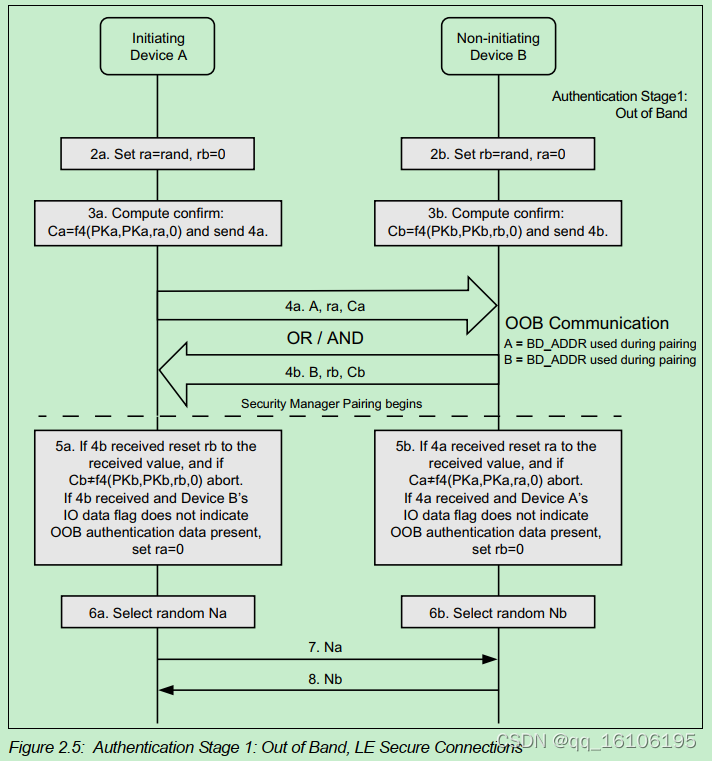
- First, both sides generate a random number
raandrb, and then each uses thef4algorithm, taking their own public key and generated random number as parameters to calculate their respective confirm values (CaandCb). - Next, using out-of-band communication capabilities outside of Bluetooth, they transmit their random Bluetooth addresses (
BD_ADDR_A/BD_ADDR_B) used for the pairing communication flow, the random numbersra/rbgenerated on both ends, and the respective confirm valuesCa/Cbcalculated by each end to the peer. - Both ends re-calculate a confirm value using the
f4algorithm based on the information passed over the OOB channel, utilizing the peer’s public key and the peer’s random number. They then compare this calculated confirm value with theCa/Cbpassed from the peer via OOB to check for consistency. If they match, it indicates that the hardware identity authentication of both parties is successful. - Finally, both parties generate a new random number (
NaandNb) and transmit it to the peer, which will be used in the next phase to generate the Long Term Key (LTK).
Generation and Verification of the LTK
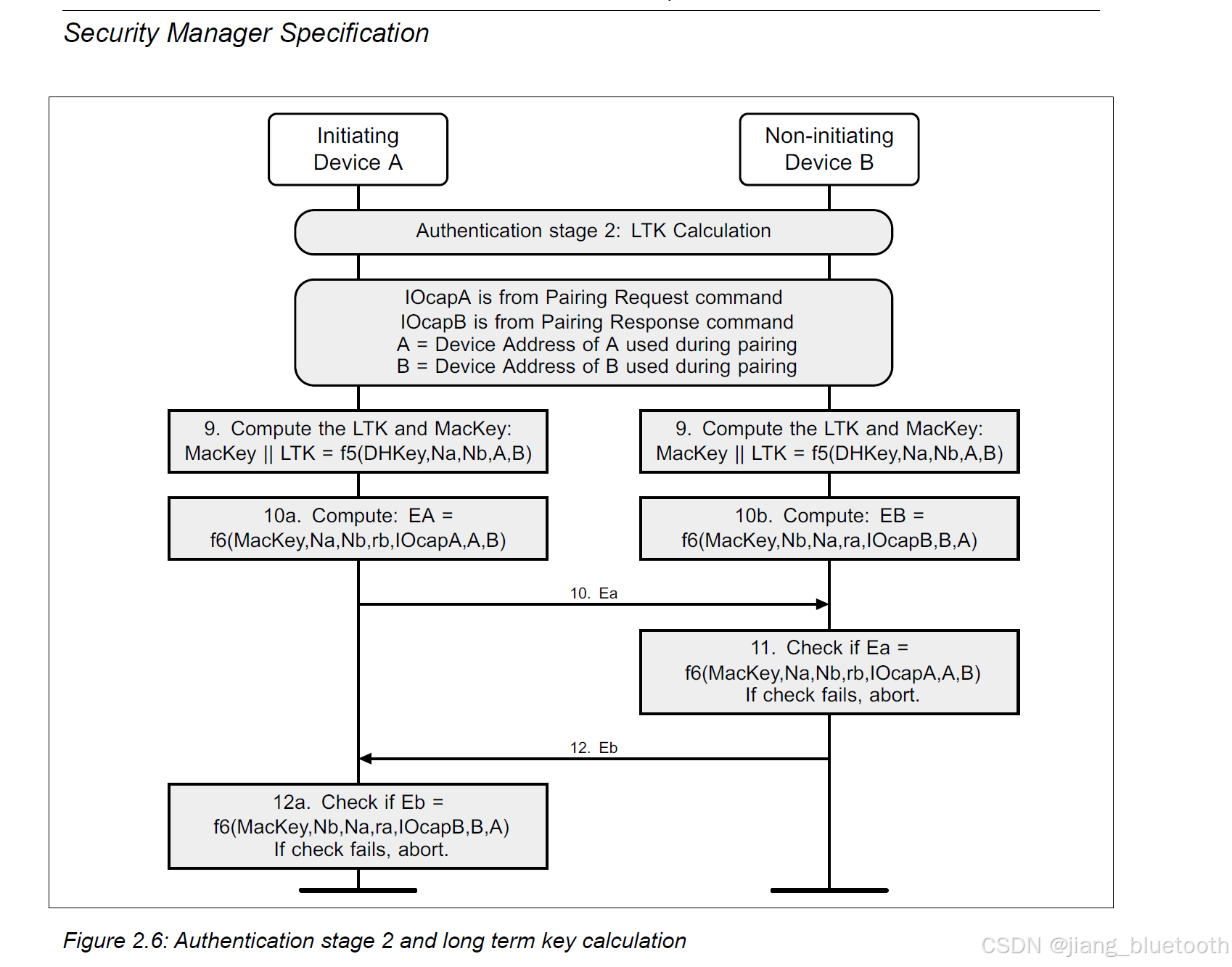
Next is calculating the LTK on both ends. To ensure that all preceding steps are correct and that the LTK calculated on both ends is identical, an additional MacKey is required to perform this verification and confirmation step.
Calculating the LTK and MacKey requires the f5 algorithm defined in the Bluetooth specification. The input parameters for this algorithm include the DHKey, the random numbers Na and Nb generated by both ends, and the Bluetooth MAC addresses BD_ADDR_C and BD_ADDR_P used by both ends during the pairing process.
MacKey || LTK = f5(DHKey, Na, Nb, BD_ADDR_C, BD_ADDR_P)
- Through all the preceding steps, both ends already know the
DHKey, random numbersNaandNb, and Bluetooth MAC addressesBD_ADDR_CandBD_ADDR_P. Therefore, they can independently use thef5function to calculate theMacKeyand LTK. Barring any unexpected issues, the LTK andMacKeycalculated by both ends should be identical.
At this point, the Long Term Key (LTK) used to subsequently encrypt the data connection link is born. How do we guarantee that the LTK generated on both ends is identical? At this stage, a verification of the MacKey must be performed. If the MacKey matches, the LTK is guaranteed to be correct.
The MacKey verification process relies on the f6 algorithm defined in the Bluetooth specification. Its parameters include the MacKey calculated by each end, the random numbers Na and Nb exchanged in the previous phase, the IOCap information exchanged during pairing (contained in the Pairing Request and Pairing Response messages), and the Bluetooth MAC addresses BD_ADDR_C and BD_ADDR_P used by both ends during pairing.
The logical flow of MacKey verification is as follows:
- The Initiator calculates its verification value
EAaccording to thef6algorithm, and the Responder calculates its verification valueEBaccording to thef6algorithm. Note that the calculation parameters differ slightly (one usesIoCapAand the otherIoCapB), soEAandEBshould be different. - The Initiator sends its calculated
EAto the Responder. The Responder recalculates its ownEAlocally using the same parameters and algorithm as the Initiator, and compares whether the twoEAvalues match. If they match, the Responder knows clearly that theMacKeyand LTK on both ends are identical. - Following the same logic, the Responder sends its calculated
EBto the Initiator. The Initiator recalculates its ownEBlocally using the same parameters and algorithm as the Responder, and compares whether the twoEBvalues match. If they match, the Initiator knows clearly that theMacKeyand LTK on both ends are identical. - At this point, the Initiator and Responder confirm the consistency of the
MacKeyand LTK on both ends through the above process.
Refer to the figure below to fully understand the logic of LTK generation and verification:
Next, the communication link can be protected with encryption using the LTK generated and verified by both ends, allowing the transition into Phase 3 of the pairing process.
Pairing Process Phase 3:
Phase 3 involves protecting the communication link based on the STK key (for LE Legacy Pairing) or LTK key (for LE Secure Connections) generated in Phase 2, making all subsequent communications in the pairing process fully encrypted.
The primary function of Phase 3 is to arrange the key distribution process according to the information negotiated by both parties in Phase 1 regarding which keys to share (LTK, CSRK, IRK), key lengths, and which end distributes each key. The ultimate goal is to synchronize the actual keys used for subsequent data communication on both ends. After the pairing process ends, the short-term key STK is discarded (for LE Legacy Pairing mode).
- LTK, CSRK, and IRK are the actual communication keys used between the two devices during subsequent data communication.
- For LE Secure Connections mode, because the LTK was already exchanged in Phase 2, Phase 3 only needs to transmit the CSRK and IRK between both parties over the encrypted connection. For LE Legacy Pairing mode, all three keys mentioned above must be transmitted within the encrypted connection during Phase 3.
The keys shared between the two ends above are used solely for subsequent communication in the current connection and are not saved automatically. If the two devices want to establish a connection and communicate again next time, they would have to repeat the entire pairing process from scratch to exchange new connection communication keys. Doing so would make the entire process far too tedious. Therefore, if the communication keys shared on both ends are saved after the pairing process ends and used directly for subsequent communication processes, it eliminates the pairing process for every reconnection. The action of saving the communication keys exchanged in Phase 3 of the pairing process over the encrypted connection is called Bonding. After a bonding operation, the two devices can directly use the previously saved communication keys upon reconnecting in the future.
- Whether the keys need to be saved after the pairing process ends (i.e., executing the bonding process) depends on the Bonding Flags bit contained in the Pairing Request and Pairing Response messages in Phase 1.
References
- Understanding Bluetooth LE Pairing—Step by Step - Technical Articles
- Developer Study Guide: Bluetooth® Low Energy Security V1.2.1
- BLE蓝牙技术详解