Summary of Router DMZ Configuration, Working Principles, and Limitations
- 18 Nov, 2024
Due to work requirements aimed at improving the success rate of P2P connections, I summarized the concepts, working principles, configuration processes, and limitations of DMZ settings in home routers. When the router’s WAN port has a public IP address, enabling DMZ is indeed very effective in increasing the P2P traversal success rate. However, one must also be mindful of the security risks associated with DMZ hosts losing the protection of NAT.
Concepts of NAT / SNAT / DNAT
To understand how DMZ works, we must first clarify how Network Address Translation (NAT) on a router plays a role in communication between internal and external network hosts. The workflow of a DMZ host is closely tied to the DNAT type within NAT.
NAT stands for Network Address Translation. Here, network address translation actually refers to the translation between internal network (LAN) addresses and external network (WAN) addresses. The specific implementation of NAT relies on a NAT table. In essence, the NAT table stores the correspondence relationship between internal and external addresses. When a data packet from the local network needs to be sent to the external network, the NAT processing queries the NAT table, replaces the source internal IP address in the packet with its corresponding external IP address, and then sends it out. Similarly, when an external data packet arrives at the NAT to be sent to an internal host, it queries the correspondence in the NAT table, replaces the destination external IP address in the packet with the corresponding internal IP address, and then forwards it to the internal host.
Through the network address translation process described above, the NAT function in home routers generally serves two main purposes:
- Security Firewall Role: Under the protection of NAT, external hosts cannot directly access internal hosts. All network communication must be initiated first by the internal hosts, thereby ensuring a basic level of security for the internal network.
- Expanding IP Address Capacity: To this day, IPv4 is still widely used on the internet, yet the IP addresses available under the IPv4 framework are largely exhausted. NAT allows multiple internal hosts to simultaneously share one or more public IP addresses to access the internet, thereby expanding the available IP capacity and alleviating issues caused by the scarcity of IPv4 addresses.
NAT can be primarily classified into the following types:
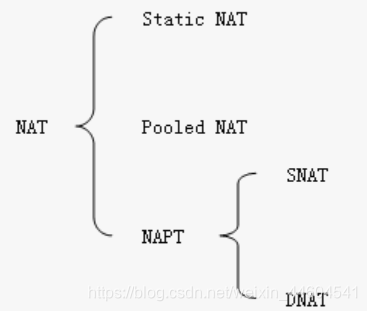
- Static NAT: In this NAT mode, the IP correspondence between the internal and external networks is a pre-configured one-to-one relationship. This means the relationship between the two in the NAT table is fixed, set up in advance by network administrators. The router performs address translation and forwarding for internal and external traffic based on this static NAT table. Therefore, Static NAT can only hide internal host servers and does not help expand the number of IP addresses.
- Pooled NAT: Pooled NAT has a pool of public IP addresses on the external side (similar to Static NAT). When an internal host accesses the external network, the router dynamically selects an idle public IP address to construct a dynamic internal-to-external IP address mapping table. Address translation for internal and external packets on the router is still based on this mapping table. Thus, the workflow of Pooled NAT is basically identical to Static NAT; the only difference is whether the NAT table is statically pre-configured or dynamically generated and maintained by the router. Each mapping entry in the dynamic NAT table generated by the router has a time limit. Once expired, the public IP address is returned to the public IP pool so it can be used for new internal host communications. In this way, a small number of public IP addresses can support the communication needs of a larger number of internal hosts accessing the external network.
- NAPT: This mode is currently the most commonly used mode for NAT translation in home routers. It can be further divided into two forms: SNAT and DNAT. For the implementation of NAT translation functions commonly used in home routers, SNAT within NAPT is universally applied. Meanwhile, the implementation of DMZ is closely tied to the working logic of DNAT.
SNAT
SNAT stands for Source NAT, which translates the source IP address contained in the request packets originating from the internal network.
In fact, when we access public network services from a local network through a router, the router essentially performs SNAT translation on the internal request packets. That is to say, the IP address contained in the request packet sent by the internal host is a private IP address, which has no meaning on the public internet. Therefore, when this request packet is forwarded outward by the internal router, the router performs translation based on the NAT table, replacing the source address (internal IP address) in the request packet with its own public IP address. This is equivalent to the WAN port of the internal router acting as a proxy for the internal host to communicate with the public network host. Subsequently, when the WAN port of the internal router receives the response packet from the public host (whose destination address is the public IP of the router’s WAN port), the router uses the NAT table to replace the destination address (now the public IP of the router’s WAN port) with the original internal IP address of the internal host, and then forwards the packet to the internal host.
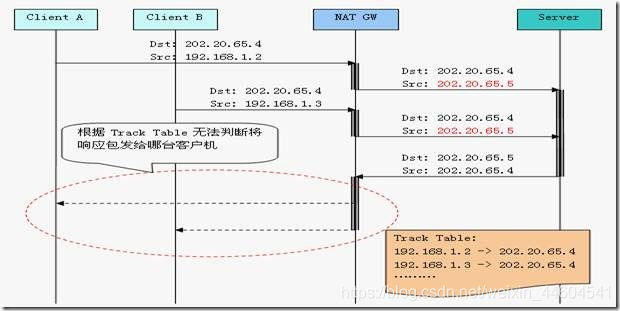
Of course, the actual operation of SNAT is not simply about converting between internal and external IP addresses. To allow more internal hosts to share the same WAN public IP address via the internal router to access the external network, SNAT also simultaneously replaces the source and destination ports during operation. This is because if only the internal and external IP addresses were replaced, when two internal hosts A and B simultaneously accessed the same external server, the response packet sent back from the external network would not be distinguishable at the WAN port as to whether it should be forwarded to A or B.
Therefore, to support more internal hosts in freely and simultaneously accessing external servers, it is necessary to replace the communication port with different ports on the internal router’s WAN side while performing SNAT address translation. This allows the router to determine whether to forward the packet to internal host A or B based on the destination port in the response packet from the external server.
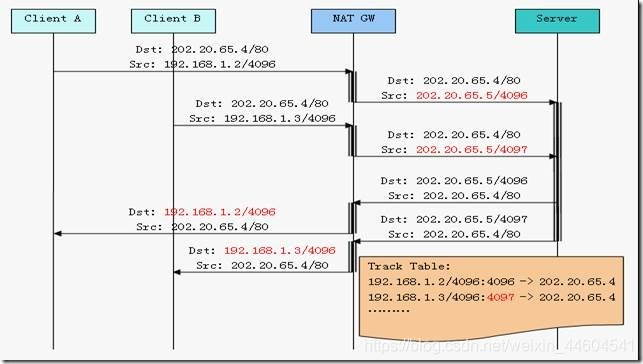
Analyzing the SNAT address and port translation process above, the key to SNAT lies in the NAT table maintained on the router. Each address translation entry in the NAT table actually contains a 7-tuple of information:
- Transport layer protocol used for communication (TCP or UDP)
- Internal IP address of the source host
- Internal communication port of the source host
- Public IP address of the server’s WAN side
- Port of the server’s WAN side designated for this communication interaction
- Public IP address of the destination host
- Communication port of the destination host
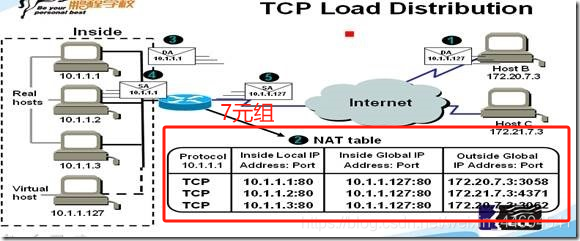
The above 7-tuple NAT translation entry is created and maintained on the router when the internal host first sends a request packet to the external server. Similarly, when a response packet sent back by the public server reaches the WAN port of the internal router, it looks up the NAT table using the 7-tuple information to find the internal host and port (if no corresponding NAT table entry is found, the packet will be blocked and dropped by the internal server). After replacing the destination IP and port, the packet is forwarded to the internal host. Each entry in the NAT table has a countdown validity period upon creation and is automatically deleted once the time expires. In this way, the internal router can allow external data packets to enter the internal network only for a short period (within the validity period of the NAT table entry), and all external data packets that do not match the recorded NAT table entries are dropped by the router, thereby achieving protection for internal hosts.
DNAT
DNAT stands for Destination NAT, which translates the destination address contained in the public network request packets.
The workflow of DNAT is the exact opposite of SNAT. While SNAT translates the source IP address and port of packets going from the internal network to the external network (replacing the internal host’s private IP address with the server WAN port IP address), DNAT replaces the destination address and port of packets entering the internal network from the external network (replacing the destination address and port in the packet with the internal host’s IP address and port according to DNAT rules). Load balancing, port forwarding in network deployment and configuration, and DMZ (which will be summarized below) fundamentally rely on DNAT.
The similarity between DNAT and SNAT is that the NAT table entries they rely on are composed of the aforementioned 7-tuples. Regardless of whether packets are entering the internal network or going out from it, they find the IP address and port mapping rules and perform replacements based on 7-tuple NAT table entries.
The difference is that SNAT primarily serves the address and port translation required for packets initiated proactively by internal hosts outward, whereas DNAT primarily targets address and port translation for requests proactively initiated by external hosts toward internal hosts.
As mentioned above, because SNAT table entries are always created when internal hosts proactively initiate outbound requests, and each NAT table entry has a countdown lifecycle after creation (where external packets not matching NAT entries are blocked by SNAT), the security of SNAT is guaranteed. However, without proper deployment, DNAT can pose significant security risks. Because all external data packets can potentially enter the internal network through address translation governed by DNAT rules, the use of DNAT generally requires additional firewall settings and meticulous forwarding rules to properly protect sensitive internal data and resources.
Concept and Working Principles of DMZ
DMZ stands for Demilitarized Zone. In network topology, its counterpart is naturally the militarized zone where the external network (the internet) resides, as well as the secure zone where the internal network resides (where this security function is achieved precisely through NAT address translation).
The primary significance of having a DMZ zone is: once NAT is used to protect the security of the internal network, external networks cannot directly access internal hosts. However, if certain server resources (such as corporate Web servers, FTP servers, etc.) are deployed in the internal network and there is a requirement to access these internal servers from the external network, a buffer zone can be established between the secure zone and the non-secure zone. These internal servers that need to provide access permissions to the external network can then be placed into this buffer zone, namely the DMZ zone.
The diagram below illustrates a typical architecture for deploying a DMZ zone within an internal network. Through appropriate deployment and configuration of routers and firewalls, the entire corporate internal network remains deployed internally. Hosts that are sensitive regarding security and data are still deployed within the internal LAN zone and cannot be accessed by the external network. Meanwhile, hosts that need to be shared with the external network are deployed in the internal DMZ zone, where targeted packet filtering and access control are performed via the firewall of the DMZ part.
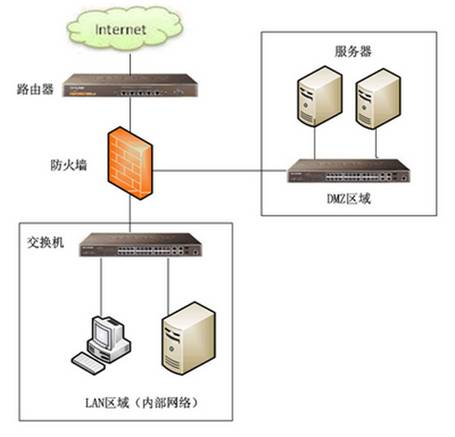
For hosts deployed in the DMZ zone, the communication workflow for an external host requesting an internal DMZ host can be summarized as follows (External Host C — Internal DMZ Zone Server A):
- External Host Initiates Request: External host C wants to access internal server A located in the DMZ zone. However, server A’s address is a private address (because server A is still deployed inside the internal network), so external data packets cannot be sent directly to server A. Therefore, external host C actually sends the request packet to the firewall’s public IP address. At this point, the source address of the request packet is external host C’s IP, and the destination address is the firewall’s public IP.
- Firewall Receives Request: After receiving this request packet, the firewall checks its destination address and performs DNAT translation.
- DNAT Translation: When the destination address of the external request packet is the firewall’s public IP, and the firewall is configured with DNAT rules and a DMZ zone, the firewall translates the destination address of the packet from the firewall’s public IP to the private IP of server A in the DMZ zone based on these rules. This conversion process is DNAT (modifying the destination address).
- Forwarding to DMZ Host: The address-translated packet is sent to server A in the DMZ zone. At this point, the source address of the packet remains external host C’s IP, while the destination address has been changed by the preceding DNAT translation to the private IP of server A in the DMZ.
- Server A Responds: After receiving the request, server A deployed in the DMZ zone processes it and generates a response packet. The source address of the response packet is server A’s private IP, and the destination address is external host C’s IP.
- SNAT Translation: When the response packet reaches the firewall, the firewall translates the source address of the packet from server A’s private IP to the firewall’s public IP. This process is SNAT (Source Network Address Translation).
- This step is actually identical to accessing a web server on the public network through a browser in the internal network.
- Sending Back to External Host: Following SNAT translation, the source address of the packet becomes the firewall’s public IP, and the packet is then sent back to external host C. This completes the entire communication process.
Looking at the entire workflow of DMZ above, the process actually contains two parts: DNAT and SNAT. DNAT is responsible for address replacement of packets entering the internal network from the outside, while packets sent outward from the internal network still adopt SNAT replacement rules.
Differences Between DMZ and Port Forwarding
From a functional standpoint, setting up DMZ or static port forwarding on a router can both achieve the effect of exposing internal hosts to the external network. However, their actual working principles are quite different.
- DMZ is a rule set in the firewall and router via the DNAT mechanism to parse, filter, and address-translate request packets entering the internal network from the outside; it operates at the host IP address level. In contrast, port forwarding merely acts mechanically according to a pre-configured static port forwarding table, rigidly forwarding packets accessing a specific port from the external network to a specific port on a specific internal host, operating at the port level.
- In terms of security, DMZ combined with firewall and router settings can provide a higher level and more flexible protection for the internal network. This allows public services of the internal network to remain open externally while effectively preventing external attacks from directly impacting internal network security. Conversely, port forwarding offers relatively low security as it only handles fixed-port traffic forwarding and must be paired with other security services to achieve a robust security protection level.
DMZ Configuration, Usage, and Limitations
Configuring and using DMZ on home routers is actually very straightforward.
Taking a commonly used TP-Link home router as an example, the process of enabling and setting up the DMZ function is very simple. Through the router’s management interface, locate the DMZ host configuration under device management: enable the DMZ host option, and fill in the internal IP address corresponding to the DMZ host (you need to look up the internal IP address of the host you want to set as the DMZ host in advance, and it is best to make this internal IP address static; otherwise, if the host’s IP changes later, the DMZ configuration will need to be updated accordingly).
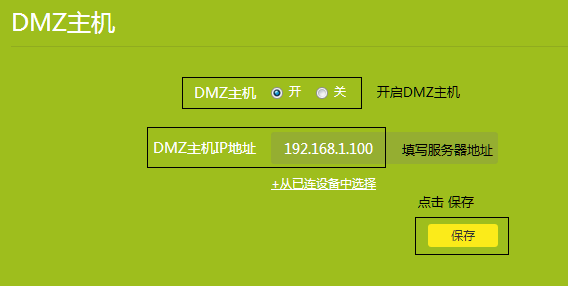
It should be noted that for the vast majority of home routers that support DMZ settings, the configuration option only supports a single DMZ host, which is why you only see space for one DMZ host IP address in the configuration interface above. From the perspective of the DNAT workflow, a DMZ zone can certainly support multiple hosts, but this requires setting up DNAT packet filtering rules on the firewall and router. When external packets pass through DNAT, they are distinguished based on their destination port numbers according to predefined rules to determine which DMZ host and service are being accessed, after which the destination address of the packet is modified to the internal IP and port of that DMZ host. However, for home routers, security design requirements are not that stringent, and the services and ports that need to be exposed to the public network do not need to be overly complex. Therefore, generally setting up a single DMZ host is sufficient, meaning all request packets from the public network will pass through DNAT by default to reach this DMZ host.
Limitations of Using the DMZ Function
In fact, as can be seen from the workflow of the DMZ function and the packet forwarding principle of DNAT, the effectiveness of the DMZ setting presupposes that the router’s WAN port has an independent public IP address rather than a subnetwork IP address inside the ISP! This point is crucial and easy to understand. If the router’s WAN IP is still a subnetwork IP, proactive request packets from the external network will be blocked by the ISP router or switch upstream of the user’s router and will never reach the WAN port of the user’s home router. In such a case where the home router’s WAN IP is not a public IP, configuring DMZ on this router becomes completely meaningless.
How Configuring DMZ Improves P2P Traversal Success Rate
Based on the workflow of DMZ and DNAT described above, when an internal host is configured as a DMZ host on a home router, all proactive traffic from the public network is forwarded to this DMZ host. This effectively gives this DMZ host the equivalent of a public IP. During P2P traversal, if one of the two participating hosts has a public IP, 100% traversal between the two hosts is guaranteed. It only requires the host behind the internal network to send packets to the designated DMZ host and receive responses. The entire process is essentially similar to accessing a web server on the public network from an internal host, meaning communication can naturally succeed 100%. This is why configuring DMZ can effectively improve the P2P traversal success rate (provided, of course, that the WAN port of the router where DMZ is configured has a public IP).