Summary of Learning Linux UBI and UBIFS Filesystems
- 25 Oct, 2024
In these two notes, we will organize the concepts, structures, application workflows, and points to note regarding the UBI and UBIFS filesystems in Linux systems.
Concepts of UBI/UBIFS and Their Hierarchical Architecture in Linux Filesystems
UBI: Unsorted Block Images.
UBIFS: Unsorted Block Images File System.
UBI is an abstraction layer built on top of the Linux MTD (Memory Technology Device) flash filesystem architecture. Its read and write access to flash memory still relies on the MTD layer, yet it is not an independent filesystem directly usable by the application layer. To facilitate efficient flash memory utilization by application-layer filesystems, UBI handles common flash medium issues such as bad block management and wear leveling. Through the mapping of logical erase blocks (LEBs) to physical erase blocks (PEBs), UBI provides an ideal storage space management interface via logical blocks to the upper layers.
UBIFS, on the other hand, is a filesystem based on UBI that can be directly called by the application layer for file creation, read, and write operations. UBIFS operates on top of the UBI abstraction layer. In other words, although UBIFS is a filesystem, unlike JFFS2 or YAFFS which work directly on MTD block devices, it runs on a volume created by the UBI layer.
Therefore, UBI and UBIFS are related but entirely distinct concepts. UBI is merely a virtual layer over the traditional Linux MTD flash read/write architecture, encapsulating common solutions for flash management issues without serving as a filesystem directly accessible by the application layer. UBIFS is a user-space-accessible filesystem implemented on top of UBI; UBIFS must be built upon UBI.
Thus, the relationship between MTD, various filesystems, and UBI/UBIFS on Linux is illustrated in the diagram below:
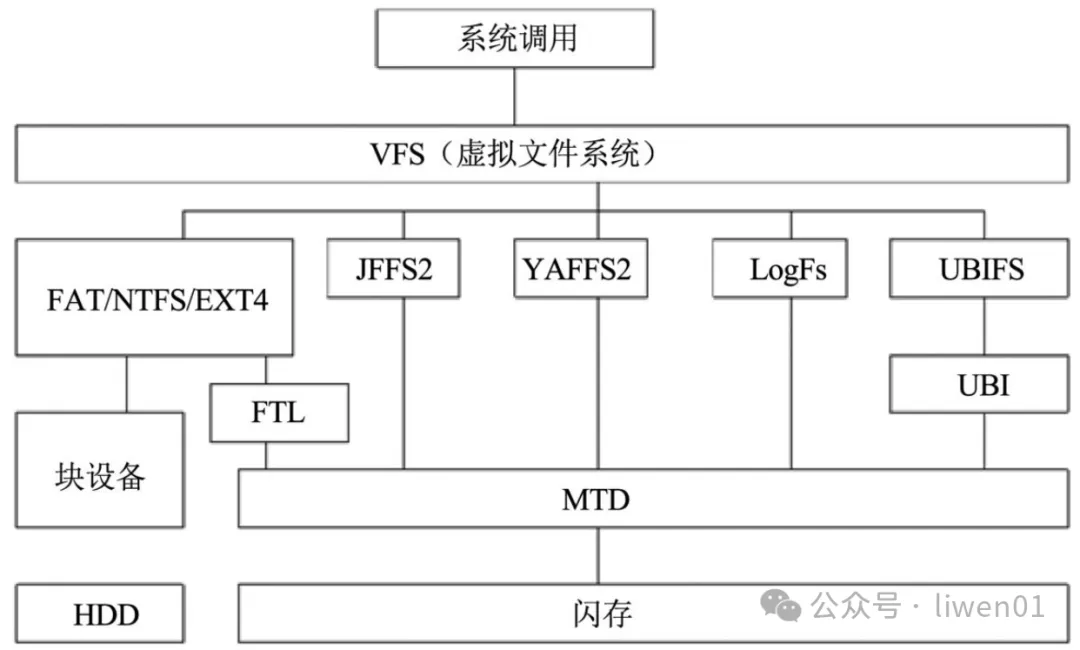
- The MTD layer provides universal interfaces for reading and writing the underlying flash hardware.
- UBI, running on top of the MTD layer, provides wear leveling and bad block management tailored for flash devices (especially NAND Flash). Through logical-to-physical block mapping, it provides an ideal storage access interface for the filesystem layer above it.
- UBIFS is a filesystem based on UBI. Since it lacks built-in wear leveling and bad block management features, it is not suitable for running directly on the MTD layer. UBIFS is a user-space-accessible filesystem.
In addition, the UBI layer supports multiple logical volumes—meaning a single UBI space can support multiple logical partitions, and each logical partition is an independent UBIFS filesystem. Logical volumes on UBI even support dynamic creation, deletion, and resizing. All of these features are made possible because UBI provides the upper-layer filesystem with an ideal storage interface composed of virtual logical blocks.
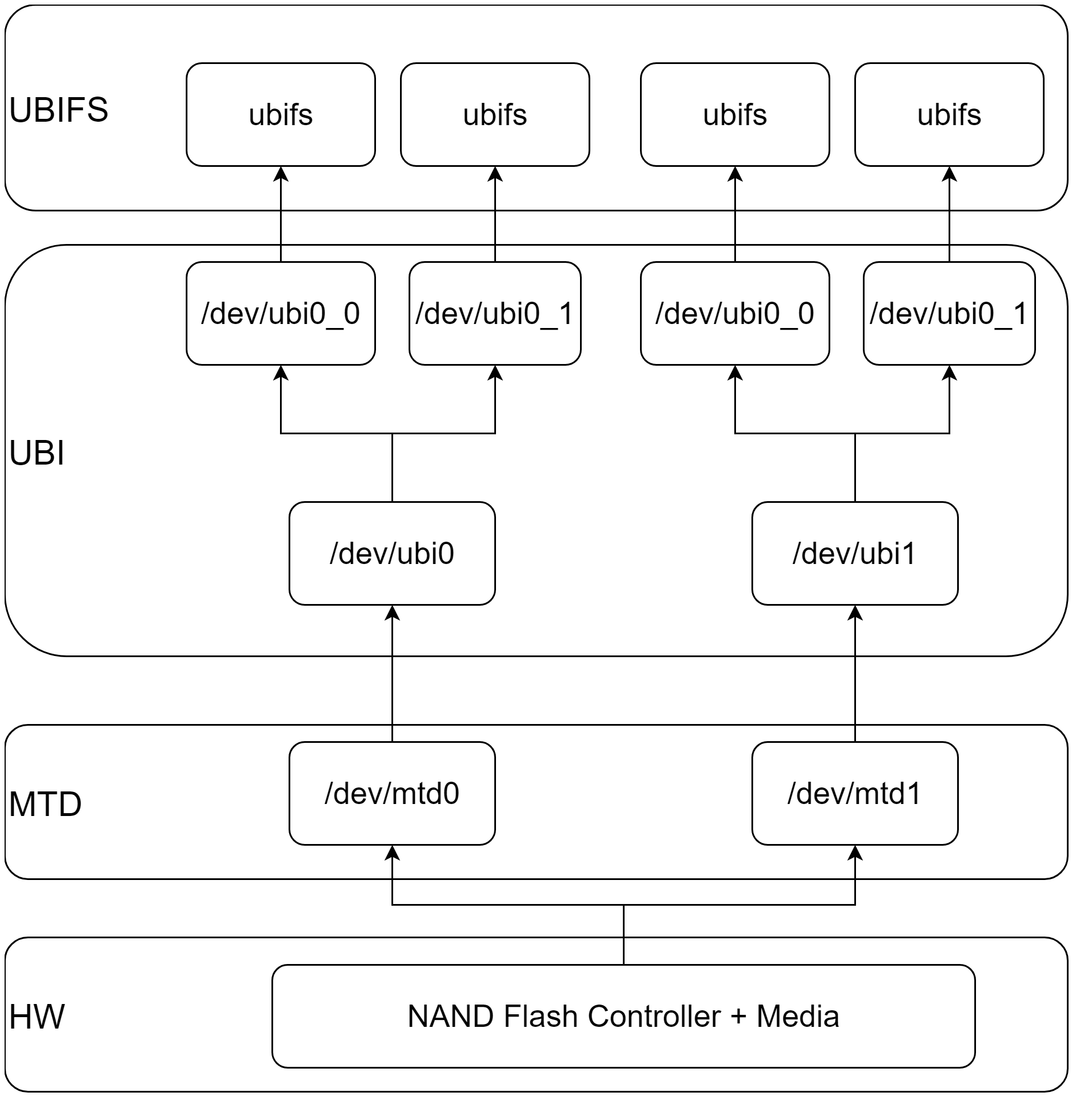
UBI Headers
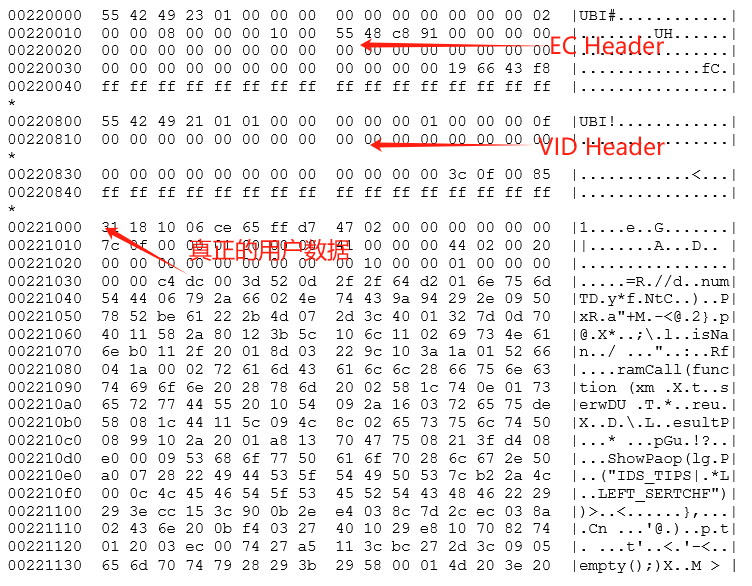
As described above, UBI is implemented on top of the standardized flash hardware read/write interfaces provided by the MTD layer. Therefore, what the UBI layer sees are the physical flash blocks and pages provided by MTD. To facilitate the implementation of UBI’s functions, UBI writes a UBI Header to each flash block during formatting to mark the status information of each block. For instance, this header records the erase count of the block, allowing UBI to track the wear status and ensure through wear leveling that all flash blocks receive roughly equal erase cycles, thereby extending the lifespan of the flash memory.
The UBI Header written at the beginning of each flash block mainly consists of two header structures: the EC Header (which primarily contains the erase count of each block) and the VID Header (which primarily contains the relationship between the flash block and the logical volume on UBI). Each header structure is 64 bytes long and occupies one page. Consequently, after UBI formatting, the first two pages of each flash block are used to store the EC Header and VID Header respectively. Actual data storage begins at the third flash page, meaning the usable space for actual data in each flash block is smaller than the block itself by two page sizes.
UBI Runtime Status Tables
In addition to writing the EC Header and VID Header in the first two pages of each erase block on the flash, the operation of UBI relies on three tables:
- Volume Table: Records information such as the names, types, IDs, sizes, and checksums of all volumes created in this UBI space. The Volume Table is stored in flash memory and read out during UBI driver initialization. Because this information is critical for UBI volume management, to handle potential power outages during volume table reads and writes, the flash actually stores two copies of the Volume Table, one of which serves as a backup. This Volume Table is used exclusively by UBI for volume management and is not visible in user space.
- EC Table: The erase counter table for each erase block, recording the erase count of every erase block. It is primarily used by UBI to execute the flash wear leveling algorithm. As mentioned earlier, because the erase count is written to the first page of every erase block, the EC table is actually constructed in RAM during UBI driver initialization by scanning all flash erase blocks and reading their erase counts. Subsequent wear leveling algorithms rely on this EC Table to select appropriate erase blocks for writing new data.
- Erase Block Association Table: The mapping relationship table between logical memory blocks and physical memory blocks. Similar to the EC Table, this table is parsed from the UBI VID Header information recorded in each flash block and runs in RAM.
In summary, among the three tables required for normal UBI operation, the Volume Table is recorded in the flash and read out during initialization; while both the EC Table and the Erase Block Association Table are constructed in RAM by reading and parsing the EC Header and VID Header information from all erase blocks in the flash during UBI driver initialization.
UBI Tools: Ubiformat / Ubiattach / Ubimkvol
Because all flash storage blocks managed by UBI require pre-written EC Headers and VID Headers (with the VID Header written when a storage block is mapped to a UBIFS logical storage block), UBI must be formatted using ubiformat before use. Furthermore, due to the existence of the EC Header and other metadata, tools like nandwrite cannot be used directly to write to UBI-managed memory cards; specialized UBI tools must be used instead, otherwise the EC Header information will be erased.

After formatting an MTD partition using the ubiformat command as described above, you can use the ubiattach command to attach this MTD partition to the UBI system, preparing a UBI volume for the application layer to mount the filesystem:

Following the ubiattach operation above (which essentially tells the kernel that the mtd2 partition is a UBI image and to treat it accordingly), the kernel will create a device file corresponding to this UBI image under /dev, namely /dev/ubi0:

Next, since multiple UBI volumes can be created on a single UBI image, and a UBIFS filesystem can run on each UBI volume, you can further use the ubimkvol command to create multiple UBI volumes on the /dev/ubi0 device file and mount each UBI volume as a UBIFS filesystem for use:
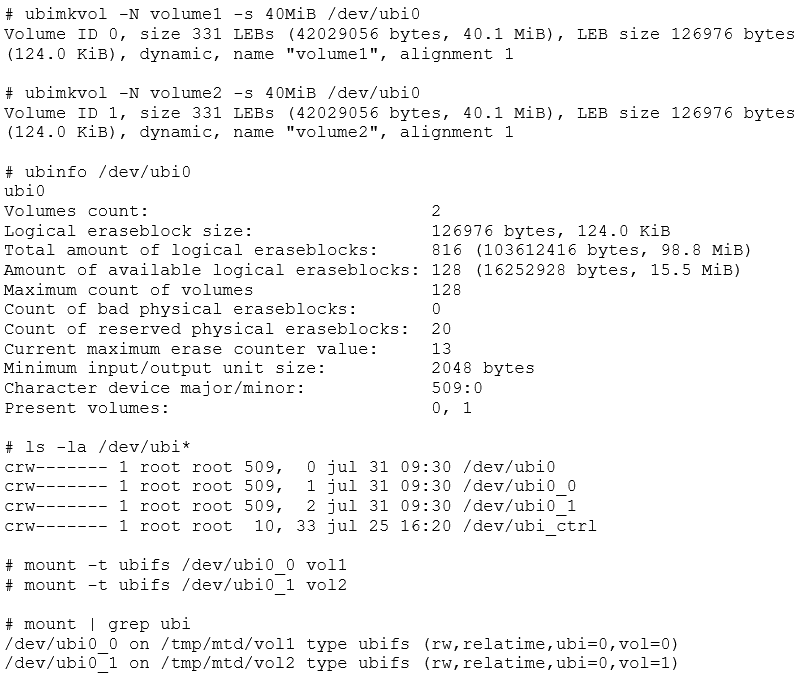
The contents of the UBIFS filesystem are organized in another note.
If you need to detach a UBI image from the system, you should first unmount the UBIFS filesystem mounted to the kernel, and then invoke the ubidetach command: ubidetach -p /dev/mtd2.
References
- https://v.flomoapp.com/mine/?memo_id=NjY1ODgxMw
- Filesystem (10): Understanding the UBI Filesystem in One Article - liwen01 - Blogs Park
- 《Solid-State Storage: Principles, Architecture, and Data Security》
In the previous article, we reviewed some technical details related to UBI. This next part summarizes the contents of the UBIFS filesystem running on top of UBI.
Introduction to UBIFS
UBIFS: Unsorted Block Images File System. UBIFS is designed to run on top of UBI. Because UBIFS itself lacks features like bad block management and flash block wear leveling, it must run on a UBI layer created over an MTD partition. To UBIFS, the flash space it sees is an ideal flash space where bad block markers and wear leveling have already been handled by UBI, and virtual logical blocks are mapped to physical erase blocks.
The inception of UBIFS was primarily to solve problems faced by previous-generation flash filesystems—such as JFFS2 and YAFFS—as NAND Flash storage capacities grew, including slow filesystem loading speeds and low efficiency.
- For example, during the boot process when mounting a JFFS2 filesystem, it reads the entire contents of the flash where the JFFS2 partition resides to attempt to build a complete filesystem in memory. This process is linearly proportional to the flash size: the larger the flash, the longer the mount time. Therefore, JFFS2 is not suitable for large flash partitions. Additionally, the JFFS2 filesystem lacks a write-back mechanism; every write operation is committed directly to the flash, leading to lower flash I/O access efficiency. In contrast, UBIFS features a write-back mechanism where write operations from the application layer are first written to memory and only flushed to flash in batches when certain trigger conditions are met. This makes I/O access much more efficient, though it introduces the risk of incomplete data in the event of a sudden power outage or reboot. Therefore, crucial data writes require forcing buffer data to flash using operations like
syncorfsync.
Advantages of the UBIFS Filesystem:
- Leveraging the UBI layer sitting between UBIFS and the MTD hardware, the entire directory structure of a UBIFS filesystem is stored in flash. As a result, mounting does not require reading all data to rebuild the directory structure, making the mount operation fast and independent of the filesystem size.
- However, note that mounting a UBIFS filesystem requires first executing
ubiattachon the MTD block to initialize the UBI image. During this process, the EC Header and VID Header in the first two pages of each block are read. Therefore, the time required forubiattachis linearly proportional to the flash space occupied by the UBI image.
- However, note that mounting a UBIFS filesystem requires first executing
- UBIFS supports write-back, which effectively improves the efficiency of flash I/O operations.
- UBIFS supports a Journal structure, effectively reducing the risk of data loss and improving write efficiency.
- UBIFS supports filesystem compression, saving valuable storage space.
Usage of UBIFS
There are primarily two ways to use the UBIFS filesystem:
- Use
mkfs.ubifsto create a UBIFS filesystem image based on an existing directory structure and its contents; use theubinizecommand to pack this UBIFS filesystem image into a UBI image; and then use theubiformatcommand (do not usenandwriteto write the UBI image to flash) to burn this UBI image into the designated MTD partition. Afterward, you can mount the UBIFS filesystem running on this UBI image to the kernel to start read and write operations. - Use the
ubiformatcommand to format a designated MTD partition into a UBI image partition; use theubiattachcommand to mount this UBI image into the kernel; use themkubivolcommand on this mounted UBI image partition to create a UBI volume; and then use themountcommand to mount this newly created UBI volume onto a mount point in the system. Afterward, you can read and write to this filesystem in the application layer just like a regular filesystem.
Generally, for the development of mass-produced products, the filesystem is usually packed into a flashing image on the host machine ahead of time and written to the flash. Therefore, the UBIFS usage workflow predominantly adopts the first method.
1. Creating a UBIFS Filesystem Image with mkfs.ubifs
The prerequisite for creating a UBIFS filesystem image with mkfs.ubifs is to prepare a local directory containing the specific contents of the filesystem, along with certain flash and UBI operational parameters.
The command arguments for mkfs.ubifs are as follows:
mkfs.ubifs -r <root-fs> -m <min i/o size> -e <logical erase block size> -c <max erase blocks> -o <output file>
example:
bash> mkfs.ubifs -r /opt/timesys/at91sam9260_ek/rfs/ -m 2048 -e 129024 -c 2048 -o ubifs.img
-r <root-fs>: Passes the local directory containing the filesystem contents to be packed into the UBIFS image.-m <min i/o size>: The minimum I/O size for flash read/write, which is essentially the size of a flash read/write page. Check the datasheet of the flash being used.-e <logical erase block size>: The size of the logical virtual block released by the UBI layer. Note that logical block and physical block sizes differ because the first two pages of each physical block in the UBI layer are used to write header information. Thus, the logical block size equals the physical block size minus two page sizes.-c <max erase blocks>: The maximum number of erase blocks corresponding to the space this UBIFS filesystem will occupy, which can be calculated by dividing the UBIFS filesystem size by the flash physical block size.-o <output file>: The filename of the generated UBIFS filesystem image.
2. Creating a UBI Image with ubinize
The next step is to use the ubinize tool to further generate a UBI image file based on the UBIFS filesystem image generated in the first step, along with its configuration file. The image file ultimately burned to the flash is not the UBIFS image file, but the UBI image file.
You need to specify information such as the size, name, ID, and UBIFS image file of the UBIFS filesystem contained within the UBI image inside the UBI configuration file:
mode: Fixed asubiimage: Specifies the filename of the UBIFS filesystem imagevol_id: The volume ID of this filesystem on the UBI imagevol_name: The volume name of this filesystem on the UBI imagevol_size: The size of this filesystem. One volume in the entire configuration file can be set toautoresize.vol_type: Static read-only or dynamic modifiable.
The UBI image configuration file is actually an INI file. Below is an example:
[configuration-data-volume]
mode=ubi
image=config_data.img
vol_id=0
vol_size=512KiB
vol_type=static
vol_name=configuration

[rootfs-volume]
mode=ubi
image=rootfs.img
vol_id=1
vol_size=220MiB
vol_type=dynamic
vol_name=rootfs
vol_flags=autoresize
The configuration file above contains the configuration information for two UBI volumes corresponding to UBIFS images: configuration-data-volume and rootfs-volume. Below each volume, parameters such as filesystem size, image filename, volume ID, and volume name are specified. Subsequent execution of the ubinize command relies on parsing this file.
Once the above configuration file is ready, invoke the ubinize command to generate the UBI image file:
ubinize -p <physical erase block size> -m <min i/o size> -s <sub-page size> -o <output file> <ubi config>
example:
ubinize -p "128 KiB" -m 2048 -s 512 -o ubi.img ubi.ini
-p <physical erase block size>: The size of the flash physical block, which can be found in the flash datasheet.-m <min i/o size>: Same as the-mparameter ofmkfs.ubifs, which is actually the flash page size. Can be found in the flash datasheet.-s <sub-page size>: If the flash supports sub-pages, this is the sub-page size; otherwise, it is the page size.-o <output file>: Specifies the filename of the generated UBI image.<ubi config>: The INI configuration file required to run theubinizecommand.
3. Burning the UBI Image to the MTD Partition Using ubiformat
The next step is to use the ubiformat command to burn the generated UBI image into the MTD partition.
ubiformat /dev/mtdX -f <ubi image file> [-s <subpage_size>] [-O vid_header_offset]
example:
ubiformat /dev/mtd5 -s 2048 -O 2048 -f rootfs.ubi
-f <ubi image file>: Uses-fto specify the UBI image file to be written to the flash.-s <subpage_size>: If the flash supports sub-pages, this is the sub-page size; otherwise, it is the page size.-O vid_header_offset: The offset of the VID Header in each block, typically one page size.
4. Using UBIFS
After completing the three steps above, the custom UBIFS has been successfully burned into the flash. The next step is using the UBIFS: first, invoke ubiattach to register the UBI image partition with the kernel, and then mount the UBIFS filesystem into the system.
ubiattach:
ubiattach /dev/ubi_ctrl -m <mtd partition> [-s <subpage_size>] [-O vid_header_offset]
example:
# ubiattach /dev/ubi_ctrl -m 1 -O 2048
-m <mtd partition>: Specifies the index of the UBI partition on MTD.-s <subpage_size>: Sub-page size.-O vid_header_offset: The offset position of the VID Header in each block.
Mounting the UBIFS filesystem:
mount -t ubifs <volume descriptor> <mount point>The mount step is relatively simple. The volume descriptor specified when mounting UBIFS supports two formats, using either the volume index or the volume name:
ubi<device number>_<volume number>(e.g.,ubi0_4)ubi<device number>:<volume name>(e.g.,ubi0:rootfs)
Storage Structure of the UBIFS Filesystem
As mentioned above, UBIFS operates on a partitioned volume of a UBI image. Therefore, to UBIFS, the storage space it sees is an ideal storage space maintained by UBI, composed of a series of logical erase blocks (LEBs). The UBI layer handles the correspondence between logical erase blocks and physical erase blocks (PEBs) on the flash. Consequently, the data storage structure of UBIFS always begins from the first block of the logical erase block space, LEB0.
The Concept of Nodes in UBIFS
The UBIFS filesystem uses the concept of a “Node” to describe different types of data structures corresponding to the contents of the filesystem stored on the flash. Nodes are the basic operational elements constituting the UBI filesystem; the contents saved in the UBIFS filesystem can be said to consist of various types of nodes.
Overall, nodes in UBIFS are mainly divided into the following types:
- Index Node: Corresponds to the metadata and attribute information of files and directories saved in the filesystem, such as file size, permissions, timestamps, owner information, and pointers pointing to data blocks of file/directory contents. In UBIFS, an index node is analogous to the concept of an inode in the Linux kernel.
- Data Node: Contains the actual data portion corresponding to file contents in the filesystem. The location of each file’s data node is accessed and referenced via the pointers contained within its index node.
- Directory Entry Node: Used to store file/directory names contained within a directory and their corresponding index node numbers. Thus, directory entry nodes are used to organize and manage files and subdirectories within directories in the filesystem.
- Master Node: Stored in the Master partition of the UBIFS filesystem, containing global information about the filesystem, such as the highest index node number, commit number, and the location of the root index node.
- Garbage Collection Node: When file data in a UBIFS filesystem is modified, new data is written to other LEBs, and the data in the previous LEB should be erased because it is outdated. However, in actual UBIFS operations, these outdated LEBs are not immediately erased; instead, they are marked as outdated LEBs and recorded in garbage collection nodes. Later, when storage space becomes tight, the garbage collection mechanism performs unified erasure, recycling, and reuse based on the contents stored in the garbage collection nodes.
- Orphan Node: When a file in a UBIFS filesystem is deleted, its index node number is saved in an orphan node. All orphan nodes are stored in the Orphan partition within the UBIFS filesystem structure. If an abnormal unmount occurs (such as unmounting the filesystem halfway through an erasure operation), the next time this filesystem is mounted, it will scan the orphan nodes in the orphan partition and delete the inodes of the files pending deletion stored within them, ensuring consistency in filesystem operations.
- Journal Node: As a journaling filesystem, all modification operations on file contents in UBIFS are first written to journal nodes and finally committed as atomic operations to modifications of the main filesystem contents. Therefore, journal nodes and the journal partition in the UBIFS storage structure are used to save records of these modification operations.
UBIFS Storage Structure
In terms of overall storage structure, UBIFS divides its UBI partition volume into 6 regions:
- Super Block Partition: Fixedly occupies
LEB0, corresponding to thestruct ubifs_sb_nodestructure in the Linux kernel. It stores immutable parameters of this UBIFS filesystem, such as the flash erase block size, read/write page size, total number of LEBs occupied by the entire filesystem, and filesystem attributes. - Master Partition: Fixedly occupies
LEB1andLEB2, used to save the root node of each index node. The contents of the two LEBs are identical. Mutual backup ensures rapid recovery in the event of an abnormal power outage. The Master partition corresponds to thestruct ubifs_mst_nodestructure in the kernel. Key information contained in the Master partition includes:- Commit Number: Updated with every modification commit to the flash device, ensuring consistency in filesystem modifications.
- Root Index Node Location: The location of the index node corresponding to the root directory of this UBIFS filesystem on the UBI image, including its LEB number (
root_lnum) and offset (root_offs). During filesystem loading, this information is used to find the index node corresponding to the root directory, thereby locating the subdirectories and files contained beneath it. - Total Free, Total Dirty, Total Used, Total Dead, Total Dark: Records the totals of various status spaces in the filesystem, including free space, dirty space, used space, dead space, and dark space.
- Journal Partition: Starts from
LEB3. The Journal partition is used to store journal node contents—meaning it saves all modification operations on files and directories to facilitate atomic rollback operations under abnormal circumstances. The size of the Journal partition can be specified in themkfs.ubifscommand, and the number of LEBs it occupies is defined by thelog_lebsparameter in the Super Block. - LEB Properties Partition: Used to store the occupancy status of all LEBs contained in this UBIFS filesystem.
- Orphan Partition: Used to store all orphan nodes. As described above, it caches the inode numbers of all files pending deletion in orphan nodes, making it convenient for the operating system to delete these files the next time the filesystem is mounted if anomalies occur during deletion operations, thereby ensuring the consistency of the filesystem structure.
- Main Partition: Used to store all actual contents in the filesystem, such as index nodes, directory entry nodes, and data nodes of all directories and files contained within the filesystem.