Detailed Analysis of the exFAT File System
- 04 Sep, 2024
exFAT (Extended File Allocation Table), also known as the FAT64 file system, is a file system developed by Microsoft specifically for flash storage devices. It resolves limitations in FAT32, such as the lack of support for file sizes greater than 4GB and partition sizes larger than 2TB. Currently, high-capacity SDXC-type SD cards natively format using this file system by default. However, it should be noted that Microsoft still holds the patents for exFAT, and using this file system in commercial products requires paying the corresponding patent licensing fees to Microsoft.
The exFAT file system supports a maximum partition size of up to 64ZB, a maximum single file size of up to 16EB, and a maximum cluster size of up to 32MB.
- In comparison, the maximum cluster size supported by FAT32 is 64KB. While a cluster size as large as 32MB can support larger file system partitions and is beneficial for read and write operations on large files, if the file system contains a large number of small files that are only a few kilobytes each, and every small file still occupies a full 32MB cluster, the actual storage efficiency of the file system would undeniably become extremely low. Therefore, from the perspective of general-purpose file system efficiency, it is generally unlikely to set the cluster size this large in practice.
In fact, the structure of exFAT is very similar to that of FAT32. Once you thoroughly understand the structure of FAT32, learning exFAT becomes much easier. For studies on the FAT32 file system, you can refer to my other study summary dedicated to FAT32.
Structure of the exFAT File System
From a structural standpoint, like other FAT-based file systems, the exFAT file system can also be divided into three main parts: the Reserved Sectors, the FAT Region, and the Data Region, though each part has certain differences.
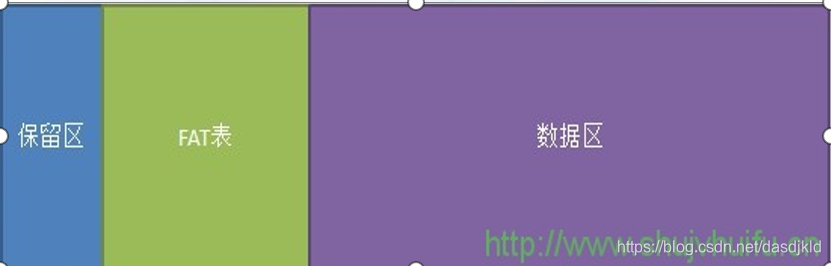
- Additionally, it is worth noting that some references separate the Cluster Heap Bitmap (bitmap) and the Up-Case Table (upcase) located at the beginning of the data region into distinct, independent areas. Under this view, the exFAT structure becomes 5 parts: adding a Cluster Bitmap Region and an Uppercase Characters Region between the FAT table and the Data Region.
Reserved Sectors
Similar to FAT32, the first part of the exFAT file system is also the reserved sectors, with the most crucial component being the DBR (DOS Boot Record) boot sector located at the very beginning. This DBR sector primarily serves two functions:
- It contains parameter information about the file system, such as sector size, starting positions of various regions, and cluster size, which primarily corresponds to the BPB (BIOS Parameter Block) records within the DBR;
- When an operating system is installed on this file system, it boots the OS via the OS bootstrap code contained within the DBR sector, which primarily corresponds to the jump instruction at the beginning of the DBR followed by the OS loader code.
The DBR data structure of the exFAT file system is shown below:
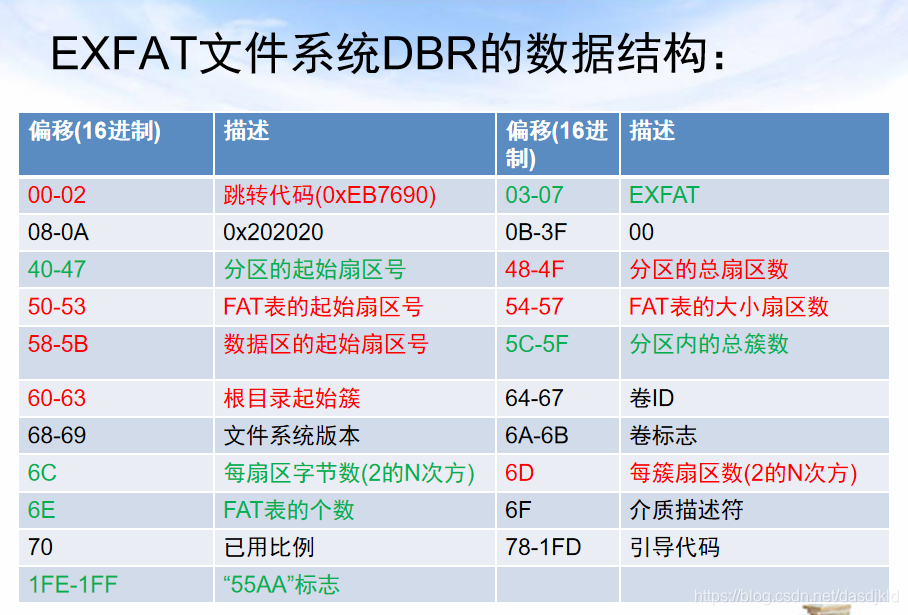
Overall, it is very similar to the DBR structure of FAT32. The BPB records located between offsets 0x40 and 0x70 contain the starting position of this exFAT partition on the entire hard drive, the locations of the FAT table and the data region, the cluster number of the root directory in the data region, the number of bytes per sector, the number of sectors per cluster, and the number of FAT entries contained in the FAT table. Therefore, after a complete parsing of the BPB record information, one can gain a clear understanding of the overall structure of the exFAT file system and its location on the hard drive.
FAT Table
Unlike FAT32, exFAT has only one FAT table and lacks a backup FAT table. Consequently, the security of this FAT table is extremely critical; once this partition’s data records are lost, recovery becomes virtually impossible.
The role and structure of the FAT table and its entries in the exFAT file system are also basically similar to those in the FAT32 file system. Each cluster in the data region corresponds to an entry in the FAT table. These entries are arranged sequentially according to cluster numbers, with each entry having a fixed length of 4 bytes.
Just like the FAT in FAT32, FAT entries in the exFAT file system are numbered starting from 0, but entries 0 and 1 are reserved for special purposes (hence clusters are numbered starting from 2). FAT entry 0 is used to store the storage media type; for instance, the value 0xFFFFFFF8 in this entry indicates a hard disk. FAT entry 1 is generally 4 bytes of 0xFF.
FAT entries 2, 3, and 4, along with clusters 2, 3, and 4 in the data region, are used to store the cluster bitmap. FAT entry 5 and cluster 5 in the data region are used to store the uppercase character translation table. FAT entry 6 and cluster 6 in the data region are finally used to store the root directory of the file system (in FAT32, cluster 2 stores the root directory). This structural layout is another major divergence between exFAT and FAT32, which will be described in detail in the subsequent Data Region section.
Cluster Chains Stored in the FAT Table Are Only Meaningful for Fragmented Files
In the FAT table of the FAT32 file system, FAT entries are not only used to represent the current allocation status of each cluster in the data region, but their record contents are also used to form the storage cluster chains for individual files. However, in the exFAT file system, the allocation status of individual clusters is no longer marked by FAT entries; instead, it is tracked using the cluster bitmap located in the data region. Effectively, the sole function of the FAT table is to provide cluster chain information for non-contiguous files.
In the exFAT file system, when accessing files stored in contiguous clusters, the system directly uses the starting cluster number and file size contained within their directory entries to perform read and write operations on the data region, without needing to access the FAT table at all. The contents of the FAT entries corresponding to those contiguous file clusters are completely meaningless and are neither accessed nor updated during file operations.
On the other hand, if a file’s clusters in the data region are non-contiguous, it is considered a fragmented file. In this case, the FAT table must be utilized to store the cluster chain corresponding to this file. The storage pattern of cluster chains in the exFAT FAT table is similar to that of FAT32, where each FAT entry stores the cluster number of the next cluster in the fragmented file. Accessing such non-contiguous fragmented files therefore strictly requires relying on the cluster chains stored in the FAT table, and the corresponding FAT entries must be populated with correct cluster chain information.
- This point can be understood in conjunction with the Attribute 2 directory entry in the data region.
- FAT entries corresponding to clusters of contiguous files are meaningless and do not guarantee correct setting values. Finding these entries set to 0 does not indicate whether they are occupied or not. When the exFAT file system determines whether a cluster is occupied, it should query the cluster bitmap rather than parsing FAT table entries.
Data Region
Cluster Bitmap
The cluster bitmap region is located at the beginning of the data region, encompassing a total of three clusters: clusters 2, 3, and 4 at the start. Every single data bit within these three clusters represents the allocation status of a cluster in the data region: 0 indicates that the cluster is currently unallocated/unused, while 1 indicates that it is occupied. Therefore, the exFAT cluster bitmap essentially fulfills part of the role played by FAT entries in FAT32.
Whether each cluster in the data region is occupied or free is determined entirely by querying the cluster bitmap.
Uppercase Character Translation Table
Structurally, the area immediately following the cluster bitmap region is the uppercase character translation table.
File names in the exFAT file system are case-insensitive, and filename strings are encoded in Unicode. Consequently, when performing file lookups, the filename format must first be converted into Unicode, and then translated into an all-uppercase string by referencing this uppercase character translation table. Comparisons are performed only after this conversion is complete. Therefore, this uppercase character translation table is solely used for table-lookup and substitution of characters within strings.
Directories
Unlike the long filename and short filename directory entries in FAT32, each subdirectory and ordinary file in exFAT must contain at least three directory entries. Each directory entry is a complete structure used to describe various attribute information corresponding to the file or subdirectory, which naturally includes the starting cluster number where the file or directory is saved in the data region.
The first byte of each directory entry is used to mark the type of this directory entry; hence, each file in the file system must have at least three attributes marked by directory entries.
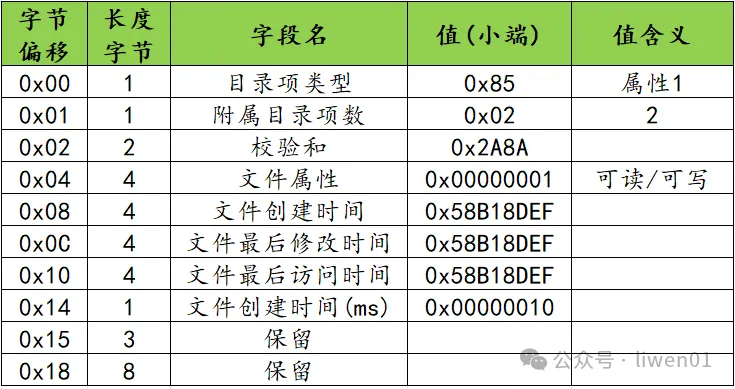
Attribute 1 Directory Entry: A fixed length of 32 bytes, using the 0x85 directory entry type as its attribute signature value. It primarily contains information such as the file’s access attributes and various creation/access/modification timestamps.
Attribute 2 Directory Entry: A fixed length of 32 bytes, using the 0xC0 directory entry type as its attribute signature value. It primarily contains whether the file is stored contiguously in the data region, the file size, the starting cluster number, the length of the filename, and its hash.
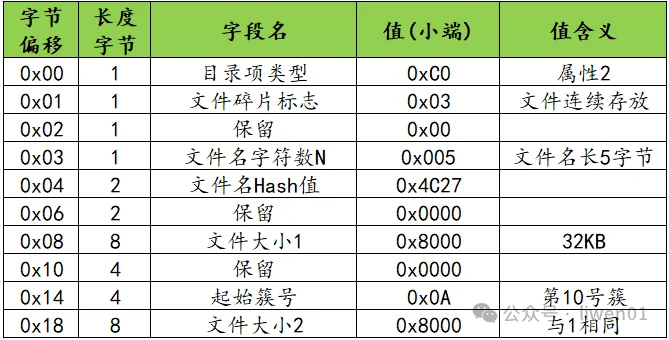
- Note the file fragmentation flag here, which is used to indicate whether the file is stored using contiguous clusters in the data region. If the file is saved using contiguous clusters—meaning it is not fragmented—accessing this file does not require the assistance of the FAT table. The starting cluster number can be retrieved directly, and by calculating the contiguous cluster data based on the file size, the complete file can be read out. However, if the file is stored in a fragmented format within the data region, it requires mechanisms similar to FAT32, retrieving the starting cluster number and reconstructing the file content using the cluster chains in the FAT table.
Attribute 3 Directory Entry: The length of this attribute structure is determined by the length of the filename, using the 0xC0 directory entry type as its attribute signature value, and containing the filename of this file as a Unicode string (2 bytes per character).

References
- “Solid-State Storage: Principles, Architecture, and Network Security” by Xv Luning, Jia Shijie, Chen Bo (Section 6.5 exFAT)
- File System (5): Detailed Explanation of exFAT File System Principles - liwen01 - 博客园 (cnblogs.com)
- exFAT File System_exFAT Partition Structure - CSDN Blog