Detailed Analysis of the FAT32 File System
- 30 Aug, 2024
The FAT (File Allocation Table) file system was invented by Microsoft, which holds some of its patents. It mainly exists in four versions: FAT12, FAT16, FAT32, and exFAT. Among them, FAT12 and FAT16 have long faded from view, FAT32 can still be found in some small-capacity SD cards, while exFAT is a FAT-type file system customized by Microsoft for flash memory storage media, and thus still has a significant share of use in USB flash drives, SD cards, and even solid-state drives (SSDs).
Core Concepts of the FAT File System
Cluster
The FAT file system allocates the hard drive space occupied by files in units of clusters. The hard disk storage space occupied by a file is always one or more clusters, meaning that the disk space occupied by each file is an integer multiple of the cluster size.
By default in the FAT32 file system, the size of a cluster is 4KB.
In the FAT file system, all clusters in the data area are numbered starting from 2, and each cluster has its own address/number. By default, the root directory of the file system is stored in cluster 2.
When the disk space occupied by a file spans multiple clusters, these clusters form a cluster chain based on the cluster information recorded in the File Allocation Table (FAT). Therefore, the multiple clusters containing a single file do not need to be physically contiguous.
File Allocation Table (FAT)
The File Allocation Table is one of the most important data structures in the FAT file system. “FAT” itself is actually the abbreviation for File Allocation Table.
The specific contents of each file and directory in the FAT file system are stored in clusters within the data area. If the space occupied by a file is larger than the size of a single cluster (i.e., 4KB), the FAT structure is further used to describe how to locate subsequent clusters: specifically, the FAT is used to find the cluster chain formed by each file stored across clusters. The directory entry records the starting cluster number of the file, and the FAT uses the cluster number as an index to point to the next cluster number of the same file. If the current cluster is the sole or final cluster of the file, it is marked as EOF in that cluster’s entry. Therefore, the FAT entries for each cluster not only contain the cluster chain information for various files but also indicate the allocation status of each cluster.
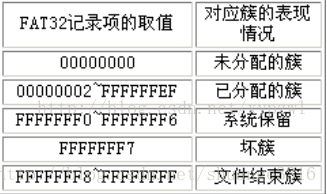
All FAT entries in the File Allocation Table are saved in the FAT region of the FAT file system. In this FAT region, one FAT entry is saved for each cluster in the data area (i.e., the allocation status records of all clusters in the data area). Each FAT entry is actually a 32-bit record, indexed starting from cluster 0. Clusters 0 and 1 are reserved by the system to store special flags and are not valid clusters; cluster 2 is the first cluster in the data area, and so on. The number of FAT entries in the FAT table corresponds to the number of clusters in the data area.
- When the file system is formatted, the entire FAT table is initialized. At this point, the FAT entry for cluster 0 is permanently written as 0xF8FFFF0F. Under normal circumstances, the entry for cluster 1 is written as 0xFFFFFFFF or 0xFFFFFF0F. Since cluster 2 is used to store the empty root directory of the file system, the entry for cluster 2 is marked as allocated + end-of-chain marker (0x0FFFFFFF). All other clusters have their FAT entries set to an unallocated state (filled with all zeros).
- When a cluster in the file system is unallocated, its corresponding FAT entry is filled with all zeros.
- When a cluster is allocated and it is the last cluster in the cluster chain of the file, the FAT entry for this cluster is written with the end-of-chain marker 0x0FFFFFFF.
- When a cluster is allocated and is not the last cluster of the file’s cluster chain, the FAT entry for this cluster is written with the number of the next cluster in the chain.
- If a cluster contains bad sectors or is in an unusable state, its FAT entry is written as 0xFFFFFFF7.
Directory Entry
The directory entry is an important data structure in the FAT file system. It describes the directory hierarchy of the entire system, the ownership relationship between directories and their files, and the starting cluster number of the space occupied by each file and directory in the data area.
Each file and directory stored in the FAT file system corresponds to a directory entry. This directory entry stores the name, size, starting cluster number of the file/directory content (only the starting cluster number is included; subsequent cluster numbers are retrieved via the cluster chain in the FAT), and other metadata. Therefore, to access any file in the FAT file system, the system must first locate its corresponding record in the directory entry data structure, parse the file’s various metadata and its starting cluster number, and then look up the corresponding cluster chain in the FAT to find the complete data content of the file.
Directory entries can be classified into Short File Name (SFN) directory entries and Long File Name (LFN) directory entries. In FAT file systems prior to FAT32, directory entries for files and directories only supported short file names. Each directory entry had a fixed size of 32 bytes. At that time, the naming convention followed the standard 8.3 format: a maximum of 8 characters for the filename and a maximum of 3 characters for the extension. The structure of a 32-byte SFN directory entry is as follows:
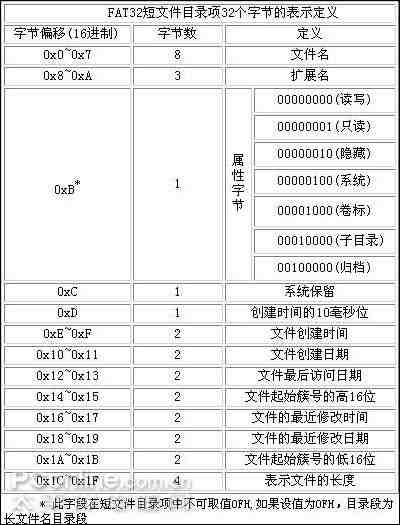
- The information contained in the SFN directory entry structure mainly includes: the filename, extension, creation/modification/last-access date and time, the file size, and the starting cluster number stored in the data area.
However, the short file name directory entry structure only supports the 8.3 filename format and cannot support long filenames. To address this issue, FAT32 introduced Long File Name (LFN) directory entries. Consequently, in the FAT32 file system, regardless of whether a filename exceeds 8 characters, the directory entry structure for each file and directory contains both LFN entries and an SFN entry. An LFN entry occupies one or more 32-byte blocks, containing only the file’s name. The number of 32-byte blocks it occupies depends on the actual length of the filename. The SFN entry still occupies a fixed 32 bytes and continues to store the file’s timestamps, size, starting cluster number, and other information according to the structure described above.
- The complete directory entry structure of the file system is stored in the data area.
DOS Boot Record (DBR)
The very beginning of the FAT file system is the reserved sectors region of the entire system (FAT32 usually contains 32 reserved sectors), and the first sector of this reserved region is the DOS Boot Record (DBR). The data structure of the DBR stores various structural parameters of the FAT file system, such as the file system size, location, and the number and size of the File Allocation Tables.
The structure of the DBR sector is shown in the figure below:
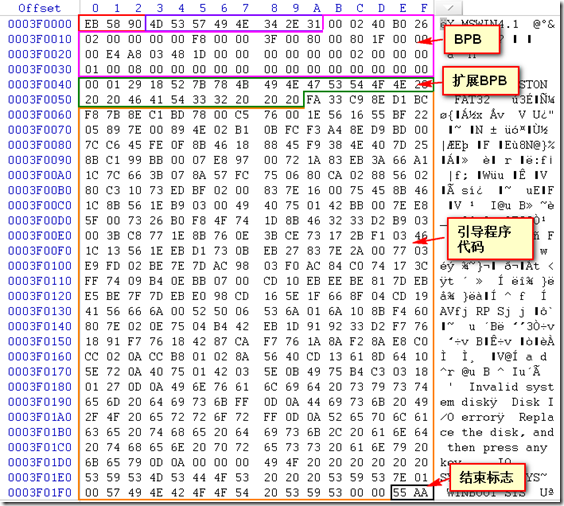
- The first three bytes (0x00-0x02) contain an executable CPU jump instruction, which jumps to the OS bootloader code starting at 0x5A to boot the operating system.
- The 8 bytes between 0x03 and 0x0A store the OEM string, which typically indicates the operating system and its version used to format the file system, such as MSWIN4.1 shown above.
- The 53 bytes starting at 0x0B constitute the BIOS Parameter Block (BPB), followed by 26 bytes starting at 0x40 for the Extended BPB (EBPB), totaling 79 bytes. These are used to store parameters of the file system.
- The 420 bytes starting at 0x5A contain the OS bootloader code. Naturally, if no operating system is installed on this file system partition, this code will not be executed.
- The final bytes 0x55 and 0xFF are the signature flags.
For a file system without an installed operating system, the BPB structure contained in the DBR is undoubtedly the most critical information structure. Its detailed definition is shown in the figure below:
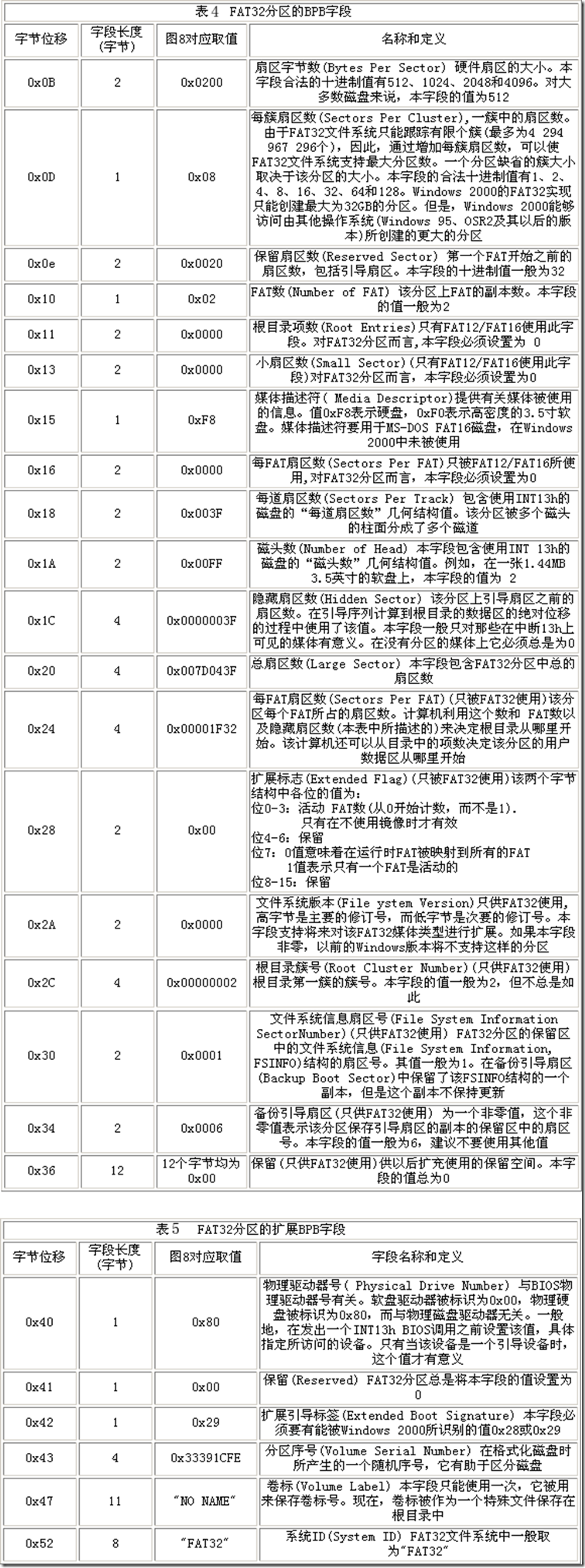
- As shown, the BPB structure includes parameters such as the number of bytes per sector, the number of sectors per cluster (i.e., the cluster size), the number of FAT entries (i.e., the total number of clusters in the file system), the total size of the file system, and the starting cluster of the root directory (typically 2). Thus, the BPB essentially defines the complete structural layout of the entire FAT file system.
Storage Structure of the FAT32 File System
The FAT32 file system can be broadly divided into three parts: the Reserved Sectors (which includes the DBR at its starting sector), the FAT Region, and the Data Area.
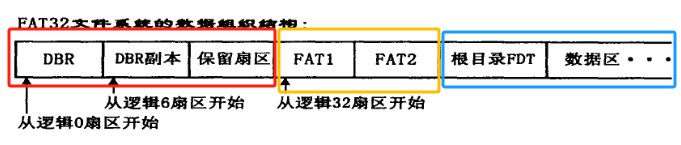
Reserved Sectors
As shown in the figure above, the reserved sectors portion consists of 32 sectors. The first sector is the boot sector (DBR) of the FAT file system, and the remaining 31 sectors are the other reserved sectors.
Among the 32 reserved sectors, except for the first sector which is used to store the DBR, a few other sectors are used to store the extended portion of the OS bootloader code for older versions of the Windows operating system; the remaining sectors are unused.
The details of the DBR sector have been described in detail earlier and will not be repeated here.
FAT1 and FAT2
The FAT region immediately follows the reserved sectors and contains two independent parts: FAT1 and FAT2. FAT2 is a backup of FAT1 to prevent file system corruption in case FAT1 is damaged. Therefore, the contents of FAT1 and FAT2 are typically identical.
As mentioned earlier, the FAT data structure serves two main purposes: recording the next cluster number occupied by each directory and file to form a cluster chain, and marking the allocation status (allocated or unallocated) of each cluster.
The FAT essentially tracks and manages the allocation status and cluster chain structures of all clusters in the data area.
Because the size of each FAT entry is fixed at 32 bits and the number of clusters in the data area is also fixed, the size of the FAT region is predetermined.
Data Area
Immediately following the FAT region is the FAT32 Data Area. This is the region where user data is actually stored; the contents of both files and directories in the file system reside in this area. As previously mentioned, the data area is partitioned in units of clusters, and the content of each file or directory occupies one or more clusters.
Note that cluster numbering starts at 2, meaning the first cluster in the data area is cluster 2. Typically, cluster 2 is used to store the root directory of the file system, and all other directories and files in the file system are stored under this root directory.
Addition and Deletion Operations in the FAT32 File System
Formatting of the FAT File System
When a hard drive partition is formatted with the FAT file system:
- FAT Region: All FAT entries in the file system’s FAT region are cleared. The FAT entries for clusters 0 and 1 are set to fixed values. The FAT entry for cluster 2 (used to store the root directory of the file system) is set to the allocated state, and all other cluster entries are set to the unallocated state.
- Data Area: Upon formatting, all data in the data area is wiped, and the entire data area is partitioned according to the cluster size specified in the BPB structure. Except for cluster 2 at the beginning of the data area (which is used to store the root directory), all other clusters are set to the unallocated state.
Addition Operations of Directories and Files in the FAT32 File System
When a new directory or file is created in the FAT32 file system, a directory entry structure (combining LFN and SFN entries) is first added to the cluster containing its parent directory. Inside this entry, metadata such as the file/directory name, creation/modification times, and file size are specified. An unallocated cluster is assigned to this new file or directory, and its starting cluster number is written into the directory entry structure. Then, the corresponding FAT entry for this cluster is set to the allocated state, and the contents of the new file or directory are written to this cluster in the data area.
If the disk space occupied by the newly created directory or file exceeds the size of a single cluster, the number of the next cluster must be written into its FAT entry, thereby forming a cluster chain to store the complete file or directory content.
Deletion Operations of Directories and Files in the FAT32 File System
The deletion of files and directories follows a process similar to creation. First, the directory entry of the file or directory to be deleted is located in the data area (stored in its parent directory’s cluster) to obtain its starting cluster number. Next, the cluster chain corresponding to this file or directory is removed from the FAT table, and the FAT entries for all its clusters are marked as unallocated. Finally, its directory entry structure is removed from the parent directory’s cluster.
Deleting a directory that contains other subdirectories and files is slightly more complex, though it similarly involves recursively finding all files and leaf directories contained within, deleting them all, and then deleting the parent directories layer by layer upward.
References
- Solid-State Storage: Principles, Architecture, and Cybersecurity by Luning Xia, Shijie Jia, Bo Chen, Section 2.1 FAT
- FAT32 File System Structure Detailed Analysis - CSDN Blog
- Detailed Explanation of FAT32 File System - CharyGao - Blog Garden (cnblogs.com)