Introduction to Matter: The Universal Smart Home Ecosystem
- 23 Jul, 2024
The Origin of Matter
Before Matter, a severe issue in the smart home industry was the fragmentation of devices and ecosystems. Smart home devices planned and manufactured by different vendors were confined to their own closed ecosystems, accessible only via their proprietary clouds and apps. Interoperability between different manufacturers’ ecosystems and devices was non-existent. This resulted in the following consequences:
- For users: To build a complete smart home ecosystem, the best option was to stick with a single manufacturer’s ecosystem and hardware. While this offered a relatively better experience, the scenarios covered by a single brand are ultimately limited and cannot satisfy all user needs.
- Alternatively: Users had to accept the reality of ecosystem fragmentation, using multiple apps to control different smart home hardware devices. Furthermore, these hardware products could not interconnect effectively to deliver a more personalized smart control experience.
For smart home hardware manufacturers, producing devices meant developing and deploying companion apps and cloud infrastructures to provide a basic user experience. Alternatively, they had to integrate with multiple mainstream smart home ecosystems simultaneously to support user needs as broadly as possible. This undoubtedly increased development complexity and prolonged the product’s time-to-market.
To address these issues, companies like Apple (with HomeKit), Amazon (with Alexa), and Xiaomi (with Mi Home) in China attempted to build open smart home ecosystems for third-party hardware manufacturers to join, aiming to achieve interoperability between products of different origins. However, when an ecosystem is controlled by a single company, it inevitably leads to a fragmented landscape dominated by a few competing giants. This is not conducive to the organic growth of the industry. Consequently, the current state—both domestically and internationally—consists of several parallel, competing tech giant ecosystems that remain isolated from one another, failing to resolve the pain points of both users and hardware manufacturers.
Therefore, to thoroughly resolve these issues, giants like Amazon, Apple, Google, Nordic, and Silicon Labs teamed up to release Matter—an open-standard protocol for interoperability among all smart home products.
On October 4, 2022, the official specification for Matter 1.0 was released.
The Technical Architecture of Matter
Matter is Essentially an Application-Layer Protocol Stack Built on IP Networks
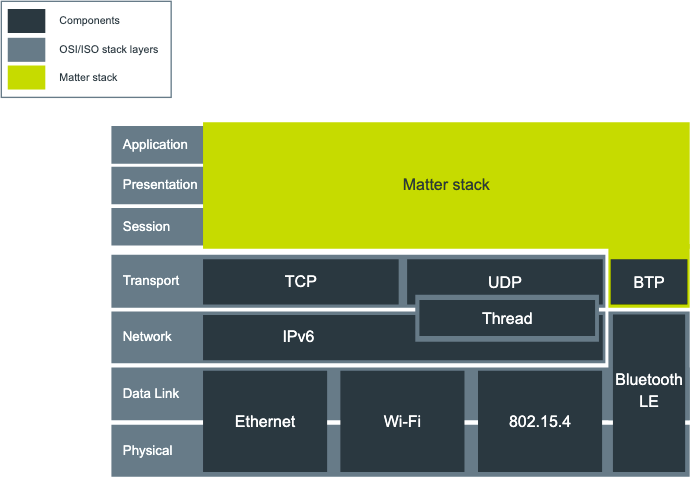
As shown in the figure below, Matter is actually a protocol stack built on IP networks, running on top of the network and transport layers. Therefore, the prerequisite for running Matter is that the device must run a complete TCP/IP network protocol stack, onto which the Matter application layer is then ported and adapted.
Matter is LAN-Based and Requires No Cloud
Similar to HomeKit, Matter inherently operates within a local area network (LAN). Matter devices on the same LAN can communicate with each other directly. However, Matter itself does not rely on cloud services, meaning external devices cannot directly access a locally deployed Matter ecosystem and its devices without a dedicated hub. A dedicated Matter Hub acts as a bridge, relaying control commands and status information between the local Matter ecosystem and external cloud services or mobile apps.
The Matter specification itself does not define the communication details between the Hub and the external cloud/app; this is left to the manufacturers of the Hub, cloud services, and apps. For example, Apple users can use a HomePod as a Matter Hub to communicate with Apple iCloud and the Home app on iOS. Similarly, Android users can use a Google Nest Hub as a Matter Hub to connect with the Google Home ecosystem.
Supported Underlying Transport Technologies: Wi-Fi, Ethernet, and Thread
Fundamentally, Matter’s communication protocol is IP-based, making its support for Wi-Fi and Ethernet straightforward to understand. Thread is a short-range communication protocol that uses IEEE 802.15.4 for its physical and data link layers but runs an IP network on top, allowing application-layer communication to be implemented using network sockets and TCP/IP.
Notably, Matter does not support using BLE (Bluetooth Low Energy) alone for communication. However, some Bluetooth chips, such as those from Nordic Semiconductor or Silicon Labs, support multi-protocol concurrency. They can run both Bluetooth and Thread protocols, making them suitable for developing Matter devices.
Border Router
Among the three underlying transport technologies supported by Matter, devices connected via Wi-Fi and Ethernet can communicate directly as long as they are on the same wireless router. However, they cannot directly communicate with Thread-based Matter devices. In this case, a device called a Border Router must be deployed to bridge communication between Thread devices and Wi-Fi/Ethernet devices.
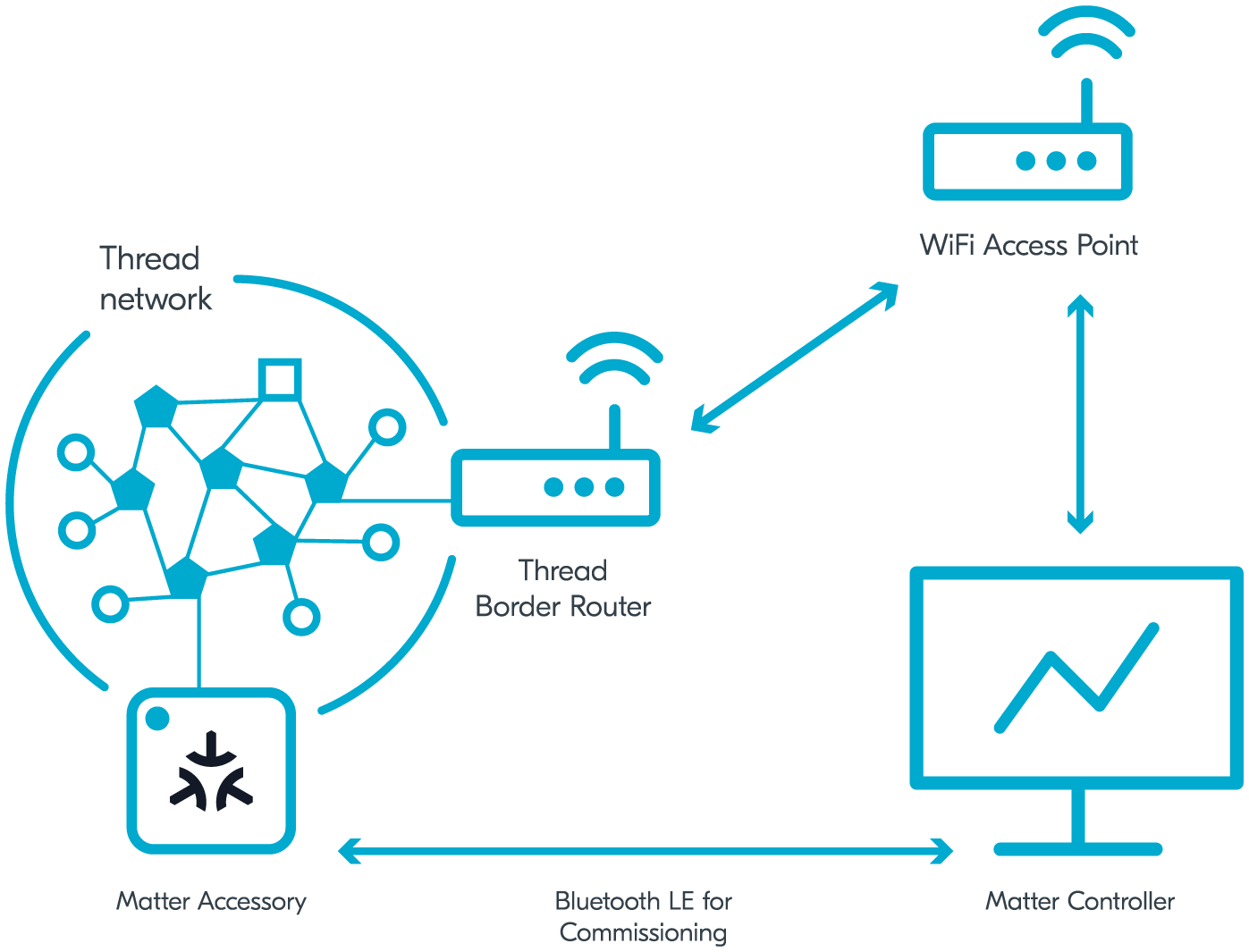
Consequently, if a Matter network contains Thread devices, a Border Router is mandatory to achieve interoperability with Wi-Fi/Ethernet devices. Fortunately, modern devices like the Apple HomePod, Amazon Echo/Alexa, and Google Nest Hubs natively support IEEE 802.15.4. They can be deployed as Border Routers within the home Matter network, eliminating the need to purchase and set up standalone Border Router hardware.
How to Use Matter
Below is a summary of the process for building a Matter-based smart home ecosystem from a user’s perspective.
Selecting a Controller Platform
First, you need to select a control system to manage the entire smart home ecosystem, known as a Matter Controller, which is typically a smart speaker from various brands.
As mentioned earlier, the Matter protocol solves the interoperability problem between different smart home hardware brands, but it only works within a local network. Theoretically, if you do not need remote control outside the home, you could simply install a Matter-compliant app on your phone, connect to your home LAN, and communicate with all local Matter devices. However, a local-only smart home severely limits the user experience. For a truly seamless experience, you need a way to access the local Matter ecosystem from the external internet. This requires a Matter Controller to manage all Matter devices. Working alongside cloud services and mobile apps, the controller allows you to monitor and control local Matter devices regardless of whether your phone is on the local network or the cellular internet, routing commands through the cloud and the controller.
Fortunately for the adoption of Matter, most mainstream smart home ecosystems now support acting as a Matter Controller:
- Amazon Alexa smart speakers and its app
- Apple HomePod speakers and the Apple Home app
- Google Home app and its Nest smart speakers
- Samsung SmartThings product line and its app
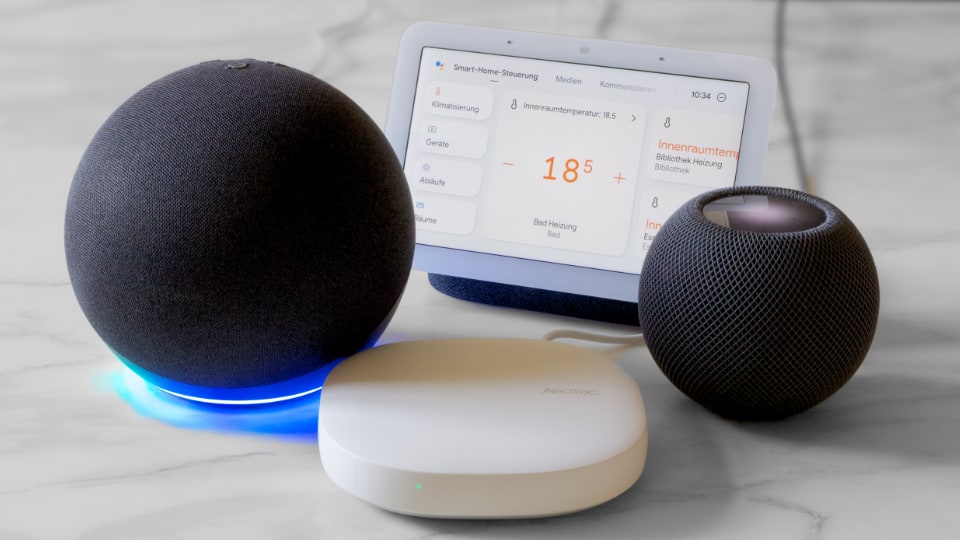
As long as users own any of these devices (updated to a compatible firmware version), they can add Matter-certified smart home devices to their system and continue using them just like they did with the legacy closed ecosystems. The difference is that previously, users could only add devices specifically certified for that closed platform; now, they can buy any Matter-compliant device and add it to any ecosystem.
Notably, Matter supports having multiple Matter Controllers in a single system (multi-admin). This means if you have both an Alexa and a HomePod at home, you can control your smart home system simultaneously using both Amazon and Apple controllers/apps.
If Thread-Based Matter Devices Are Used, a Border Router is Required
As previously described, for the three communication methods supported by Matter, Ethernet and Wi-Fi devices can connect directly to your home router without any intermediate gateway. However, if a Matter device uses the 802.15.4 Thread protocol, a Border Router must be added to the network to bridge Thread with Ethernet/Wi-Fi. Fortunately, some smart speaker models already support 802.15.4 natively, allowing them to double as a Border Router. If your hub does not support 802.15.4, you will need to deploy a standalone Border Router to bring Thread-based Matter devices into your network.
Setting Up Matter Devices
Once you have selected your Matter Controller, the first thing to do with a newly purchased Matter device is to commission it. You do this by scanning a QR code using the corresponding mobile app (such as the Apple Home or Google Home app) to onboard the device into your Matter network. This process is called Commissioning.
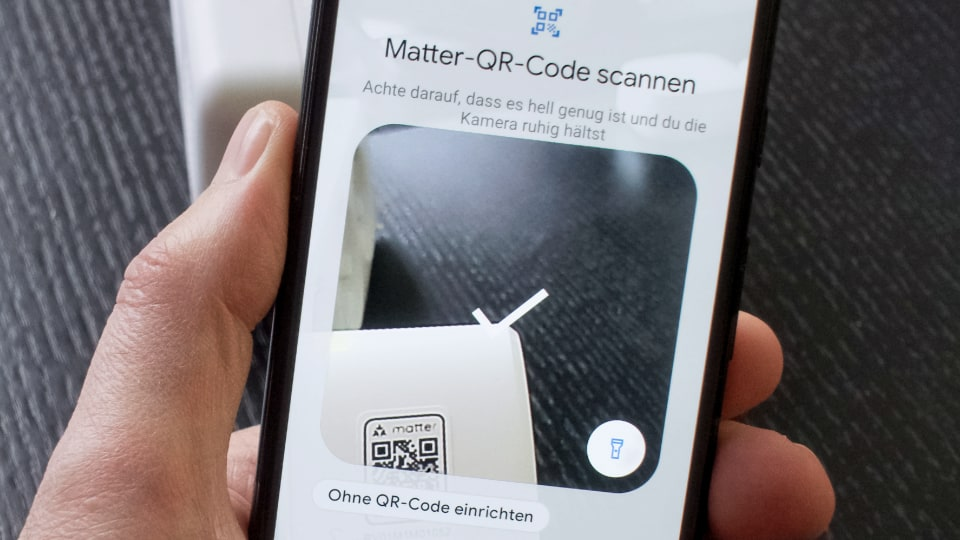
Every Matter-certified device comes with a unique QR code out of the box. Scanning this code with a Matter-compatible app securely transfers network credentials and various cryptographic key pairs for subsequent communication between Matter devices. (Communication between Matter devices and the controller is encrypted and protected using these key pairs, ensuring security even within the local network). Once the device is assigned to a room, it is successfully onboarded to your Matter network.
Controlling and Automating Matter Devices
After completing the commissioning process, the Matter device is successfully integrated into your Matter network. It can now respond to mobile app controls and voice commands from smart speakers. The mobile app and smart displays will also show the newly added devices and their current status. Subsequent control operations are executed by sending network commands as defined by the Matter protocol. On the other hand, the automation features common in smart homes (such as scenes and routines) are independent of the Matter protocol itself; they are handled by the Matter Controller (effectively the mobile app or smart speaker platform), which coordinates various automation scenes and automatically sends control commands to Matter devices based on schedules or event triggers.
Accessing Advanced Features via Vendor Apps
If a Matter device includes more complex or proprietary features that are not yet natively supported by the standard Matter protocol, manufacturers can provide their own companion apps to support these features. This is similar to how the HomeKit ecosystem works: HomeKit-compatible devices can be controlled via Apple’s ecosystem (HomePod, iPhone, iCloud), but users can also use the manufacturer’s own cloud and app to access specialized features that HomeKit doesn’t natively support.