Research Summary on the HomeKit-Based Video Camera Ecosystem
- 15 Jul, 2024
Due to business needs, I conducted research and a summary on video cameras under the Apple HomeKit ecosystem to evaluate whether this could be considered as a potential direction for our next product pre-research phase. As a result, the following information is solely a compilation and summary of learnings from publicly available online resources. I have not yet obtained official documentation regarding Apple HomeKit MFi certification, nor have I conducted real-world device experience or testing within the Apple HomeKit ecosystem.
Basic Summary of the HomeKit Ecosystem
HomeKit is a smart home ecosystem released by Apple during the Worldwide Developers Conference (WWDC) in June 2014. In essence, HomeKit is a set of standards and specifications defined by Apple for the smart home domain. Supported by these standard specifications, smart home devices within this ecosystem can easily interact, communicate, and perform automated controls through Apple devices and the Siri voice assistant.
Within the Apple HomeKit smart home ecosystem, Apple provides the entry points for users to access and interact with the ecosystem, and defines a set of communication protocols and specifications between all devices and interfaces. Various hardware manufacturers implement different types of smart home hardware in accordance with these protocols and specifications. Naturally, before sales can begin, devices must pass the Apple HomeKit MFi certification (“Works with Apple HomeKit”). Once smart home hardware developed by a manufacturer passes this certification, it can communicate within the same ecosystem alongside smart home devices produced by other manufacturers that also comply with the Apple HomeKit specification.
- Typical Apple entry devices include: iPhone, iPad, Mac, HomePod, Apple TV, Siri, and even Apple Watch.
- Apple itself does not manufacture smart home hardware. Instead, it provides a smart home protocol specification that enables interaction with Apple devices. Hardware manufacturers develop smart home hardware products based on this specification and can join Apple’s HomeKit smart home ecosystem after passing HomeKit MFi certification. This avoids any competitive relationship between Apple’s own hardware manufacturing and other hardware vendors, which facilitates the growth and promotion of the ecosystem.
On Apple devices, the entry point for HomeKit is the Home app. The Home app includes support for a variety of typical smart home device types. Typical examples include various sensors (temperature/humidity, gas, smoke detection), door locks, cameras, lights, switches/outlets, and home appliances.
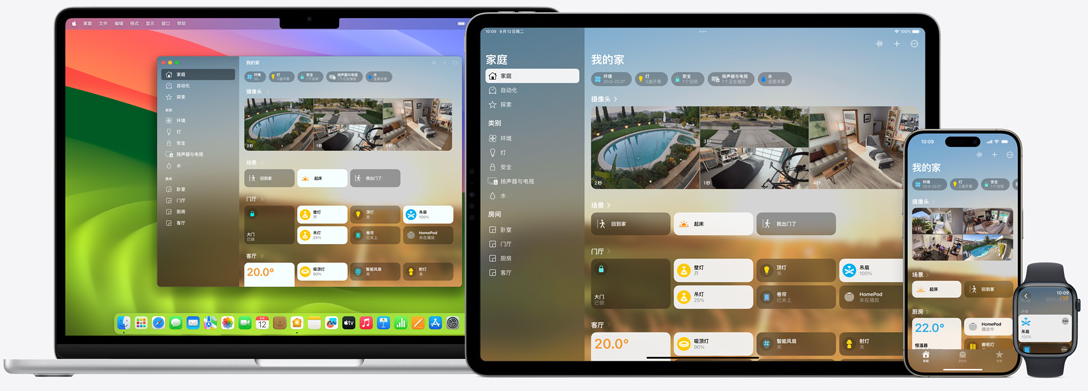
HomeKit is Fundamentally LAN-Based
Based on my previous understanding, I assumed Apple’s HomeKit ecosystem would involve Apple building a cloud service tailored for mainstream smart home applications, allowing all Wi-Fi-connected smart home products to connect directly to Apple’s smart home cloud. However, after deeper study (especially referring to Reference 4), I realized this is not the case. At the network communication level, Apple’s HomeKit operates over the Local Area Network (LAN), with all messages routed locally. Apple does not provide a complete remote cloud service framework for HomeKit smart homes. This is highly distinct from Xiaomi’s Mi Home (Mijia). All Mi Home devices connect directly to Xiaomi’s Mi Home cloud service platform, allowing direct control via the cloud. Therefore, in practice, the Mi Home design is more convenient to use.
However, designing the HomeKit ecosystem to operate within a LAN also offers several advantages:
- All user data remains within the LAN, providing the best privacy protection and security for personal data.
- Operating within a LAN ensures fast transmission and reception of communication data, resulting in highly responsive smart home products and services.
- As long as the LAN is functioning properly, even if the external Internet connection is disconnected (though this is rare), all HomeKit features remain fully functional within the local network.
- For most smart home product scenarios, they are primarily used within the home’s local network environment, so LAN-based operation satisfies the vast majority of requirements. Of course, Apple also provides a solution for accessing and controlling HomeKit ecosystem devices inside the home from an external network.
So, how do we remotely access and control HomeKit smart home devices from an external network? The answer is that there must be an Apple HomeKit home hub within the local area network. This home hub can be an Apple HomePod smart speaker, Apple TV, or an iPad (although using an iPad as a home hub is still currently supported, Apple strongly recommends using a HomePod or Apple TV instead, and reports online suggest that using an iPad as a hub can introduce instability issues). The link Set up your HomePod, HomePod mini, Apple TV, or iPad as a home hub - Apple Support provides a guide for setting up these devices as HomeKit home hubs.
In other words, HomeKit itself communicates over the local area network. However, if there is a need to remotely access smart home devices in the home, one must first set up a HomeKit home hub in the Home app. This hub must remain powered on and stay on the same local area network as all other HomeKit smart home products. Consequently, external devices like iPhones and Macs can send control commands through Apple’s iCloud service to the HomeKit home hub at home, which then forwards them to the specified smart home devices.
Overview of HomeKit Secure Video System Feature Support
The full name of the service that HomeKit supports for IP cameras is Apple’s HomeKit Secure Video system (HSV). As the name suggests, its primary focus is security. Judging from the support provided by current HomeKit camera products, it mainly includes categories such as indoor cameras, outdoor cameras, and doorbell cameras. Manufacturers like Eufy, Logitech, Aqara, and Eve have already launched camera products that support the HomeKit ecosystem.
Naturally, to smoothly use the Secure Video system service under the HomeKit ecosystem, at least one HomePod/Apple TV/iPad is required as a home hub, along with an iCloud subscription to upload and save camera event recording clips.
Currently, Apple iCloud’s subscription fees for uploading HSV camera recording clips are as follows:
- 50 GB plan ($1 or £1 a month): one camera.
- 200 GB plan ($3 or £3 a month): up to five cameras.
- 2 TB plan ($10 or £9 a month): unlimited cameras.
Compared to subscription fees from competitors like Ring or Arlo, which easily start at $10/month, this pricing is relatively budget-friendly (though HomeKit is still far less specialized in its support for these IP cameras), especially considering that the uploaded event video clips do not count against your iCloud storage quota.
For a typical smart home camera, its basic functions generally consist of:
- Event Recording: Detects triggering events through PIR (Passive Infrared) sensors or image detection, and records a video clip to an SD card or uploads it to the cloud for storage once triggered.
- Live Streaming: Allows users to open the app on their phone at any time to view the camera’s live feed whenever they want.
Regarding event recording, the camera itself continues to detect events and record according to its own operating logic. However, under the HomeKit implementation, additional consideration must be given to how event video files are uploaded to iCloud. According to my understanding, because HomeKit itself is LAN-based, uploading event recording files to iCloud must rely on the home hub device. That is, the home hub is responsible for uploading the received event video files to iCloud. Once uploaded to iCloud, these event recordings can naturally be replayed and viewed in the Home app.
The same generally applies to the live streaming function. Live stream pull commands from the Home app are first sent to the home hub device, which then pulls the stream from the HomeKit camera and forwards it back to the Home app to be decoded and displayed.
💡 In addition, Apple does not restrict camera hardware manufacturers from offering their own proprietary features, apps, and cloud service support on top of the HomeKit ecosystem. Therefore, camera manufacturers can design products with built-in support for both the HomeKit ecosystem and their own app + cloud services. For users, they can simultaneously open the Apple Home app on the same camera hardware to use HomeKit functions, while utilizing the hardware manufacturer’s own app for features not supported by HomeKit.
Pros and Cons of HomeKit Secure Video
Strengths
- Apple has always had a strong reputation for protecting user privacy, which is especially critical for security cameras. This is one of the reasons why privacy-conscious users in North America and Europe favor the Apple ecosystem. According to Apple’s promotional materials, all video data and video live streaming data are end-to-end encrypted, ensuring only the users themselves can view them. Neither the camera hardware manufacturers nor Apple itself can access this private data.
- It supports basic detection algorithms including facial recognition, human, vehicle, package, and pet detection, as well as multiple motion zones. Users can configure different trigger event types based on these detection results.
Weaknesses
- HomeKit-related features can only be used within the Apple ecosystem; users cannot access the Home app from Android devices.
- HSV only supports uploading event-triggered video recordings to iCloud and does not support 24/7 continuous recording.
- It only supports resolutions up to 1080p, which is a significant drawback compared to more professional IP cameras. Currently, new products promoted by mainstream manufacturers are mostly 2K or 2.5K.
- It lacks support for some basic functions, such as sirens, PTZ (pan-tilt-zoom) control, etc.