Introduction to 802.1X and RADIUS Authentication Basics
- 01 Jun, 2024
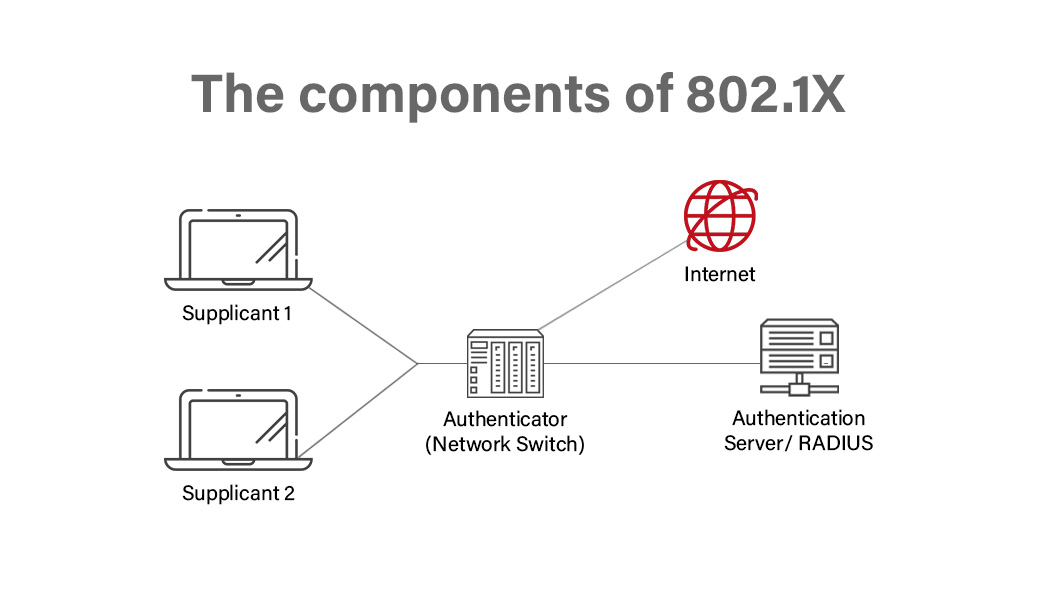
- RADIUS, as defined by 802.1X, is an enterprise-grade network access authentication and management protocol based on a client/server (C/S) architecture. It provides a more rigorous and flexible security authentication management method compared to WPA/WPA2 commonly used in home routers. However, implementing this authentication model requires deploying a dedicated RADIUS server within the same network, which manages the access permissions of connecting devices using a database or data files.
- RADIUS: Remote Authentication Dial-In User Service. RADIUS is a communication protocol used for authentication and authorization management of network access between a Network Access Server (NAS, which can be simply understood as the router or AP we use) and a shared authentication server (simply understood as the RADIUS Server).
- The RADIUS Server utilizes a user database to store credentials and details of devices attempting to connect, including usernames, passwords, MAC addresses, as well as their corresponding accessible resource types and permissions. When a user connects, the RADIUS server queries this database to determine whether to grant access and to enforce access control permissions.
- The complete workflow of 802.1X RADIUS authentication:
- The user device connects to the router, and the router submits user information—including the username, password, and MAC address—to the RADIUS server. The user password is protected using public key encryption.
- The RADIUS server validates the legitimacy of the username and password. If valid, the RADIUS Server returns an
Access-Acceptmessage to the router to allow access; otherwise, it returns anAccess-Rejectmessage to deny access. - If billing/accounting is required and access was granted in the previous stage, the router further sends an accounting request (
Accounting-Request) to the RADIUS Server, and the RADIUS Server responds with anAccounting-Responseto start accounting. - At this point, the user device can access the network normally.
- The RADIUS protocol communication between the RADIUS Server and the router uses UDP. Port UDP 1812 is responsible for authentication, and UDP 1813 is responsible for accounting.
- Setting up a RADIUS server can usually be done on a standard PC. On Linux systems, FreeRADIUS is a widely used open-source RADIUS Server. Official website: https://freeradius.org/ . The latest version is currently V3.2.4.
- Note that it is 802.1X, not 802.11x. This enterprise-grade 802.1X authentication method is not only applicable to Wi-Fi access management but can also be used to manage network devices connecting via Ethernet. Whether through Wi-Fi or a wired network, 802.1X is used to control the access permissions of connecting devices to intranet resources. During connection, it verifies the identity of the connecting device using a username, password, and MAC address to decide whether to allow access to intranet resources and to determine which resources and access levels are granted.
- Usage and Configuration of 802.1X RADIUS Authentication on Wi-Fi APs:
- First, of course, you need to set up and configure a RADIUS Server within the local area network (LAN) of this AP to lay the foundation for unified RADIUS authentication across APs.
- Configure the router/AP to use 802.1X RADIUS authentication (or WPA2 Enterprise). This generally requires setting the RADIUS Server’s IP address, port (default is UDP 1812), and the shared secret for communication between the AP and the RADIUS server.
- On the client/connecting device side, you must select 802.1X or WPA2 Enterprise as the network security type (which mobile phones can actually detect automatically), choose the authentication method (such as PEAP), and enter the username and password required for authentication.
- The specific authentication method, username, password, and the shared secret between the AP and the RADIUS Server must match the settings configured on the RADIUS Server.