Detailed Analysis of Apple Find My's Unwanted Tracking Alert Feature
- 25 May, 2024
Recently, due to the development requirements of a new company project, I started studying the Apple MFi Find My Network protocol documentation.
Since it is based on BLE and features a relatively straightforward functionality (primarily anti-lost tracking to help users quickly locate their devices), the overall logic of the protocol is simple. However, when I first started learning it, I was not very clear about the functional characteristics and operational logic of the Unwanted Tracking Alert feature.
The Four Operating States of Apple Find My Accessories
To understand the Unwanted Tracking Alert feature, we must first clarify the four operating states of an Apple Find My Accessory:
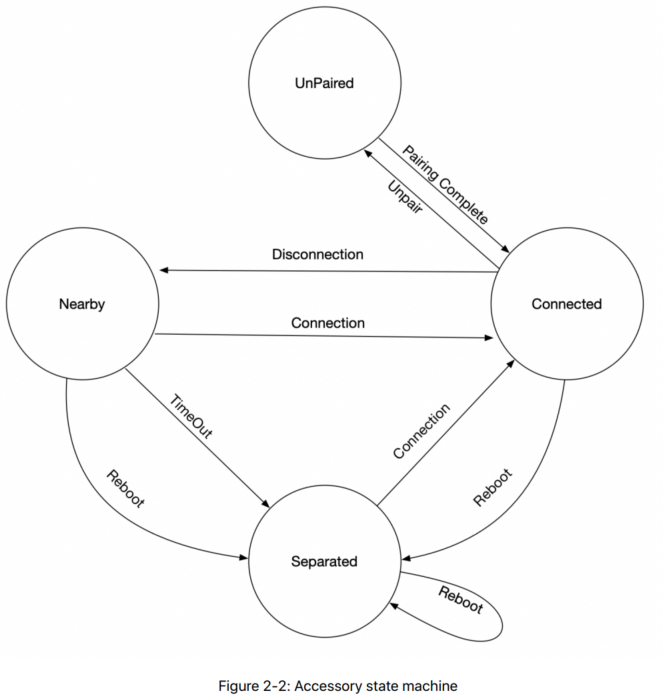
Essentially, an Apple Find My Accessory is a location tracker based on BLE Beacons and connection modes. For any Bluetooth device, it generally operates in a pre-pairing advertising state, a post-pairing advertising state (unconnected), or a connected communication state. Therefore, the Unpaired and Connected states mentioned above are quite easy to understand. But what do Nearby and Separated mean? What is the difference between them?
In fact, the difference between the Nearby and Separated states is closely related to the Unwanted Tracking Alert feature.
- Unpaired: This is the unpaired mode of the Find My Accessory. All such devices are in this state when first powered on after leaving the factory, continuously broadcasting advertising packets and waiting to pair with a user’s Apple device for the first time.
- In addition to the initial out-of-box state, the accessory will also be in this state upon every power-on if it is unpaired.
- Connected: The accessory is in a normal connected state with the user’s Apple device. The user can see the device’s location on the Find My app and trigger sounds on the accessory for easier location tracking.
- Nearby: When the BLE connection between the accessory and the user’s Apple device is disconnected, it always enters the Nearby state first. This Nearby state is essentially a BLE advertising state designed to wait for a reconnection with the user’s Apple device. The Unwanted Tracking Alert feature is not supported in this state.
- Separated: A countdown timer is maintained while in the Nearby state. When the accessory remains in the Nearby state for longer than
TNearBy(default is 15 minutes, but can be modified via the Find My app when connected), the accessory automatically enters the Separated state. The key difference in implementation between Separated and Nearby states is that Separated supports the Unwanted Tracking Alert feature, whereas Nearby does not.
My personal understanding of these states:
- In practice, for a Find My Accessory, the vast majority of normal usage after pairing falls into Connected and Nearby states. Connected obviously means the phone and the accessory are close to each other and maintain a steady connection; Nearby represents a brief separation (less than 15 minutes) between the phone and the accessory.
- The Separated state indicates that the phone and the accessory have been separated for more than 15 minutes, posing a risk of loss or meaning it is already lost. Therefore, a lost Find My Accessory is actually in this state.
- We can think of the Nearby state as a temporary disconnection between the user’s Apple device and the accessory. If the disconnection lasts too long and enters the Separated state, the device is considered lost.
- Consequently, the entire Unwanted Tracking Alert feature is designed specifically around the Separated state.
What Exactly is the Unwanted Tracking Alert Feature?
According to Section 2.6.1, Unwanted Tracking Detection, of Reference Document 1:
- Unwanted tracking detection (UT) notifies the user of the presence of an unrecognized accessory that may be traveling with them over time and allows them to take various actions, including playing a sound on the accessory if it’s in Bluetooth LE range.
In other words, the basic function of a Find My Accessory is a BLE anti-lost tracker. Combined with Apple’s Find My Network and their vast product ecosystem, it allows users to easily pinpoint the precise location of the accessory.
However, this feature can also be easily exploited for malicious tracking. A typical scenario is: a stalker places a Find My Accessory bound to their own Apple account inside a target’s vehicle or backpack. Then, no matter where the target goes, the stalker can easily track their precise location using the Find My app.
Therefore, the Unwanted Tracking Detection or Alert feature in Apple’s Find My Accessories addresses this through:
- Having the accessory periodically detect motion via a motion detector after entering the Separated state for an extended period, and actively emitting an audible alert.
- Displaying alert notifications on the potential victim’s smartphone when abnormal tracking patterns are detected.
These two methods work together to warn users, thereby mitigating and countering the dangers of location privacy leaks.
Implementation of the Unwanted Tracking Alert on the Accessory Side
Precisely because Find My Accessories can be easily abused for malicious tracking, Apple’s Find My Accessory Specification explicitly requires that compact Find My Accessories must include a sound maker (such as a speaker or buzzer) and a motion detector (such as an accelerometer/G-sensor) to help quickly locate hidden tracking devices.
If the accessory does not exceed the following dimensions, it must include a sound maker and a motion detector to implement the Unwanted Tracking Alert feature:

For the accessory, the general implementation workflow of the Unwanted Tracking Alert feature is as follows:
- After entering the Separated state, the accessory waits for
TSEPARATED_UT_TIMEOUT(default is 3 days) before enabling the motion detector. - Subsequently, it uses the motion detector to check for motion at intervals of
TSEPARATED_UT_SAMPLING_RATE1(default is 10 seconds). - If motion is detected, it plays an alert sound via the sound maker. At the same time, it shortens the motion detector’s sampling rate to
TSEPARATED_UT_SAMPLING_RATE2(default is 0.5 seconds), continuing to play a sound every time motion is detected to alert the user. - If it has played the sound 10 times, or continuously detected motion events for 20 seconds at the
TSEPARATED_UT_SAMPLING_RATE2rate, it disables the motion detector for a backoff durationTSEPARATED_UT_BACKOFF(default is 6 hours) before repeating the cycle.
Through this process, once the accessory remains in the Separated state beyond a certain threshold, it periodically enables the motion detector. If motion is detected, the sound maker alerts the user of a potential tracking attempt.
iOS-Side Unwanted Tracking Alert Features
In addition to the accessory itself periodically alerting potential targets via motion detection and sound while in the Separated state, the user’s Apple device (e.g., an iPhone running iOS) will also push a system alert when it determines that a Separated Find My Accessory is persistently traveling with them. Once the system alert is received, tapping it opens the Find My app to locate the unrecognized accessory nearby. Users can also trigger “Play Sound” to make the tracker emit noise, helping them locate it much faster.
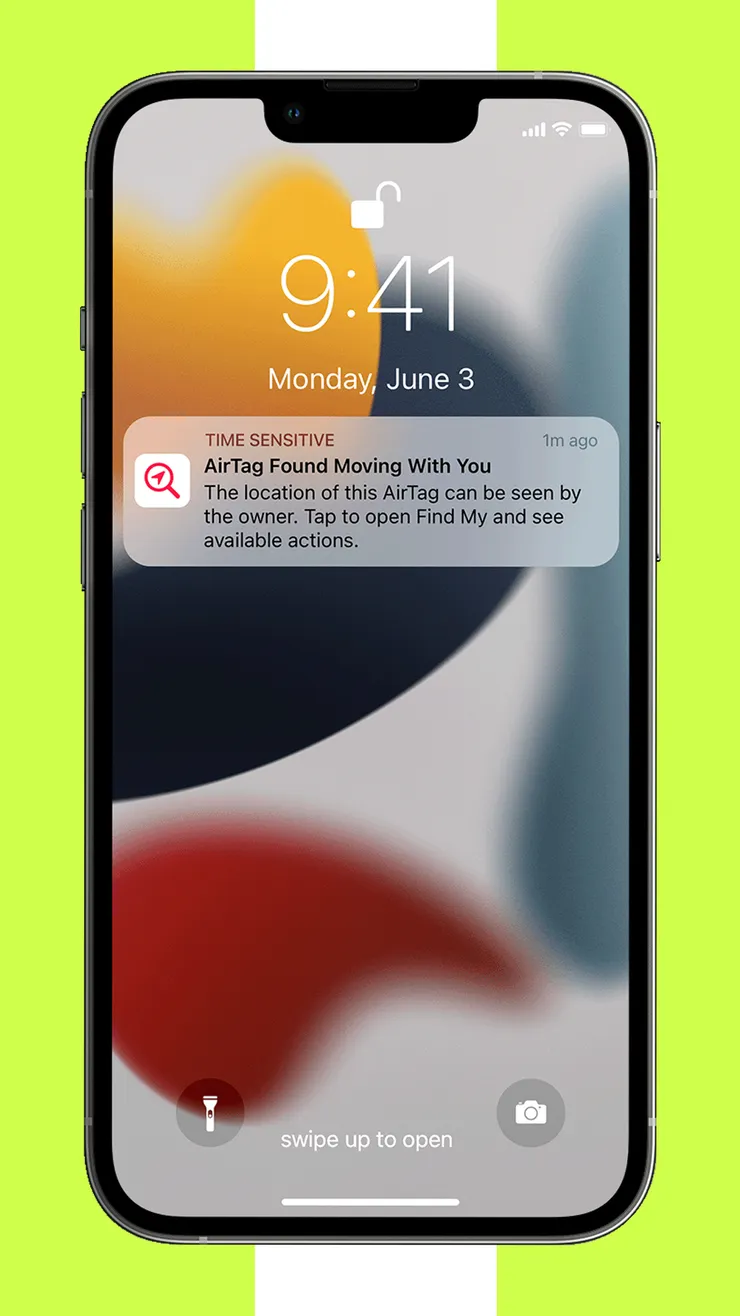
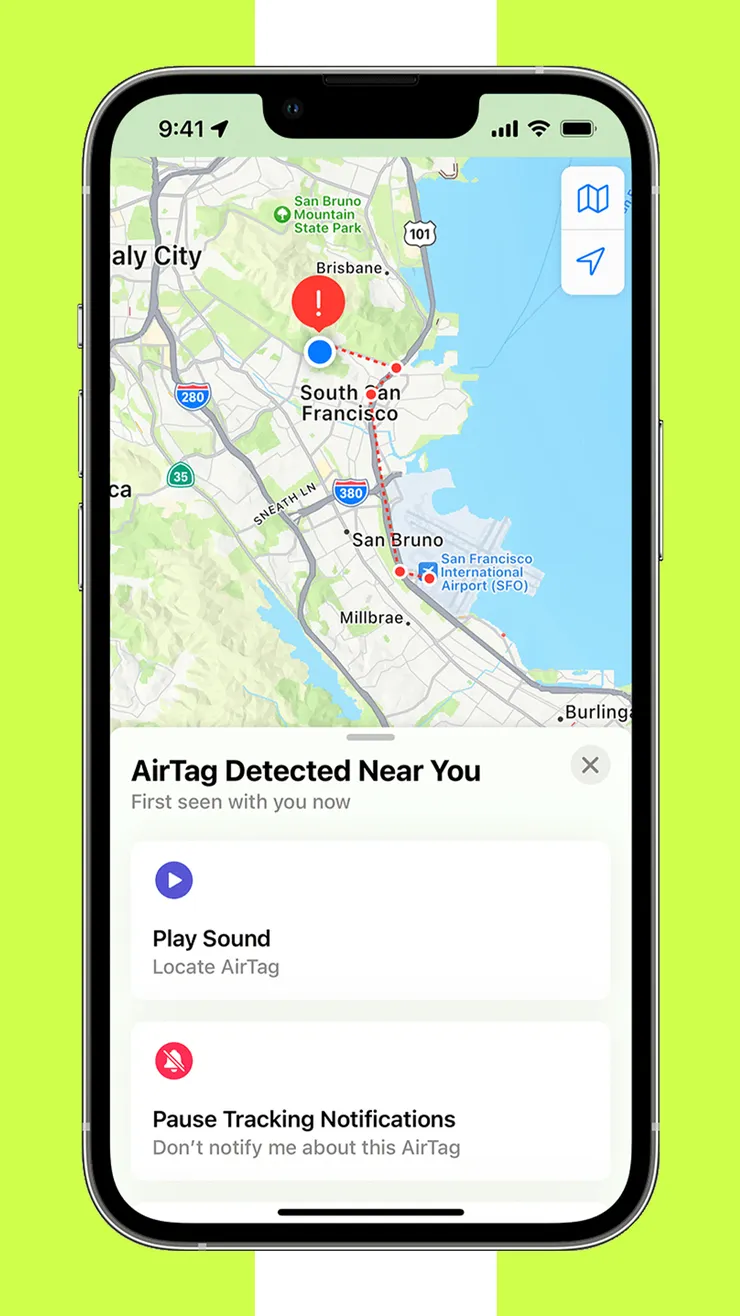
As for how the iOS system determines whether a user is being persistently tracked by an accessory, my understanding is:
- With BLE turned on, the phone continuously scans for surrounding BLE devices, which naturally includes Find My Accessories.
- If the phone detects a nearby Find My Accessory in the Separated state, it will normally follow the Find My Network workflow: it uses the public key from the accessory’s BLE advertising packet to encrypt its own current location and uploads it to Apple’s Find My Server.
- However, if the phone detects that this Separated accessory has been traveling alongside it for too long, it triggers a system-level Alert warning the user of potential tracking.
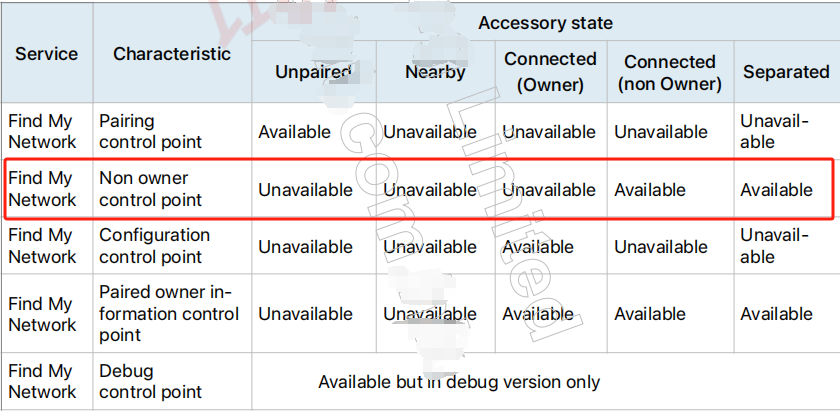
One important thing to note here is that users can command the nearby Separated accessory to play a sound via the Find My app to locate it more quickly. For this control to happen, the user’s phone must be able to establish a BLE connection with the accessory; control is impossible in pure beacon mode. Therefore, in the Find My workflow, a non-owner Apple device (the victim’s iPhone) is allowed to connect to and communicate with the Find My Accessory. Under these circumstances, the control command actually utilizes the Non-Owner Control Point Characteristic in the BLE Find My Network Service implemented on the accessory:
Other Questions
- How do Android devices support Apple Find My Accessory’s Unwanted Tracking Alert feature?
- Google is actually following Apple’s footsteps to build its own Find My Device ecosystem. According to information from Nordic distributor channels, some domestic manufacturers in China have already implemented this functionality using Nordic’s nRF52 series in compliance with Google’s Find My protocol requirements.
- Furthermore, as described on the official Apple website in Reference Document 2, Apple and Google have jointly developed an industry standard for Unwanted Tracking Alerts (draft-detecting-unwanted-location-trackers-01 - Detecting Unwanted Location Trackers (ietf.org)). In the future, whether users are on Android or iOS, they will receive potential tracking warnings on their phones when a Find My Unwanted Tracking Alert is triggered.
- What should you do after finding a tracking device via system alerts or the accessory’s periodic motion detection and sound?
- According to the information in Reference Document 3, besides discarding the tracker, another option is to force shutdown the tracker or remove its battery.