Study Notes on "Microsoft Skype for Business H.264 Video Encoder Specification"
- 20 May, 2022
For video conferencing systems seeking Microsoft Teams or Skype for Business certification that utilize H.264 for image transmission, the H.264 encoder used for video compression must obtain Teams and Skype for Business certification to display the corresponding certification logo. The specification and guidance document for this H.264 encoder certification is entitled Microsoft Skype for Business H.264 Video Encoder Specification, with document number H105958.
- Note: This specification and certification process applies to the standalone H.264 encoder, not the entire camera system. All metrics, functional requirements, and testing/verification procedures are targeted at the H.264 encoder used in the signal chain.
In this specification document, H.264 encoders seeking Teams and Skype for Business certification are categorized into three types:
- Category 1: H.264 encoders integrated inside a USB camera;
- Category 2: H.264 encoders integrated inside cameras built into laptops, tablets, and mobile phones;
- Category 3: General-purpose H.264 hardware encoders.
Like all other Teams certification specification documents, Teams H.264 Encoder certification offers two tiers: Standard and Premium, with the latter having stricter metrics and functional requirements. Meeting the Standard requirements is sufficient to display the Teams certification logo.
For both Standard and Premium certifications, the fundamental requirement for the H.264 encoder is support for UCConfig Mode 1, which means the H.264 encoder must at least support SVC Temporal Layers. Therefore, encoders that do not support the SVC mode need not apply: (4.1) Encoders must support UCConfig Mode 1 and the corresponding requirements outlined below in order to participate in the Skype for Business Logo program. Additionally, to pass this certification, the maximum resolution supported by the encoder must be at least 1080P.
- Definition of UCConfig Mode 1: SVC temporal scalability with hierarchical P with Simulcast (number of simulcast streams >= 1).
H.264 Encoder Teams Certification Testing Process
To perform compliance testing for this H.264 encoder, Microsoft provides a dedicated test tool: the Microsoft Skype Video Encoding Conformance (MLVEC) toolkit. This tool primarily consists of two parts: the H.264 BitStream Generator and the Conformance Verifier.
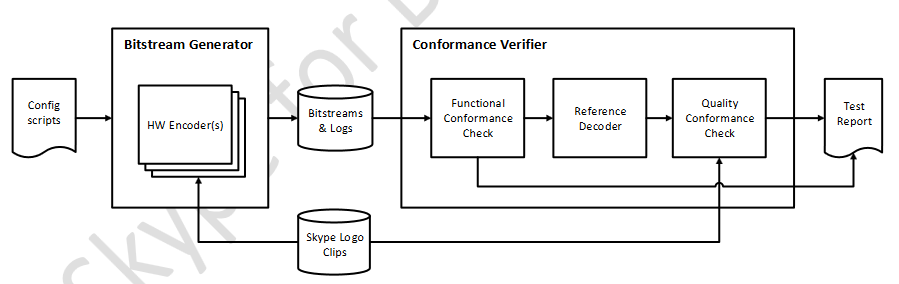
BitStream Generator:
- The BitStream Generator has two inputs: one consists of test and certification video clips provided by Skype for Business (various resolutions and scenes), namely the Skype Logo Clips; the other consists of Config Scripts, which define the encoder settings and workflows required for testing, guiding the encoder to operate according to the script’s commands.
- For USB cameras, running this test is naturally more challenging because there is no easy way to feed these certification video clips directly into the USB camera’s encoder for compression. To address this issue, the document explicitly states: For this type of USB camera certification, the camera manufacturer must devise a method (e.g., using a dedicated development board) to feed the test video clips into the internal encoder of the camera and complete the bitstream generation as required. (5.3) Tethered USB webcams usually don’t have a possibility to feed the pre-recorded clips into the hardware encoder. Due to this we are currently requiring these tests to be run on a development kit which allows feeding the pre-recorded clips into the encoder.
- The output of the BitStream Generator consists of bitstream files under various test parameter states, along with the logs generated during execution.
Conformance Verifier:
- The Conformance Verifier reads the bitstream files and execution logs generated by the BitStream Generator, uses its internal functional analysis tools to determine whether the bitstreams and runtime metric data produced by the encoder meet Standard and Premium criteria, and outputs the final test judgment report.
H.264 Encoder Certification Requirements
-
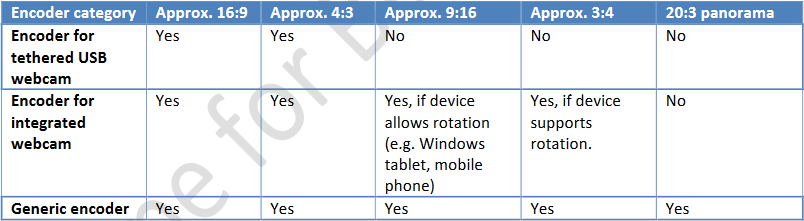
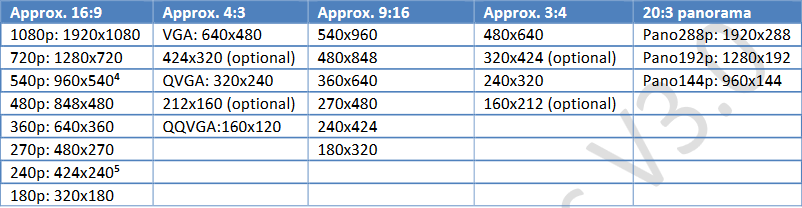
Aspect ratios and image resolutions: Regarding the aspect ratios and resolutions supported by the encoder, the three categories of encoders have distinct aspect ratio and resolution encoding test requirements;
-
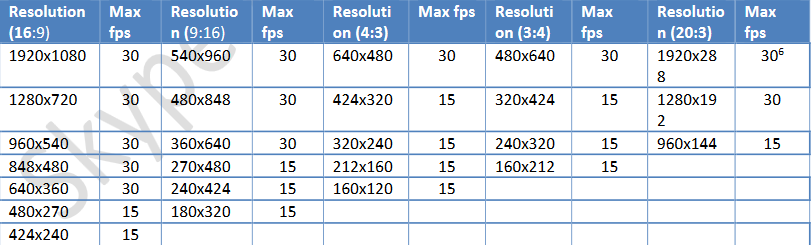
Frame rate: Encoding frame rate requirements at different resolutions
-
Video preview: Requirements for preview video output. USB cameras with built-in H.264 encoders must simultaneously provide a low-resolution (640x480 or 640x360 at 30fps) YUV image stream to support preview functionality.
- It remains unclear how a USB UVC camera can transmit this YUV preview video simultaneously while streaming the main H.264 stream. How should this be implemented specifically?
-
Encoder latency: Encoder latency metrics. Pipeline latency caused by encoding should not impact the frame rate or cause jitter during image transmission and decoding playback.
-
Dynamic resolution change: The encoder should support dynamically adjusting the resolution while the pipeline encoder is running normally, adhering to specific adjustment latency targets.
-
Dynamic profile/level change: The encoder should support dynamically adjusting the encoding profile and level settings based on specific conditions while the pipeline encoder is running normally, adhering to specific adjustment latency targets.
-
Dynamic add/remove temporal layers: For encoders supporting SVC extensions, the ability to dynamically add or remove temporal scalability layers during the encoding process, adhering to specific adjustment latency targets.
-
Bitstream Conformance: This section outlines clear requirements for the bitstream settings output by the encoder under various modes.
-
Quality Conformance: There are clear requirements for the image quality of the encoder-generated bitstream after decompression.
Others
- For USB cameras wishing to pass this Teams H.264 Video Encoder certification, the USB camera must support the UVC 1.5 specification: Although UVC 1.1 can already support H.264 payloads via Frame Based formats, treating H.264 as an independent payload requires the UVC 1.5 specification. However, UVC 1.5 has limited compatibility and is only supported on Windows 8 and later systems.
References:
- Microsoft Skype for Business H.264 Video Encoder Specification, H105958
- Unified Communication Specification for H.264 AVC and SVC UCConfig Modes, V1.1