WSDL Basics: Study Notes
- 19 Apr, 2022
WSDL stands for Web Services Description Language. It was jointly developed by Microsoft and IBM.
Like SOAP, WSDL is an XML-based specification. However, WSDL is used on the server side to describe Web Services, defining how these Web Services can be remotely invoked and accessed by clients.
Therefore, in essence, WSDL is a document written in XML. It describes the location of a Web service and the operations or methods that the service provides.
A typical workflow for using a Web Service is as follows: A client application connects to the server, reads the WSDL file from the server, and parses it to understand the available functional interfaces and detailed invocation instructions. It can then invoke the functional interfaces described in the WSDL using SOAP messages.
WSDL Document Structure
WSDL itself is an XML document. Its basic structure is as follows:
<definitions>

<types>
  data type definitions........
</types>

<message>
  definition of the data being communicated....
</message>

<portType>
  set of operations......
</portType>

<binding>
  protocol and data format specification....
</binding>

</definitions>
Reference 2 provides a real-world example of a WSDL document:
<definitions name = "HelloService"
   targetNamespace = "http://www.examples.com/wsdl/HelloService.wsdl"
   xmlns = "http://schemas.xmlsoap.org/wsdl/"
   xmlns:soap = "http://schemas.xmlsoap.org/wsdl/soap/"
   xmlns:tns = "http://www.examples.com/wsdl/HelloService.wsdl"
   xmlns:xsd = "http://www.w3.org/2001/XMLSchema">

   <message name = "SayHelloRequest">
      <part name = "firstName" type = "xsd:string"/>
   </message>

   <message name = "SayHelloResponse">
      <part name = "greeting" type = "xsd:string"/>
   </message>

   <portType name = "Hello_PortType">
      <operation name = "sayHello">
         <input message = "tns:SayHelloRequest"/>
         <output message = "tns:SayHelloResponse"/>
      </operation>
   </portType>

   <binding name = "Hello_Binding" type = "tns:Hello_PortType">
      <soap:binding style = "rpc"
         transport = "http://schemas.xmlsoap.org/soap/http"/>
      <operation name = "sayHello">
         <soap:operation soapAction = "sayHello"/>
         <input>
            <soap:body
               encodingStyle = "http://schemas.xmlsoap.org/soap/encoding/"
               namespace = "urn:examples:helloservice"
               use = "encoded"/>
         </input>

         <output>
            <soap:body
               encodingStyle = "http://schemas.xmlsoap.org/soap/encoding/"
               namespace = "urn:examples:helloservice"
               use = "encoded"/>
         </output>
      </operation>
   </binding>

   <service name = "Hello_Service">
      <documentation>WSDL File for HelloService</documentation>
      <port binding = "tns:Hello_Binding" name = "Hello_Port">
         <soap:address
            location = "http://www.examples.com/SayHello/" />
      </port>
   </service>
</definitions>
WSDL Element Types
definitions
The definitions element must be the root element of a WSDL document. It defines the name of the Web Service.
In a WSDL document, the definitions root element contains various types of child elements.
The following example uses the definitions element to define a Web Service named HelloService.
<
definitions name="HelloService"

   targetNamespace="http://www.examples.com/wsdl/HelloService.wsdl"
   xmlns="http://schemas.xmlsoap.org/wsdl/"
   xmlns:soap="http://schemas.xmlsoap.org/wsdl/soap/"
   xmlns:tns="http://www.examples.com/wsdl/HelloService.wsdl"
   xmlns:xsd="http://www.w3.org/2001/XMLSchema">
   ................................................
</definitions>
Types
Used to define the data types used in the document. To ensure maximum neutrality across execution platforms and programming languages, WSDL uses XML Schema syntax to define data types.
Data types defined here may be referenced in elements such as message or portType.
In practice, types is primarily used to define complex data structures that need to be exchanged between the client and server, such as combinations of different simple data types. If the interaction message parameters between the client and server only involve simple data types (such as integers and strings), using the types element is not necessary.
The following WSDL snippet defines two data structures within the types element: TradePriceRequest and TradePrice. Both structures are simple encapsulations of basic data types like strings and floats. Subsequently, these data types can be directly referenced in message and portType elements as parameters for input and output messages.
<types>
   <schema targetNamespace = "http://example.com/stockquote.xsd"
      xmlns = "http://www.w3.org/2000/10/XMLSchema">

      <element name = "TradePriceRequest">
         <complexType>
            <all>
               <element name = "tickerSymbol" type = "string"/>
            </all>
         </complexType>
      </element>

      <element name = "TradePrice">
         <complexType>
            <all>
               <element name = "price" type = "float"/>
            </all>
         </complexType>
      </element>

   </schema>
</types>
Message
Used to define the messages used in the document. The messages defined here are referenced by operation elements within a portType as input or output parameters for operation calls.
For example, in the WSDL snippet above, an operation named getTerm is defined, which contains one input message parameter and one output message parameter. Both message parameters are defined using the message element and are essentially string types.
<message name="getTermRequest">
  <part name="term" type="xs:string"/>
</message>

<message name="getTermResponse">
  <part name="value" type="xs:string"/>
</message>

<portType name="glossaryTerms">
  <operation name="getTerm">
    <input message="getTermRequest"/>
    <output message="getTermResponse"/>
  </operation>
</portType>
PortType
portType is the most important element in WSDL. It describes the executable operations contained within a Web Service, along with the input parameters and return messages for each operation.
Simply put, you can think of portType as a function library in traditional programming languages. It contains multiple operations, where each operation corresponds to a function in the library.
Based on the request (input) and response (output) parameters included in an operation, operations can be categorized into four types:
One-Way: This type of operation contains only a request message and no response message.
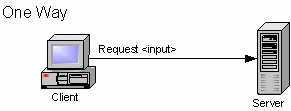
<operation name="updateWeather">
  <input message="tns:updateWeather"/>
</operation>Request-response: This is the most common Web Service pattern. It includes a request parameter and returns a response parameter to the client after processing.
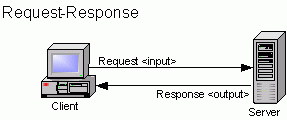
<operation name="getSummary">
  <input message="tns:getSummary"/>
	<output message="tns:getSummaryResponse"/>
</operation>Solicit-response: The exact opposite of Request-response. The Web Service provider initiates a request message to the client and then reads a response message back from the client.
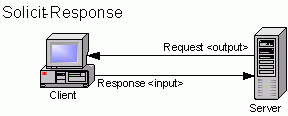
<operation name="weatherUpdateRenew">
  <output message="tns:RenewRequest"/>
  <input message="tns:RenewResponse"/>
</operation>Notification: In this type of Web Service operation, the server simply sends a notification message to the client.
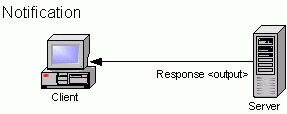
<operation name="weatherNotification">
  <output message="tns:getSummaryResponse"/>
</operation>
Binding
The binding element specifies which communication protocol should be used to transport the operations defined in portType during actual network requests and access. For example, HTTP GET, HTTP PUT, or SOAP can be used.
- If SOAP is used for transmission, the binding element should include
<soap:binding>. In this case, Web Services are accessed using SOAP messages encapsulated over HTTP.
This element also defines the location of the operations.
The binding element primarily has two attributes: type specifies which portType this binding element attaches a protocol to, and name specifies the name of this binding element.
The example below defines a portType named glossaryTerms, which contains an operation named getTerm. A binding element is then used to specify that all operations in glossaryTerms will use the SOAP protocol for transmission, with the soapAction attribute specifying the string for accessing this operation.
<message name="getTermRequest">
  <part name="term" type="xs:string"/>
</message>

<message name="getTermResponse">
  <part name="value" type="xs:string"/>
</message>

<portType name="glossaryTerms">
  <operation name="getTerm">
    <input message="getTermRequest"/>
    <output message="getTermResponse"/>
  </operation>
</portType>

<binding type="glossaryTerms" name="b1">
   <soap:binding style="document"
   transport="http://schemas.xmlsoap.org/soap/http" />
   <operation>
     <soap:operation soapAction="http://example.com/getTerm"/>
     <input><soap:body use="literal"/></input>
     <output><soap:body use="literal"/></output>
  </operation>
</binding>