AAC Audio Codec Profiles and Support Across Platforms
- 03 Mar, 2022
Introduction to AAC
AAC stands for Advanced Audio Codec.
AAC was historically introduced as the successor to the MP3 audio codec algorithm. Like MP3, AAC is a lossy audio coding standard. Compared to MP3, AAC achieves smaller file sizes for the same audio data while maintaining higher sound quality.
In 1997, AAC was published as an international standard by the MPEG organization. Its specific definitions are contained in Part 7 of MPEG-2 and Part 3 of MPEG-4.
Different AAC Profiles
AAC-LC: Advanced Audio Codec - Low Complexity.
AAC-HE: Advanced Audio Codec - High Efficiency.
AAC-LD: Advanced Audio Codec - Low Delay.
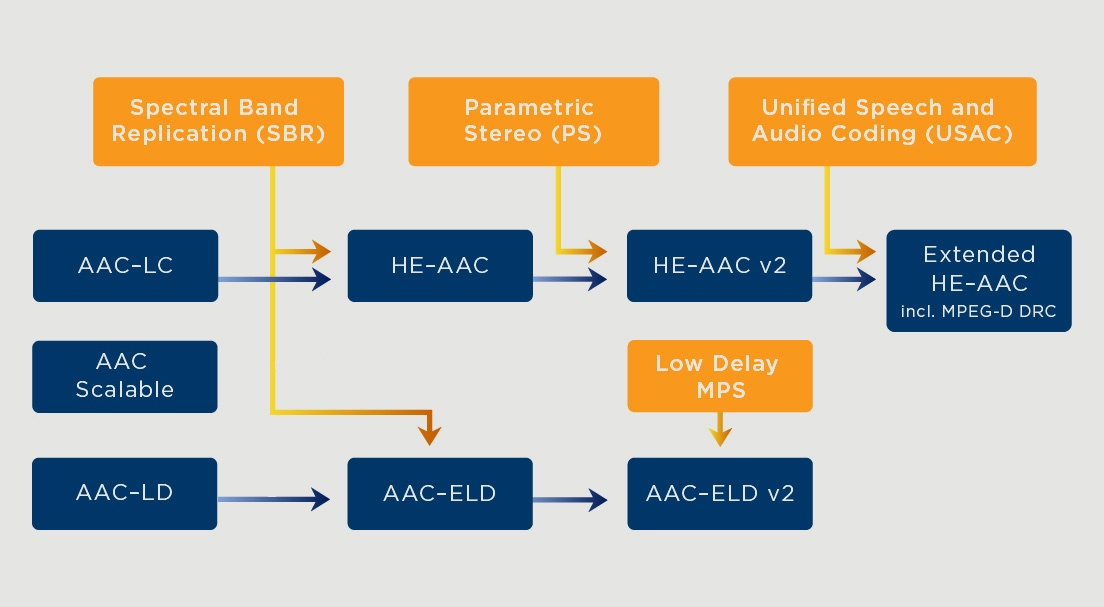
As shown, the AAC audio codec evolved along two independent branches, both continually adopting more complex technologies to achieve better performance metrics:
- AAC-LC (MPEG-2) -> AAC-LC (MPEG-4) -> HE-AAC -> HE-AAC v2 -> Extended HE-AAC (xHE);
- HE-AAC adds SBR (Spectral Band Replication) technology on top of AAC-LC;
- HE-AAC v2 adds PS (Parametric Stereo) technology on top of HE-AAC;
- Extended HE-AAC adds USAC (Unified Speech and Audio Coding) technology on top of HE-AAC v2;
- AAC-LD -> AAC-ELD -> AAC-ELD v2;
- AAC-ELD adds SBR technology on top of AAC-LD;
- AAC-ELD v2 adds Low Delay MPS (MPEG Surround) technology on top of AAC-ELD.
Different AAC profile versions support backward compatibility. For example, an MPEG-4 AAC-LC decoder can correctly decode data encoded by an MPEG-2 AAC-LC encoder; similarly, an MPEG-4 HE-AAC decoder supports decoding audio streams encoded by both MPEG-2 and MPEG-4 AAC-LC encoders.
Implementing AAC Encoding with FFmpeg
Common open-source AAC codec libraries include libfdk_aac, libfaac, libaacplus, etc.
The following demonstrates the AAC encoding workflow in FFmpeg using libfdk_aac as an example.
--enable-libfdk_aac --enable-nonfree --enable-encoder=libfdk_aacAfter compiling, use the following command to test whether libfdk_aac was properly compiled and linked:
ffmpeg -i <input file> -vcodec copy -acodec libfdk_aac -profile:a aac_he <output file>Use the following code snippet to open and configure the AAC codec for audio encoding:
AVCodecContext *encoder_ctx;
encoder_ctx->codec_id           =   AV_CODEC_ID_AAC;
encoder_ctx->sample_fmt         =   AV_SAMPLE_FMT_S16;
encoder_ctx->profile            =   FF_PROFILE_AAC_HE;//在此处指定aac编码的profile

encoder = avcodec_find_encoder_by_name("libfdk_aac");
// if you still try to open it using avcodec_find_encoder it will open libfaac only.
avcodec_open2(encoder_ctx, encoder, NULL);
Reference 4 provides a more detailed guide on AAC encoding using FFmpeg + libfdk_aac.
AAC Codec Support on Android
AAC codec support on Android is shown in the image below:
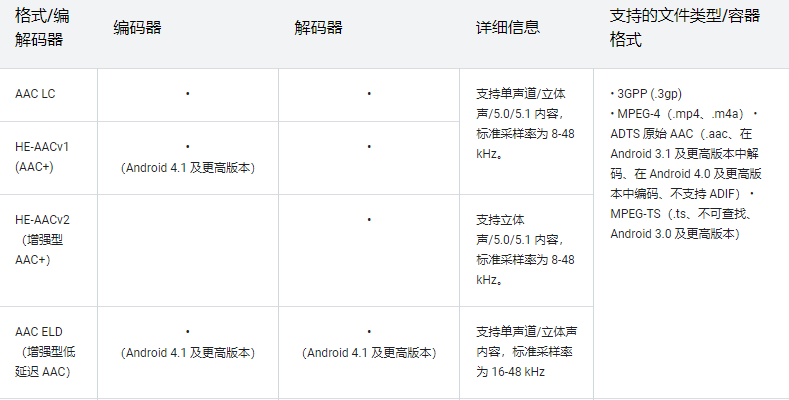
On the Android platform, MediaCodec is used to create and manage audio and video codecs.
Reference 5 contains a complete code workflow on Android for microphone audio capture, AAC compression, ADTS streaming encapsulation, and AAC decoding.
When configuring the MediaCodec encoder, the AAC-LC profile is specified via the option: MediaCodecInfo.CodecProfileLevel.AACObjectLC
MediaFormat format = MediaFormat.createAudioFormat(MIMETYPE_AUDIO_AAC, SAMPLE_RATE, CHANNEL_COUNT);
format.setInteger(MediaFormat.KEY_AAC_PROFILE,
MediaCodecInfo.CodecProfileLevel.AACObjectLC
);//在此处指定AAC的profile
format.setInteger(MediaFormat.KEY_BIT_RATE, BIT_RATE);

mMediaCodec = MediaCodec.createEncoderByType(MIMETYPE_AUDIO_AAC);
mMediaCodec.configure(format, null, null, MediaCodec.CONFIGURE_FLAG_ENCODE);
Other AAC codec profiles supported by MediaCodecInfo.CodecProfileLevel include:
public static final int AACObjectELD=39;//AAC-ELD

public static final int AACObjectERLC=17;
public static final int AACObjectERScalable=20;

public static final int AACObjectHE=5;//HE-AAC


public static final int AACObjectHE_PS=29;//HE-AAC V2


public static final int AACObjectLC=2;//AAC-LC


public static final int AACObjectLD=23;//AAC-LD

public static final int AACObjectLTP=4;
public static final int AACObjectMain=1;
public static final int AACObjectSSR=3;
public static final int AACObjectScalable=6;

public static final int AACObjectXHE=42;//xHE-AAC
AAC Codec Support on iOS
In the iOS SDK, Audio Converter Services within AudioToolbox is used to perform AAC encoding and decoding.
Reference 7 demonstrates the complete code workflow for transcoding PCM to AAC and saving it using Audio Converter Services.
- Note: This reference does not explicitly set the AAC profile.
Under the Audio Converter Services framework, the AudioConverterNew or AudioConverterNewSpecific API is typically used to create an audio codec. Both APIs require initializing audio codec parameters using the AudioStreamBasicDescription struct:
struct AudioStreamBasicDescription {
    Float64 mSampleRate;        // sample frames per second
    UInt32
mFormatID
;          // a four-char code indicating stream type
    UInt32
mFormatFlags
;       // flags specific to the stream type
    UInt32  mBytesPerPacket;    // bytes per packet of audio data
    UInt32  mFramesPerPacket;   // frames per packet of audio data
    UInt32  mBytesPerFrame;     // bytes per frame of audio data
    UInt32  mChannelsPerFrame;  // number of channels per frame
    UInt32  mBitsPerChannel;    // bit depth
    UInt32  mReserved;          // padding
};
typedef struct AudioStreamBasicDescription AudioStreamBasicDescription;
When mFormatID in AudioStreamBasicDescription is set to kAudioFormatMPEG4AAC, it indicates that an AAC encoder is being created. At this point, mFormatFlags can be used to specify the AAC codec profile. The AAC profiles supported on iOS through this method include:
MPEG4ObjectID.aac_Main
MPEG4ObjectID.AAC_LC
MPEG4ObjectID.AAC_SSR
MPEG4ObjectID.AAC_LTP
MPEG4ObjectID.AAC_SBR
MPEG4ObjectID.aac_Scalable
MPEG4ObjectID.twinVQ
MPEG4ObjectID.CELP
MPEG4ObjectID.HVXC
Alternatively, when setting mFormatID in AudioStreamBasicDescription, you can directly initialize mFormatID to one of the AAC encoder types listed below, eliminating the need to use mFormatFlags to specify the AAC profile:
kAudioFormatMPEG4AAC_HE
: MPEG-4 High Efficiency AAC audio object. Uses no flags.

kAudioFormatMPEG4AAC_LD
: MPEG-4 AAC Low Delay audio object. Uses no flags.

kAudioFormatMPEG4AAC_ELD
: MPEG-4 AAC Enhanced Low Delay audio object. Uses no flags.

kAudioFormatMPEG4AAC_ELD_SBR
: MPEG-4 AAC Enhanced Low Delay audio object with SBR (spectral band replication) extension layer. Uses no flags.

kAudioFormatMPEG4AAC_HE_V2
: MPEG-4 High Efficiency AAC Version 2 audio object. Uses no flags.

kAudioFormatMPEG4AAC_Spatial
: MPEG-4 Spatial Audio audio object. Uses no flags.
Below is a code snippet showing how to initialize the audio codec to AAC and set the AAC profile:
func setupAudioConverter() {
        var outputFormat = AudioStreamBasicDescription.init(
            mSampleRate: 44100,
            mFormatID: kAudioFormatLinearPCM,
            mFormatFlags: kLinearPCMFormatFlagIsSignedInteger,
            mBytesPerPacket: 2,
            mFramesPerPacket: 1,
            mBytesPerFrame: 2,
            mChannelsPerFrame: 1,
            mBitsPerChannel: 16,
            mReserved: 0)

        var inputFormat = AudioStreamBasicDescription.init(
            mSampleRate: 44100,
            mFormatID: kAudioFormatMPEG4AAC,//此处设置audio codec为aac
            mFormatFlags: UInt32(MPEG4ObjectID.AAC_LC.rawValue),//此处设置aac profile为aac_lc
            mBytesPerPacket: 0,
            mFramesPerPacket: 0,
            mBytesPerFrame: 0,
            mChannelsPerFrame: 1,
            mBitsPerChannel: 0,
            mReserved: 0)

        let status: OSStatus =  AudioConverterNew(&inputFormat, &outputFormat, &audioConverter)
        if (status != 0) {
            print("setup converter error, status: \(status)")
        }
    }
References
- Advanced Audio Coding (AAC) – ViaCorp (via-corp.com)
- All Tips about AAC (iskysoft.com)
- ffmpeg - How to encode audio in AAC-LC, AAC-HE-V1, AAC-HE-V2 using libavcodec? - Stack Overflow
- AAC Encoding in Practice - Jianshu (jianshu.com)
- Android Audio/Video: Encoding and Decoding AAC Using MediaCodec - Jianshu (jianshu.com)
- MediaCodecInfo.CodecProfileLevel | Android Developers
- iOS: Encoding PCM to AAC Using AudioToolbox - Blog - Dan Jiang (danthought.com)
- Audio Data Format Identifiers | Apple Developer Documentation