Setting Up an FFmpeg Development Environment with QT Creator
- 24 Sep, 2020
Operating System: Windows 10.
Download Pre-compiled FFmpeg Libraries for Windows
Download address: https://ffmpeg.zeranoe.com/builds/.
For dynamic link library (DLL) development, you need to download the Shared and Dev packages shown in the image below:
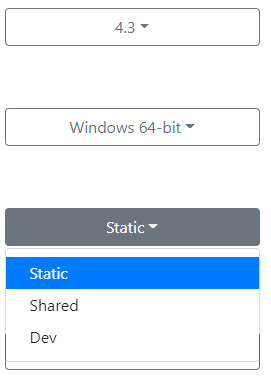
After downloading, decompress both packages into a specified directory for later use. Here, both packages are extracted to D:\development\ffmpeg_lib:

Set the Dynamic Link Library Directory in System Environment Variables
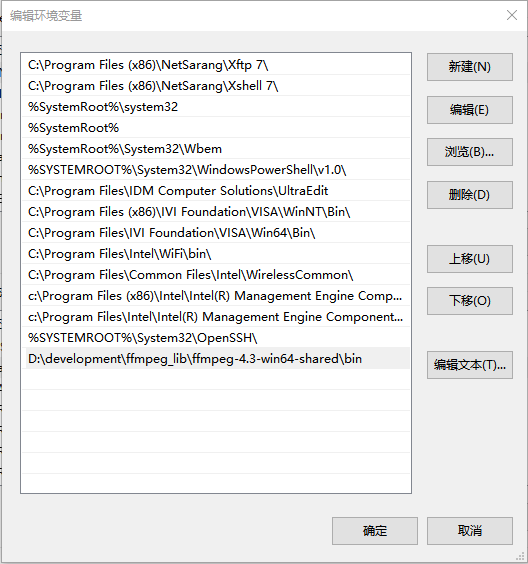
- This way, you don’t need to copy the dynamic link libraries to the application’s directory;
Create a New QT Project, Modify the QT Project’s .pro File to Add Header and Library Paths
INCLUDEPATH += D:\development\ffmpeg_lib\ffmpeg-4.3-win64-dev\include
LIBS += D:\development\ffmpeg_lib\ffmpeg-4.3-win64-dev\lib\avcodec.lib \
				D:\development\ffmpeg_lib\ffmpeg-4.3-win64-dev\lib\avdevice.lib \
				D:\development\ffmpeg_lib\ffmpeg-4.3-win64-dev\lib\avfilter.lib \
				D:\development\ffmpeg_lib\ffmpeg-4.3-win64-dev\lib\avformat.lib \
				D:\development\ffmpeg_lib\ffmpeg-4.3-win64-dev\lib\avutil.lib \
				D:\development\ffmpeg_lib\ffmpeg-4.3-win64-dev\lib\postproc.lib \
				D:\development\ffmpeg_lib\ffmpeg-4.3-win64-dev\lib\swresample.lib \
				D:\development\ffmpeg_lib\ffmpeg-4.3-win64-dev\lib\swscale.lib
Environment Test Code
#include "widget.h"
#include <QApplication>
#include <QDebug>

//ffmpeg include
extern "C"
{
#include "libavcodec/avcodec.h"
#include "libavformat/avformat.h"
#include "libavutil/pixfmt.h"
#include "libswscale/swscale.h"
#include "libavutil/time.h"
#include "libavutil/mathematics.h"
}

int main(int argc, char *argv[])
{
	QApplication a(argc, argv);
	Widget w;

	av_register_all();

	unsigned int version = avcodec_version();

	qDebug()<< version;
	char * filename="D:\\video.mp4";

	AVFormatContext * fc = NULL;

	int ret = avformat_open_input(&fc, filename, 0, 0);
	if(ret == 0){
		qDebug() << "Video Duration:" << fc->duration / AV_TIME_BASE << " secs";
		avformat_close_input(&fc);
	}
	w.show();

	return a.exec();
}