Configuring a C/C++ Jenkins Continuous Integration Environment on Debian/Linux
- 19 Jun, 2020
Install Java JDK Environment
Download the latest version of the JDK package from the Oracle official website;
https://www.oracle.com/java/technologies/javase-downloads.html
The current latest version is 14.0.1.
Since it’s for use on a Debian system, download the .deb version of the JDK installation file: jdk-14.0.1_linux-x64_bin.deb.
Install the downloaded JDK .deb package and check its installation location:
pavel@debian:~$ sudo dpkg -i jdk-14.0.1_linux-x64_bin.deb
pavel@debian:~$ sudo dpkg -S jdk-14.0.1
jdk-14.0.1: /usr/lib/jvm/jdk-14.0.1/legal/java.scripting/COPYRIGHT
jdk-14.0.1: /usr/lib/jvm/jdk-14.0.1/lib/libsplashscreen.so
jdk-14.0.1: /usr/lib/jvm/jdk-14.0.1/legal/jdk.jlink
jdk-14.0.1: /usr/lib/jvm/jdk-14.0.1/legal/jdk.compiler/COPYRIGHT
jdk-14.0.1: /usr/lib/jvm/jdk-14.0.1/jmods/jdk.incubator.jpackage.jmod
jdk-14.0.1: /usr/lib/jvm/jdk-14.0.1/legal/java.management.rmi
jdk-14.0.1: /usr/lib/jvm/jdk-14.0.1/jmods/jdk.compiler.jmod
jdk-14.0.1: /usr/lib/jvm/jdk-14.0.1/conf/logging.properties
jdk-14.0.1: /usr/lib/jvm/jdk-14.0.1/bin/jdeps
jdk-14.0.1: /usr/lib/jvm/jdk-14.0.1/bin/jconsole
jdk-14.0.1: /usr/lib/jvm/jdk-14.0.1/man/man1/jaccesswalker.1
......
The installation path for the JDK .deb package is /usr/lib/jvm/jdk-14.0.1;
Configure JDK Environment Variables
Modify the /etc/profile file and append the following content:
JAVA_HOME=/usr/lib/jvm/jdk-14.0.1
PATH=$JAVA_HOME/bin:$PATH
CLASSPATH=$JAVA_HOME/lib:.
export PATH JAVA_HOME CLASSPATH
After saving, execute source /etc/profile to apply the changes immediately.
Check if the environment is successfully installed:
pavel@debian:/usr/lib$ java --version
java 14.0.1 2020-04-14
Java(TM) SE Runtime Environment (build 14.0.1+7)
Java HotSpot(TM) 64-Bit Server VM (build 14.0.1+7, mixed mode, sharing)
pavel@debian:/usr/lib$ **echo** $JAVA_HOME
/usr/lib/jvm/jdk-14.0.1
Install Tomcat
Download the latest Tomcat 9 version from the Tomcat official website:
https://mirror.bit.edu.cn/apache/tomcat/tomcat-9/v9.0.35/bin/apache-tomcat-9.0.35.tar.gz.
Unzip it to the /usr/local/share directory.
- Execute the
startup.shscript in thebindirectory to start the Tomcat service; - Execute the
shutdown.shscript in thebindirectory to stop the Tomcat service;
After starting the Tomcat service, visit ip address:8080 in your browser to check if you can access the Tomcat webpage, which indicates a successful installation.
Install and Configure Jenkins to Automatically Compile C Code from GitHub
Download the latest .war package file (Generic Java Package version) from the Jenkins official website (https://www.jenkins.io/download/). The current version is 2.222.4;
Place the downloaded .war package into the webapps directory of your Tomcat installation;
After starting Tomcat, navigate to ip address:8080/jenkins in your browser to access the Jenkins configuration interface.
- The default username for the first Jenkins login is
admin, and the password is the string found in~/.jenkins/secrets/initialAdminPassword; - For the first use of Jenkins, you need to install necessary plugins according to your project requirements. For example, to compile C code from GitHub, you’ll need to install the Git plugin via
Manage Jenkins->Manage Plugins;
Create a new ‘Freestyle project’ item in Jenkins;
Set the source code repository access path and credentials:
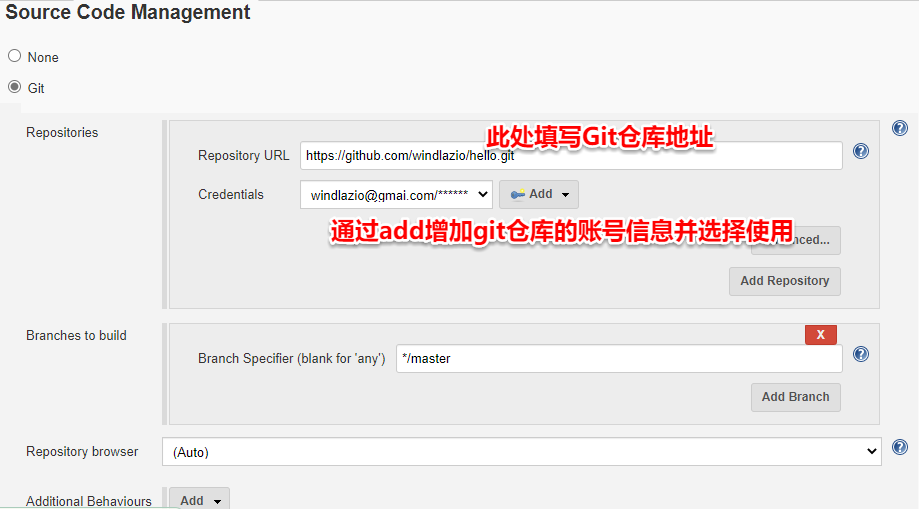
Configure the build steps. In ‘Add Build Step’, select ‘Execute Shell’ and enter the project’s build script;
- At the beginning of a build, Jenkins will clone the latest code from the Git repository into the
~/.jenkins/workspacedirectory. Therefore, first navigate to this workspace directory, and then you can execute the compilation script within it;
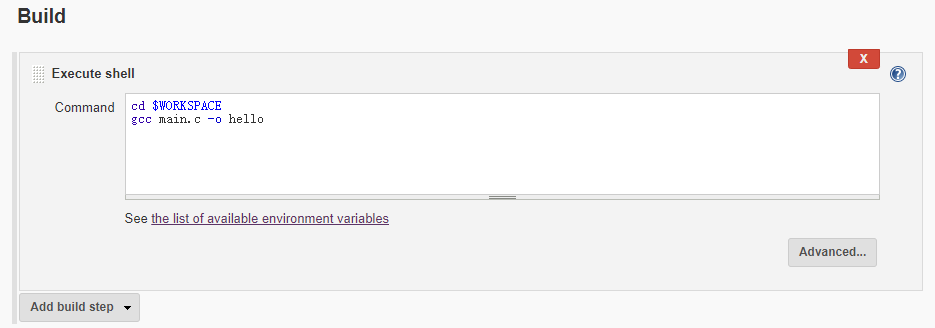
At this point, you can initiate a manual build by clicking the ‘Build Now’ option for your new project. Real-time build process output can be viewed in the ‘Console Output’.
The next step is to configure automated build triggers.
Configure Automated Build Triggers
Jenkins primarily provides the following four types of automated build triggers:
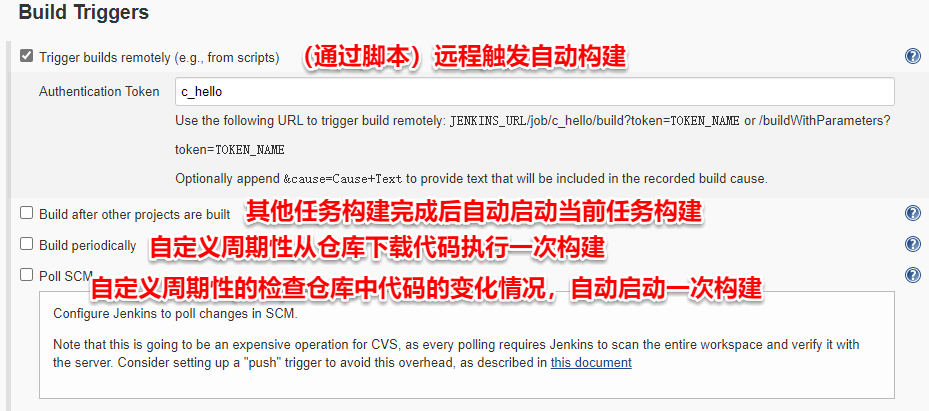
In general:
Trigger builds remotely (e.g., from scripts): The essence of this trigger is to send a specific HTTP request to the Jenkins server. Upon receiving, parsing, and authenticating the request, Jenkins will automatically execute a build process.- This is the most commonly used method. Whether through GitHub webhooks or the execution of a
post_commitscript on an SVN server, the core idea is to send an HTTP request to the Jenkins server after code submission to automatically initiate the build process. - It is crucial to ensure that the Jenkins server can receive this HTTP request. For instance, if the Jenkins server is deployed in an internal network, and the source code management server (deployed on an external network or a different subnet) cannot access the Jenkins server, then automated compilation cannot be triggered this way. Therefore, typically, either the Jenkins server is deployed on an external network, or both Jenkins and the source code management server are deployed within the same internal network.
- To provide some protection for remotely triggered builds, this method offers an ‘Authentication Token’ mechanism. A build will only be successfully triggered if the
tokenparameter in the HTTP request matches the configured ‘Authentication Token’ value. For example, if my project task is namedc_helloand the Authentication Token is alsoc_hello, the URL for remote build triggering would be:localhost:8080/job/c_hello/build?token=c_hello;
- This is the most commonly used method. Whether through GitHub webhooks or the execution of a
Build after other projects are built: This is suitable for large projects divided into multiple modules, allowing for a serialized overall build process. Each module creates its own build task, and this method connects the entire application’s build flow.Build periodically: Automatically downloads code from the repository and executes a build at a custom periodic time.- This setup is the simplest and conveniently checks the compilation status of the latest code in the repository. The disadvantage is that it will automatically compile even if no new code has been committed for a period.
Poll SCM: Similar toBuild periodically, it also requires setting a custom periodic time. At the specified time, it checks the code status in the repository and only triggers an automatic build if there are changes.- The disadvantage is that it regularly checks the repository for file updates, imposing a certain access load on the source code management server.
Note:
As mentioned above, in daily use, the most commonly applied automated trigger method should be the Trigger builds remotely (e.g., from scripts) mode. When configured this way, upon receiving actions like code commits, a source code management server (e.g., SVN or Git server) will automatically submit an automated build request to the Jenkins server via an HTTP URL as described in the options above.
In simple terms, since this build is triggered by an HTTP request from the source code management server to the Jenkins server, the most fundamental requirement is to ensure that the HTTP request sent by the source code management server can be received by the Jenkins server. This implies:
- The source code management server and the Jenkins server are deployed in the same subnet or can access each other within a subnet. This is standard practice for most small and medium-sized companies;
- Alternatively: The Jenkins server is deployed on a public network with an independent public IP, and the source code management server is deployed on a public/private network. This also ensures that HTTP requests from the source code management server can be received by the Jenkins server;
- If the Jenkins server is deployed in a private network, and the code management server is deployed on a public network or code is directly committed to a code hosting platform like GitHub, then port forwarding must be used to expose the Jenkins service port from the private network, ensuring that the public code management server can access the Jenkins service deployed within the private network;